Restore the default theme in Win7 from a save

loninappleton

New member
Member
VIP
Local time
1:32 PM
Messages
892
I know the error I made (not knowing it) but don't know how to undo it. Can post a screen shot of needed but I'll do it in words.

The Personalization screen accessible in right click from desk top in Win7 shows a default window top of page and Windows color window bottom middle. Opening that lower one reveals the old style XP colors and fonts adjustments plus some others. I made adjustments there.

But then I saved to the default Sample at the top of page. _That_ turned of the ability to
open that Windows color selection on the lower screen. I would like to redo some things.

How can I reset to default? Any reset to default will do even if I lose some settings

thanks
 

My Computer My Computer

Computer type
PC/Desktop
Computer Manufacturer/Model Number
custom
OS
Windows 7 x64 Ultimate
CPU
AMD Athlon II x3 450
Motherboard
MSI 880GM
Memory
2 GB
Hard Drives
various
Browser
Firefox, Opera
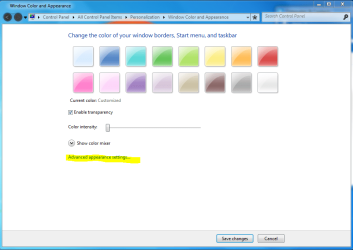
After clicking on the Windows Color button try clicking on the Advance appearance settings.

Jerry
Capture.PNG
 

My Computer My Computer

Computer type
Laptop
Computer Manufacturer/Model Number
Sager NP9170
OS
Win 7 Pro x64 / Win 10 Pro
CPU
Intel(R) Core(TM) i7-3630QM CPU @ 2.40GHz
Motherboard
CLEVO P170EM
Memory
12 GB
Graphics Card(s)
(1) Intel(R) HD Graphics 4000 (2) NVIDIA GeForce GTX 675M
Sound Card
(1) Realtek High Definition Audio (2) Intel(R) Display Aud
Monitor(s) Displays
17.3
Screen Resolution
1920x1080
Hard Drives
(1) Samsung 860 EVO 500GB(OS) (1) Samsung 860 EVO 500GB(Data)
Keyboard
Backlite
Antivirus
MSE, Malwarebytes Pro
Browser
Firefox
Other Info
DESKTOP: Custom-built.
OS: Win 10 Pro x64.
CASE: Rosewill R5.
CPU: Intel I5 4670K CPU @ 3.40GHz.
CPU COOLER: Cool Master Hyper 212 EVO.
MOTHERBOARD: Asus Z87-A.
MEMORY: Kingston HyperX 2x4 GB.
GPU: Nvidia Geforce 650 TI.
PSU: Corsair TX750.
DRIVES: (1) Samsung 840 120 GB SSD (2) Western Digital blue 500 GB 7200 RPM.
themes

Doesn't matter.

All you have to do is right click on the desktop as you did and select (hover over with mouse then enter) which ever theme you want to use
As you see from the screenshot below

Note
The 4 secondary settings background/sounds/colours/screensaver, are specific to the theme,
you have to change them to >>what you want<<, otherwise the defaults are used.

Roy
 

Attachments

  • themes.PNG
    themes.PNG
    102.1 KB · Views: 2

My Computer My Computer

Computer type
PC/Desktop
Computer Manufacturer/Model Number
medionl/Aspire 6930G/acer x55a
OS
W7 home premium 32bit/W7HP 64bit/w10 tp insider ring
CPU
E5300 dual core
Motherboard
medion MS7366
Memory
3gb
Graphics Card(s)
Nvidia Geforce 7100 Nforce 630i
Monitor(s) Displays
avixc
Internet Speed
n (isp resticted to 72)
Antivirus
mse/pands
Browser
palemoon
Other Info
Belkin Fd7050 n USB using Railink RT2870 drivers, more upto date
ok I'll try it again, though I'm sure I just selected Windows Classic but once _saved_ the
control of the settings, esp fonts greyed out and was lost.

Will report back if I get it this time.
 

My Computer My Computer

Computer type
PC/Desktop
Computer Manufacturer/Model Number
custom
OS
Windows 7 x64 Ultimate
CPU
AMD Athlon II x3 450
Motherboard
MSI 880GM
Memory
2 GB
Hard Drives
various
Browser
Firefox, Opera
Not there yet.

What's going on is yes, I can click on the Windows classic lower screen and the
dialog opens, but _Apply_ is greyed out.

I need some kind of master reset switch.
 

My Computer My Computer

Computer type
PC/Desktop
Computer Manufacturer/Model Number
custom
OS
Windows 7 x64 Ultimate
CPU
AMD Athlon II x3 450
Motherboard
MSI 880GM
Memory
2 GB
Hard Drives
various
Browser
Firefox, Opera
This is from Microsoft. I think it's close:
All the default Themes in Windows 7 are located in the C:\Windows\Resources\Themes folder. This is also where all of the system files that enable themes and other display components are located.

Any other Themes that a user downloads and installs are placed in the
C:\Users\yourusername\AppData\Local\Microsoft\Windows\Themes folder.

You may have to unhide hidden files for this.

Refer to the Delete a theme section form this article to delete a theme.
Create a theme
18 people found this helpful

unquote.

Not sure about user name in this path but I'll try a logoff for that. I rarely change users on a sole owner system.
 

My Computer My Computer

Computer type
PC/Desktop
Computer Manufacturer/Model Number
custom
OS
Windows 7 x64 Ultimate
CPU
AMD Athlon II x3 450
Motherboard
MSI 880GM
Memory
2 GB
Hard Drives
various
Browser
Firefox, Opera
I got the path selected, emptied the themes folder as directed but the problem of greyed out
buttons remains.

This seems way more than should be needed to clear and make a new theme with some different font sizes.

I read something that Aero has to selected for that but when I made the initial larger type and font selection it was in the old style Windows classic.

I'm stumped.
 

My Computer My Computer

Computer type
PC/Desktop
Computer Manufacturer/Model Number
custom
OS
Windows 7 x64 Ultimate
CPU
AMD Athlon II x3 450
Motherboard
MSI 880GM
Memory
2 GB
Hard Drives
various
Browser
Firefox, Opera

My Computer My Computer

Computer type
Laptop
Computer Manufacturer/Model Number
Sager NP9170
OS
Win 7 Pro x64 / Win 10 Pro
CPU
Intel(R) Core(TM) i7-3630QM CPU @ 2.40GHz
Motherboard
CLEVO P170EM
Memory
12 GB
Graphics Card(s)
(1) Intel(R) HD Graphics 4000 (2) NVIDIA GeForce GTX 675M
Sound Card
(1) Realtek High Definition Audio (2) Intel(R) Display Aud
Monitor(s) Displays
17.3
Screen Resolution
1920x1080
Hard Drives
(1) Samsung 860 EVO 500GB(OS) (1) Samsung 860 EVO 500GB(Data)
Keyboard
Backlite
Antivirus
MSE, Malwarebytes Pro
Browser
Firefox
Other Info
DESKTOP: Custom-built.
OS: Win 10 Pro x64.
CASE: Rosewill R5.
CPU: Intel I5 4670K CPU @ 3.40GHz.
CPU COOLER: Cool Master Hyper 212 EVO.
MOTHERBOARD: Asus Z87-A.
MEMORY: Kingston HyperX 2x4 GB.
GPU: Nvidia Geforce 650 TI.
PSU: Corsair TX750.
DRIVES: (1) Samsung 840 120 GB SSD (2) Western Digital blue 500 GB 7200 RPM.
I'm familiar with sfc /scannow and will try it on Win7.
 

My Computer My Computer

Computer type
PC/Desktop
Computer Manufacturer/Model Number
custom
OS
Windows 7 x64 Ultimate
CPU
AMD Athlon II x3 450
Motherboard
MSI 880GM
Memory
2 GB
Hard Drives
various
Browser
Firefox, Opera
One other weird thing is a help file I have with pictures shows a slider on that
screen and mine shows none. My version is Win 7 Ultimate 64 and the Bios upgrades have been
made.

I wanted to lighten the shade of the color selected.
 

My Computer My Computer

Computer type
PC/Desktop
Computer Manufacturer/Model Number
custom
OS
Windows 7 x64 Ultimate
CPU
AMD Athlon II x3 450
Motherboard
MSI 880GM
Memory
2 GB
Hard Drives
various
Browser
Firefox, Opera

My Computer My Computer

Computer type
Laptop
Computer Manufacturer/Model Number
Sager NP9170
OS
Win 7 Pro x64 / Win 10 Pro
CPU
Intel(R) Core(TM) i7-3630QM CPU @ 2.40GHz
Motherboard
CLEVO P170EM
Memory
12 GB
Graphics Card(s)
(1) Intel(R) HD Graphics 4000 (2) NVIDIA GeForce GTX 675M
Sound Card
(1) Realtek High Definition Audio (2) Intel(R) Display Aud
Monitor(s) Displays
17.3
Screen Resolution
1920x1080
Hard Drives
(1) Samsung 860 EVO 500GB(OS) (1) Samsung 860 EVO 500GB(Data)
Keyboard
Backlite
Antivirus
MSE, Malwarebytes Pro
Browser
Firefox
Other Info
DESKTOP: Custom-built.
OS: Win 10 Pro x64.
CASE: Rosewill R5.
CPU: Intel I5 4670K CPU @ 3.40GHz.
CPU COOLER: Cool Master Hyper 212 EVO.
MOTHERBOARD: Asus Z87-A.
MEMORY: Kingston HyperX 2x4 GB.
GPU: Nvidia Geforce 650 TI.
PSU: Corsair TX750.
DRIVES: (1) Samsung 840 120 GB SSD (2) Western Digital blue 500 GB 7200 RPM.
@Bongo,

I see you are using the same program version.

Before I do that I'll see what progress I can make with system file checker.
 

My Computer My Computer

Computer type
PC/Desktop
Computer Manufacturer/Model Number
custom
OS
Windows 7 x64 Ultimate
CPU
AMD Athlon II x3 450
Motherboard
MSI 880GM
Memory
2 GB
Hard Drives
various
Browser
Firefox, Opera
I ran System File Checker twice and it found nothing.
Just wondered in passing why SFC doesn't load from the Repair disk or something
so that the original media can be scanned. I've done this previously and my system was in the cd drive. Anyway nothing in SFC.

This computer has saved changes gotten from the Windows Appearance dialog and they
are active: icon size change, spacing between icons etc. All that looks good. I just wanted to
enlarge the font that controls their labels.

I'm just not able to reopen the dialog found at screen color where Apply and Fonts are
greyed out. This seems like my not knowing how to do something rather than system.

A screen shot will follow.
 

My Computer My Computer

Computer type
PC/Desktop
Computer Manufacturer/Model Number
custom
OS
Windows 7 x64 Ultimate
CPU
AMD Athlon II x3 450
Motherboard
MSI 880GM
Memory
2 GB
Hard Drives
various
Browser
Firefox, Opera
Here is the image of what I see.

Note Fonts selector is greyed out and Apply is greyed out. It's like once my changes were made
any future changes are locked out.

I mentioned I did save as a new name the Default image at top of page.
That may have lost my options and is what I have to restore as the default 'appearance image'

This was much too easy to screw up.
 

Attachments

  • win7windows appearance window.gif
    win7windows appearance window.gif
    143.8 KB · Views: 1

My Computer My Computer

Computer type
PC/Desktop
Computer Manufacturer/Model Number
custom
OS
Windows 7 x64 Ultimate
CPU
AMD Athlon II x3 450
Motherboard
MSI 880GM
Memory
2 GB
Hard Drives
various
Browser
Firefox, Opera
Update,

This Win7 screen handling is still giving me fits but I've learned something about Aero Themes.
In one location (I have two home-networked machines now on Win7) I click on the
first Aero theme and the screen changes to that and if I then go to screen color,
it opens with the slider for intensity and the additional control panel. But not on the location where I need to brighten the screen.

Then I apparently can select windows classic again.

But something is still locking out new changes. And I can only open the color slider at this one location.

How can I get back to square one defaults on these complex things?
 

My Computer My Computer

Computer type
PC/Desktop
Computer Manufacturer/Model Number
custom
OS
Windows 7 x64 Ultimate
CPU
AMD Athlon II x3 450
Motherboard
MSI 880GM
Memory
2 GB
Hard Drives
various
Browser
Firefox, Opera
So you cant use the down arrow and change anything?

My Windows Color and Appearance looks like yours for Desktop.

Jerry
 

My Computer My Computer

Computer type
Laptop
Computer Manufacturer/Model Number
Sager NP9170
OS
Win 7 Pro x64 / Win 10 Pro
CPU
Intel(R) Core(TM) i7-3630QM CPU @ 2.40GHz
Motherboard
CLEVO P170EM
Memory
12 GB
Graphics Card(s)
(1) Intel(R) HD Graphics 4000 (2) NVIDIA GeForce GTX 675M
Sound Card
(1) Realtek High Definition Audio (2) Intel(R) Display Aud
Monitor(s) Displays
17.3
Screen Resolution
1920x1080
Hard Drives
(1) Samsung 860 EVO 500GB(OS) (1) Samsung 860 EVO 500GB(Data)
Keyboard
Backlite
Antivirus
MSE, Malwarebytes Pro
Browser
Firefox
Other Info
DESKTOP: Custom-built.
OS: Win 10 Pro x64.
CASE: Rosewill R5.
CPU: Intel I5 4670K CPU @ 3.40GHz.
CPU COOLER: Cool Master Hyper 212 EVO.
MOTHERBOARD: Asus Z87-A.
MEMORY: Kingston HyperX 2x4 GB.
GPU: Nvidia Geforce 650 TI.
PSU: Corsair TX750.
DRIVES: (1) Samsung 840 120 GB SSD (2) Western Digital blue 500 GB 7200 RPM.
Im wondering because its an >>Unsaved<< theme, your going to have to to save it before changes can be made

Roy
 

My Computer My Computer

Computer type
PC/Desktop
Computer Manufacturer/Model Number
medionl/Aspire 6930G/acer x55a
OS
W7 home premium 32bit/W7HP 64bit/w10 tp insider ring
CPU
E5300 dual core
Motherboard
medion MS7366
Memory
3gb
Graphics Card(s)
Nvidia Geforce 7100 Nforce 630i
Monitor(s) Displays
avixc
Internet Speed
n (isp resticted to 72)
Antivirus
mse/pands
Browser
palemoon
Other Info
Belkin Fd7050 n USB using Railink RT2870 drivers, more upto date
Saving?

This is confusing because Saving over a default was what got me into this jamb.

Bomgo, the Arroe workd fine at the selection which says desktop.

You can see in the image that Fonts is greyed and Apply is greyed and so nothing can be
applied.

I'll pick this up tomorrow and see what any saving does.

I asked for the Aero theme to get to the screen shader slider and now cannot return to
Windows classic on one of these two setups. Maybe that saving trick is the key.

But is there a default or 'reset' of all this? Perhaps a profile or some such to delete.
 

My Computer My Computer

Computer type
PC/Desktop
Computer Manufacturer/Model Number
custom
OS
Windows 7 x64 Ultimate
CPU
AMD Athlon II x3 450
Motherboard
MSI 880GM
Memory
2 GB
Hard Drives
various
Browser
Firefox, Opera
Bomgo, the Arroe workd fine at the selection which says desktop.

You can see in the image that Fonts is greyed and Apply is greyed and so nothing can be
applied.
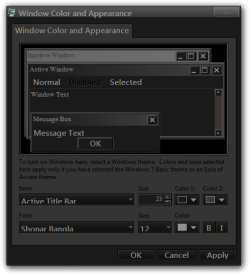
That's because you cannot change Font on the desktop area, use the drop-down arrow and go to something else like Active Title Bar see my screenshot below and see if you can change anything.

Jerry
Window Color and Appearance.png
 

My Computer My Computer

Computer type
Laptop
Computer Manufacturer/Model Number
Sager NP9170
OS
Win 7 Pro x64 / Win 10 Pro
CPU
Intel(R) Core(TM) i7-3630QM CPU @ 2.40GHz
Motherboard
CLEVO P170EM
Memory
12 GB
Graphics Card(s)
(1) Intel(R) HD Graphics 4000 (2) NVIDIA GeForce GTX 675M
Sound Card
(1) Realtek High Definition Audio (2) Intel(R) Display Aud
Monitor(s) Displays
17.3
Screen Resolution
1920x1080
Hard Drives
(1) Samsung 860 EVO 500GB(OS) (1) Samsung 860 EVO 500GB(Data)
Keyboard
Backlite
Antivirus
MSE, Malwarebytes Pro
Browser
Firefox
Other Info
DESKTOP: Custom-built.
OS: Win 10 Pro x64.
CASE: Rosewill R5.
CPU: Intel I5 4670K CPU @ 3.40GHz.
CPU COOLER: Cool Master Hyper 212 EVO.
MOTHERBOARD: Asus Z87-A.
MEMORY: Kingston HyperX 2x4 GB.
GPU: Nvidia Geforce 650 TI.
PSU: Corsair TX750.
DRIVES: (1) Samsung 840 120 GB SSD (2) Western Digital blue 500 GB 7200 RPM.
Jerry , Bongo


I wasn't watching my spelling. apologies.

But I had been able to enlarge the font size separate from adjusting the icons
on the desktop.

I'm going to check my backup made prior to all these errors and see if I can
get around all this.

Yet to do, I have to try and save the theme and perhaps, according to above,
that will open up the Apply and Fonts. don't know yet.

What do other people do? This certainly cannot be a unique problem.

Answers may not be immediate, so bear with me.
 

My Computer My Computer

Computer type
PC/Desktop
Computer Manufacturer/Model Number
custom
OS
Windows 7 x64 Ultimate
CPU
AMD Athlon II x3 450
Motherboard
MSI 880GM
Memory
2 GB
Hard Drives
various
Browser
Firefox, Opera
Back
Top