Restore the registry editor to its default state?

2603Munna

New member
Local time
4:19 AM
Messages
5
How to restore the registry editor to its default state?.....................,
 

My Computer My Computer

At a glance

Windows 7 64-bitIntel core 2 duo$ GBonly graphics acclerator present
OS
Windows 7 64-bit
CPU
Intel core 2 duo
Memory
$ GB
Graphics Card(s)
only graphics acclerator present
Hard Drives
SATA 500 GB
There is no such thing as a standard default state for the registry. The contents of the registry depend on the OS type, OS settings, hardware settings, applications installed and uninstalled etc. So the registry cannot be common across different windows installs.

If you think your registry is corrupted, you can do a system restore to go back to a previous point of time. Or if you think your registry may get corrupted in the future and want to take preventive steps, then apart from setting restore points, you can also backup the registry and restore from that backup at a later point. Theres a nice tutorial.

http://www.sevenforums.com/tutorials/4230-registry-backup-restore.html
 

My Computer My Computer

At a glance

Windows 7 x64 pro/ Windows 7 x86 Pro/ XP SP3 x86
Computer Manufacturer/Model Number
Too many to describe...
OS
Windows 7 x64 pro/ Windows 7 x86 Pro/ XP SP3 x86
If you are having computer problems you can restore your computer to a pervious restore point. That will take the registry back as well.
 

My Computer My Computer

At a glance

Windows 7 Enterprise (x64); Windows Server 20...16GB
Computer type
PC/Desktop
Computer Manufacturer/Model Number
Dell OP7010
OS
Windows 7 Enterprise (x64); Windows Server 2008 R2 (x64)
Memory
16GB
Monitor(s) Displays
4 Dell 24" LCD
Screen Resolution
1280x1024
Keyboard
Dell
Mouse
Dell Optical
Internet Speed
40meg
What do you mean by default? Do you mean for the editor to always open in the same manner each time without remembering the last key that was open (as is the default)?
 

My Computer My Computer

At a glance

Windows 8.1 Pro RTM x64Intel Core-i5-3570K 4-core @ 3.4GHz (Ivy Brid...4 x 4GB DDR3-1600 Corsair Vengeance CMZ8GX3M2...MSI GeForce GTX770 Gaming OC 2GB
Computer type
PC/Desktop
Computer Manufacturer/Model Number
Dwarf Dwf/11/2012 r09/2013
OS
Windows 8.1 Pro RTM x64
CPU
Intel Core-i5-3570K 4-core @ 3.4GHz (Ivy Bridge) (OC 4.4GHz)
Motherboard
ASRock Z77 Extreme4-M
Memory
4 x 4GB DDR3-1600 Corsair Vengeance CMZ8GX3M2A1600C9B (16GB)
Graphics Card(s)
MSI GeForce GTX770 Gaming OC 2GB
Sound Card
Realtek High Definition on board solution (ALC 898)
Monitor(s) Displays
ViewSonic VA1912w Widescreen (VGA)
Screen Resolution
1440x900
Hard Drives
OCZ Agility 3 SSD 120GB SATA III x2 (RAID 0)
Samsung HD501LJ 500GB SATA II x2
Hitachi HDS721010CLA332 1TB SATA II
Iomega 1.5TB Ext USB 2.0
WD 2.0TB Ext USB 3.0
PSU
XFX Pro Series 850W Semi-Modular
Case
Gigabyte IF233
Cooling
1 x 120mm Front Inlet 1 x 120mm Rear Exhaust
Keyboard
Microsoft Comfort Curve Keyboard 3000 (USB)
Mouse
Microsoft Comfort Mouse 3000 for Business (USB)
Internet Speed
NetGear DG834Gv3 ADSL Modem/Router (Ethernet) ~4.0 Mb/s (O2)
Antivirus
Avast! 8.0.1497
Browser
IE 11
Other Info
Optical Drive: HL-DT-ST BD-RE BH10LS30 SATA Bluray
Lexmark S305 Printer/Scanner/Copier (USB)
WEI Score: 8.1/8.1/8.5/8.5/8.25
Asus Eee PC 1011PX Netbook (Windows 7 x86 Starter)
If you mean that you want the editor to open in its original state, just as though you had opened it for the first time, then this can be achieved by editing Permissions.

Open the Registry Editor and browse to the following key.

HKEY_CURRENT_USER\Software\Microsoft\Windows\CurrenVersion\Applets\Regedit

In the left-hand panel, right click on Regedit and click Permissions...

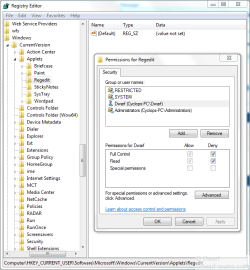
In the dialogue panel that appears, click on the user that you require. There will be a box that has the title Permissions for <UserName> with a list of options together with Allow and Deny checkboxes. Click on the top two Deny checkboxes (Full Control and Read) to put a tick in them as shown in the image below.

Capture.PNG

Click OK and then close the Registry Editor. When you next re-open it, it will no longer remember the last key that you had opened and will open as shown below.

Capture1.PNG

   Note
If you want this for all users, then you will have to log into each user in turn and set the permissions as detailed above.

You can reverse this procedure by following the above instructions, this time click on the checkboxes to remove the ticks.

This also applies to Vista as well as Windows 7.


   Warning
Only do this for users. Do not change permissions for RESTRICTED, SYSTEM, or Administrators.

 
Last edited:

My Computer My Computer

At a glance

Windows 8.1 Pro RTM x64Intel Core-i5-3570K 4-core @ 3.4GHz (Ivy Brid...4 x 4GB DDR3-1600 Corsair Vengeance CMZ8GX3M2...MSI GeForce GTX770 Gaming OC 2GB
Computer type
PC/Desktop
Computer Manufacturer/Model Number
Dwarf Dwf/11/2012 r09/2013
OS
Windows 8.1 Pro RTM x64
CPU
Intel Core-i5-3570K 4-core @ 3.4GHz (Ivy Bridge) (OC 4.4GHz)
Motherboard
ASRock Z77 Extreme4-M
Memory
4 x 4GB DDR3-1600 Corsair Vengeance CMZ8GX3M2A1600C9B (16GB)
Graphics Card(s)
MSI GeForce GTX770 Gaming OC 2GB
Sound Card
Realtek High Definition on board solution (ALC 898)
Monitor(s) Displays
ViewSonic VA1912w Widescreen (VGA)
Screen Resolution
1440x900
Hard Drives
OCZ Agility 3 SSD 120GB SATA III x2 (RAID 0)
Samsung HD501LJ 500GB SATA II x2
Hitachi HDS721010CLA332 1TB SATA II
Iomega 1.5TB Ext USB 2.0
WD 2.0TB Ext USB 3.0
PSU
XFX Pro Series 850W Semi-Modular
Case
Gigabyte IF233
Cooling
1 x 120mm Front Inlet 1 x 120mm Rear Exhaust
Keyboard
Microsoft Comfort Curve Keyboard 3000 (USB)
Mouse
Microsoft Comfort Mouse 3000 for Business (USB)
Internet Speed
NetGear DG834Gv3 ADSL Modem/Router (Ethernet) ~4.0 Mb/s (O2)
Antivirus
Avast! 8.0.1497
Browser
IE 11
Other Info
Optical Drive: HL-DT-ST BD-RE BH10LS30 SATA Bluray
Lexmark S305 Printer/Scanner/Copier (USB)
WEI Score: 8.1/8.1/8.5/8.5/8.25
Asus Eee PC 1011PX Netbook (Windows 7 x86 Starter)
What do you mean by default? Do you mean for the editor to always open in the same manner each time without remembering the last key that was open (as is the default)?

Great catch...you are right, does the OP mean the Registry Editor or the Registry. I have used your Registry Editor deny patch as well as just deleting the key. Deleting the key will not prevent the Registry Remembering were you were the next time but it is great for leaving it at default for imaging or cloning systems.
 

My Computer My Computer

At a glance

Windows 7 Enterprise (x64); Windows Server 20...16GB
Computer type
PC/Desktop
Computer Manufacturer/Model Number
Dell OP7010
OS
Windows 7 Enterprise (x64); Windows Server 2008 R2 (x64)
Memory
16GB
Monitor(s) Displays
4 Dell 24" LCD
Screen Resolution
1280x1024
Keyboard
Dell
Mouse
Dell Optical
Internet Speed
40meg
It doesn't work here ((
Do you have a command like file to add it this way ?


If you mean that you want the editor to open in its original state, just as though you had opened it for the first time, then this can be achieved by editing Permissions.

Open the Registry Editor and browse to the following key.

HKEY_CURRENT_USER\Software\Microsoft\Windows\CurrenVersion\Applets\Regedit

In the left-hand panel, right click on Regedit and click Permissions...

In the dialogue panel that appears, click on the user that you require. There will be a box that has the title Permissions for <UserName> with a list of options together with Allow and Deny checkboxes. Click on the top two Deny checkboxes (Full Control and Read) to put a tick in them as shown in the image below.

View attachment 70096

Click OK and then close the Registry Editor. When you next re-open it, it will no longer remember the last key that you had opened and will open as shown below.

View attachment 70099

   Note
If you want this for all users, then you will have to log into each user in turn and set the permissions as detailed above.

You can reverse this procedure by following the above instructions, this time click on the checkboxes to remove the ticks.

This also applies to Vista as well as Windows 7.


   Warning
Only do this for users. Do not change permissions for RESTRICTED, SYSTEM, or Administrators.
 

My Computer My Computer

At a glance

win7 x64 Pro
Computer type
PC/Desktop
OS
win7 x64 Pro
Back
Top