Restore Win8.1

PussEKatt

New member
Member
Local time
12:41 PM
Messages
99
I have a Lenovo laptop and I wiped Windows and installed Lubuntu.After trying out Lubuntu I have decided that I want to go back to Windows.I turned my laptop off.pressed the small (one button restore button ) and when I restart I do get the option to do a factory reset, but when I select this option the PC just goes ahead and loads Lubuntu.
What could be the problem ?

PS If I have to format the c:drive then please tell me how to do this over Linux,thank you.
I look foreward to your replies.
 

My Computer

OS
Windows home premium 64 bit
CPU
AMD Athlon II Dual Core 2.3Ghz
Memory
2048 MB DDR SD RAM
Graphics Card(s)
AMD M88OG with ATI Mobility Radeon HD 4250
Hard Drives
500 Gb
Did you accidentally wipe out the hidden Factory Restore partition? You will need to have some utility within Linux or usb-bootable that will return a partition breakout of your present HDD.
 

My Computer

Computer type
PC/Desktop
Computer Manufacturer/Model Number
Antec desktop; Acer Aspire laptops
OS
Windows 7 Professional 64-bit
CPU
Desktop i5; Acers i5 & i7
Memory
desktop 16GB; 1 Acer 8GB & 1 Acer 16GB
Hard Drives
1TB split into 2 equal partitions [OS and data] usable by RJS
Internet Speed
AT&T DSL
Browser
FF, GChrome, msIE
Other Info
Windows 7 Firewall, Emsisoft AM/AV, MSE [scan-only], SpywareBlaster, Ruiware/BillP combine
im concerned, i dont believe that laptop came with 8.1, this is BASED on your system specs 2GB RAM sounds like an old XP comp

what is the model of the Lenovo
 

My Computer

Computer type
PC/Desktop
Computer Manufacturer/Model Number
medionl/Aspire 6930G/acer x55a
OS
W7 home premium 32bit/W7HP 64bit/w10 tp insider ring
CPU
E5300 dual core
Motherboard
medion MS7366
Memory
3gb
Graphics Card(s)
Nvidia Geforce 7100 Nforce 630i
Monitor(s) Displays
avixc
Internet Speed
n (isp resticted to 72)
Antivirus
mse/pands
Browser
palemoon
Other Info
Belkin Fd7050 n USB using Railink RT2870 drivers, more upto date
Did you accidentally wipe out the hidden Factory Restore partition? You will need to have some utility within Linux or usb-bootable that will return a partition breakout of your present HDD.
No.The recovery partition is still there.

- - - Updated - - -

@ Torchwood: This laptop is a Lenovo G40,it coms with USB 3 so its not as old as Windows XP.
 

My Computer

OS
Windows home premium 64 bit
CPU
AMD Athlon II Dual Core 2.3Ghz
Memory
2048 MB DDR SD RAM
Graphics Card(s)
AMD M88OG with ATI Mobility Radeon HD 4250
Hard Drives
500 Gb

My Computer

Computer type
PC/Desktop
Computer Manufacturer/Model Number
medionl/Aspire 6930G/acer x55a
OS
W7 home premium 32bit/W7HP 64bit/w10 tp insider ring
CPU
E5300 dual core
Motherboard
medion MS7366
Memory
3gb
Graphics Card(s)
Nvidia Geforce 7100 Nforce 630i
Monitor(s) Displays
avixc
Internet Speed
n (isp resticted to 72)
Antivirus
mse/pands
Browser
palemoon
Other Info
Belkin Fd7050 n USB using Railink RT2870 drivers, more upto date
Hi Torchwood.grub is out as I dont want remove Ubuntu from the boot menu,I want to be able to boot into Windows.
As I said I use the one button reset option and I get the option to do a factory reset but when I select that option the laptop boots into Ubuntu.Its supposed to format the partition and then re-install Windows.

- - - Updated - - -

I went to the "Ask Ubuntu" site that you mentioned above but as you can see from this clip this guy booted back into Windows and is trying to get rid of the Ubuntu entry on his boot menu.
"I have recently installed dual-boot with Windows 10 and Ubuntu 16.04 LTS. After messing around with Ubuntu, I decided it was time for a clean re-install.I booted back into Windows 10 and deleted the Ubuntu partition (two of them) and they were converted back to free space.
My problem is that I cant boot into Windows because the laptop will not do a factory reset.
 

My Computer

OS
Windows home premium 64 bit
CPU
AMD Athlon II Dual Core 2.3Ghz
Memory
2048 MB DDR SD RAM
Graphics Card(s)
AMD M88OG with ATI Mobility Radeon HD 4250
Hard Drives
500 Gb
Hi

I was somewhat confused about what u actually want to have available
i take it you still want BOTH
please download this tool, it will show you what you have available, and give you the BOOT options CURRENTLY available
EasyBCD - NeoSmart Technologies

hopefully you have Lubuntu,(8.1) and 8.1 recovery
 

My Computer

Computer type
PC/Desktop
Computer Manufacturer/Model Number
medionl/Aspire 6930G/acer x55a
OS
W7 home premium 32bit/W7HP 64bit/w10 tp insider ring
CPU
E5300 dual core
Motherboard
medion MS7366
Memory
3gb
Graphics Card(s)
Nvidia Geforce 7100 Nforce 630i
Monitor(s) Displays
avixc
Internet Speed
n (isp resticted to 72)
Antivirus
mse/pands
Browser
palemoon
Other Info
Belkin Fd7050 n USB using Railink RT2870 drivers, more upto date
If you have the product key you can do a clean install from the bootable ISO. You can download it here: https://www.microsoft.com/en-us/software-download/windows8ISO You will have to install the version it came with the computer as well as any drivers from the manufacturer's site. On my computer I hardly had to install any drivers including graphics drivers. Everything I needed was integrated. When you are back up and running you might want to give Open Shell a try. It's the only way I can stand 8.1. Welcome to the Open-Shell-Menu | Open-Shell-Menu
 

My Computers

System One System Two

torchwood What I want to do is scrap Ubuntu alltogether and re-install Windows 8 from the factory reset.I tried Ubuntu but I find it too restrictive for games and also the syntax is difficult.I will try the Easy BCD and see if I can do a factory reset with it.

- - - Updated - - -
townsbg I do not have the product key as I suppose this is within the original Windows OS.Once I get Windows 8 up and running I will be sure to get the product key for future reference.I will also look into getting that bootable ISO you mention,again for future use.
 

My Computer

OS
Windows home premium 64 bit
CPU
AMD Athlon II Dual Core 2.3Ghz
Memory
2048 MB DDR SD RAM
Graphics Card(s)
AMD M88OG with ATI Mobility Radeon HD 4250
Hard Drives
500 Gb
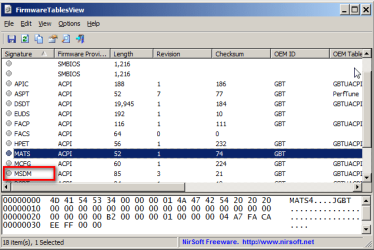
If it came with 8.1 pre installed, it should activate using the msdm table in bios..
You can have a look using Nir Sofers FirmwareTablesView
 

My Computers

System One System Two

  • Computer type
    PC/Desktop
    OS
    7 X64
    CPU
    i5 8400
    Motherboard
    gigabyte b365m ds3h
    Memory
    2x8gb 3200mhz
    Hard Drives
    various
    PSU
    pure power 11 400w cm
    Case
    Coolermaster
    Cooling
    cryorig m9i
  • Computer type
    PC/Desktop
    OS
    7x64
    CPU
    g5400
    Motherboard
    ga b365m ds3h
    Memory
    8gb ddr4 2400
    PSU
    xfx pro 450w
If it came with 8.1 pre installed, it should activate using the msdm table in bios..
You can have a look using Nir Sofers FirmwareTablesView
Yes this la[top came with Win 8 pre-installed.I checked out the firmware tables you suggested ( only on the screenshot provided in that link ) and I dont know what I should be looking for or if I am able to load it.
Is this another way of installing the factory reset ?

- - - Updated - - -

Hi

I was somewhat confused about what u actually want to have available
i take it you still want BOTH
please download this tool, it will show you what you have available, and give you the BOOT options CURRENTLY available
EasyBCD - NeoSmart Technologies

hopefully you have Lubuntu,(8.1) and 8.1 recovery
I tried to install Easy BCD but as I have Ubuntu installed and not Windows the Easy BCD program would not install.
I have Lubuntu installed BUT I only have Windows 6.1 on the recovery partition.I am trying to get rid of Lubuntu and go back to Windows.
 

My Computer

OS
Windows home premium 64 bit
CPU
AMD Athlon II Dual Core 2.3Ghz
Memory
2048 MB DDR SD RAM
Graphics Card(s)
AMD M88OG with ATI Mobility Radeon HD 4250
Hard Drives
500 Gb
If it came with 8.1 pre installed, it should activate using the msdm table in bios..

You are looking for the msdm table.

It is in the screenshot at the nir sofer link

2021-09-14_150816.png

If you click where it says MSDM it will show you the embedded key at the bottom
 

My Computers

System One System Two

  • Computer type
    PC/Desktop
    OS
    7 X64
    CPU
    i5 8400
    Motherboard
    gigabyte b365m ds3h
    Memory
    2x8gb 3200mhz
    Hard Drives
    various
    PSU
    pure power 11 400w cm
    Case
    Coolermaster
    Cooling
    cryorig m9i
  • Computer type
    PC/Desktop
    OS
    7x64
    CPU
    g5400
    Motherboard
    ga b365m ds3h
    Memory
    8gb ddr4 2400
    PSU
    xfx pro 450w
You are looking for the msdm table.

It is in the screenshot at the nir sofer link

View attachment 420191

If you click where it says MSDM it will show you the embedded key at the bottom
Thanks SIW2 I will try that when I get back on my laptop ( all these replies are comming from my friends PC )
In case it matters,I had another strange thing happen.I powered off the laptop,then I powered on and pressed the one key recovery key.I got a menu with 4 options.I hilighted Reset computer and pressed the enter key and it STILL booted into Lubuntu.
 

My Computer

OS
Windows home premium 64 bit
CPU
AMD Athlon II Dual Core 2.3Ghz
Memory
2048 MB DDR SD RAM
Graphics Card(s)
AMD M88OG with ATI Mobility Radeon HD 4250
Hard Drives
500 Gb
If you wiped off the entire hard drive you won't be able to use the restore because the recovery partition isn't there anymore. Do you think that it is still there or do you know that it is?
 

My Computers

System One System Two

If you wiped off the entire hard drive you won't be able to use the restore because the recovery partition isn't there anymore. Do you think that it is still there or do you know that it is?
I know for sure that it is still there.

- - - Updated - - -
SIW2
I tried that MSDM table but it wont install,its for Windows only and I have Lubuntu on my laptop.I am trying to get rid of Lubuntu and put Windows back.
 

My Computer

OS
Windows home premium 64 bit
CPU
AMD Athlon II Dual Core 2.3Ghz
Memory
2048 MB DDR SD RAM
Graphics Card(s)
AMD M88OG with ATI Mobility Radeon HD 4250
Hard Drives
500 Gb
It runs in winpe.


17514x86.iso

extract the 17514x86.iso to create bootable usb , or burn it as an image to cd/dvd then boot it.
 

My Computers

System One System Two

  • Computer type
    PC/Desktop
    OS
    7 X64
    CPU
    i5 8400
    Motherboard
    gigabyte b365m ds3h
    Memory
    2x8gb 3200mhz
    Hard Drives
    various
    PSU
    pure power 11 400w cm
    Case
    Coolermaster
    Cooling
    cryorig m9i
  • Computer type
    PC/Desktop
    OS
    7x64
    CPU
    g5400
    Motherboard
    ga b365m ds3h
    Memory
    8gb ddr4 2400
    PSU
    xfx pro 450w
Ok,ill try that.
Thanks
 

My Computer

OS
Windows home premium 64 bit
CPU
AMD Athlon II Dual Core 2.3Ghz
Memory
2048 MB DDR SD RAM
Graphics Card(s)
AMD M88OG with ATI Mobility Radeon HD 4250
Hard Drives
500 Gb
The short answer is, "Never, ever, wipe out an OS without backing it up first, to some external media, whether HD, Flash Drive, DVD, etc.

Then when you want to go back to your old OS, just boot up with your Backup/Restore program disk (or flash drive) and restore your old OS.

There is NOTHING better than a complete backup of your C: partition when for any reason you need to do a full System Restore.

When you install a new OS over your old one, the old one is GONE. You loose!
:cool:
 

My Computer

Computer type
PC/Desktop
Computer Manufacturer/Model Number
Various
OS
Win 7 Pro, SP1, x86, Win-11/Pro/64
CPU
AMD
Motherboard
Various
Memory
8GB Crucial
Graphics Card(s)
Various
Sound Card
OnBoard
Monitor(s) Displays
Acer 21.5"
Hard Drives
Crucial SSD, 500 GB
PSU
OEM
Case
SFF Slim Line Case
Cooling
OEM
Keyboard
eMachines
Mouse
Logitech Wireless
Internet Speed
varies
Antivirus
Windows Defender/Super Anti-Spyware
Browser
Firefox
@S!W2
I tried running that program on Ubuntu but it wont run on that OS.
What is Winpe and should I try running it on that ? If so how do I go about it ?
Thanks for your help so far,much appreciated.

- - - Updated - - -
technomage 2016
I formatted C drive and installed Lubuntu knowing that I had the hidden partition with Win 8.1 intact and am trying to restore my laptop back to its factory reset.I was under the impression that a factory reset would reset a PC back to its original state whatever the problem ?!
 

My Computer

OS
Windows home premium 64 bit
CPU
AMD Athlon II Dual Core 2.3Ghz
Memory
2048 MB DDR SD RAM
Graphics Card(s)
AMD M88OG with ATI Mobility Radeon HD 4250
Hard Drives
500 Gb
Back
Top