Restore Windows 7 Bootloader

Dj3Dub

New member
Local time
5:40 PM
Messages
8
Location
Chicago
I am running a dual boot machine with Ubuntu 10.04 & Win 7 Pro x64. I somehow lost the Win7 bootloader and get the Vista style loader when I start Win7. How can I restore the Win7 bootloader with its elegant, high resolution animation?
 

My Computer

Computer Manufacturer/Model Number
Homebrew
OS
Windows 7 Professional x64
CPU
i7-3770K
Motherboard
ASUS P8Z77-V-LK
Memory
Corsair Vengenance DDR3 8GB
Graphics Card(s)
XFX HD 7850
Monitor(s) Displays
Samsung SyncMaster731B
Screen Resolution
1280x1024
Hard Drives
SSD-Vertex4-WD 500 GB Blue x 2,WD Black 1TB
PSU
Corsair TX650
Case
Antec 300
Cooling
Corsair H80
Keyboard
G19
Internet Speed
12/1.5
I am running a dual boot machine with Ubuntu 10.04 & Win 7 Pro x64. I somehow lost the Win7 bootloader and get the Vista style loader when I start Win7. How can I restore the Win7 bootloader with its elegant, high resolution animation?


Bootloader? Do you mean the startup screen with the animated swirling colors?

Where did you get your win 7 image? did you download it or purchase it directly??

Was this a clean install or upgrade


Ken
 

My Computer

Computer Manufacturer/Model Number
HP Pavillion dv-7 1005 Tx
OS
Win 8 Release candidate 8400
CPU
[email protected]
Memory
4 gigs
Graphics Card(s)
Nvidia 9600M
Sound Card
HD built-in
Monitor(s) Displays
17" Wxga
Screen Resolution
1440x900
Cooling
none
Internet Speed
45Mb down 5Mb up
I am running a dual boot machine with Ubuntu 10.04 & Win 7 Pro x64. I somehow lost the Win7 bootloader and get the Vista style loader when I start Win7. How can I restore the Win7 bootloader with its elegant, high resolution animation?


Bootloader? Do you mean the startup screen with the animated swirling colors?

Where did you get your win 7 image? did you download it or purchase it directly??

Was this a clean install or upgrade


Ken
Yes it was a clean install but I must have done something because I got the GRUB2 screen and when I tried to boot into W7 I got the "insert DVD, select repair" to boot back in to W7.

Yes I do mean startup screen. I've been having MBR probs all weekend so far. My apologies.

I downloaded my Win 7 image from MSDNAA

How do I get said Win 7 startup screen back?
 

My Computer

Computer Manufacturer/Model Number
Homebrew
OS
Windows 7 Professional x64
CPU
i7-3770K
Motherboard
ASUS P8Z77-V-LK
Memory
Corsair Vengenance DDR3 8GB
Graphics Card(s)
XFX HD 7850
Monitor(s) Displays
Samsung SyncMaster731B
Screen Resolution
1280x1024
Hard Drives
SSD-Vertex4-WD 500 GB Blue x 2,WD Black 1TB
PSU
Corsair TX650
Case
Antec 300
Cooling
Corsair H80
Keyboard
G19
Internet Speed
12/1.5
I found this:
bcdboot %WinDir% /l en-US and this: bcdedit /set {current} locale en-US but when I run those commands all I get is "failure when attempting to copy boot files" "the boot configuration store could not be opened" "The system cannot find the file specified"

How do I get the Win 7 startup screen back? (without having to reinstall) Thank you in advance.
 

My Computer

Computer Manufacturer/Model Number
Homebrew
OS
Windows 7 Professional x64
CPU
i7-3770K
Motherboard
ASUS P8Z77-V-LK
Memory
Corsair Vengenance DDR3 8GB
Graphics Card(s)
XFX HD 7850
Monitor(s) Displays
Samsung SyncMaster731B
Screen Resolution
1280x1024
Hard Drives
SSD-Vertex4-WD 500 GB Blue x 2,WD Black 1TB
PSU
Corsair TX650
Case
Antec 300
Cooling
Corsair H80
Keyboard
G19
Internet Speed
12/1.5
Update.
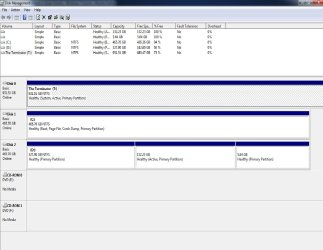
I think I figured it out. Since T is just my storage drive it a) shouldn't be active and b)shouldn't be primary but logical instead.

Comments/suggestions?
 

Attachments

  • Screenshot.jpg
    Screenshot.jpg
    110.6 KB · Views: 159

My Computer

Computer Manufacturer/Model Number
Homebrew
OS
Windows 7 Professional x64
CPU
i7-3770K
Motherboard
ASUS P8Z77-V-LK
Memory
Corsair Vengenance DDR3 8GB
Graphics Card(s)
XFX HD 7850
Monitor(s) Displays
Samsung SyncMaster731B
Screen Resolution
1280x1024
Hard Drives
SSD-Vertex4-WD 500 GB Blue x 2,WD Black 1TB
PSU
Corsair TX650
Case
Antec 300
Cooling
Corsair H80
Keyboard
G19
Internet Speed
12/1.5
There is no reason why it shouldn't be an active Primary.

Open an elevated command prompt and type:

bcdboot c:\windows /s t:

press enter.
 

My Computers

System One System Two

  • Computer type
    PC/Desktop
    OS
    7 X64
    CPU
    i5 8400
    Motherboard
    gigabyte b365m ds3h
    Memory
    2x8gb 3200mhz
    Hard Drives
    various
    PSU
    pure power 11 400w cm
    Case
    Coolermaster
    Cooling
    cryorig m9i
  • Computer type
    PC/Desktop
    OS
    7x64
    CPU
    g5400
    Motherboard
    ga b365m ds3h
    Memory
    8gb ddr4 2400
    PSU
    xfx pro 450w
Several months ago I discovered that my Grub 2 was being occasionally overwritten by the Windows 7 MBR. I tried a number of things, but the one that works for me was to re-install Win 7 (from a previously stored image) so as to get the correct Win 7 MBR. Then I installed Ubuntu 10.04 which, of course gave me Grub 2 that I do not want.

Then on yet another partition, I installed Ubuntu 9.04 which gave me the older Grub Legacy which does not conflict with the Win 7 MBR. In Grub Legacy I am able to select my default OS or boot to any installed OS.

When I boot now, I get Grub Legacy with all of those options.
 

My Computer

Computer Manufacturer/Model Number
Asus CG5270
OS
Windows 7 Home Premium
CPU
Intel Core 2 Quad
Memory
8 GB
Monitor(s) Displays
23" Acer Widescreen
Several months ago I discovered that my Grub 2 was being occasionally overwritten by the Windows 7 MBR. I tried a number of things, but the one that works for me was to re-install Win 7 (from a previously stored image) so as to get the correct Win 7 MBR. Then I installed Ubuntu 10.04 which, of course gave me Grub 2 that I do not want.

Then on yet another partition, I installed Ubuntu 9.04 which gave me the older Grub Legacy which does not conflict with the Win 7 MBR. In Grub Legacy I am able to select my default OS or boot to any installed OS.

When I boot now, I get Grub Legacy with all of those options.
This was not the case this time. When I did my clean install on Fri. GRUB just didn't wanna let go when I installed Win 7. I was expecting Win 7 MBR to overwrite GRUB2 as usual.I guess thats where all these MBR headaches came from this weekend.

Thank you to everyone for your support. Problem solved.
 

My Computer

Computer Manufacturer/Model Number
Homebrew
OS
Windows 7 Professional x64
CPU
i7-3770K
Motherboard
ASUS P8Z77-V-LK
Memory
Corsair Vengenance DDR3 8GB
Graphics Card(s)
XFX HD 7850
Monitor(s) Displays
Samsung SyncMaster731B
Screen Resolution
1280x1024
Hard Drives
SSD-Vertex4-WD 500 GB Blue x 2,WD Black 1TB
PSU
Corsair TX650
Case
Antec 300
Cooling
Corsair H80
Keyboard
G19
Internet Speed
12/1.5
Back
Top