restoring a partition

kindredspirit3

New member
Local time
3:24 PM
Messages
1
Hi
I just brought a new seagate 5tb hard drive and I did a shrink partition to create a new partition on my new drive. But after I did this it now says that the section I shrank to create a new partition is black lined and unallocated.

Want I want to do is partition to create a new volume but it will not let me.

So please can anyone help me?

The unaloccated partition is About 1tb which I want to use
 
Last edited:

My Computer

Computer type
Laptop
Computer Manufacturer/Model Number
Samsung RF711
OS
windows 7
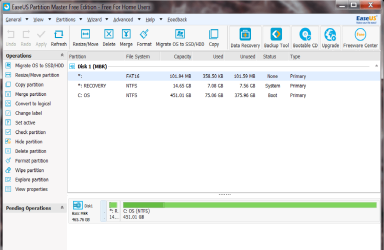
Hi kindredspirit3 and Welcome. Is there any data on this drive? If not I would recommend downloading Easeus Partition Master Download the free version. It's very easy to use and is fast. Format the 1 GB partition you created. Screenshot.
 

Attachments

  • Untitled.png
    Untitled.png
    39.4 KB · Views: 0

My Computer

Computer type
PC/Desktop
Computer Manufacturer/Model Number
Custom Built By Me.
OS
Windows 10 Pro 64 bit
CPU
AMD FX 9590 8 Core Black Edition
Motherboard
MSI 990FXA GAMING (MS-7893)
Memory
Corsair Vengeance 16GB DDR3
Graphics Card(s)
AMD Radeon (TM) R9 380 Gaming Series
Sound Card
AMD High Definition
Monitor(s) Displays
Samsung 32" 60Hz 4ms Curved PLS LED
Screen Resolution
1920 X 1080
Hard Drives
C: 223 GB SSD = E: 465 GB HDD = F: 931 GB HDD = G: 149 GB HDD = H: 931 GB HDD
PSU
EVGA Supernova NEX750B 750W ATX EPS12V 80PLUS Bronze
Case
Cool Master
Cooling
Noctua NH-D15 Premium Cooler with 2x NF-A15 PWM 140mm Fan
Internet Speed
Fiber Optic: Download 332.7 Mbps / Upload 331.5 Mbps
Antivirus
Windows Defender
Browser
Slimjet (64bit)
Want I want to do is partition to create a new volume but it will not let me.

What do you intend to put on this drive?

Windows?

Personal data?

Both?

A screen shot of Windows Disk Management would help.
 

My Computer

Computer type
PC/Desktop
Computer Manufacturer/Model Number
Ignatz Special; 4 speed manual gearbox; factory air conditioning; one of one
OS
Windows 7 Home Premium SP1, 64-bit
CPU
Intel Skylake i5-6600K, not overclocked
Motherboard
AsRock Z170M Extreme 4, micro ATX
Memory
8 GB HyperX DDR4-2666 (2 x 4 GB)
Graphics Card(s)
none; graphics are integrated on CPU
Sound Card
onboard: Realtek ALC1150; external: USB Behringer UF0-202
Monitor(s) Displays
Dell S2340M 23 inch IPS
Screen Resolution
1600 x 900
Hard Drives
System: Crucial MX100 series SSD, 128 GB;
Data: Samsung Spinpoint 103SJ, 1 TB;
Backup: WD Caviar Green WD30EZRX-00D8PB0, 3 TB
PSU
Rosewill SilentNight 500 watt fanless, semi-modular
Case
Antec Solo II
Cooling
Noctua NH-U12S; Noctua F12 intake, Noctua S12A exhaust
Keyboard
Microsoft 200 6JH-00001 USB
Mouse
Dell or Microsoft optical wired; USB
Antivirus
Microsoft Security Essentials and Malwarebytes Premium
Browser
Pale Moon
Other Info
All fans PWM; speeds at idle: CPU circa 500 rpm; intake circa 600 rpm; exhaust circa 600 rpm; CPU temps 27 idle and 47 C load in a warm room (27 C/81 F) when running Intel Extreme Tuning Utility stress test.
Hi kindredspirit3
Could be many things post a screen shoot to see where you get .Windows should let you to format hd.
 

My Computer

Computer type
PC/Desktop
Computer Manufacturer/Model Number
Custom build
OS
Windows 7 Ultimate x64
CPU
AMD Athlon 64 3500+
Motherboard
MSI MS-7125
Memory
DDR,Dual,4096MBytes
Graphics Card(s)
ATI Radeon HD 4350, 512MB
Hard Drives
SAMSUNG HD642JJ ATA Device
Antivirus
Microsoft Security Essentials
Browser
Internet Explorer,Firefox Developer Edition
Back
Top