Restoring "Date Created" timestamp after accidentally changing it.

Killakappe

New member
Local time
10:41 AM
Messages
2
Restoring "Date Created" timestamp after accidentally changing it.

Hey 7-Forums!

I have my music library, a 20GB folder on my hard-drive, containing a few thousand mp3s.
I use iTunes to play them, and I've always sorted them (inside iTunes) using the "Date Modified" property.

As a result of this sorting order, say,
if I found out an old song had the wrong name, or simply missing a capital letter and
corrected this, the song would move up to the top of my iTunes library because it is now the "newest".

This bothered me, so I decided to change the "Date Modified" of all my mp3s back to the original date:
the same as the "Date Created" of the file, using ATTRIBUTE CHANGER 7.
Unfortunately, I did not pay attention to what I was doing with the Attribute Changer and instead of changing the "Date Modified", I accidentally reset the "Date Created" of all the files to now.

This means that all timestamps were reset and my organized library is now f*cked.

-----------------------------------------------------------

Does anyone know how to undo timestamp changes??
 

My Computer My Computer

Computer type
PC/Desktop
OS
Windows 7 Home Premium 64bit
CPU
Intel Core i7-4770
Hi and welcome to the seven forum. Have you tried a system restore to a date before you made the changes
 

My Computer My Computer

Computer type
PC/Desktop
Computer Manufacturer/Model Number
Home Made
OS
Windows 7 Ultimate x64
CPU
Q6600 3.1ghz
Motherboard
Gigabyte GA-P35-DS3L
Memory
Kingston DDR2 6400 8GB
Graphics Card(s)
Gigabyte Radeon HD 6850 1GB 256-Bit
Sound Card
On board
Monitor(s) Displays
Acer X243H
Screen Resolution
1920x1080
Hard Drives
Intel 330 120GB SSD
WD 2TB 7200
PSU
Thermaltake Toughpower 750W Semi Modular
Case
Modified Alienware
Keyboard
A4Tech
Mouse
Gigabyte ECO600
Antivirus
Comodo
Browser
Cyberfox
Hi and welcome to the seven forum. Have you tried a system restore to a date before you made the changes

No I have not, since I thought the system restore only can make changes to system files and would thus not affect any music files that I have?

Correct me if I'm wrong!

Thanks
 

My Computer My Computer

Computer type
PC/Desktop
OS
Windows 7 Home Premium 64bit
CPU
Intel Core i7-4770
This means that all timestamps were reset and my organized library is now f*cked.

-----------------------------------------------------------

Does anyone know how to undo timestamp changes??
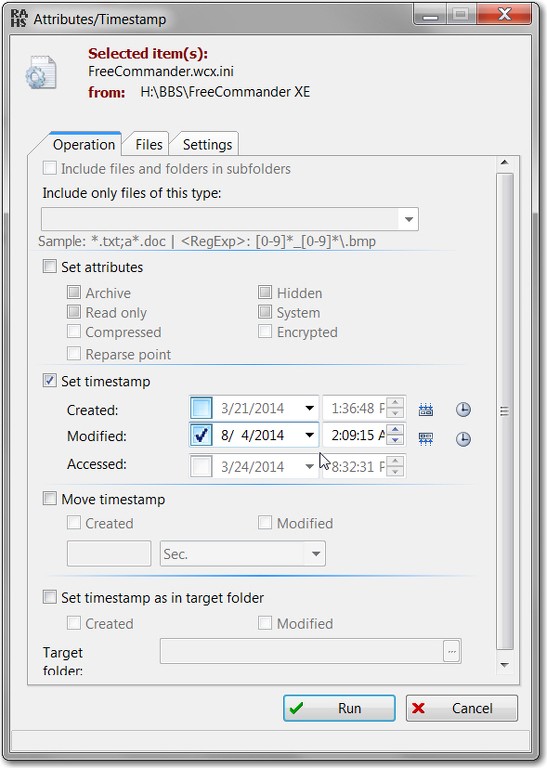
I'm sure there are other products out there to assist you, but for sure you can use FreeCommanderXE to modify the timestamps (and other attributes) on files quite conveniently.

File -> Attributes/timestamp...

TQniJA.jpg


Note that you can select more than one file at a time (using the usual Windows standard technique of CTRL+click or SHITF+click) so you can do a "mass timestamp reset" to a group of files at once.

NOTE: FreeCommanderXE is a SUPERB and highly recommended Windows Explorer substitute, providing a very intuitive and convenient optional "split screen" view (for either over/under or side-by-side panes) making drag/drop a piece of cake.
 

My Computer My Computer

Computer type
PC/Desktop
Computer Manufacturer/Model Number
Home-built, two systems (1) and (2)
OS
Windows 7 Pro x64 (1), Win7 Pro X64 (2)
CPU
i5-3350p 3.1Ghz/6MB-cache (1); E8400 3.0Ghz/6MB-cache (2)
Motherboard
ASUS P8Z77-V Pro (1); ASUS P5Q3 (2)
Memory
8GB PC3-12800 DDR3 (1); 4GB PC3-10600 DDR3 (2)
Graphics Card(s)
ATI HD7750 (1), (see TV cards); ATI R7 250 (2)
Sound Card
Realtek ALC892 HD Audio (1); Realtek ALC1200 HD Audio (2)
Monitor(s) Displays
Eizo HD2441W LCD, Eizo S2433W (1); Eizo 24" S2433W (2)
Screen Resolution
1920x1200, 1920x1200 (1); 1920x1200 (2)
Hard Drives
(1) 1TB SATA-II (7200RPM), 2x2TB SATA-III (7200RPM), 250GB SATA-III (10000RPM) for OS; 2x2TB external USB 3.0

(2) 320GB SATA-II (7200RPM), 750GB SATA-II (7200RPM), 150GB SATA-II (10000RPM) for OS; 2TB external USB 3.0
PSU
Nesteq ECS-6001 600W (1); Nesteq ECS-5001 500W (2)
Case
Acousti-Case 360 (1) and (2)
Cooling
Noctua NH-U12P SE2 for CPU, 2x120mm case fans (1) and (2)
Keyboard
IBM PS/2 (1) and (2)
Mouse
Logitech MX Revolution wireless (1); Microsoft wired (2)
Internet Speed
100mbps down / 10mbps up
Antivirus
Microsoft Security Essentials; Malwarebyte Anti-Malware Pro
Browser
Firefox
Other Info
Ceton InfiniTV 4-tuner cablecard-enabled TV card as well as Hauppauge HVR-2250 OTA/ATSC 2-tuner TV card in (1), running under Win7 WMC
Hi and welcome to the seven forum. Have you tried a system restore to a date before you made the changes

No I have not, since I thought the system restore only can make changes to system files and would thus not affect any music files that I have?

Correct me if I'm wrong!
You are correct. The point of Windows' System Restore is to protect the integrity and operability of Windows itself by keeping track of changes to Windows files, not to perform backup or protection of your user data. That is an entirely separate notion... and one best left to the user.

Which brings me to my next point: why aren't you doing your own "backup of user data", if you have something which is so precious and irreplaceable to you? You should have been able to recover this data yourself, from your own backups... taken to say an external USB drive on a regular monthly/daily/weekly schedule with a proper 3rd-party data backup and system imaging product. Investing say $85USD in a 2TB external USB 3.0 drive like this one (for backups and other external data storage needs) like this one is a superb investment that will give you many years of payback.

One such highly recommended software product is Macrium Reflect Standard (which is not free, but is modestly priced), and can perform both "system image" Windows system backups as well as "data" folder/file backups for user data.

Or, you can find other products that are possibly free to support both needs, (a) system image, and (b) data folder/file. But Macrium Reflect is a very highly regarded product by forum members here, and many use its Free version to perform "system image" backups only. The "data" capability for folders/files is only part of the non-free version, along with some other enhanced features and facilities that you may feel easily justify the minor cost (as I do). Macrium is also a terrific software vendor company that provides terrific support if you need it.

Up to you, but taking your own user data backups for irreplaceable or priceless data... well, word to the wise.
 

My Computer My Computer

Computer type
PC/Desktop
Computer Manufacturer/Model Number
Home-built, two systems (1) and (2)
OS
Windows 7 Pro x64 (1), Win7 Pro X64 (2)
CPU
i5-3350p 3.1Ghz/6MB-cache (1); E8400 3.0Ghz/6MB-cache (2)
Motherboard
ASUS P8Z77-V Pro (1); ASUS P5Q3 (2)
Memory
8GB PC3-12800 DDR3 (1); 4GB PC3-10600 DDR3 (2)
Graphics Card(s)
ATI HD7750 (1), (see TV cards); ATI R7 250 (2)
Sound Card
Realtek ALC892 HD Audio (1); Realtek ALC1200 HD Audio (2)
Monitor(s) Displays
Eizo HD2441W LCD, Eizo S2433W (1); Eizo 24" S2433W (2)
Screen Resolution
1920x1200, 1920x1200 (1); 1920x1200 (2)
Hard Drives
(1) 1TB SATA-II (7200RPM), 2x2TB SATA-III (7200RPM), 250GB SATA-III (10000RPM) for OS; 2x2TB external USB 3.0

(2) 320GB SATA-II (7200RPM), 750GB SATA-II (7200RPM), 150GB SATA-II (10000RPM) for OS; 2TB external USB 3.0
PSU
Nesteq ECS-6001 600W (1); Nesteq ECS-5001 500W (2)
Case
Acousti-Case 360 (1) and (2)
Cooling
Noctua NH-U12P SE2 for CPU, 2x120mm case fans (1) and (2)
Keyboard
IBM PS/2 (1) and (2)
Mouse
Logitech MX Revolution wireless (1); Microsoft wired (2)
Internet Speed
100mbps down / 10mbps up
Antivirus
Microsoft Security Essentials; Malwarebyte Anti-Malware Pro
Browser
Firefox
Other Info
Ceton InfiniTV 4-tuner cablecard-enabled TV card as well as Hauppauge HVR-2250 OTA/ATSC 2-tuner TV card in (1), running under Win7 WMC
Back
Top