Disastrox3
New member
- Local time
- 6:18 AM
- Messages
- 5
Restoring default location of "My Documents" after moving folder?
Hello all,
Let me start of by saying that I have followed this tutorial: http://www.sevenforums.com/tutorials/18583-user-folders-restore-default-location.html and have not had results.
Additionally, I have 2 hard drives: An SSD solely for the Windows OS and an HDD for everything else.
I'm having issues trying to restore the My Documents folder to factory settings. I did something stupid o I know, it's shame on me here) and tried to re-route the My Documents folder to my HDD from my SSD because my SSD has considerably less memory. I did this by following a tutorial from the Microsoft website.
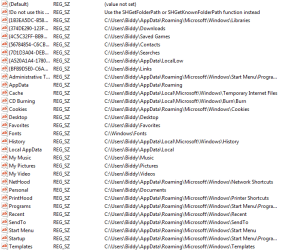
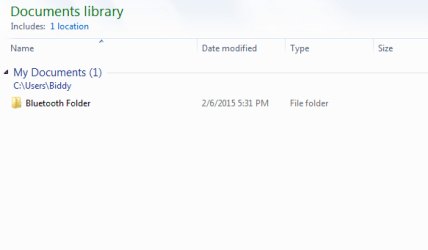
Needless to say, I dern ****ed up and accidentally routed the My Documents folder to BE my HDD (as in E:/ instead of the intended E:/My Documents folder) which I didn't want to do. The folder then "disappeared" but still existed somewhere in the computer. I then spoke to a Microsoft support rep, who then proceeded to dig the hole deeper by remotely accessing my desktop and fiddling with the registry. Now the contents of the My Documents folder exist in my HDD default directory (E:/) and a makeshift My Documents folder exists in the Library section. How can I just undo this whole mess and restore the My Documents folder to its factory conditions, including the files that were originally stored in said folder?
SOS, I'm about to tear my hair out here!
Disastrox3
Hello all,
Let me start of by saying that I have followed this tutorial: http://www.sevenforums.com/tutorials/18583-user-folders-restore-default-location.html and have not had results.
Additionally, I have 2 hard drives: An SSD solely for the Windows OS and an HDD for everything else.
I'm having issues trying to restore the My Documents folder to factory settings. I did something stupid
o I know, it's shame on me here) and tried to re-route the My Documents folder to my HDD from my SSD because my SSD has considerably less memory. I did this by following a tutorial from the Microsoft website.Needless to say, I dern ****ed up and accidentally routed the My Documents folder to BE my HDD (as in E:/ instead of the intended E:/My Documents folder) which I didn't want to do. The folder then "disappeared" but still existed somewhere in the computer. I then spoke to a Microsoft support rep, who then proceeded to dig the hole deeper by remotely accessing my desktop and fiddling with the registry. Now the contents of the My Documents folder exist in my HDD default directory (E:/) and a makeshift My Documents folder exists in the Library section. How can I just undo this whole mess and restore the My Documents folder to its factory conditions, including the files that were originally stored in said folder?
SOS, I'm about to tear my hair out here!
Disastrox3
My Computer
At a glance
Windows 7 Home Premium 64-bit.Intel Core i7-4770k16 GB RAMNVIDIA GeForce GTX 780
- Computer type
- PC/Desktop
- Computer Manufacturer/Model Number
- custom build
- OS
- Windows 7 Home Premium 64-bit.
- CPU
- Intel Core i7-4770k
- Motherboard
- Asus Z87 PRO LGA 1150
- Memory
- 16 GB RAM
- Graphics Card(s)
- NVIDIA GeForce GTX 780
- Hard Drives
- Crucial M500 120GB SSD
WD Blue 1 TB Desktop Hard Drive
- Antivirus
- Malware Bytes
- Browser
- Google Chrome