Restoring DV7-1150us; Neither BIOS utility will execute. Help pls

zapp22

New member
Power User
VIP
Local time
12:14 AM
Messages
730
Location
Tejas, northern Mexico
Friends I'm doing another thankless restore of a good older, built-like-tank HP DV7-1150us. It is working pretty well except that I can't tell if the charge circuit works or not - battery at 0% and no indication of charge, but that's not what I need at moment.

It has the original BIOS, and there are a string of updates, so I just grabbed the last/latest one and ran it: Insyde Utility came up and ran ok but on a sanity check returned a message about "No multi-FD" and bailed. There is another BIOS/util that was marked for UEFI systems update so I tried to run it, and failed due to missing .NET version [must have been an older one] - maybe an indication it looks for the "HP Support Framework" which I have not installed.

Anyone know how to get the BIOS updated?

thanks
z

p.s. the p/n if it matters: FS148UA#ABA
 

My Computer My Computer

At a glance

Windows XP Pro SP3, Windows 7 Pro 32-bit, Win...Pentium 4 3.2GHz, Pentium 4 3.4GHz 64bit, Atom,4GB matched, 1GB, 2.5GB, 4.0 GBGeforce 8400 GS and others
Computer Manufacturer/Model Number
HP DC7600, HP DC7600[2], HP DC7100, Samsung NC10
OS
Windows XP Pro SP3, Windows 7 Pro 32-bit, Windows 7 Ultimate 64bit, Windows XP Home SP3
CPU
Pentium 4 3.2GHz, Pentium 4 3.4GHz 64bit, Atom,
Motherboard
Dunno
Memory
4GB matched, 1GB, 2.5GB, 4.0 GB
Graphics Card(s)
Geforce 8400 GS and others
Sound Card
RealteK ALC260 and others
Monitor(s) Displays
Asus HD
Screen Resolution
1920x1080
Hard Drives
WD Caviar 640gb SATA
Cooling
We Be Cool
If the battery is dead (doesn't charge), remove it to prevent damaging the internal power supply.

Most computers can do a BIOS update from BIOS, some doesn't and you need to run under Windows or DOS. HP Pavilion g7-1150us Notebook PC Software and Driver Downloads | HP(R) Customer Support
You can run the sp60864.exe BIOS update file under WinPE.
Boot from a windows installation drive (7, 8 or 10), open a CMD window, type the path to the file.
 

My Computers My Computers

  • At a glance

    Windows 7 HP 64i5 6600K - 800MHz to 4200MHz4+4G GSkill DDR4 3000IG - Intel 530
    Computer type
    PC/Desktop
    Computer Manufacturer/Model Number
    custom build
    OS
    Windows 7 HP 64
    CPU
    i5 6600K - 800MHz to 4200MHz
    Motherboard
    GA-Z170-HD3P
    Memory
    4+4G GSkill DDR4 3000
    Graphics Card(s)
    IG - Intel 530
    Monitor(s) Displays
    Samsung 226BW
    Screen Resolution
    1680x1050
    Hard Drives
    (1) -1 SM951 – 128GB M.2 AHCI PCIe SSD drive for Windows 7 and Lubuntu
    (2) -1 WD SATA 3 - 1T for Data
    (3) -1 WD SATA 3 - 1T for backup
    PSU
    Thermaltake 450W TR2 gold
    Keyboard
    Old and good Chicony mechanical keyboard
    Mouse
    Logitech mX performance - 9 buttons (had to disable some)
    Internet Speed
    500Mb/s
    Browser
    Firefox 64
    Other Info
    TinyWall firewall
  • At a glance

    Windows 7 Proi7-4500U 800MHz to 3.0GHz(4+4)G DDR3 1600IG intel 4400 + NVIDIA GeForce GT 745M
    Computer type
    Laptop
    System Manufacturer/Model Number
    Asus Q550LF
    OS
    Windows 7 Pro
    CPU
    i7-4500U 800MHz to 3.0GHz
    Motherboard
    Asus Q550LF
    Memory
    (4+4)G DDR3 1600
    Graphics Card(s)
    IG intel 4400 + NVIDIA GeForce GT 745M
    Sound Card
    Realtek
    Monitor(s) Displays
    LG Display LP156WF4-SPH1
    Screen Resolution
    1920 x 1080
    Hard Drives
    BX500 120G SSD for Windows and programs +
    1T HDD for data
    Internet Speed
    500 Mb/s
    Browser
    Firefox
    Other Info
    TinyWall firewall
these have 2 bad reps, both related indirectly to BIOS:
- stubborn to pull up setup
- BIOS update fails, black screen


I would prefer to try to execute from Setup if it has that option but so far unable to get it there.
The manual is not much help: press ESC, Then F10. Neither works. F12 no luck. If I hold any key, i get a bunch of beeps, then 'boot from OS' flashes for a split second and I'm back to Windows.
suggestion?


EDIT: Got into setup. The issue is that when the wait time is set to Zero [default], can't detect the Esc or F10 presses.
But in this early version of the BIOS/Setup there is no option to update BIOS from Setup. Very threadbare, primitive
 
Last edited:

My Computer My Computer

At a glance

Windows XP Pro SP3, Windows 7 Pro 32-bit, Win...Pentium 4 3.2GHz, Pentium 4 3.4GHz 64bit, Atom,4GB matched, 1GB, 2.5GB, 4.0 GBGeforce 8400 GS and others
Computer Manufacturer/Model Number
HP DC7600, HP DC7600[2], HP DC7100, Samsung NC10
OS
Windows XP Pro SP3, Windows 7 Pro 32-bit, Windows 7 Ultimate 64bit, Windows XP Home SP3
CPU
Pentium 4 3.2GHz, Pentium 4 3.4GHz 64bit, Atom,
Motherboard
Dunno
Memory
4GB matched, 1GB, 2.5GB, 4.0 GB
Graphics Card(s)
Geforce 8400 GS and others
Sound Card
RealteK ALC260 and others
Monitor(s) Displays
Asus HD
Screen Resolution
1920x1080
Hard Drives
WD Caviar 640gb SATA
Cooling
We Be Cool
I think you did not read my post.
Download BIOS update file from HP site
Boot from a windows installation drive (7, 8 or 10), open a CMD window, type the path to the file.
 

My Computers My Computers

  • At a glance

    Windows 7 HP 64i5 6600K - 800MHz to 4200MHz4+4G GSkill DDR4 3000IG - Intel 530
    Computer type
    PC/Desktop
    Computer Manufacturer/Model Number
    custom build
    OS
    Windows 7 HP 64
    CPU
    i5 6600K - 800MHz to 4200MHz
    Motherboard
    GA-Z170-HD3P
    Memory
    4+4G GSkill DDR4 3000
    Graphics Card(s)
    IG - Intel 530
    Monitor(s) Displays
    Samsung 226BW
    Screen Resolution
    1680x1050
    Hard Drives
    (1) -1 SM951 – 128GB M.2 AHCI PCIe SSD drive for Windows 7 and Lubuntu
    (2) -1 WD SATA 3 - 1T for Data
    (3) -1 WD SATA 3 - 1T for backup
    PSU
    Thermaltake 450W TR2 gold
    Keyboard
    Old and good Chicony mechanical keyboard
    Mouse
    Logitech mX performance - 9 buttons (had to disable some)
    Internet Speed
    500Mb/s
    Browser
    Firefox 64
    Other Info
    TinyWall firewall
  • At a glance

    Windows 7 Proi7-4500U 800MHz to 3.0GHz(4+4)G DDR3 1600IG intel 4400 + NVIDIA GeForce GT 745M
    Computer type
    Laptop
    System Manufacturer/Model Number
    Asus Q550LF
    OS
    Windows 7 Pro
    CPU
    i7-4500U 800MHz to 3.0GHz
    Motherboard
    Asus Q550LF
    Memory
    (4+4)G DDR3 1600
    Graphics Card(s)
    IG intel 4400 + NVIDIA GeForce GT 745M
    Sound Card
    Realtek
    Monitor(s) Displays
    LG Display LP156WF4-SPH1
    Screen Resolution
    1920 x 1080
    Hard Drives
    BX500 120G SSD for Windows and programs +
    1T HDD for data
    Internet Speed
    500 Mb/s
    Browser
    Firefox
    Other Info
    TinyWall firewall
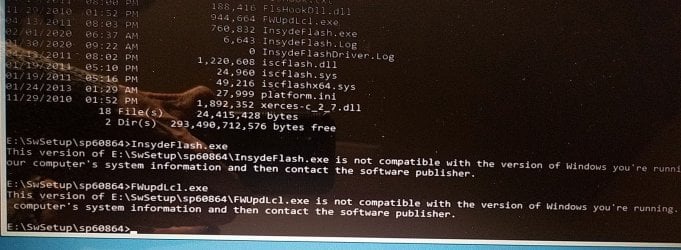
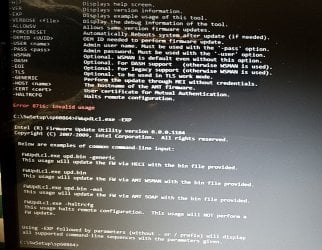
Couple of images of the display, showing option switches for a one of the executables. To reiterate what I posted earlier, there is no executable directly downloadable from the "Drivers & Download" page for this DV7 which runs under Setup/BIOS - no such option showing in the current, originally-issued BIOS.
I'm going to hazard a guess that if I were to reinstall the original recovery partition and run from there, the Insyde run-under-windows would work... maybe. I don't have that drive in my possession


See the option switches shown in the images. Does anyone have knowledge, or a link, as to the function of each, and if any of these would update the BIOS under either Windows 10 or Windows 7?


Flash-fail-1.jpg

FWupdate-switches.jpg
 

My Computer My Computer

At a glance

Windows XP Pro SP3, Windows 7 Pro 32-bit, Win...Pentium 4 3.2GHz, Pentium 4 3.4GHz 64bit, Atom,4GB matched, 1GB, 2.5GB, 4.0 GBGeforce 8400 GS and others
Computer Manufacturer/Model Number
HP DC7600, HP DC7600[2], HP DC7100, Samsung NC10
OS
Windows XP Pro SP3, Windows 7 Pro 32-bit, Windows 7 Ultimate 64bit, Windows XP Home SP3
CPU
Pentium 4 3.2GHz, Pentium 4 3.4GHz 64bit, Atom,
Motherboard
Dunno
Memory
4GB matched, 1GB, 2.5GB, 4.0 GB
Graphics Card(s)
Geforce 8400 GS and others
Sound Card
RealteK ALC260 and others
Monitor(s) Displays
Asus HD
Screen Resolution
1920x1080
Hard Drives
WD Caviar 640gb SATA
Cooling
We Be Cool
Back
Top