Restoring From Backup - How?

Brash

New member
Local time
5:45 PM
Messages
21
I have Norton Ghost 15.0 and i've made a backup of both partitions of Windows 7 Ultimate.
1. the 100mb System Reserved partition (g:/) that it made by default when i installed win7, because it recommended it.
and
2. the (C:/) main partition.


but my question is this:
Which of these 2 partitions is "Set Active for booting OS"? I can't figure out which is the boot drive. I called Symantec (norton) and they say it's the C:/ drive.. yet when i read the Forums there the regular people that use their forums tell me it's the SRP [100mb system reserved partition (drive g:)]

confusing.

And should i restore original Disc Signature?

What about the MBR? do i restore that if i'm using same harddrive with no partition-changes? Just rewinding time.


i have restored many times with previous versions of windows, mostly vista and XP but since Win7 is trying something new by using 2 partitions, it confuses me as to how to go about doing it correctly so i dont have to use the DVD to "repair" afterwards or do any other fancy tricks.
 

My Computer

OS
Windows 7
I have Norton Ghost 15.0 and i've made a backup of both partitions of Windows 7 Ultimate.
1. the 100mb System Reserved partition (g:/) that it made by default when i installed win7, because it recommended it.
and
2. the (C:/) main partition.


but my question is this:
Which of these 2 partitions is "Set Active for booting OS"? I can't figure out which is the boot drive. I called Symantec (norton) and they say it's the C:/ drive.. yet when i read the Forums there they tell me it's the SRP [100mb system reserved partition (drive g:)]

confusing.

And should i restore original Disc Signature?

What about the MBR? do i restore that if i'm using same harddrive with no partition-changes? Just rewinding time.


i have restored many times with previous versions of windows, mostly vista and XP but since Win7 is trying something new by using 2 partitions, it confuses me as to how to go about doing it correctly so i dont have to use the DVD to "repair" afterwards or do any other fancy tricks.
C : should be your boot drive if you installed it correctly.:)
 

My Computer

Computer Manufacturer/Model Number
Blue Shards 1.0
OS
Windows 7 Ultimate 64bit
CPU
AMD Phenom II 555 Black Edition Quad Core OC'd to 4.0GHz
Motherboard
ASUS M4A88T-M
Memory
G Skill RipJaw 1333MHz 4GB
Graphics Card(s)
ATI raideon 4250 HD/XFX ATI Radeon 1GB HD4650
Sound Card
Realteck HD Audio
Monitor(s) Displays
2x 22" Widescreen HD Monitors
Hard Drives
500GB Sata 7500RPM
80GB IDE
PSU
850W OCUK Modular
Case
Antec Dark Fleet DF-30
Cooling
Titan Fenrir Pro (CPU)
Keyboard
Logitech Wireless
Mouse
Logitech Wireless
Internet Speed
24Meg
Other Info
Getting soon-
2TB 7200RPM HDD
+8GB RAM
30GB SSD
HD6950/70
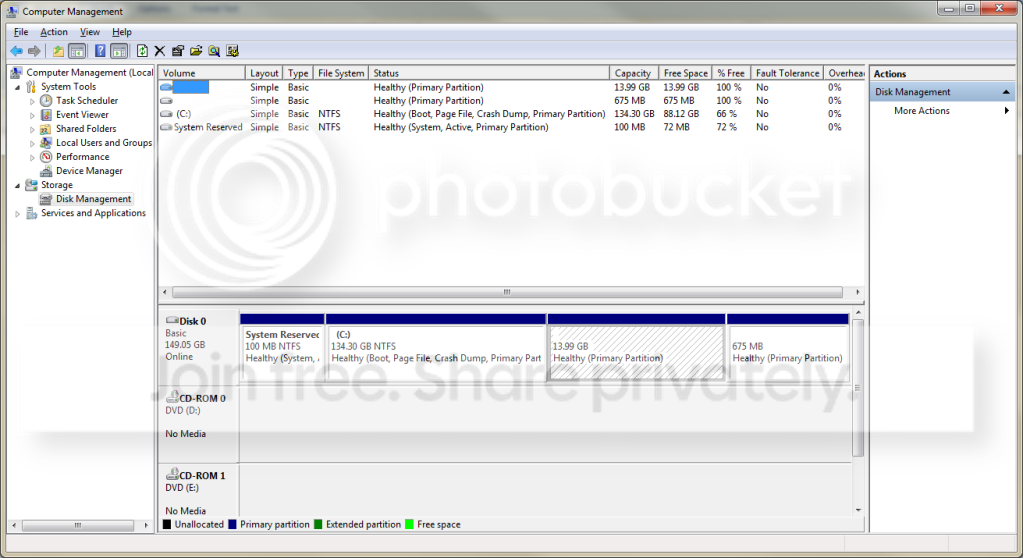
On my Windows 7 box, the 100MB system partition is set to Primary and Active. The C drive is a primary partition.

Edit: here is an image
DiskManagement.png
 

My Computer

Computer Manufacturer/Model Number
Self-Built in July 2009
OS
Windows 7 Ultimate x64
CPU
Intel Q9550 2.83Ghz OC'd to 3.40Ghz
Motherboard
Gigabyte GA-EP45-UD3R rev. 1.1, F12 BIOS
Memory
8GB G.Skill PI DDR2-800, 4-4-4-12 timings
Graphics Card(s)
EVGA 1280MB Nvidia GeForce GTX570
Sound Card
Realtek ALC899A 8 channel onboard audio
Monitor(s) Displays
23" Acer x233H
Screen Resolution
1920x1080
Hard Drives
Intel X25-M 80GB Gen 2 SSD
Western Digital 1TB Caviar Black, 32MB cache. WD1001FALS
PSU
Corsair 620HX modular
Case
Antec P182
Cooling
stock
Keyboard
ABS M1 Mechanical
Mouse
Logitech G9 Laser Mouse
Internet Speed
15/2 cable modem
Other Info
Windows and Linux enthusiast. Logitech G35 Headset.
On my Windows 7 box, the 100MB system partition is set to Primary and Active. The C drive is a primary partition.

Edit: here is an image
DiskManagement.png

i just looked at mine and it shows the same as that picture you uploaded.

that is confusing. both are primary.. so i can understand that, but it's saying the C: is "Boot" and the 100mb SRP is "Active".. why isn't the c: also "active"? And i thought "Active" was the same thing as "Boot", isn't it?

In norton's advanced settings for restoring the partitions i have the option to set the partition drive with a checkmark besides "Set drive Active (for booting OS)"

so it lists the word "Active" and it also lists the word "Booting" so it makes it sound like Active means the same as Boot.
Yet in the disk management picture you showed (and also on my computer) one partition is Boot and the other is Active like it's 2 separate things.
 

My Computer

OS
Windows 7
The important word is system, which means this is where your bios looks first for instructions to boot from. Just my 2 cents worth.
 

My Computer

Computer Manufacturer/Model Number
Gateway GT5692
OS
Windows 7 Ulti. x64
CPU
AMD Phenom 8450 triple-core 2.10 ghz
Memory
4GB
Graphics Card(s)
ATI Radion HD 3200
Monitor(s) Displays
Gateway FPD1775W
Screen Resolution
1280x720
Hard Drives
465.6613 Gibibytes
Using the Windows Disk Management, myzr7 is correct. The "system" status is where the boot files are and it is active and it is the primary drive.

Boot just means that is the OS you are booted into. If you ever want to check, for Vista and Win 7 the boot files are bootmgr and the Boot folder containing the BCD store. They are both hidden system files.
 

My Computer

Computer Manufacturer/Model Number
Homebuilt
OS
Windows 7 x64
CPU
i7-2600K
Motherboard
Asus P8Z77-v Pro
Memory
8 G
Graphics Card(s)
GTX 480
Sound Card
Onboard
Monitor(s) Displays
LG W2753V
Screen Resolution
1920x1080
Hard Drives
Crucial M4 128 G SSD
that is confusing. both are primary.. so i can understand that, but it's saying the C: is "Boot" and the 100mb SRP is "Active".. why isn't the c: also "active"? And i thought "Active" was the same thing as "Boot", isn't it?
Generally speaking in a Windows partitioning scheme, you will only have 1 active partition. This is usually the place where the bootloader in the MBR is going to look in order to start the computer. With Windows 7...it starts from that system recovery partition.

And as you can see, active is not the same as boot in this case. For example, in those other partitions I also run Ubuntu Linux. So, there is a boot partition for Linux and a boot partition for Windows. But grub..which is my bootloader, is in the MBR and can boot either Windows or Linux...depending upon which is picked.
 

My Computer

Computer Manufacturer/Model Number
Self-Built in July 2009
OS
Windows 7 Ultimate x64
CPU
Intel Q9550 2.83Ghz OC'd to 3.40Ghz
Motherboard
Gigabyte GA-EP45-UD3R rev. 1.1, F12 BIOS
Memory
8GB G.Skill PI DDR2-800, 4-4-4-12 timings
Graphics Card(s)
EVGA 1280MB Nvidia GeForce GTX570
Sound Card
Realtek ALC899A 8 channel onboard audio
Monitor(s) Displays
23" Acer x233H
Screen Resolution
1920x1080
Hard Drives
Intel X25-M 80GB Gen 2 SSD
Western Digital 1TB Caviar Black, 32MB cache. WD1001FALS
PSU
Corsair 620HX modular
Case
Antec P182
Cooling
stock
Keyboard
ABS M1 Mechanical
Mouse
Logitech G9 Laser Mouse
Internet Speed
15/2 cable modem
Other Info
Windows and Linux enthusiast. Logitech G35 Headset.
The 100mb is disposable at any time by deleting or not restoring it, passing the active flag to Win7 partition, booting into Win7 DVD Repair console to run Startup Repair up to 3 separate times with reboots to write the MBR to Win7.

As long as 100mb remains System Active, it too can be repaired or restored using Startup Repair, which automates all of the MBR recovery commands.
 
so for norton ghost, if i roll-back the installation to a previous date and restore those partitions to when they were working great, i need to put a checkmark besides "make drive active (for booting OS)" for the 100mb system reserved partition and not the c: partition with all the programs on it?

That's what it sound slike you guys are saying.. and if that's so, then the guy at Symantec doesn't know what he is talking about. He kept telling me the system partition was not related to windows 7 booting operations and that it was only for backup of certain critical system files.
 

My Computer

OS
Windows 7
Back
Top