Restoring LAN on windows 7

Sinobiah

New member
Local time
11:40 PM
Messages
33
Location
Johannesburg South Africa
Hi All,

A while back I had a lan connection working perfectly (first time i ever used it) on windows 7. I Connected to a windows xp box through the lan cable, and played MPG's with no problem.

For some reason later on I had to disable my LAN. I am also sure that someone else was on my pc as my connection then disappeared!!!! I have not been able to restore my LAN, connect to the XP pc, or anything of the sort.

When I attempt to connect to the XP box, it gives no sign of any connection enabled. When I "ping" the XP box through CMD, it gives 50% loss. But when I Ping the win 7 pc from the XP box, it gives 100% loss.

Any ideas on what the problem might be? I have tried everything from online guides and almost throwing my beloved pc away...

Any help will be greatly appreciated.
 

My Computer

Computer Manufacturer/Model Number
Microsoft Corporation
OS
Windows 7 Ultimate 32 bit 6.1.7600 build 7600
CPU
3.0 Ghz Dual Core CPU
Memory
2Gb Ram
Graphics Card(s)
Nvidia 7300 GS 256mb
Sound Card
onboard... soon upgrading
Monitor(s) Displays
Samsung 23" lcd flat screen
Screen Resolution
1024 x 786
Hard Drives
5: 250gb, 80, 80, 160, 160
Keyboard
USB Okion - white - lights up in the dark
Internet Speed
21.6 MB/s
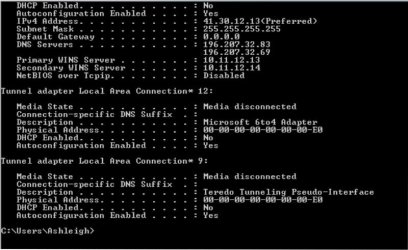
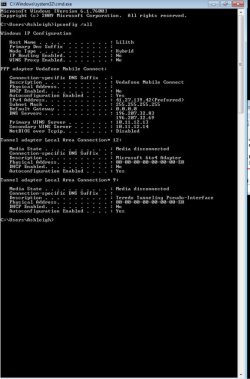
What do you get when you open a CMD Prompt and type in ipconfig /all and post back with a screen shot of it.

For some reason later on I had to disable my LAN. I am also sure that someone else was on my pc as my connection then disappeared!!!! I have not been able to restore my LAN, connect to the XP pc, or anything of the sort.

Who has been on the PC? A hacker or a family member?
 

My Computer

Computer Manufacturer/Model Number
Alienware
OS
Windows 7 Ultimate x64
CPU
I7
Motherboard
GA-X58-USB3
Memory
6 x 1.5V DDR3 DIMM sockets supporting up to 24 GB of system
Graphics Card(s)
GeForce GTX 580
Sound Card
Realtek ALC892 codec 2/4/5.1/7.1-channel
Monitor(s) Displays
NEC Display Solutions E321 Black 32"
Screen Resolution
1366 x 768
Hard Drives
OCZ Colossus LT Series OCZSSD2-1CLSLT1T 3.5" 1TB SATA II MLC Internal Solid State Drive
PSU
XFX Black Edition XPS-850W-BES 850W ATX12V
Case
Antec
Cooling
Zalman
Keyboard
Microsoft
Mouse
Microsoft
Reply

Hi there,

Thanks for the reply.

Here is a screenshot, and it was a relative. I hope it shows??? lol..

Don;t you perhaps have skype? it will speed things up greatly.
 

Attachments

  • sc1.jpg
    sc1.jpg
    48 KB · Views: 12

My Computer

Computer Manufacturer/Model Number
Microsoft Corporation
OS
Windows 7 Ultimate 32 bit 6.1.7600 build 7600
CPU
3.0 Ghz Dual Core CPU
Memory
2Gb Ram
Graphics Card(s)
Nvidia 7300 GS 256mb
Sound Card
onboard... soon upgrading
Monitor(s) Displays
Samsung 23" lcd flat screen
Screen Resolution
1024 x 786
Hard Drives
5: 250gb, 80, 80, 160, 160
Keyboard
USB Okion - white - lights up in the dark
Internet Speed
21.6 MB/s
You don't have a default gateway, which computer is your host computer to the internet and how are you connecting to the internet, router, modem, any switches..?

I don't have skype no sry..
 

My Computer

Computer Manufacturer/Model Number
Alienware
OS
Windows 7 Ultimate x64
CPU
I7
Motherboard
GA-X58-USB3
Memory
6 x 1.5V DDR3 DIMM sockets supporting up to 24 GB of system
Graphics Card(s)
GeForce GTX 580
Sound Card
Realtek ALC892 codec 2/4/5.1/7.1-channel
Monitor(s) Displays
NEC Display Solutions E321 Black 32"
Screen Resolution
1366 x 768
Hard Drives
OCZ Colossus LT Series OCZSSD2-1CLSLT1T 3.5" 1TB SATA II MLC Internal Solid State Drive
PSU
XFX Black Edition XPS-850W-BES 850W ATX12V
Case
Antec
Cooling
Zalman
Keyboard
Microsoft
Mouse
Microsoft
You don't have a default gateway, which computer is your host computer to the internet and how are you connecting to the internet, router, modem?

I don't have skype no sry..

I use a 3G modem to connect to the internet, which is the PC I am currently using to connect. It is the windows 7 pc. So this is the host pc.
 

My Computer

Computer Manufacturer/Model Number
Microsoft Corporation
OS
Windows 7 Ultimate 32 bit 6.1.7600 build 7600
CPU
3.0 Ghz Dual Core CPU
Memory
2Gb Ram
Graphics Card(s)
Nvidia 7300 GS 256mb
Sound Card
onboard... soon upgrading
Monitor(s) Displays
Samsung 23" lcd flat screen
Screen Resolution
1024 x 786
Hard Drives
5: 250gb, 80, 80, 160, 160
Keyboard
USB Okion - white - lights up in the dark
Internet Speed
21.6 MB/s
It could be that you have a bad Ethernet Cable if you had another and switched it out and see if that made a difference then we could rule that out.
 

My Computer

Computer Manufacturer/Model Number
Alienware
OS
Windows 7 Ultimate x64
CPU
I7
Motherboard
GA-X58-USB3
Memory
6 x 1.5V DDR3 DIMM sockets supporting up to 24 GB of system
Graphics Card(s)
GeForce GTX 580
Sound Card
Realtek ALC892 codec 2/4/5.1/7.1-channel
Monitor(s) Displays
NEC Display Solutions E321 Black 32"
Screen Resolution
1366 x 768
Hard Drives
OCZ Colossus LT Series OCZSSD2-1CLSLT1T 3.5" 1TB SATA II MLC Internal Solid State Drive
PSU
XFX Black Edition XPS-850W-BES 850W ATX12V
Case
Antec
Cooling
Zalman
Keyboard
Microsoft
Mouse
Microsoft
It could be that you have a bad Ethernet Cable if you had another and switched it out and see if that made a difference then we could rule that out.

It's not the cable.. We have 2 cables and it still does the same thing. The problem is that my LOCAL AREA CONNECTION ICON itself is missing out of my adapters. It's no longer there, and I can't create a new one?
 

My Computer

Computer Manufacturer/Model Number
Microsoft Corporation
OS
Windows 7 Ultimate 32 bit 6.1.7600 build 7600
CPU
3.0 Ghz Dual Core CPU
Memory
2Gb Ram
Graphics Card(s)
Nvidia 7300 GS 256mb
Sound Card
onboard... soon upgrading
Monitor(s) Displays
Samsung 23" lcd flat screen
Screen Resolution
1024 x 786
Hard Drives
5: 250gb, 80, 80, 160, 160
Keyboard
USB Okion - white - lights up in the dark
Internet Speed
21.6 MB/s
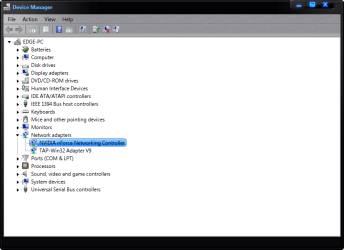
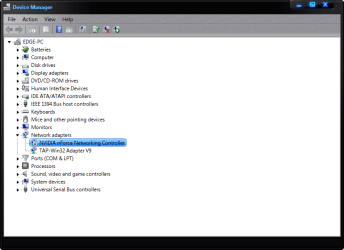
OK go into your device manager and see if you have a problem with your adapter itself.
 

Attachments

  • network1.png
    network1.png
    20.8 KB · Views: 21
  • network2.png
    network2.png
    21.1 KB · Views: 13

My Computer

Computer Manufacturer/Model Number
Alienware
OS
Windows 7 Ultimate x64
CPU
I7
Motherboard
GA-X58-USB3
Memory
6 x 1.5V DDR3 DIMM sockets supporting up to 24 GB of system
Graphics Card(s)
GeForce GTX 580
Sound Card
Realtek ALC892 codec 2/4/5.1/7.1-channel
Monitor(s) Displays
NEC Display Solutions E321 Black 32"
Screen Resolution
1366 x 768
Hard Drives
OCZ Colossus LT Series OCZSSD2-1CLSLT1T 3.5" 1TB SATA II MLC Internal Solid State Drive
PSU
XFX Black Edition XPS-850W-BES 850W ATX12V
Case
Antec
Cooling
Zalman
Keyboard
Microsoft
Mouse
Microsoft
I've tried that on more than one occasion. I'll send a screenshot of what my device manager sends in about a minute. PS, how do i fix the default gateway problem? And how does that affect my LAN?
 

My Computer

Computer Manufacturer/Model Number
Microsoft Corporation
OS
Windows 7 Ultimate 32 bit 6.1.7600 build 7600
CPU
3.0 Ghz Dual Core CPU
Memory
2Gb Ram
Graphics Card(s)
Nvidia 7300 GS 256mb
Sound Card
onboard... soon upgrading
Monitor(s) Displays
Samsung 23" lcd flat screen
Screen Resolution
1024 x 786
Hard Drives
5: 250gb, 80, 80, 160, 160
Keyboard
USB Okion - white - lights up in the dark
Internet Speed
21.6 MB/s
Ok.

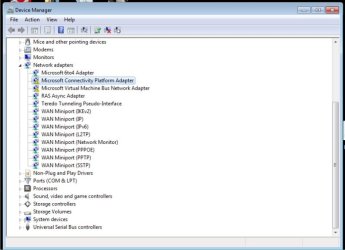
So this is what my device manager states in my networks drivers etc etc....

I'm really frustrated with all this! It's been months since I have been able to use it.:(
 

Attachments

  • sc2.jpg
    sc2.jpg
    41.7 KB · Views: 14

My Computer

Computer Manufacturer/Model Number
Microsoft Corporation
OS
Windows 7 Ultimate 32 bit 6.1.7600 build 7600
CPU
3.0 Ghz Dual Core CPU
Memory
2Gb Ram
Graphics Card(s)
Nvidia 7300 GS 256mb
Sound Card
onboard... soon upgrading
Monitor(s) Displays
Samsung 23" lcd flat screen
Screen Resolution
1024 x 786
Hard Drives
5: 250gb, 80, 80, 160, 160
Keyboard
USB Okion - white - lights up in the dark
Internet Speed
21.6 MB/s
I've tried that on more than one occasion. I'll send a screenshot of what my device manager sends in about a minute. PS, how do i fix the default gateway problem? And how does that affect my LAN?

It's actually the other way around after we fix the Lan issue the gateway will fix itself.
 

My Computer

Computer Manufacturer/Model Number
Alienware
OS
Windows 7 Ultimate x64
CPU
I7
Motherboard
GA-X58-USB3
Memory
6 x 1.5V DDR3 DIMM sockets supporting up to 24 GB of system
Graphics Card(s)
GeForce GTX 580
Sound Card
Realtek ALC892 codec 2/4/5.1/7.1-channel
Monitor(s) Displays
NEC Display Solutions E321 Black 32"
Screen Resolution
1366 x 768
Hard Drives
OCZ Colossus LT Series OCZSSD2-1CLSLT1T 3.5" 1TB SATA II MLC Internal Solid State Drive
PSU
XFX Black Edition XPS-850W-BES 850W ATX12V
Case
Antec
Cooling
Zalman
Keyboard
Microsoft
Mouse
Microsoft
So those adapters showing the yellow signs are your main connection to the internet and are whats causing the problem can you right click on them and uninstall them and reboot the computer. The computer should recognize them and install them again as soon as it boots up do the MCPA first and see if that corrects itself.

Sry it's taking so long to reply I'm tired and was looking at your computer specs..
 

My Computer

Computer Manufacturer/Model Number
Alienware
OS
Windows 7 Ultimate x64
CPU
I7
Motherboard
GA-X58-USB3
Memory
6 x 1.5V DDR3 DIMM sockets supporting up to 24 GB of system
Graphics Card(s)
GeForce GTX 580
Sound Card
Realtek ALC892 codec 2/4/5.1/7.1-channel
Monitor(s) Displays
NEC Display Solutions E321 Black 32"
Screen Resolution
1366 x 768
Hard Drives
OCZ Colossus LT Series OCZSSD2-1CLSLT1T 3.5" 1TB SATA II MLC Internal Solid State Drive
PSU
XFX Black Edition XPS-850W-BES 850W ATX12V
Case
Antec
Cooling
Zalman
Keyboard
Microsoft
Mouse
Microsoft
Sorry for the late reply. Will try that in a bit.
 

My Computer

Computer Manufacturer/Model Number
Microsoft Corporation
OS
Windows 7 Ultimate 32 bit 6.1.7600 build 7600
CPU
3.0 Ghz Dual Core CPU
Memory
2Gb Ram
Graphics Card(s)
Nvidia 7300 GS 256mb
Sound Card
onboard... soon upgrading
Monitor(s) Displays
Samsung 23" lcd flat screen
Screen Resolution
1024 x 786
Hard Drives
5: 250gb, 80, 80, 160, 160
Keyboard
USB Okion - white - lights up in the dark
Internet Speed
21.6 MB/s
sorry, i just realized i cut out a piece of the cmd prompt.. here is the full one? does it make a difference?
 

Attachments

  • sc3.jpg
    sc3.jpg
    55 KB · Views: 4

My Computer

Computer Manufacturer/Model Number
Microsoft Corporation
OS
Windows 7 Ultimate 32 bit 6.1.7600 build 7600
CPU
3.0 Ghz Dual Core CPU
Memory
2Gb Ram
Graphics Card(s)
Nvidia 7300 GS 256mb
Sound Card
onboard... soon upgrading
Monitor(s) Displays
Samsung 23" lcd flat screen
Screen Resolution
1024 x 786
Hard Drives
5: 250gb, 80, 80, 160, 160
Keyboard
USB Okion - white - lights up in the dark
Internet Speed
21.6 MB/s
Those adapters need to be uninstalled to see if they will repair themselves after a reboot..
 

My Computer

Computer Manufacturer/Model Number
Alienware
OS
Windows 7 Ultimate x64
CPU
I7
Motherboard
GA-X58-USB3
Memory
6 x 1.5V DDR3 DIMM sockets supporting up to 24 GB of system
Graphics Card(s)
GeForce GTX 580
Sound Card
Realtek ALC892 codec 2/4/5.1/7.1-channel
Monitor(s) Displays
NEC Display Solutions E321 Black 32"
Screen Resolution
1366 x 768
Hard Drives
OCZ Colossus LT Series OCZSSD2-1CLSLT1T 3.5" 1TB SATA II MLC Internal Solid State Drive
PSU
XFX Black Edition XPS-850W-BES 850W ATX12V
Case
Antec
Cooling
Zalman
Keyboard
Microsoft
Mouse
Microsoft
Those adapters need to be uninstalled to see if they will repair themselves after a reboot..

Did what you said, it did not restore all the drivers after a restart besides for RAS async adapter.

in cmd, my tunnel adapter for local area connection says the media is disconnected.
 

My Computer

Computer Manufacturer/Model Number
Microsoft Corporation
OS
Windows 7 Ultimate 32 bit 6.1.7600 build 7600
CPU
3.0 Ghz Dual Core CPU
Memory
2Gb Ram
Graphics Card(s)
Nvidia 7300 GS 256mb
Sound Card
onboard... soon upgrading
Monitor(s) Displays
Samsung 23" lcd flat screen
Screen Resolution
1024 x 786
Hard Drives
5: 250gb, 80, 80, 160, 160
Keyboard
USB Okion - white - lights up in the dark
Internet Speed
21.6 MB/s
Back
Top