Being a MSDN Subscriber, I got Windows 7 when it went RTM and which is when I initially installed it as a dual boot with Vista. The mild click button worked as Tim Sneath described in #19 of his blog:
'19. One More of the Same, Please. I’ve seen a few folk caught out by this one. If you’ve already got an application open on your desktop (for example, a command prompt window), and you want to open a second instance of the same application, you don’t have to go back to the start menu. You can simply hold down the Shift key while clicking on the taskbar icon, and it will open a new instance of the application rather than switching to the existing application. For a keyboard-free shortcut, you can middle-click with the third mouse button to do the same thing. (This trick assumes that your application supports multiple running instances, naturally.)'
For some reason I reinstalled Windows 7 about two months ago and did something different and now when I use the middle click, it simply displays the task list. Anyone know how to make the middle click return to the default behavior?
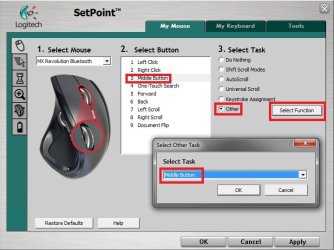
You can open Mouse in the Control Panel to look for a middle button setting, but this is dependant on your mouse drivers for how this can be set. What mouse brand and model do you have?
For example, I have a logitech mouse that uses Setpoint drivers that has this setting below for it.
Hope this helps for now,
Shawn
My Computer
At a glance
64-bit Windows 11 Pro for WorkstationsIntel i7-8700K OC'd to 5 GHz64 GB (4x16GB) G.SKILL TridentZ RGB DDR4 3600...ASUS ROG-STRIX-GTX1080TI-O11G-GAMING
Computer type
PC/Desktop
Computer Manufacturer/Model Number
Self built custom
OS
64-bit Windows 11 Pro for Workstations
CPU
Intel i7-8700K OC'd to 5 GHz
Motherboard
ASUS ROG Maximus XI Formula Z390
Memory
64 GB (4x16GB) G.SKILL TridentZ RGB DDR4 3600 MHz
Graphics Card(s)
ASUS ROG-STRIX-GTX1080TI-O11G-GAMING
Sound Card
Integrated
Monitor(s) Displays
2 x Samsung Odyssey G7 27"
Screen Resolution
2560x1440
Hard Drives
1TB Samsung 990 PRO M.2,
4TB Samsung 990 PRO PRO M.2,
TerraMaster F8 SSD Plus NAS
PSU
Seasonic Prime Titanium 850W
Case
Thermaltake Core P3
Cooling
Corsair Hydro H115i
Keyboard
Logitech wireless K800
Mouse
Logitech MX Master 4
Internet Speed
2 Gb/s Download and 100 Mb/s Upload
Antivirus
Malwarebyte Anti-Malware Premium
Browser
Google Chrome
Other Info
Logitech Z625 speaker system,
Logitech BRIO 4K Pro webcam,
HP Color LaserJet Pro MFP M477fdn,
APC SMART-UPS RT 1000 XL - SURT1000XLI,
Galaxy S23 Plus phone
I have the Microsoft Laser Mouse 6000. The default for the Wheel button is Flip, here is the list of options, I ain't got a clue as to the correct one: