
There is a very old thread where Cpt Jack Sparrow came up with a simple solution to my Outlook 2010 problem - I couldn't access it. I had tried everything I could find, but it was only his suggestion re a simple Registry edit that solved it. Many thanks.
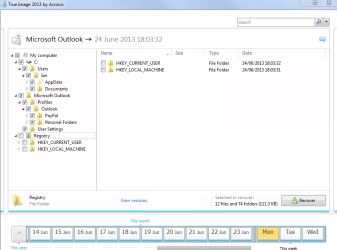
However I am now trying to restore my data. After I deleted the Registry profile and created a new one I tried to use my Acronis True Image backup but this does not restore the data even though it appears to be doing so. As you can see from the attached screen capture I have several options for restore. I picked the ones ticked plus used a backup form before the problem. That doesn't restore the data as far as I can see. If I include the Profiles, then the problem I had re-appears.
Irrespective of whether or not this restore issue is fixed, thank you Jack for restoring Outlook!!
However I am now trying to restore my data. After I deleted the Registry profile and created a new one I tried to use my Acronis True Image backup but this does not restore the data even though it appears to be doing so. As you can see from the attached screen capture I have several options for restore. I picked the ones ticked plus used a backup form before the problem. That doesn't restore the data as far as I can see. If I include the Profiles, then the problem I had re-appears.
Irrespective of whether or not this restore issue is fixed, thank you Jack for restoring Outlook!!
Attachments
My Computer
- Computer Manufacturer/Model Number
- Home build
- OS
- Windows 7
- CPU
- Intel i7 4-Core 2.8Ghz
- Motherboard
- Gigabyte GA-P55-UD5
- Memory
- 4 GBytes
- Graphics Card(s)
- GV-NX66T128D
- Sound Card
- On motherboard
- Monitor(s) Displays
- Samsung Syncmaster 2693HM
- Screen Resolution
- 1920x1200
- Internet Speed
- 1.8
