Resurging svchost.exe*32 TempFile taking needed CPU runtime

Razraal

New member
Local time
6:08 AM
Messages
12
Location
Portugal
Hello everyone!

I've been having this problem for approximately a month.
This particular file, named svchost.exe (size: 942KB), located in C:\Users\David\AppData\Local\Temp is giving me some bad times.

Everytime I log in my Windows account, this file starts executing itself, and is shown on Task Manager as the image proves it.

The most straightforward solution would be to delete this file permanently.
When I do that, it reappears after rebooting or logging out and then logging in.

I've tried deleting the whole content of the specified folder above, and yet it still shows up again, aswell as all the other "temporary" files.

I asked around, before posting this problem here, and one of the possible reasons could be a malfunctioning windows update.

The goal is to get rid of this nasty file permanently.
Can I count on your help?


Thank you for your time,
-Razraal
 

Attachments
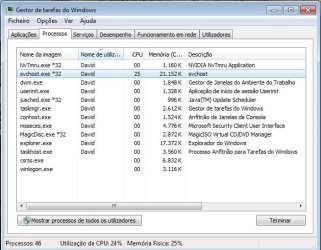
  • process_svchost.jpg
    process_svchost.jpg
    52.8 KB · Views: 25
  • location_svchost.jpg
    location_svchost.jpg
    55.1 KB · Views: 4

My Computer My Computer

At a glance

Windows 7 Ultimate x64Intel(R) Core(TM) i5 CPU 650 @ 3.20GHz 3.21 GHz4,00GBNVIDIA GeForce GTS 250
Computer type
PC/Desktop
Computer Manufacturer/Model Number
custom build
OS
Windows 7 Ultimate x64
CPU
Intel(R) Core(TM) i5 CPU 650 @ 3.20GHz 3.21 GHz
Motherboard
ASUSTeK Computer INC. P7P55LX
Memory
4,00GB
Graphics Card(s)
NVIDIA GeForce GTS 250
Monitor(s) Displays
Samsung SyncMaster 701N
Screen Resolution
1280x1024
Hard Drives
SAMSUNG HD 160JJ ATA Device
WDC WD1600YS-01SHB1 ATA Device
PSU
EUROTECH Silent Pro 420W
Keyboard
Genius K641
Mouse
Logitech G400
Antivirus
Microsoft Security Essentials
Browser
Google Chrome
The svchost.exe process is vital for w7 to operate. If you succeed in deleting it the system will be bricked.
The svchost.exe is an internal kind of OS that w7 uses to run its own processes. I have from 11-17 or more instances of it running. This particular one may be caused by a program you installed a month ago.
 

My Computer My Computer

At a glance

Windows 7 Ultimate X64 SP1Intel i5-2550K, Differing ~4.4-4.8GHz No buil...16GB G.Skill Sniper 1866MHz @ 2133MHz 2x8GBASUS GTX650TIB-DC2OC-2GD5, (650TI Boost)
Computer type
PC/Desktop
Computer Manufacturer/Model Number
Home Built Desktop By DataTech
OS
Windows 7 Ultimate X64 SP1
CPU
Intel i5-2550K, Differing ~4.4-4.8GHz No built in GPU
Motherboard
ASUS P8Z68-V PRO/GEN3
Memory
16GB G.Skill Sniper 1866MHz @ 2133MHz 2x8GB
Graphics Card(s)
ASUS GTX650TIB-DC2OC-2GD5, (650TI Boost)
Sound Card
Onboard Realtek 5-1
Monitor(s) Displays
Samsung P2570HD
Screen Resolution
1920x1080
Hard Drives
Samsung 840 Pro 256GB SSD for OS, 500GB Seagate Constellation (Enterprise drive) for Data
PSU
Corsair HX650W
Case
Inwin Dragon Rider
Cooling
Hyper 212 EVO w/two Noctua fans, push-pull, @1300 RPM
Keyboard
E-Z Eyes, bright yellow keys with large characters
Mouse
steelseries SENSEI Laser Pro Gaming
Internet Speed
48-51Mbs Mbs down, 11 Mbs up Xfinity Cable
Antivirus
Norton Internet Security 2013
Browser
IE 10, Opera, Pale Moon if needed
Other Info
4 case fans, LG BluRay-RE, ASUS DVD-RW, Mr. Fusion power supply, 1.21 gigawatts.
That's way too big and in the wrong folder to be a Windows svchost agent. It's also not the one running in Task Manager. The one in the Temp folder dated 4-12-2013 must have been added by an app you installed as Britton30 mentioned. Malwarebytes AM adds one but it's not even 1/3 the size of that one. Right click on it and select Properties. Click on the Digital Signatures tab and see if it's signed.
 

My Computer My Computer

At a glance

Windows 7 Pro-x64i7-2600 3.4GHz - 3.8GHz Turbo8Gb - 2x4GB, Muskin 991770 PC3-1333Integrated Intel HD 2000
Computer type
PC/Desktop
Computer Manufacturer/Model Number
Built 2/11/2011
OS
Windows 7 Pro-x64
CPU
i7-2600 3.4GHz - 3.8GHz Turbo
Motherboard
Intel DH67BL-B3
Memory
8Gb - 2x4GB, Muskin 991770 PC3-1333
Graphics Card(s)
Integrated Intel HD 2000
Sound Card
Integrated Intel 10.1 HD, RealTek ALC892
Monitor(s) Displays
Asus LCD VH222H, Haier HL24XSL2a
Screen Resolution
1920x1080, 1920x1080
Hard Drives
Crucial SSD C300-128Gb,
Western Digital WD5002AALX - 500Gb,
Western Digital WD7501AALS - 750Gb
PSU
Seasonic 650W 80+ Gold Modular
Case
Rosewill Defender
Cooling
Stock CPU, Four 120mm case fans, PCH fan added
Keyboard
Logitech EX100 Y-RBH94 Wireless
Mouse
Logitech EX100 M-RCE95 Wireless
Internet Speed
3.0/1.5 Mbs
Antivirus
Microsoft Security Essentials
Browser
Microsoft Internet Explorer 11
Other Info
Antec Veris Premier-Multimedia IR Station,
Cyber Accoustics-3602 Speakers,
AFT XM-5U Card Reader,
Hauppauge TV-HVR-2250,
Sony LX300 USB Turntable
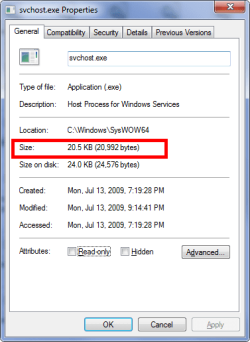
Carwiz jogged my memory, a Windows svchost.exe should only be in one or two places, C:\Windows\System32, Or if a 64 bit system, here too, C:\Windows\SysWOW64.

Size should be in the 20-30 KB range.

scvhost.png

Run a full scan with an updated MalwareBytes and Super AntiSpyware, links in my sig. You may well have a Trojan or worm which self replicates.
 

My Computer My Computer

At a glance

Windows 7 Ultimate X64 SP1Intel i5-2550K, Differing ~4.4-4.8GHz No buil...16GB G.Skill Sniper 1866MHz @ 2133MHz 2x8GBASUS GTX650TIB-DC2OC-2GD5, (650TI Boost)
Computer type
PC/Desktop
Computer Manufacturer/Model Number
Home Built Desktop By DataTech
OS
Windows 7 Ultimate X64 SP1
CPU
Intel i5-2550K, Differing ~4.4-4.8GHz No built in GPU
Motherboard
ASUS P8Z68-V PRO/GEN3
Memory
16GB G.Skill Sniper 1866MHz @ 2133MHz 2x8GB
Graphics Card(s)
ASUS GTX650TIB-DC2OC-2GD5, (650TI Boost)
Sound Card
Onboard Realtek 5-1
Monitor(s) Displays
Samsung P2570HD
Screen Resolution
1920x1080
Hard Drives
Samsung 840 Pro 256GB SSD for OS, 500GB Seagate Constellation (Enterprise drive) for Data
PSU
Corsair HX650W
Case
Inwin Dragon Rider
Cooling
Hyper 212 EVO w/two Noctua fans, push-pull, @1300 RPM
Keyboard
E-Z Eyes, bright yellow keys with large characters
Mouse
steelseries SENSEI Laser Pro Gaming
Internet Speed
48-51Mbs Mbs down, 11 Mbs up Xfinity Cable
Antivirus
Norton Internet Security 2013
Browser
IE 10, Opera, Pale Moon if needed
Other Info
4 case fans, LG BluRay-RE, ASUS DVD-RW, Mr. Fusion power supply, 1.21 gigawatts.
Right click on it and select Properties. Click on the Digital Signatures tab and see if it's signed.

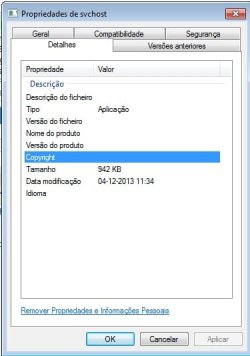
There is no Digital Signature tab whatsoever. The copyright field is empty though.
On the image, the tabs are translated to:
Details, Previous Versions, General, Compatibility, Security.
 

Attachments

  • svchost_copyright.jpg
    svchost_copyright.jpg
    23.9 KB · Views: 15

My Computer My Computer

At a glance

Windows 7 Ultimate x64Intel(R) Core(TM) i5 CPU 650 @ 3.20GHz 3.21 GHz4,00GBNVIDIA GeForce GTS 250
Computer type
PC/Desktop
Computer Manufacturer/Model Number
custom build
OS
Windows 7 Ultimate x64
CPU
Intel(R) Core(TM) i5 CPU 650 @ 3.20GHz 3.21 GHz
Motherboard
ASUSTeK Computer INC. P7P55LX
Memory
4,00GB
Graphics Card(s)
NVIDIA GeForce GTS 250
Monitor(s) Displays
Samsung SyncMaster 701N
Screen Resolution
1280x1024
Hard Drives
SAMSUNG HD 160JJ ATA Device
WDC WD1600YS-01SHB1 ATA Device
PSU
EUROTECH Silent Pro 420W
Keyboard
Genius K641
Mouse
Logitech G400
Antivirus
Microsoft Security Essentials
Browser
Google Chrome
Carwiz jogged my memory, a Windows svchost.exe should only be in one or two places, C:\Windows\System32, Or if a 64 bit system, here too, C:\Windows\SysWOW64.

Size should be in the 20-30 KB range.
Hence why I specified this particular file's location and size.

Run a full scan with an updated MalwareBytes and Super AntiSpyware, links in my sig. You may well have a Trojan or worm which self replicates.

I ran a full scan with an updated MalwareBytes a few days ago. It detected this file and deleted it. However, this didn't prove to be a consistent solution, as the file reappeared in the same place after logging in again.

I just ran a full scan with SUPERAntiSpyware, it found several cookies and the svchost file.
It deleted the file after approximately 40 minutes of scan.
It then asked a reboot, which I agreed.
Upon logging in, the file was on the specified location again, only this time it was blocked by SUPERAntiSpyware, and was not executed.
 

Attachments

My Computer My Computer

At a glance

Windows 7 Ultimate x64Intel(R) Core(TM) i5 CPU 650 @ 3.20GHz 3.21 GHz4,00GBNVIDIA GeForce GTS 250
Computer type
PC/Desktop
Computer Manufacturer/Model Number
custom build
OS
Windows 7 Ultimate x64
CPU
Intel(R) Core(TM) i5 CPU 650 @ 3.20GHz 3.21 GHz
Motherboard
ASUSTeK Computer INC. P7P55LX
Memory
4,00GB
Graphics Card(s)
NVIDIA GeForce GTS 250
Monitor(s) Displays
Samsung SyncMaster 701N
Screen Resolution
1280x1024
Hard Drives
SAMSUNG HD 160JJ ATA Device
WDC WD1600YS-01SHB1 ATA Device
PSU
EUROTECH Silent Pro 420W
Keyboard
Genius K641
Mouse
Logitech G400
Antivirus
Microsoft Security Essentials
Browser
Google Chrome
Sounds like malware to me. :( It also sounds like it has installed a root kit that wasn't detected. I put in a help call to one of our AV/Malware gurus to look in on this thread.
 

My Computer My Computer

At a glance

Windows 7 Pro-x64i7-2600 3.4GHz - 3.8GHz Turbo8Gb - 2x4GB, Muskin 991770 PC3-1333Integrated Intel HD 2000
Computer type
PC/Desktop
Computer Manufacturer/Model Number
Built 2/11/2011
OS
Windows 7 Pro-x64
CPU
i7-2600 3.4GHz - 3.8GHz Turbo
Motherboard
Intel DH67BL-B3
Memory
8Gb - 2x4GB, Muskin 991770 PC3-1333
Graphics Card(s)
Integrated Intel HD 2000
Sound Card
Integrated Intel 10.1 HD, RealTek ALC892
Monitor(s) Displays
Asus LCD VH222H, Haier HL24XSL2a
Screen Resolution
1920x1080, 1920x1080
Hard Drives
Crucial SSD C300-128Gb,
Western Digital WD5002AALX - 500Gb,
Western Digital WD7501AALS - 750Gb
PSU
Seasonic 650W 80+ Gold Modular
Case
Rosewill Defender
Cooling
Stock CPU, Four 120mm case fans, PCH fan added
Keyboard
Logitech EX100 Y-RBH94 Wireless
Mouse
Logitech EX100 M-RCE95 Wireless
Internet Speed
3.0/1.5 Mbs
Antivirus
Microsoft Security Essentials
Browser
Microsoft Internet Explorer 11
Other Info
Antec Veris Premier-Multimedia IR Station,
Cyber Accoustics-3602 Speakers,
AFT XM-5U Card Reader,
Hauppauge TV-HVR-2250,
Sony LX300 USB Turntable

My Computer My Computer

At a glance

Windows 7 Ultimate X64 SP1Intel i5-2550K, Differing ~4.4-4.8GHz No buil...16GB G.Skill Sniper 1866MHz @ 2133MHz 2x8GBASUS GTX650TIB-DC2OC-2GD5, (650TI Boost)
Computer type
PC/Desktop
Computer Manufacturer/Model Number
Home Built Desktop By DataTech
OS
Windows 7 Ultimate X64 SP1
CPU
Intel i5-2550K, Differing ~4.4-4.8GHz No built in GPU
Motherboard
ASUS P8Z68-V PRO/GEN3
Memory
16GB G.Skill Sniper 1866MHz @ 2133MHz 2x8GB
Graphics Card(s)
ASUS GTX650TIB-DC2OC-2GD5, (650TI Boost)
Sound Card
Onboard Realtek 5-1
Monitor(s) Displays
Samsung P2570HD
Screen Resolution
1920x1080
Hard Drives
Samsung 840 Pro 256GB SSD for OS, 500GB Seagate Constellation (Enterprise drive) for Data
PSU
Corsair HX650W
Case
Inwin Dragon Rider
Cooling
Hyper 212 EVO w/two Noctua fans, push-pull, @1300 RPM
Keyboard
E-Z Eyes, bright yellow keys with large characters
Mouse
steelseries SENSEI Laser Pro Gaming
Internet Speed
48-51Mbs Mbs down, 11 Mbs up Xfinity Cable
Antivirus
Norton Internet Security 2013
Browser
IE 10, Opera, Pale Moon if needed
Other Info
4 case fans, LG BluRay-RE, ASUS DVD-RW, Mr. Fusion power supply, 1.21 gigawatts.
Back
Top