Solved ReThreading this - Font is now too large - Where /How to adjust

Justin Denial

Member
Member
Local time
8:13 AM
Messages
70
Capture Font.JPG

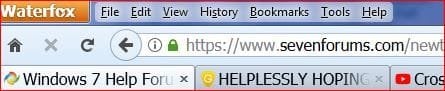
suddenly a larger font in the address bar, and on the Tabs. - compared About: config "font" and this has the same entries as the Dell with "regular" fonts on tab and address bar. Oh, and thanks in Advance :)


View attachment 406526
 

My Computer My Computer

At a glance

Windows 7 professional 64 bitIntel I3
Computer type
Laptop
Computer Manufacturer/Model Number
Dell
OS
Windows 7 professional 64 bit
CPU
Intel I3
Hi Justin,

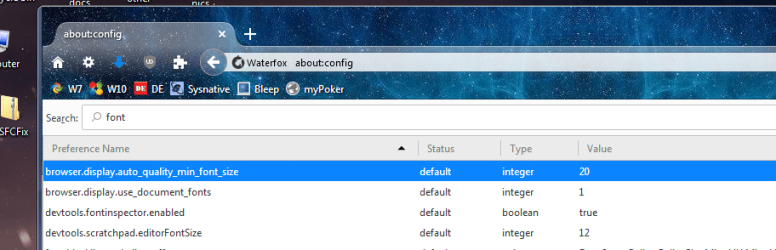
whats here (highlighted), see screenshot.


Roy
 

Attachments

  • font.PNG
    font.PNG
    68.7 KB · Views: 0

My Computer My Computer

At a glance

W7 home premium 32bit/W7HP 64bit/w10 tp insid...E5300 dual core3gbNvidia Geforce 7100 Nforce 630i
Computer type
PC/Desktop
Computer Manufacturer/Model Number
medionl/Aspire 6930G/acer x55a
OS
W7 home premium 32bit/W7HP 64bit/w10 tp insider ring
CPU
E5300 dual core
Motherboard
medion MS7366
Memory
3gb
Graphics Card(s)
Nvidia Geforce 7100 Nforce 630i
Monitor(s) Displays
avixc
Internet Speed
n (isp resticted to 72)
Antivirus
mse/pands
Browser
palemoon
Other Info
Belkin Fd7050 n USB using Railink RT2870 drivers, more upto date
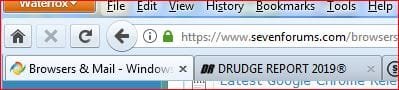
Shot of the Dell's fonts

That's my current setting on "both" machines - the"Problem lenovo" above and the Dell - attached->

Capture font dell .JPG
 

My Computer My Computer

At a glance

Windows 7 professional 64 bitIntel I3
Computer type
Laptop
Computer Manufacturer/Model Number
Dell
OS
Windows 7 professional 64 bit
CPU
Intel I3
edited config, changed These settings and seems a lot better : "12" was too small, went with 14.

Capture Font 2.JPG
 

My Computer My Computer

At a glance

Windows 7 professional 64 bitIntel I3
Computer type
Laptop
Computer Manufacturer/Model Number
Dell
OS
Windows 7 professional 64 bit
CPU
Intel I3
Back
Top