Retrieving data from old system drive

NikD

New member
Local time
10:59 PM
Messages
8
Hi All,

I recently upgraded my Win7 system (motherboard, CPU, RAM, HDD) and part of that upgrade was purchasing a new 1TB hard drive. I decided to use that as my new System Drive. My old system drive was a Samsung 500gb and I figured that I'd be able to plug it in and transfer my old data off after I reinstalled Windows 7. However, when I plugged it in Windows displayed my new hard drive (the 1TB) and a 99mb "System Reserved" drive of which there was 72mb available. I checked in Disk Management and it appeared that the System Reserved partition didn't belong to my 500gb, it actually belonged to the new system drive, yet it only showed up after I plugged the old drive in.

I can't seem to find a way to access the data of the old drive and I've been cruising Google for a couple of hours now with no success. Any help would be hugely appreciated!

Peace, Nik.
 

My Computer

Computer Manufacturer/Model Number
Custom Built
OS
Win 7 Professional x64
CPU
Intel i7 2600
Motherboard
Asus P8 H67-M Pro
Memory
16gb DDR3 1333
Graphics Card(s)
Nvidia 8800GTS
Sound Card
PreSonus Firebox Firewire - External
Monitor(s) Displays
2x 2BENQ 22"
Screen Resolution
1680 x 1050
Hard Drives
2x Samsung 1TB
PSU
Cooler Masters 650W
Keyboard
Logitech DiNovo
Mouse
Logitech G5
Internet Speed
24Mb/s
Hi All,

I recently upgraded my Win7 system (motherboard, CPU, RAM, HDD) and part of that upgrade was purchasing a new 1TB hard drive. I decided to use that as my new System Drive. My old system drive was a Samsung 500gb and I figured that I'd be able to plug it in and transfer my old data off after I reinstalled Windows 7. However, when I plugged it in Windows displayed my new hard drive (the 1TB) and a 99mb "System Reserved" drive of which there was 72mb available. I checked in Disk Management and it appeared that the System Reserved partition didn't belong to my 500gb, it actually belonged to the new system drive, yet it only showed up after I plugged the old drive in.

I can't seem to find a way to access the data of the old drive

The system reserved partition was placed on the 1 TB drive as part of the new Windows installation. It's completely normal, but can be omitted if you had wanted to omit it. It may or may not have also been on the 500 gig drive when it was your system drive.

Was the 500 gig drive totally disconnected when you installed Windows on the new drive?

I assume you have since reconnected the old drive and now you cannot access it at all? It does not appear in Windows Explorer? Is it acknowledged in the BIOS?

Post a picture of your disk management screen if possible.
 

My Computer

Computer type
PC/Desktop
Computer Manufacturer/Model Number
Ignatz Special; 4 speed manual gearbox; factory air conditioning; one of one
OS
Windows 7 Home Premium SP1, 64-bit
CPU
Intel Skylake i5-6600K, not overclocked
Motherboard
AsRock Z170M Extreme 4, micro ATX
Memory
8 GB HyperX DDR4-2666 (2 x 4 GB)
Graphics Card(s)
none; graphics are integrated on CPU
Sound Card
onboard: Realtek ALC1150; external: USB Behringer UF0-202
Monitor(s) Displays
Dell S2340M 23 inch IPS
Screen Resolution
1600 x 900
Hard Drives
System: Crucial MX100 series SSD, 128 GB;
Data: Samsung Spinpoint 103SJ, 1 TB;
Backup: WD Caviar Green WD30EZRX-00D8PB0, 3 TB
PSU
Rosewill SilentNight 500 watt fanless, semi-modular
Case
Antec Solo II
Cooling
Noctua NH-U12S; Noctua F12 intake, Noctua S12A exhaust
Keyboard
Microsoft 200 6JH-00001 USB
Mouse
Dell or Microsoft optical wired; USB
Antivirus
Microsoft Security Essentials and Malwarebytes Premium
Browser
Pale Moon
Other Info
All fans PWM; speeds at idle: CPU circa 500 rpm; intake circa 600 rpm; exhaust circa 600 rpm; CPU temps 27 idle and 47 C load in a warm room (27 C/81 F) when running Intel Extreme Tuning Utility stress test.
Hi Ignatzatsonic,

Thanks for your reply.

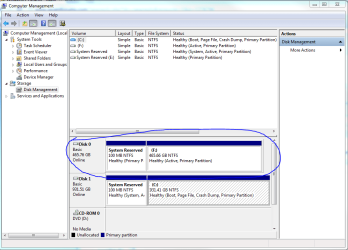
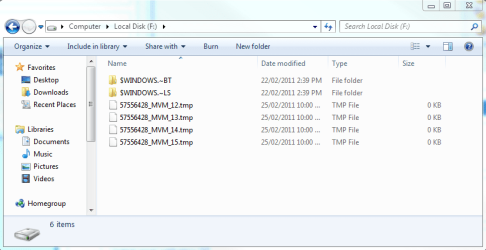
The drive was completely disconnected when the system was being set up. I have restarted a few times now and for some reason I am now getting this (see screen shot: 'dskMngr.PNG') in Disk Manager - i.e. it's recognising the disk but seems to think it's empty. Also, in Explorer I have the following files in the root of the drive which I never had before (see screen shot: 'explorer.PNG'), but all the rest of the data seems to be MIA. I never chose to reformat the drive or deleted any files in any way, this is purely what resulted from plugging the drive in.

Thanks again for all your help.
Peace, Nik.
 

Attachments

  • dskMngr.PNG
    dskMngr.PNG
    33.6 KB · Views: 58
  • explorer.PNG
    explorer.PNG
    21.6 KB · Views: 20

My Computer

Computer Manufacturer/Model Number
Custom Built
OS
Win 7 Professional x64
CPU
Intel i7 2600
Motherboard
Asus P8 H67-M Pro
Memory
16gb DDR3 1333
Graphics Card(s)
Nvidia 8800GTS
Sound Card
PreSonus Firebox Firewire - External
Monitor(s) Displays
2x 2BENQ 22"
Screen Resolution
1680 x 1050
Hard Drives
2x Samsung 1TB
PSU
Cooler Masters 650W
Keyboard
Logitech DiNovo
Mouse
Logitech G5
Internet Speed
24Mb/s
The only thing I see wrong is that the new C is not marked "active".

C should be active. The old C (now F) is active and it should not be.

I would shut down and disconnect the old drive. Reboot with just the new drive connected. Go to disk management and right click C and mark it as active.

Then reboot and confirm that C is still marked active and that disk management looks OK.

If it looks OK, then shut down again and reconnect the old drive, go to disk management and make sure that F (the old C) is NOT marked active.

I'd think you could then get your data from it.

I wouldn't worry about the files in the root of F at this time. If all goes well, they may either disappear or can be deleted later on.

I'm not clear why you think Disk Management thinks the old disk is empty.
 

My Computer

Computer type
PC/Desktop
Computer Manufacturer/Model Number
Ignatz Special; 4 speed manual gearbox; factory air conditioning; one of one
OS
Windows 7 Home Premium SP1, 64-bit
CPU
Intel Skylake i5-6600K, not overclocked
Motherboard
AsRock Z170M Extreme 4, micro ATX
Memory
8 GB HyperX DDR4-2666 (2 x 4 GB)
Graphics Card(s)
none; graphics are integrated on CPU
Sound Card
onboard: Realtek ALC1150; external: USB Behringer UF0-202
Monitor(s) Displays
Dell S2340M 23 inch IPS
Screen Resolution
1600 x 900
Hard Drives
System: Crucial MX100 series SSD, 128 GB;
Data: Samsung Spinpoint 103SJ, 1 TB;
Backup: WD Caviar Green WD30EZRX-00D8PB0, 3 TB
PSU
Rosewill SilentNight 500 watt fanless, semi-modular
Case
Antec Solo II
Cooling
Noctua NH-U12S; Noctua F12 intake, Noctua S12A exhaust
Keyboard
Microsoft 200 6JH-00001 USB
Mouse
Dell or Microsoft optical wired; USB
Antivirus
Microsoft Security Essentials and Malwarebytes Premium
Browser
Pale Moon
Other Info
All fans PWM; speeds at idle: CPU circa 500 rpm; intake circa 600 rpm; exhaust circa 600 rpm; CPU temps 27 idle and 47 C load in a warm room (27 C/81 F) when running Intel Extreme Tuning Utility stress test.

My Computer

Computer type
PC/Desktop
Computer Manufacturer/Model Number
Me
OS
Win 7 Ultimate x64
CPU
FX-8350 @ 4.6 GHz so far
Motherboard
Asus M5A97 EVO
Memory
ADATA XPG V1 Series Black 8GB DDR3 1600
Graphics Card(s)
Sapphire R9 270x Dual-X
Sound Card
Xonar DGX w/ Corsair Vengence 1300
Monitor(s) Displays
Acer S232HL Abid
Screen Resolution
1920x1080
Hard Drives
120 GB OCZ Vertex 3
500 GB Seagate 7200.12
PSU
Antec Earthwatts 650W Green
Case
Antec Three Hundred
Cooling
Cooler Master 212 EVO
Keyboard
Logitech G510
Mouse
Logitech G500s
Internet Speed
35000/3000
Hey, just tried that but I think I've messed it up more than it already was, now it won't boot and just says: BOOTMGR is missing. Press ctrl+alt+del to restart. Any thoughts?

Thanks, Nik.
 

My Computer

Computer Manufacturer/Model Number
Custom Built
OS
Win 7 Professional x64
CPU
Intel i7 2600
Motherboard
Asus P8 H67-M Pro
Memory
16gb DDR3 1333
Graphics Card(s)
Nvidia 8800GTS
Sound Card
PreSonus Firebox Firewire - External
Monitor(s) Displays
2x 2BENQ 22"
Screen Resolution
1680 x 1050
Hard Drives
2x Samsung 1TB
PSU
Cooler Masters 650W
Keyboard
Logitech DiNovo
Mouse
Logitech G5
Internet Speed
24Mb/s

My Computer

Computer type
PC/Desktop
Computer Manufacturer/Model Number
Ignatz Special; 4 speed manual gearbox; factory air conditioning; one of one
OS
Windows 7 Home Premium SP1, 64-bit
CPU
Intel Skylake i5-6600K, not overclocked
Motherboard
AsRock Z170M Extreme 4, micro ATX
Memory
8 GB HyperX DDR4-2666 (2 x 4 GB)
Graphics Card(s)
none; graphics are integrated on CPU
Sound Card
onboard: Realtek ALC1150; external: USB Behringer UF0-202
Monitor(s) Displays
Dell S2340M 23 inch IPS
Screen Resolution
1600 x 900
Hard Drives
System: Crucial MX100 series SSD, 128 GB;
Data: Samsung Spinpoint 103SJ, 1 TB;
Backup: WD Caviar Green WD30EZRX-00D8PB0, 3 TB
PSU
Rosewill SilentNight 500 watt fanless, semi-modular
Case
Antec Solo II
Cooling
Noctua NH-U12S; Noctua F12 intake, Noctua S12A exhaust
Keyboard
Microsoft 200 6JH-00001 USB
Mouse
Dell or Microsoft optical wired; USB
Antivirus
Microsoft Security Essentials and Malwarebytes Premium
Browser
Pale Moon
Other Info
All fans PWM; speeds at idle: CPU circa 500 rpm; intake circa 600 rpm; exhaust circa 600 rpm; CPU temps 27 idle and 47 C load in a warm room (27 C/81 F) when running Intel Extreme Tuning Utility stress test.
Aww, I wish id read this before going ahead. Windows came up with a warning not to mark the drive as active if there wasn't a valid os on there but I figured since that drive hosted my windows installation it wouldn't be an issue. Is there any way to undo what I've done, with my win7 cd perhaps?
 

My Computer

Computer Manufacturer/Model Number
Custom Built
OS
Win 7 Professional x64
CPU
Intel i7 2600
Motherboard
Asus P8 H67-M Pro
Memory
16gb DDR3 1333
Graphics Card(s)
Nvidia 8800GTS
Sound Card
PreSonus Firebox Firewire - External
Monitor(s) Displays
2x 2BENQ 22"
Screen Resolution
1680 x 1050
Hard Drives
2x Samsung 1TB
PSU
Cooler Masters 650W
Keyboard
Logitech DiNovo
Mouse
Logitech G5
Internet Speed
24Mb/s
Your old drive should still be bootable if the new drive is disconnected.

Boot with the old drive and look at disk management. The "system reserved" partition should be marked as active. Confirm that.

Then reconnect the new drive, so you have 2 drives connected. You should still boot to the old drive. You can then make the "system reserved" partition on the NEW drive active and set the system reserved partition on the old drive to NOT active.

Then shut down and disconnect the old drive and see if you can boot to the new drive.
 

My Computer

Computer type
PC/Desktop
Computer Manufacturer/Model Number
Ignatz Special; 4 speed manual gearbox; factory air conditioning; one of one
OS
Windows 7 Home Premium SP1, 64-bit
CPU
Intel Skylake i5-6600K, not overclocked
Motherboard
AsRock Z170M Extreme 4, micro ATX
Memory
8 GB HyperX DDR4-2666 (2 x 4 GB)
Graphics Card(s)
none; graphics are integrated on CPU
Sound Card
onboard: Realtek ALC1150; external: USB Behringer UF0-202
Monitor(s) Displays
Dell S2340M 23 inch IPS
Screen Resolution
1600 x 900
Hard Drives
System: Crucial MX100 series SSD, 128 GB;
Data: Samsung Spinpoint 103SJ, 1 TB;
Backup: WD Caviar Green WD30EZRX-00D8PB0, 3 TB
PSU
Rosewill SilentNight 500 watt fanless, semi-modular
Case
Antec Solo II
Cooling
Noctua NH-U12S; Noctua F12 intake, Noctua S12A exhaust
Keyboard
Microsoft 200 6JH-00001 USB
Mouse
Dell or Microsoft optical wired; USB
Antivirus
Microsoft Security Essentials and Malwarebytes Premium
Browser
Pale Moon
Other Info
All fans PWM; speeds at idle: CPU circa 500 rpm; intake circa 600 rpm; exhaust circa 600 rpm; CPU temps 27 idle and 47 C load in a warm room (27 C/81 F) when running Intel Extreme Tuning Utility stress test.
Is that possible when I had a completely different hardware configuration for my last Windows installation?
 

My Computer

Computer Manufacturer/Model Number
Custom Built
OS
Win 7 Professional x64
CPU
Intel i7 2600
Motherboard
Asus P8 H67-M Pro
Memory
16gb DDR3 1333
Graphics Card(s)
Nvidia 8800GTS
Sound Card
PreSonus Firebox Firewire - External
Monitor(s) Displays
2x 2BENQ 22"
Screen Resolution
1680 x 1050
Hard Drives
2x Samsung 1TB
PSU
Cooler Masters 650W
Keyboard
Logitech DiNovo
Mouse
Logitech G5
Internet Speed
24Mb/s
I'd wait for more input to this thread.

You may have to do a "repair install" with the Windows disc.

Or search this forum's tutorials or google for how to make a partition active when you can't readily boot to that disc. I don't use the "system reserved" partitions, so my active partition is C.

I have little doubt you can get out of the problem, but I wouldn't jump into anything right now, pending further input.
 

My Computer

Computer type
PC/Desktop
Computer Manufacturer/Model Number
Ignatz Special; 4 speed manual gearbox; factory air conditioning; one of one
OS
Windows 7 Home Premium SP1, 64-bit
CPU
Intel Skylake i5-6600K, not overclocked
Motherboard
AsRock Z170M Extreme 4, micro ATX
Memory
8 GB HyperX DDR4-2666 (2 x 4 GB)
Graphics Card(s)
none; graphics are integrated on CPU
Sound Card
onboard: Realtek ALC1150; external: USB Behringer UF0-202
Monitor(s) Displays
Dell S2340M 23 inch IPS
Screen Resolution
1600 x 900
Hard Drives
System: Crucial MX100 series SSD, 128 GB;
Data: Samsung Spinpoint 103SJ, 1 TB;
Backup: WD Caviar Green WD30EZRX-00D8PB0, 3 TB
PSU
Rosewill SilentNight 500 watt fanless, semi-modular
Case
Antec Solo II
Cooling
Noctua NH-U12S; Noctua F12 intake, Noctua S12A exhaust
Keyboard
Microsoft 200 6JH-00001 USB
Mouse
Dell or Microsoft optical wired; USB
Antivirus
Microsoft Security Essentials and Malwarebytes Premium
Browser
Pale Moon
Other Info
All fans PWM; speeds at idle: CPU circa 500 rpm; intake circa 600 rpm; exhaust circa 600 rpm; CPU temps 27 idle and 47 C load in a warm room (27 C/81 F) when running Intel Extreme Tuning Utility stress test.
OK, I'll wait it our a bit and see if any one else has any suggestions, then I'll try using my Windows disk to do a repair.

Thanks, Nik
 

My Computer

Computer Manufacturer/Model Number
Custom Built
OS
Win 7 Professional x64
CPU
Intel i7 2600
Motherboard
Asus P8 H67-M Pro
Memory
16gb DDR3 1333
Graphics Card(s)
Nvidia 8800GTS
Sound Card
PreSonus Firebox Firewire - External
Monitor(s) Displays
2x 2BENQ 22"
Screen Resolution
1680 x 1050
Hard Drives
2x Samsung 1TB
PSU
Cooler Masters 650W
Keyboard
Logitech DiNovo
Mouse
Logitech G5
Internet Speed
24Mb/s
Here's a tutorial on how to do it with diskpart command. You have to be able to get to a command prompt.

Set Active Partition - Tutorial

You can also find diskpart tutorials on this forum.
 

My Computer

Computer type
PC/Desktop
Computer Manufacturer/Model Number
Ignatz Special; 4 speed manual gearbox; factory air conditioning; one of one
OS
Windows 7 Home Premium SP1, 64-bit
CPU
Intel Skylake i5-6600K, not overclocked
Motherboard
AsRock Z170M Extreme 4, micro ATX
Memory
8 GB HyperX DDR4-2666 (2 x 4 GB)
Graphics Card(s)
none; graphics are integrated on CPU
Sound Card
onboard: Realtek ALC1150; external: USB Behringer UF0-202
Monitor(s) Displays
Dell S2340M 23 inch IPS
Screen Resolution
1600 x 900
Hard Drives
System: Crucial MX100 series SSD, 128 GB;
Data: Samsung Spinpoint 103SJ, 1 TB;
Backup: WD Caviar Green WD30EZRX-00D8PB0, 3 TB
PSU
Rosewill SilentNight 500 watt fanless, semi-modular
Case
Antec Solo II
Cooling
Noctua NH-U12S; Noctua F12 intake, Noctua S12A exhaust
Keyboard
Microsoft 200 6JH-00001 USB
Mouse
Dell or Microsoft optical wired; USB
Antivirus
Microsoft Security Essentials and Malwarebytes Premium
Browser
Pale Moon
Other Info
All fans PWM; speeds at idle: CPU circa 500 rpm; intake circa 600 rpm; exhaust circa 600 rpm; CPU temps 27 idle and 47 C load in a warm room (27 C/81 F) when running Intel Extreme Tuning Utility stress test.
Here is the tutorial from this site:

http://www.sevenforums.com/tutorials/119713-diskpart-pc-startup.html

You should be able to get to diskpart by using your install disc and hitting Shift F10 at the language screen.

When you get to diskpart enter help /? to see a list of switches.

You will need the active switch and the inactive switch.

I think the list command will show your partitions. Be careful to choose the right one. Use select command to move among partitions.

You have to make sure you have chosen the system reserved partition on the new drive and then set it to active.

Then set the system reserved partition on the old drive to inactive.

Then exit, remove the install disc, and reboot.

You can always go back to diskpart a second or third time.
 

My Computer

Computer type
PC/Desktop
Computer Manufacturer/Model Number
Ignatz Special; 4 speed manual gearbox; factory air conditioning; one of one
OS
Windows 7 Home Premium SP1, 64-bit
CPU
Intel Skylake i5-6600K, not overclocked
Motherboard
AsRock Z170M Extreme 4, micro ATX
Memory
8 GB HyperX DDR4-2666 (2 x 4 GB)
Graphics Card(s)
none; graphics are integrated on CPU
Sound Card
onboard: Realtek ALC1150; external: USB Behringer UF0-202
Monitor(s) Displays
Dell S2340M 23 inch IPS
Screen Resolution
1600 x 900
Hard Drives
System: Crucial MX100 series SSD, 128 GB;
Data: Samsung Spinpoint 103SJ, 1 TB;
Backup: WD Caviar Green WD30EZRX-00D8PB0, 3 TB
PSU
Rosewill SilentNight 500 watt fanless, semi-modular
Case
Antec Solo II
Cooling
Noctua NH-U12S; Noctua F12 intake, Noctua S12A exhaust
Keyboard
Microsoft 200 6JH-00001 USB
Mouse
Dell or Microsoft optical wired; USB
Antivirus
Microsoft Security Essentials and Malwarebytes Premium
Browser
Pale Moon
Other Info
All fans PWM; speeds at idle: CPU circa 500 rpm; intake circa 600 rpm; exhaust circa 600 rpm; CPU temps 27 idle and 47 C load in a warm room (27 C/81 F) when running Intel Extreme Tuning Utility stress test.
Managed to do it using windows repair *phew*! might leave it for now and have another crack tomorrow, it's getting late here in Australia. Thanks for all your help!

Peace, nik
 

My Computer

Computer Manufacturer/Model Number
Custom Built
OS
Win 7 Professional x64
CPU
Intel i7 2600
Motherboard
Asus P8 H67-M Pro
Memory
16gb DDR3 1333
Graphics Card(s)
Nvidia 8800GTS
Sound Card
PreSonus Firebox Firewire - External
Monitor(s) Displays
2x 2BENQ 22"
Screen Resolution
1680 x 1050
Hard Drives
2x Samsung 1TB
PSU
Cooler Masters 650W
Keyboard
Logitech DiNovo
Mouse
Logitech G5
Internet Speed
24Mb/s
Back
Top