Retrieving History

Nikki1969

New member
Local time
12:55 PM
Messages
6
Hey.....I do believe my daughter may be visting sites that she shouldn't be visiting as when I get home from work at night, the browing history has been deleted. I have the computer in the living room as to monitor her but there are times when she's alone here and I'm worried she's on chat lines as this is only a feeding ground for pedofiles. Please help. I've tried to restore our computer to an earlier date but it did not show me the browing history.

Thanks again,
Nikki
 

My Computer

Computer Manufacturer/Model Number
Hewlett Packard
OS
Windows 7 Home Premium
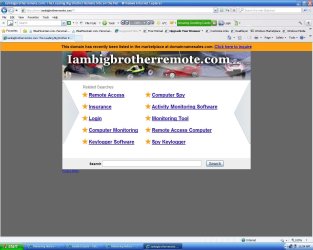
Thanks for the quick reply. However, when I go to the link you had provided, the screen gives me a message (See Attachment). As you can see, it provides a list of sub categories and these, then, are broken down into separate programs/downloads. I'd rather use a download that someone else has already vouched for.

Nik
 

Attachments

  • IABB.JPG
    IABB.JPG
    116.5 KB · Views: 9

My Computer

Computer Manufacturer/Model Number
Hewlett Packard
OS
Windows 7 Home Premium
Take a look at my earlier post, I corrected the bad link.

You can also try to adjust the Parental Controls on your Computer. Although, you'll find this choice much more limited on what changes to can make.

Start Orb, in the Search box, type Parental. You will see two choices there: Parent Controls & Set up Parental Controls for any user.
 

My Computer

OS
Windows 7 Ultimate x64
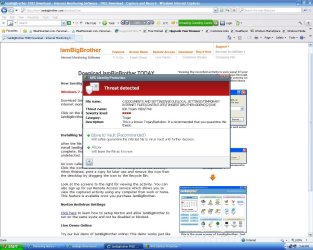
Thanks.....but our computer now picks this up as a "Threat" (See Attached). In regards to Parental Controls, I've tried that already and you're right, it was limited and did not give me much information as to what sites she was visiting online.

Nikki
 

Attachments

  • IABB-Threat.JPG
    IABB-Threat.JPG
    158.5 KB · Views: 8

My Computer

Computer Manufacturer/Model Number
Hewlett Packard
OS
Windows 7 Home Premium
On another note, I tried system restore and it did not bring up any of the deleted history. According to some of the information on the web, this should be able to do this, but it doesn't!?

Nik
 

My Computer

Computer Manufacturer/Model Number
Hewlett Packard
OS
Windows 7 Home Premium
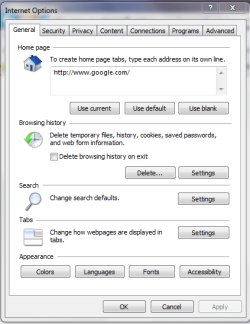
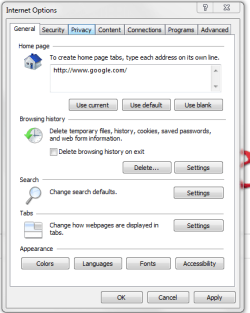
Once temporary History files are deleted, that's it...their gone for good. The site has a great Tutorial section, if you'd like to read up on System Restore. She might be using the 'In Private' mode - this does not save any cookies, history, or anything at all. Downloads are still saved, though, but she can delete those just like any other file, of course. You might try the option one, step 2 in this link. Another possibility to check is if the history files are being saved automatically, or the storage amount is set too low. Take a look at the Browsing History file settings. To do this, go to the top left of the IE Browser window and click, "Tools", "Internet Options". Under Browsing History, make sure there is no tick in the box labeled: Delete Browsing History on exit. If there is a tick in the box, remove it, and then click "Apply". Now click on "Settings" in the Browser History section. This will bring up "Temporary Internet Files and History Settings" Window. Here you want to check the default settings. This should be set to "Automatic." Disk Space to use" should be set at 250 MB. You can increase this amount if you want to save more files. Near the bottom of this page, you'll see "History." And "Days to Keep Pages in History". Default is set at 20 days. You can increase this, as well. If you'd like, or just keep it the same. Below are some screen shots of all of this with the Help section. Just click on then once to enlarge, twice to make them even larger still. Or just navigate to the actual section.

Capture3.PNG

Capture 4.PNG

Capture 5.PNG
 
Last edited:

My Computer

OS
Windows 7 Ultimate x64
Thanks, everything you mentioned has been completed!
 

My Computer

Computer Manufacturer/Model Number
Hewlett Packard
OS
Windows 7 Home Premium
I ran both an online virus scan and a Norton scan on IamBigBrother, nothing came up, and the site is considered safe. However, if your still not comfortable using their site, I'm sure you could do a Google search for plenty more just like it. I use Norton Internet Security with safe search. When I am using Google, it automatically scans the site and displays a green circle with a check mark to let me know it's safe. By I do a lot more to protect my computer from the Internet. I only get an attack which comes through the Firewall a few times per year and even then it's automatically quarantined. Sometimes, I have to run a specialized removal tool to get rid of it. But, doing this is not a big deal. Please, update me if you require more assistance.
 

My Computer

OS
Windows 7 Ultimate x64

My Computer

Computer Manufacturer/Model Number
Hewlett Packard
OS
Windows 7 Home Premium
Ok...I disregarded the threat warning.

I am only able to run the DEMO version of IABB...see link below.

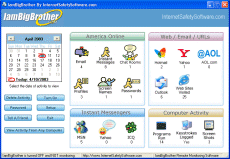
IamBigBrother FREE Download - Internet Monitoring Software - FREE Download - Capture and Record EVERYTHING Your Kids Are Doing On The Internet With IamBigBrother

When I do that, there is no shortcut to the actual program on my desktop only a shircut to the page giving instructions of how to use it...HELP!!!!!

The program is meant to be hidden. There will be nothing on the desktop related to this app (the instructions say to print out the instructions and get rid of the temporary shortcut that it placed on the desktop). There will be nothing in the program files folder on the hard drive for this app and nothing in the start menu.

Users of Vista and above will need to modify their instructions a bit since the "Run" box does not show on the start menu by default. You can just type iview into the search field just above the Windows Start orb.

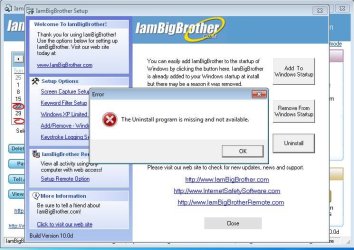
The demo did not work for me. I tried it several times. I set it up to capture an image of the screen every minute, but it never did. And the uninstall process failed. So, I still have every annoying file & folder that the demo created in the root of C and elsewhere.

un-install.JPG

Once you get 10 or more posts, you can send private messages (PM) to other forum members that also have 10 or more posts. Please send me a PM and and I'll help you clean up the stuff left behind by the demo. I'm going to assume that the demo works similar to the full program and any instructions that I post in a public for would just help kids disable the program.
 

My Computer

Computer type
Laptop
Computer Manufacturer/Model Number
Employer provided Dell Latitude
OS
W7 Pro SP1 64bit
CPU
i7
Memory
8GB
Graphics Card(s)
Intel HD Graphics
Hard Drives
crappy SSD
Antivirus
Employer mandated Symantec Endpoint Protection
Browser
Pale Moon 64bit, IE11 64bit & Chrome 64bit
Back
Top