Reusing a master HDD with corrupt OS as a slave...couple questions!

My Computer My Computer

At a glance

Vista, Windows7, Mint Mate, Zorin, Windows 8from 1.6GHz Duo to i7
Computer Manufacturer/Model Number
HP, Dell, Gateway, Toshiba - 4 laptops and 2 desktops
OS
Vista, Windows7, Mint Mate, Zorin, Windows 8
CPU
from 1.6GHz Duo to i7
Monitor(s) Displays
2x HP w2207
Hard Drives
5x HDD, 7x SSD, 12x Externals
Keyboard
with trackball - no mices
Mouse
Trackball mice
Internet Speed
DSL 6000
Do you have a flash stick plugged in at time you reboot, or any other drive?

Try setting SSD first to boot in BIOS setup to be sure.

Run a full Disk Check

Alrighty, did this. Restarted it three times and it worked fine. Going to use it a little and then do a couple more rounds of restart to see what happens.
 

My Computer My Computer

At a glance

Windows 7 Home Premium 64 bitAMD Phenom™ II X4 955 Black Edition Quad-Core8 GB DDR3-1600AMD Radeon HD 6770
OS
Windows 7 Home Premium 64 bit
CPU
AMD Phenom™ II X4 955 Black Edition Quad-Core
Motherboard
Gigabyte GA-870A-UD3 -- AMD 870 w/ 2x PCI-E 2.0 x16
Memory
8 GB DDR3-1600
Graphics Card(s)
AMD Radeon HD 6770
Sound Card
3D Premium Surround Sound Onboard
Hard Drives
SSD - Samsung 840 250GB
HDD - Hitachi 2TB
PSU
700 watt
Case
Cooler Master Storm
Cooling
AMD Liquid CPU Cooling System

My Computer My Computer

At a glance

Vista, Windows7, Mint Mate, Zorin, Windows 8from 1.6GHz Duo to i7
Computer Manufacturer/Model Number
HP, Dell, Gateway, Toshiba - 4 laptops and 2 desktops
OS
Vista, Windows7, Mint Mate, Zorin, Windows 8
CPU
from 1.6GHz Duo to i7
Monitor(s) Displays
2x HP w2207
Hard Drives
5x HDD, 7x SSD, 12x Externals
Keyboard
with trackball - no mices
Mouse
Trackball mice
Internet Speed
DSL 6000
We restarted multiple times yesterday, even after using it for most of the day, and we weren't able to get the error to come up again. Do we assume we fixed the issue with Disk Check and keep the SSD? I haven't even bothered loading any more programs yet because I don't want to have to go through the trouble again if we're just going to have to reload windows on a new SSD BUT I don't want to get a new one if what we were experiencing was minor and is now resolved.
 

My Computer My Computer

At a glance

Windows 7 Home Premium 64 bitAMD Phenom™ II X4 955 Black Edition Quad-Core8 GB DDR3-1600AMD Radeon HD 6770
OS
Windows 7 Home Premium 64 bit
CPU
AMD Phenom™ II X4 955 Black Edition Quad-Core
Motherboard
Gigabyte GA-870A-UD3 -- AMD 870 w/ 2x PCI-E 2.0 x16
Memory
8 GB DDR3-1600
Graphics Card(s)
AMD Radeon HD 6770
Sound Card
3D Premium Surround Sound Onboard
Hard Drives
SSD - Samsung 840 250GB
HDD - Hitachi 2TB
PSU
700 watt
Case
Cooler Master Storm
Cooling
AMD Liquid CPU Cooling System
That is a tough call and very hard to say. Just monitor it during the time frame where you can still return it. If it crops out on you again, get rid of it. There are always special offerings at Newegg.
 

My Computer My Computer

At a glance

Vista, Windows7, Mint Mate, Zorin, Windows 8from 1.6GHz Duo to i7
Computer Manufacturer/Model Number
HP, Dell, Gateway, Toshiba - 4 laptops and 2 desktops
OS
Vista, Windows7, Mint Mate, Zorin, Windows 8
CPU
from 1.6GHz Duo to i7
Monitor(s) Displays
2x HP w2207
Hard Drives
5x HDD, 7x SSD, 12x Externals
Keyboard
with trackball - no mices
Mouse
Trackball mice
Internet Speed
DSL 6000
Here is a detailed analysis of the 840 - if you have time to read. It is 12 pages long.

Samsung’s 840 Series SSD reviewed | Ars Technica

Just got a chance to read this finally; really informative and even though a lot of it was over my head it still gave me a general understanding, so thanks!

The write times for RAW were saddening, but then I'm not entirely sure I fully grasp what constitutes "writing" on a SSD/HDD set up and how it will impact me with how I use it. With Photoshop for example; this is how the process works for me. I shoot images in RAW, open them in Adobe Bridge, edit about 10 images at a time, open in Photoshop and edit further. Then each image gets saved as a PSD, a high res jpeg, and a web ready jpeg. I save all of these on an external HDD (each year of my photography business gets its own HDD) and then I save a backup of the PSD files on my internal HDD and my husband's. Obviously now with the SSD it will be about the same except I'll never save the files to the SSD. So will the RAW write times really effect me in this case?

I'm going to be most paranoid about making sure that what I'm doing isn't causing rewrites on the SSD and decreasing its life...if I'm understanding that correctly. Like, I do a lot of Internet browsing. Is keeping the temp folder for Firefox on the SSD decreasing it's life? Are certain games going to decrease the life with file rewrites? I just want to make sure I'm doing what's best for keeping it running efficently.

Is anyone getting annoyed by my sad lack of knowledge yet??:p
 

My Computer My Computer

At a glance

Windows 7 Home Premium 64 bitAMD Phenom™ II X4 955 Black Edition Quad-Core8 GB DDR3-1600AMD Radeon HD 6770
OS
Windows 7 Home Premium 64 bit
CPU
AMD Phenom™ II X4 955 Black Edition Quad-Core
Motherboard
Gigabyte GA-870A-UD3 -- AMD 870 w/ 2x PCI-E 2.0 x16
Memory
8 GB DDR3-1600
Graphics Card(s)
AMD Radeon HD 6770
Sound Card
3D Premium Surround Sound Onboard
Hard Drives
SSD - Samsung 840 250GB
HDD - Hitachi 2TB
PSU
700 watt
Case
Cooler Master Storm
Cooling
AMD Liquid CPU Cooling System
The write performance will largely depend on the blocksize of the files. But in any event, it will be a lot faster than to a spinning HDD. So I would not worry about it.

And:

I'm going to be most paranoid about making sure that what I'm doing isn't causing rewrites on the SSD and decreasing its life...

That is another one of those fairy tales. In no way will you ever wear out the SSD with write operations for the lifetime of the SSD. Lifetime meaning the amount of years you will probably keep it. One of my 3 year old SSDs still has a life expectency until 2022. By that time it will be since long in the bin.
 

My Computer My Computer

At a glance

Vista, Windows7, Mint Mate, Zorin, Windows 8from 1.6GHz Duo to i7
Computer Manufacturer/Model Number
HP, Dell, Gateway, Toshiba - 4 laptops and 2 desktops
OS
Vista, Windows7, Mint Mate, Zorin, Windows 8
CPU
from 1.6GHz Duo to i7
Monitor(s) Displays
2x HP w2207
Hard Drives
5x HDD, 7x SSD, 12x Externals
Keyboard
with trackball - no mices
Mouse
Trackball mice
Internet Speed
DSL 6000
Don't confuse the term RAW. A RAW photo file has no relation to the RAW specs of SSD drives.

As whs posted, if you have more problems with the drive, replace it with another.
 

My Computer My Computer

At a glance

Windows 7 Home Premium 64biti3-5308 Gbonboard
Computer Manufacturer/Model Number
HP p6370t
OS
Windows 7 Home Premium 64bit
CPU
i3-530
Motherboard
MSI - IONA
Memory
8 Gb
Graphics Card(s)
onboard
Sound Card
onboard
Monitor(s) Displays
Dell ST2400
Screen Resolution
1920x1080
Hard Drives
Intell 520 SSD 120Gb, WD6400AAKS, 640Gb & WD USB MyBook 1Tb
Internet Speed
1.5 Mmbps, Hughes Satellite
  • Like
Reactions: whs
Don't confuse the term RAW. A RAW photo file has no relation to the RAW specs of SSD drives.

As whs posted, if you have more problems with the drive, replace it with another.
Right - RAW image formats and RAW disk formats are two different things.
 

My Computer My Computer

At a glance

Vista, Windows7, Mint Mate, Zorin, Windows 8from 1.6GHz Duo to i7
Computer Manufacturer/Model Number
HP, Dell, Gateway, Toshiba - 4 laptops and 2 desktops
OS
Vista, Windows7, Mint Mate, Zorin, Windows 8
CPU
from 1.6GHz Duo to i7
Monitor(s) Displays
2x HP w2207
Hard Drives
5x HDD, 7x SSD, 12x Externals
Keyboard
with trackball - no mices
Mouse
Trackball mice
Internet Speed
DSL 6000
We restarted multiple times yesterday, even after using it for most of the day, and we weren't able to get the error to come up again. Do we assume we fixed the issue with Disk Check and keep the SSD? I haven't even bothered loading any more programs yet because I don't want to have to go through the trouble again if we're just going to have to reload windows on a new SSD BUT I don't want to get a new one if what we were experiencing was minor and is now resolved.

The thing I would do is create system images of your SSD before and after you install all your programs. That way, if the SSD gives you trouble, you can restore the image you saved on your second HDD, to the replacement SSD. You can use the native imaging program in Backup and Restore, or a third party software, like Macrium Reflect, Easeus Todo Backup, Acronis True Image, etc. I know WHS is a fan of Macrium Reflect and can give you pointers on how to use it.
 

My Computer My Computer

At a glance

Windows 7 Home Premium 64bit SP 1Intel i5 2500k8 gigabytes Corsair PC3-12800 DDR3EVGA GeForce GTX 460 superclocked
Computer Manufacturer/Model Number
Customized build from CyberPower
OS
Windows 7 Home Premium 64bit SP 1
CPU
Intel i5 2500k
Motherboard
Asus P8P67 Deluxe
Memory
8 gigabytes Corsair PC3-12800 DDR3
Graphics Card(s)
EVGA GeForce GTX 460 superclocked
Sound Card
Integrated
Monitor(s) Displays
ViewSonic 23" LCD
Screen Resolution
1980 x 1080
Hard Drives
120 Gb Samsung 840 Pro SSD
120 Gb Kingston Hyper X SSD
1 Tb WD Caviar Black HDD
PSU
Coolermaster 1000 watt modular
Case
Coolermaster HAF X full tower
Cooling
Coolermaster Hyper 212 plus
Keyboard
Logitech USB
Mouse
Microsoft 3 button
Internet Speed
download 1.5 Mb/sec upload 300Kb/sec
It will actually not re-designate the original folders. Those will stay put but will be empty - except the Documents folder that some programs use as repository for small files. The new folders on the HDD will be an extra entry in the library which YOU will use as repository for your files.

You'll see, it works very well.

The alternative would be to change the location of reference of the original folders - and that can be messy.


actually changing actual folders for user files after clean isntall isnt so messy.. i always do this on all my systems and no problems so far.
 

My Computer My Computer

At a glance

Windows 7 pro 64bit. (SP1)Intel core I5 24008GB DDR3 KingstonGigabyte GF GTX650OC
Computer type
PC/Desktop
Computer Manufacturer/Model Number
Self Built PC
OS
Windows 7 pro 64bit. (SP1)
CPU
Intel core I5 2400
Motherboard
Gigabyte H61
Memory
8GB DDR3 Kingston
Graphics Card(s)
Gigabyte GF GTX650OC
Sound Card
Realtek HD audio
Monitor(s) Displays
LCD 20"
Screen Resolution
1600x900
Hard Drives
INTEL SSD 320 80GB +Seagate 7200.12 1TBx3
PSU
Coolermaster RX450W
Case
Coolermaster atx case
Cooling
stock cooler
Keyboard
logitech
Mouse
logitech
Internet Speed
FTTD 100mbps
It will actually not re-designate the original folders. Those will stay put but will be empty - except the Documents folder that some programs use as repository for small files. The new folders on the HDD will be an extra entry in the library which YOU will use as repository for your files.

You'll see, it works very well.

The alternative would be to change the location of reference of the original folders - and that can be messy.


actually changing actual folders for user files after clean isntall isnt so messy.. i always do this on all my systems and no problems so far.
An initial move is OK. But when you move them several times, it can get iffy - especially if you moved them to the root. Creating new folders is just easier and it keeps the folders that the programs create (mostely in Documents) seperated from your own stuff.
 

My Computer My Computer

At a glance

Vista, Windows7, Mint Mate, Zorin, Windows 8from 1.6GHz Duo to i7
Computer Manufacturer/Model Number
HP, Dell, Gateway, Toshiba - 4 laptops and 2 desktops
OS
Vista, Windows7, Mint Mate, Zorin, Windows 8
CPU
from 1.6GHz Duo to i7
Monitor(s) Displays
2x HP w2207
Hard Drives
5x HDD, 7x SSD, 12x Externals
Keyboard
with trackball - no mices
Mouse
Trackball mice
Internet Speed
DSL 6000
Update and a Question(s)!

Ended up ordering the Samsung 830 (128GB) and that one hasn't given us any problems this weekend as we've been reloading everything back on my computer so major relief there!

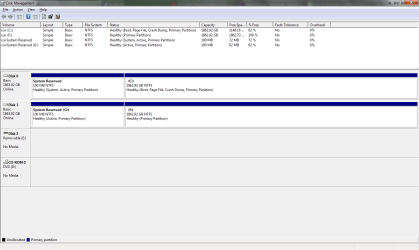
After we got my files all backed up from my old hard drive, my husband formatted it on his computer. But, when he took it out and tried to restart his computer, his computer wouldn't load anything from HIS HDD. He pllugged my formatted HDD back in to his and started it up and it loaded windows from his HDD just fine. Totally lost on that!

Also, wondering if I should load my fonts on the SSD or the HDD...
 

My Computer My Computer

At a glance

Windows 7 Home Premium 64 bitAMD Phenom™ II X4 955 Black Edition Quad-Core8 GB DDR3-1600AMD Radeon HD 6770
OS
Windows 7 Home Premium 64 bit
CPU
AMD Phenom™ II X4 955 Black Edition Quad-Core
Motherboard
Gigabyte GA-870A-UD3 -- AMD 870 w/ 2x PCI-E 2.0 x16
Memory
8 GB DDR3-1600
Graphics Card(s)
AMD Radeon HD 6770
Sound Card
3D Premium Surround Sound Onboard
Hard Drives
SSD - Samsung 840 250GB
HDD - Hitachi 2TB
PSU
700 watt
Case
Cooler Master Storm
Cooling
AMD Liquid CPU Cooling System
1. leave the fonts on the SSD

2. Regarding your boot problem, I suspect a bootmgr problem. Post a picture of full Disk Management with both HDDs attached and we'll see where this bugger is.
 

My Computer My Computer

At a glance

Vista, Windows7, Mint Mate, Zorin, Windows 8from 1.6GHz Duo to i7
Computer Manufacturer/Model Number
HP, Dell, Gateway, Toshiba - 4 laptops and 2 desktops
OS
Vista, Windows7, Mint Mate, Zorin, Windows 8
CPU
from 1.6GHz Duo to i7
Monitor(s) Displays
2x HP w2207
Hard Drives
5x HDD, 7x SSD, 12x Externals
Keyboard
with trackball - no mices
Mouse
Trackball mice
Internet Speed
DSL 6000
.....
 

Attachments

  • Screenshot.png
    Screenshot.png
    24 KB · Views: 11

My Computer My Computer

At a glance

Windows 7 Home Premium 64 bitAMD Phenom™ II X4 955 Black Edition Quad-Core8 GB DDR3-1600AMD Radeon HD 6770
OS
Windows 7 Home Premium 64 bit
CPU
AMD Phenom™ II X4 955 Black Edition Quad-Core
Motherboard
Gigabyte GA-870A-UD3 -- AMD 870 w/ 2x PCI-E 2.0 x16
Memory
8 GB DDR3-1600
Graphics Card(s)
AMD Radeon HD 6770
Sound Card
3D Premium Surround Sound Onboard
Hard Drives
SSD - Samsung 840 250GB
HDD - Hitachi 2TB
PSU
700 watt
Case
Cooler Master Storm
Cooling
AMD Liquid CPU Cooling System

My Computer My Computer

At a glance

Vista, Windows7, Mint Mate, Zorin, Windows 8from 1.6GHz Duo to i7
Computer Manufacturer/Model Number
HP, Dell, Gateway, Toshiba - 4 laptops and 2 desktops
OS
Vista, Windows7, Mint Mate, Zorin, Windows 8
CPU
from 1.6GHz Duo to i7
Monitor(s) Displays
2x HP w2207
Hard Drives
5x HDD, 7x SSD, 12x Externals
Keyboard
with trackball - no mices
Mouse
Trackball mice
Internet Speed
DSL 6000

My Computer My Computer

At a glance

Windows 7 Home Premium 64 bitAMD Phenom™ II X4 955 Black Edition Quad-Core8 GB DDR3-1600AMD Radeon HD 6770
OS
Windows 7 Home Premium 64 bit
CPU
AMD Phenom™ II X4 955 Black Edition Quad-Core
Motherboard
Gigabyte GA-870A-UD3 -- AMD 870 w/ 2x PCI-E 2.0 x16
Memory
8 GB DDR3-1600
Graphics Card(s)
AMD Radeon HD 6770
Sound Card
3D Premium Surround Sound Onboard
Hard Drives
SSD - Samsung 840 250GB
HDD - Hitachi 2TB
PSU
700 watt
Case
Cooler Master Storm
Cooling
AMD Liquid CPU Cooling System
No problem. Any time.
 

My Computer My Computer

At a glance

Vista, Windows7, Mint Mate, Zorin, Windows 8from 1.6GHz Duo to i7
Computer Manufacturer/Model Number
HP, Dell, Gateway, Toshiba - 4 laptops and 2 desktops
OS
Vista, Windows7, Mint Mate, Zorin, Windows 8
CPU
from 1.6GHz Duo to i7
Monitor(s) Displays
2x HP w2207
Hard Drives
5x HDD, 7x SSD, 12x Externals
Keyboard
with trackball - no mices
Mouse
Trackball mice
Internet Speed
DSL 6000

My Computer My Computer

At a glance

Windows 7 Home Premium 32-Bit - Build 7600 SP1Intel Core i3-2120 3.30GhzKingston 4 GB DDR3 1333 mhzAMD Radeon HD6670
Computer type
PC/Desktop
Computer Manufacturer/Model Number
Custom Build
OS
Windows 7 Home Premium 32-Bit - Build 7600 SP1
CPU
Intel Core i3-2120 3.30Ghz
Motherboard
Asus P8Z68-V LX Intel Z68 Socket H2 ATX
Memory
Kingston 4 GB DDR3 1333 mhz
Graphics Card(s)
AMD Radeon HD6670
Sound Card
Sound Blaster Audigy SE 24-Bit
Monitor(s) Displays
Asus VE228
Screen Resolution
1440 X 900
Hard Drives
OCZ Vertex 3 120 GB Sata 3 SSD ==
Kingston SH103/S3 120 G Hyper X 120 GB SSD ==
Western Digital 500 GB Caviar Green 7200 RPM ==
PSU
Corsair CX600M == 600 Watt
Case
NZXT Apollo - Silver with Clear Side Panel
Cooling
Three 120 mm Fans
Keyboard
Microsoft Natural 4000
Mouse
Microsoft Custom Optical 3000
Internet Speed
AT&T Fiber Optic Wireless Network
Antivirus
Microsoft Security Essentials
Browser
Chrome
Other Info
120 mm Blue LED Fan -- Three Blue LED Lazer Light Sticks
Formatting is not sufficient when you have a booting System Reserved partition on a HD. The drive should be wiped with http://www.sevenforums.com/tutorials/52129-disk-clean-clean-all-diskpart-command.html. Then you can repartition it in Disk Mgmt.

If you unplug the wiped HD and the OS HD will not boot then check that it's System Reserved partition is marked Active and set to boot first in BIOS setup, then run http://www.sevenforums.com/tutorials/105541-startup-repair-run-3-separate-times.html.
http://www.sevenforums.com/tutorials/71432-partition-mark-active.html

If you only copy the boot files to C using EasyBCD then you may have lost http://www.sevenforums.com/tutorials/668-system-recovery-options.html on the F8 http://www.sevenforums.com/tutorials/666-advanced-boot-options.html as they will not re-establish their hotlink without running Startup Repairs - the reason why we have always used that method here.
 
Back
Top