Revert Back to RC from 7 ultimate install?

honzel

New member
Local time
8:57 PM
Messages
12
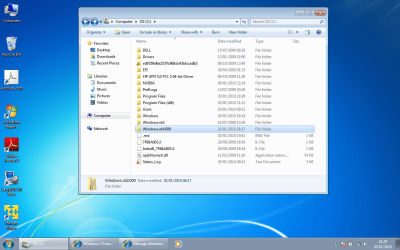
I recently installed windows 7 ultimate (x86) over windows 7 RC(x64). The install worked fine however i mistakenly thought it was upgrading not installing over (x64). Long story short im left with windows.old and windows.old.000. i'd like to revert back to the rc for the time being becuase i dont have all of the software to install on the fresh os. is there any way to do this? i found the microsoft article: How to back up or transfer your data on a Windows-based computer
it however is dealing with 32bit and not the 64 (two sets of program files ect.) so im not sure how to procede without FUBARing my os. Is there a way to VMware my old os? or partition it and boot from it?
Thanks
 

My Computer My Computer

OS
7
But what about the second file windows.old.000 there are two sets of windows old files what do i rename them?
 

My Computer My Computer

OS
7
Suggest you only deal with the windows.old folder that has your complete set of RC files in it, which would include all of your User accounts folders, windows, program files, etc.

Anyone else know for sure?
 
Could we get a screenshot of the files in both folders
 

My Computer My Computer

Computer Manufacturer/Model Number
Compal JFT02 (Custom Build Laptop)
OS
Windows 7 Home Premium x64 - Mac OS X 10.6.4 x64
CPU
Intel Core 2 Duo T9300 2.5 GHz
Motherboard
JFT02
Memory
4GB Kingston DDR2-800
Graphics Card(s)
NVIDIA Geforce 8600M GT (512MB Model)
Sound Card
Realtek HD Audio
Monitor(s) Displays
WUXGA Standard Laptop Display
Screen Resolution
1680*1050
Hard Drives
Toshiba 320GB 5400RPM Laptop HD
PSU
Standard Laptop Power Supply
Case
Standard Laptop Case
Cooling
Standard Laptop Cooling
Keyboard
Standard Laptop 105 Key-Keyboard
Mouse
Synaptics Touchpad
Internet Speed
Verizion Online DSL 3360/864 kbs (dl/up)
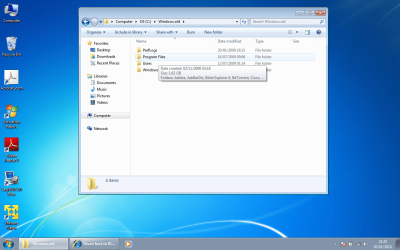
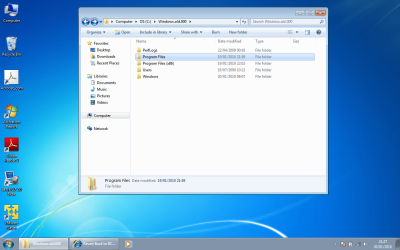
windows.old contains the program files for what looks like the 32bit programs and the windows.old.000 contains the installs for the 64 bit.
 

My Computer My Computer

OS
7
windows.old contains the program files for what looks like the 32bit programs and the windows.old.000 contains the installs for the 64 bit.
hm...if this is true...this is interesting
 

My Computer My Computer

Computer Manufacturer/Model Number
Compal JFT02 (Custom Build Laptop)
OS
Windows 7 Home Premium x64 - Mac OS X 10.6.4 x64
CPU
Intel Core 2 Duo T9300 2.5 GHz
Motherboard
JFT02
Memory
4GB Kingston DDR2-800
Graphics Card(s)
NVIDIA Geforce 8600M GT (512MB Model)
Sound Card
Realtek HD Audio
Monitor(s) Displays
WUXGA Standard Laptop Display
Screen Resolution
1680*1050
Hard Drives
Toshiba 320GB 5400RPM Laptop HD
PSU
Standard Laptop Power Supply
Case
Standard Laptop Case
Cooling
Standard Laptop Cooling
Keyboard
Standard Laptop 105 Key-Keyboard
Mouse
Synaptics Touchpad
Internet Speed
Verizion Online DSL 3360/864 kbs (dl/up)
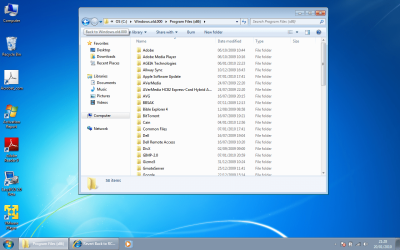
would it be possible to copy them into another partition and just boot that? and the windows.old/windows and windows.old.000/windows do not have the same content are there two sets of windows files onthe 64bit?
 

My Computer My Computer

OS
7
here are some screenshots
 

Attachments

  • 1.png
    1.png
    165.1 KB · Views: 22
  • 2.png
    2.png
    171.3 KB · Views: 20
  • 3.png
    3.png
    166.4 KB · Views: 24
  • 4.png
    4.png
    171.2 KB · Views: 17
  • 5.png
    5.png
    175.1 KB · Views: 12
  • 6.png
    6.png
    173.1 KB · Views: 15

My Computer My Computer

OS
7
Thats' interesting. What did O/S you have installed before the RC?

Did you get the RC in August/September time?
 

My Computers My Computers

System One System Two

  • Computer type
    PC/Desktop
    OS
    7 X64
    CPU
    i5 8400
    Motherboard
    gigabyte b365m ds3h
    Memory
    2x8gb 3200mhz
    Hard Drives
    various
    PSU
    pure power 11 400w cm
    Case
    Coolermaster
    Cooling
    cryorig m9i
  • Computer type
    PC/Desktop
    OS
    7x64
    CPU
    g5400
    Motherboard
    ga b365m ds3h
    Memory
    8gb ddr4 2400
    PSU
    xfx pro 450w
I just need some way to boot the old system. is there some way i can copy it to another partition or boot it from vmware or rename the files. i totally shotmyself in the foot and cant finish my work.
 

My Computer My Computer

OS
7
32 bit Vista?

We need to find out what has gone on to prescribe the best course of action.
 

My Computers My Computers

System One System Two

  • Computer type
    PC/Desktop
    OS
    7 X64
    CPU
    i5 8400
    Motherboard
    gigabyte b365m ds3h
    Memory
    2x8gb 3200mhz
    Hard Drives
    various
    PSU
    pure power 11 400w cm
    Case
    Coolermaster
    Cooling
    cryorig m9i
  • Computer type
    PC/Desktop
    OS
    7x64
    CPU
    g5400
    Motherboard
    ga b365m ds3h
    Memory
    8gb ddr4 2400
    PSU
    xfx pro 450w
Hang on greg - waiting for honzel to answer the question.

This should be doable - need to do it the right way.
 

My Computers My Computers

System One System Two

  • Computer type
    PC/Desktop
    OS
    7 X64
    CPU
    i5 8400
    Motherboard
    gigabyte b365m ds3h
    Memory
    2x8gb 3200mhz
    Hard Drives
    various
    PSU
    pure power 11 400w cm
    Case
    Coolermaster
    Cooling
    cryorig m9i
  • Computer type
    PC/Desktop
    OS
    7x64
    CPU
    g5400
    Motherboard
    ga b365m ds3h
    Memory
    8gb ddr4 2400
    PSU
    xfx pro 450w
so after looking through the two files it seems that the windows.old is just a partial copy of the windows.old.000/program files. I beleive somehow the install only copied part of the files before it reset and just made a whole new foler. dont know why that would happen but its the only reasonable thing i could deduce to explain why this would happen.
 

My Computer My Computer

OS
7
Scrath the last post thats wrong. It must have been from the vista restore.
 

My Computer My Computer

OS
7
OK Greg - you are on the right track .

Honzel needs to use the windows.old.000 folder.

Couple of things to make it easier.

1. Rename the existing Windows.old to VistaWindows.old

2. Rename Windows.old.000 to Windows.old

3. follow the ms kb - remember to also move the Program Files (x86) in step 3 & 4.

It will work if followed correctly.
 

My Computers My Computers

System One System Two

  • Computer type
    PC/Desktop
    OS
    7 X64
    CPU
    i5 8400
    Motherboard
    gigabyte b365m ds3h
    Memory
    2x8gb 3200mhz
    Hard Drives
    various
    PSU
    pure power 11 400w cm
    Case
    Coolermaster
    Cooling
    cryorig m9i
  • Computer type
    PC/Desktop
    OS
    7x64
    CPU
    g5400
    Motherboard
    ga b365m ds3h
    Memory
    8gb ddr4 2400
    PSU
    xfx pro 450w
Back
Top