
Revert back to win 7 Boot up

disgo55

New member
Member
Local time
11:22 AM
Messages
36
Iv installed win 7 on one drive,XP on another.
During boot up,i have the option to boot C:windows 7(Primary),or older OS,IE D:WinXP.
I would like to format the XP drive,& do away with the options in boot.
Any help please.Thanks
 

My Computer

OS
XP Pro & win 7
CPU
AMD Athlon(tm) 64 X2 Dual Core Processor 6000+
Motherboard
Gigabyte M59SLI-S5
Memory
4gb
Graphics Card(s)
NVIDIA GeForce 8800 GTS
Sound Card
onboard
Monitor(s) Displays
2x 22in samsung
Hard Drives
3x 500gb seagate
1x 1500gb seagate
PSU
700 or 750
Case
shark
Hello disgo55,

Welcome to Seven Forums.

Type msconfig into the start menu search and hit Enter. Boot tab, select the xp boot option and click delete. Format the XP drive. Should do it. Reboot to see that it's gone.

Hope this helps.

Gary
 

My Computer

Computer Manufacturer/Model Number
Dell XPS420
OS
Vista Ult 64 bit Seven Ult RTM x64
CPU
Intel Core2 Quad Q6600 2.40 gigahertz
Memory
Crucial Ballistix 4x2GB PC2 6400
Graphics Card(s)
NVIDIA GeForce 8600 GTS 256 MB
Sound Card
Creative SB X-Fi audio
Monitor(s) Displays
HP w2207 + HPvs15
Screen Resolution
1680x1050 + 1024x768
Hard Drives
2-WD5000AAKS-500 GB
WD5000AAV-500 GB external
Keyboard
Microsoft Comfort Curve
Mouse
MX Revolution
Other Info
Wacom Intuos 2 Graphics Tablet
Experience Index=5.5

My Computer

OS
XP Pro & win 7
CPU
AMD Athlon(tm) 64 X2 Dual Core Processor 6000+
Motherboard
Gigabyte M59SLI-S5
Memory
4gb
Graphics Card(s)
NVIDIA GeForce 8800 GTS
Sound Card
onboard
Monitor(s) Displays
2x 22in samsung
Hard Drives
3x 500gb seagate
1x 1500gb seagate
PSU
700 or 750
Case
shark
Please post back a screenshot of your full Disk Management drive map, using Snipping Tool in Start Menu, attaching file using paper clip in reply box.

XP will most likely hold the System Active MBR, so in order to remove it you need to recover the MBR into Win7 so it will boot on its own. This is done by booting into the Win7 DVD repair console to run Startup Repair up to 3 separate times with reboots as it will attempt to repair and then rewrite the MBR to Win7,.

If you would like to remove XP and recover the space into Win7, we can give you the exact steps after seeing the screenshot.
 
Ok thanks 4 replys.i did a format on the winxp drive,using my win7 install disk,then i reinstalled win 7,now it seems the xp drive F is a system partition,& i cant format it.Any ideas.Thanks.
 

Attachments

  • Capture3.jpg
    Capture3.jpg
    81.4 KB · Views: 47

My Computer

OS
XP Pro & win 7
CPU
AMD Athlon(tm) 64 X2 Dual Core Processor 6000+
Motherboard
Gigabyte M59SLI-S5
Memory
4gb
Graphics Card(s)
NVIDIA GeForce 8800 GTS
Sound Card
onboard
Monitor(s) Displays
2x 22in samsung
Hard Drives
3x 500gb seagate
1x 1500gb seagate
PSU
700 or 750
Case
shark
Sorry you did all of that before posting the screenshot as your C:Win7 System MBR is still on the F drive.

You need mark F and D inactive, then recover MBR into C.

Boot into free Partition Wizard CD, select 1 for screen resolution, rightclick on F>Modify>Set Inactive, OK.

Now rightclick on D>Modify>Set Inactive, OK. Apply all steps.

Make sure Win7 HD is set to boot first in BIOS setup, after DVD drive.

Win7 will not boot now. Boot into Win7 DVD, select Repair My Computer, click through to Recovery Tools list to run Startup Repair up to 3 separate times with reboots, as it will attempt to repair and then write the MBR to C.
 
Last edited:
gregrocker,i done all that you asked,boots into win7 ok,but still no change to F&D.Any more ideas,thanks
 

My Computer

OS
XP Pro & win 7
CPU
AMD Athlon(tm) 64 X2 Dual Core Processor 6000+
Motherboard
Gigabyte M59SLI-S5
Memory
4gb
Graphics Card(s)
NVIDIA GeForce 8800 GTS
Sound Card
onboard
Monitor(s) Displays
2x 22in samsung
Hard Drives
3x 500gb seagate
1x 1500gb seagate
PSU
700 or 750
Case
shark
How do you mean , no change to F and D? Did you mark them both Inactive?
 

My Computers

System One System Two

  • Computer type
    PC/Desktop
    OS
    7 X64
    CPU
    i5 8400
    Motherboard
    gigabyte b365m ds3h
    Memory
    2x8gb 3200mhz
    Hard Drives
    various
    PSU
    pure power 11 400w cm
    Case
    Coolermaster
    Cooling
    cryorig m9i
  • Computer type
    PC/Desktop
    OS
    7x64
    CPU
    g5400
    Motherboard
    ga b365m ds3h
    Memory
    8gb ddr4 2400
    PSU
    xfx pro 450w
If D and F are not marked Active in Disk Management, then you can format them, or use them as you please.

If either are still marked Active, use steps given above to mark inactive.
 
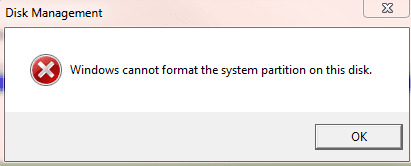
gregrocker. As i have said.i used Partition Wizard CD/ i marked drives F & D as Inactive.Drive D will now format using disk management,but this is what i get when i try to format the F:Drive... (Disk management is telling me that my F:is (Healthy (System,Active.Primary Partition)
 

Attachments

  • Capture3.PNG
    Capture3.PNG
    4.5 KB · Views: 4

My Computer

OS
XP Pro & win 7
CPU
AMD Athlon(tm) 64 X2 Dual Core Processor 6000+
Motherboard
Gigabyte M59SLI-S5
Memory
4gb
Graphics Card(s)
NVIDIA GeForce 8800 GTS
Sound Card
onboard
Monitor(s) Displays
2x 22in samsung
Hard Drives
3x 500gb seagate
1x 1500gb seagate
PSU
700 or 750
Case
shark
You probably need to set the Win 7 Hard drive first in the bios. That way it will become the system drive.

After you have done that, do what gregrocker suggests about using the startup repair, or

From the Win7 partition, open an administrative command window and type the following with enter after:

bcdboot C:\Windows /s C:

close the command window.

This will put the Win 7 boot files on the Win 7 partition. Now, since that partition is active, it has the boot files and the drive is first in the bios drive order, it will become the system drive on reboot. Right now you seem to have the F: drive first in the bios.

Do not look at the Disk number in Disk Management, that is just how the SATA connectors are arranged, it is the order in the bios that matters.
 

My Computer

Computer Manufacturer/Model Number
Homebuilt
OS
Windows 7 x64
CPU
i7-2600K
Motherboard
Asus P8Z77-v Pro
Memory
8 G
Graphics Card(s)
GTX 480
Sound Card
Onboard
Monitor(s) Displays
LG W2753V
Screen Resolution
1920x1080
Hard Drives
Crucial M4 128 G SSD
gregrocker. As i have said.i used Partition Wizard CD/ i marked drives F & D as Inactive.Drive D will now format using disk management,but this is what i get when i try to format the F:Drive... (Disk management is telling me that my F:is (Healthy (System,Active.Primary Partition)

F drive has not been marked inactive; System MBR has not been recovered to Win7 yet.

Make sure Win7 HD is set as first HD to boot in BIOS setup Boot Order, after CD/DVD.

Then boot the Partition Wizard CD, rightclick F>Modify>Set to Inactive, OK, Apply.

Now boot into Win7 DVD Repair console, click through to Recovery tools to run Startup Repair up to 3 separate times to rewrite the MBR to Win7.
 
gregrocker/Saltgrass.
I think iv solved problem Thanks to you.
Heres what i done/shut down my comp,took out HD`s one at a time. Found that my C Drive was the one,with windows 7 boot menu on/F drive was the win 7 OS.
So i put all but the F:drive back in, then used Partition Wizard CD to set Inactive on all 3 drives,then used the format cmd.i then put F:drive back in, on its own, reused Partition Wizard CD to Repair My Computer 3 times, seems to be ok now,what do you think? heres a screen shot,& thanks again for your help.
 

Attachments

  • Capture2.jpg
    Capture2.jpg
    91.6 KB · Views: 16

My Computer

OS
XP Pro & win 7
CPU
AMD Athlon(tm) 64 X2 Dual Core Processor 6000+
Motherboard
Gigabyte M59SLI-S5
Memory
4gb
Graphics Card(s)
NVIDIA GeForce 8800 GTS
Sound Card
onboard
Monitor(s) Displays
2x 22in samsung
Hard Drives
3x 500gb seagate
1x 1500gb seagate
PSU
700 or 750
Case
shark
It looks fine.

You mean that you used Win7 DVD (not PW) to recover MBR into Win7 partition, right?

How many times did you have to run Startup Repair?
 
two times
 

My Computer

OS
XP Pro & win 7
CPU
AMD Athlon(tm) 64 X2 Dual Core Processor 6000+
Motherboard
Gigabyte M59SLI-S5
Memory
4gb
Graphics Card(s)
NVIDIA GeForce 8800 GTS
Sound Card
onboard
Monitor(s) Displays
2x 22in samsung
Hard Drives
3x 500gb seagate
1x 1500gb seagate
PSU
700 or 750
Case
shark
sorry,yes i did use Windows 7 recover MBR
 

My Computer

OS
XP Pro & win 7
CPU
AMD Athlon(tm) 64 X2 Dual Core Processor 6000+
Motherboard
Gigabyte M59SLI-S5
Memory
4gb
Graphics Card(s)
NVIDIA GeForce 8800 GTS
Sound Card
onboard
Monitor(s) Displays
2x 22in samsung
Hard Drives
3x 500gb seagate
1x 1500gb seagate
PSU
700 or 750
Case
shark
The reason I ask is that there is a Recover MBR option on booted Partition Wizard CD. Did you use this?

Or did you boot the Win7 DVD to use Startup Repair?
 
I used the boot to Windows 7 DVD, to use Startup Repair,doing 2x reboots
 

My Computer

OS
XP Pro & win 7
CPU
AMD Athlon(tm) 64 X2 Dual Core Processor 6000+
Motherboard
Gigabyte M59SLI-S5
Memory
4gb
Graphics Card(s)
NVIDIA GeForce 8800 GTS
Sound Card
onboard
Monitor(s) Displays
2x 22in samsung
Hard Drives
3x 500gb seagate
1x 1500gb seagate
PSU
700 or 750
Case
shark
only used Partition Wizard CD to Format 3 drives,then (Windows 7 DVD Startup Repair),to bring back MBR on F drive.
 

My Computer

OS
XP Pro & win 7
CPU
AMD Athlon(tm) 64 X2 Dual Core Processor 6000+
Motherboard
Gigabyte M59SLI-S5
Memory
4gb
Graphics Card(s)
NVIDIA GeForce 8800 GTS
Sound Card
onboard
Monitor(s) Displays
2x 22in samsung
Hard Drives
3x 500gb seagate
1x 1500gb seagate
PSU
700 or 750
Case
shark
Back
Top