Revert some UI to Vista

chengbin

New member
Local time
5:43 PM
Messages
14
I just upgraded to Windows 7, and I don't like some of the UI upgrades.

I also like to change the placement of tabs on the taskbar. I have some shortcuts pinned on the taskbar. When I open the icon, the tab is located at the location of the icon. I hate that. It looks so ugly and inconvenient. Can I change it so the tab opens regularly to the rightmost place on the taskbar like every other program?

There is a small space between the top of the monitor and to the topmost icon. That is super annoying. I like to just move my mouse to the edge of the screen to open My Computer, but with this I have to move it slightly down. Very annoying. Right now I have align icon to grid off so I have move the icon a little bit up, but moving other icons is messy. How do I change that?

I have another keyboard, I press ctrl+space to switch between English and Chinese. In Windows 7 I can do that to switch from English to Chinese, but I can't do that to switch it back. I have to press shift+alt. How can I change it so it switches between keyboards with just ctrl+space?

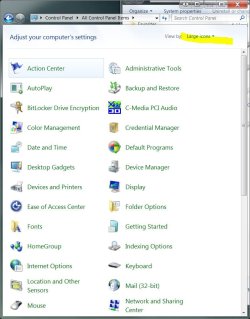
How do I view control panel in folder view? Folder view is just so much convenient.

Sorry for the long list of questions! Thanks everyone who answers.
 

My Computer My Computer

OS
windows 7
How do I view control panel in folder view? Folder view is just so much convenient.

Adjust the "View By: To either small/or large icons"


ctrl panel.JPG
 

My Computer My Computer

Computer type
PC/Desktop
Computer Manufacturer/Model Number
Systems by SmartEyeball
OS
8 Pro x64
CPU
i7 3770K 4.6GHz
Motherboard
ASUS P8Z77 WS
Memory
16GB G.Skill Trident X 2666mhz
Graphics Card(s)
x2 EVGA 780 Ti Superclocked SLI
Sound Card
SB X-FI Surround 5.1 PRO USB / ATH-AD900 Headphones
Monitor(s) Displays
x3 Dell U2410 / 58" Samsung
Screen Resolution
5760*1200/ 1920*1200
Hard Drives
2x Intel 520 240GB (RAID 0) * 2x WD Caviar Blacks 2TB (RAID 0) * 2TB WD Caviar Black * Sony Optirac DVD
PSU
Silverstone Strider Evolution 1200W
Case
Thermaltake Level 10 GT Snow Edition
Cooling
Noctua NH-D14
Keyboard
Topre Realforce // Ducky Shine MX Black // Filco Ninja TKL
Mouse
Thermaltake Theron (Highly Recommended) + Razer Imperator
Antivirus
MSE
Browser
IE, FF, WaterFox
Other Info
GT Extreme V2 Sim Racing Cockpit + 40" LCD and K/B Mouse stand ▼
Fanatec CSR Elite Wheel + Clubsport V1 Pedals + CSR shifter/7G-H ▼Saitek X52 Pro ▼ TrackIR 5 Pro
Buttkicker v2 Seat Rumbler with Dedicated 5.1 and Sub Woofer attached to frame ▼
=
Bloody Big Grin
Thanks.

That's one down, 3 to go!
 

My Computer My Computer

OS
windows 7
That's one down, 3 to go!
Right now I have align icon to grid off so I have move the icon a little bit up, but moving other icons is messy. How do I change that?

Hopefully this idea will make it 2 down...

Once you have your icons nice and tidy (using align to grid), de-select ATG and then hold down the left mouse button and draw a window around and highlight all the icons (just like selecting multiple files in explorer) and simply move all the icons at once to where you are happy with them.
 

My Computer My Computer

Computer type
PC/Desktop
Computer Manufacturer/Model Number
Systems by SmartEyeball
OS
8 Pro x64
CPU
i7 3770K 4.6GHz
Motherboard
ASUS P8Z77 WS
Memory
16GB G.Skill Trident X 2666mhz
Graphics Card(s)
x2 EVGA 780 Ti Superclocked SLI
Sound Card
SB X-FI Surround 5.1 PRO USB / ATH-AD900 Headphones
Monitor(s) Displays
x3 Dell U2410 / 58" Samsung
Screen Resolution
5760*1200/ 1920*1200
Hard Drives
2x Intel 520 240GB (RAID 0) * 2x WD Caviar Blacks 2TB (RAID 0) * 2TB WD Caviar Black * Sony Optirac DVD
PSU
Silverstone Strider Evolution 1200W
Case
Thermaltake Level 10 GT Snow Edition
Cooling
Noctua NH-D14
Keyboard
Topre Realforce // Ducky Shine MX Black // Filco Ninja TKL
Mouse
Thermaltake Theron (Highly Recommended) + Razer Imperator
Antivirus
MSE
Browser
IE, FF, WaterFox
Other Info
GT Extreme V2 Sim Racing Cockpit + 40" LCD and K/B Mouse stand ▼
Fanatec CSR Elite Wheel + Clubsport V1 Pedals + CSR shifter/7G-H ▼Saitek X52 Pro ▼ TrackIR 5 Pro
Buttkicker v2 Seat Rumbler with Dedicated 5.1 and Sub Woofer attached to frame ▼
=
Bloody Big Grin
That's one down, 3 to go!
Right now I have align icon to grid off so I have move the icon a little bit up, but moving other icons is messy. How do I change that?

Hopefully this idea will make it 2 down...

Once you have your icons nice and tidy (using align to grid), de-select ATG and then hold down the left mouse button and draw a window around and highlight all the icons (just like selecting multiple files in explorer) and simply move all the icons at once to where you are happy with them.

Nice. It is not perfect, but it works.
 

My Computer My Computer

OS
windows 7
Back
Top