I have installed an old Ricoh MP 171 SPF printer/fax/copier/scanner unit into my Windows 7 32 bit system and used the PCL 6 driver. I think that this is only a printer driver and suspect that the scanner function requires a separate driver? The printer is being seen by Windows and is working flawlessly through the USB connection. I am having trouble working out how I might set this machine up to simply scan and save the scanned files to a folder to use as desired. It seems to want me to enter a network path but from my very rudimentary network knowledge the printer is not networked anyway. Any help would be appreciate
My Computer
Computer type
PC/Desktop
Computer Manufacturer/Model Number
custom build,
OS
Windows 7 home 32 bit
CPU
Processer2.20 gigahertz AMD Athlon 64
Motherboard
Gigabyte GA-MA78LM-S2
Memory
2 GB
Graphics Card(s)
NVIDIA GeForce 7300 GS
Hard Drives
2 - ST3250820AS Hard drive 250 GB
1 - Seagate Desktop USB Hard drive 1 TB
1 - Seagate Desktop USB Hard drive 250 GB
Thanks maxie.
Yes I did find that page before and thought that the printer was using the PCL 6 Driver from that link you provided but when I checked it seemed to be using a generic Windows driver 6.1.7600.16385 instead So do you think that that driver is for both the printer and scanner function?I tried to update this generic driver to the PCL 6 Driver but Windows will not let me saying that "the best driver software is up to date" Please note I only have 32 bit Windows 7 home premium which is limiting because no [FONT="]Local Group Policy Editor Any suggestions please[/FONT]
My Computer
Computer type
PC/Desktop
Computer Manufacturer/Model Number
custom build,
OS
Windows 7 home 32 bit
CPU
Processer2.20 gigahertz AMD Athlon 64
Motherboard
Gigabyte GA-MA78LM-S2
Memory
2 GB
Graphics Card(s)
NVIDIA GeForce 7300 GS
Hard Drives
2 - ST3250820AS Hard drive 250 GB
1 - Seagate Desktop USB Hard drive 1 TB
1 - Seagate Desktop USB Hard drive 250 GB
Yes I do. I have tried that i.e. change to folder but then its asks for a destination? Could it be the fact that I only have the printer/scanner connected via USB as opposed to using the ethernet cable and having the printer/scanner as part of my network?
Last edited:
My Computer
Computer type
PC/Desktop
Computer Manufacturer/Model Number
custom build,
OS
Windows 7 home 32 bit
CPU
Processer2.20 gigahertz AMD Athlon 64
Motherboard
Gigabyte GA-MA78LM-S2
Memory
2 GB
Graphics Card(s)
NVIDIA GeForce 7300 GS
Hard Drives
2 - ST3250820AS Hard drive 250 GB
1 - Seagate Desktop USB Hard drive 1 TB
1 - Seagate Desktop USB Hard drive 250 GB
Thanks for the time that you are putting into helping me here, but I have found that manual as well as well as a more comprehensive online one here Manuals - - Operating Instructionsbut I think that it looks as if I will have to network this printer even though I have already set up the printer portion of it via USB connection and my PC sees the printer and all functions work well. It just seems strange that I cannot scan via the USB connection as well because I get totally lost when it comes to networking and the like if indeed that is what is required here I will have to dig deep and learn how I will run the driver update program that you sent the link for although I generally shy away from this sort of thing as I have not found them to be of any help in the past. They do not even seem to detect all the hardware that I have connected to my system but I'll try it seeing as you recommended it.
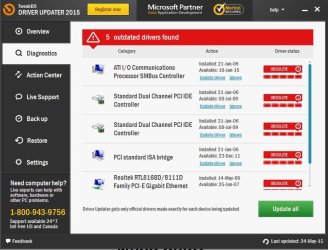
I just ran that driver scan and it found 77 up to date drivers and 5 that I feel are of not too much significance in regard to my problem and it wants money to update them. No thanks TweakBit Drive
Look thanks for all your help but it looks like the network path is the way that I am going to have to go
Attachments
driver update scan.jpg
72.1 KB
· Views: 0
My Computer
Computer type
PC/Desktop
Computer Manufacturer/Model Number
custom build,
OS
Windows 7 home 32 bit
CPU
Processer2.20 gigahertz AMD Athlon 64
Motherboard
Gigabyte GA-MA78LM-S2
Memory
2 GB
Graphics Card(s)
NVIDIA GeForce 7300 GS
Hard Drives
2 - ST3250820AS Hard drive 250 GB
1 - Seagate Desktop USB Hard drive 1 TB
1 - Seagate Desktop USB Hard drive 250 GB
No need to be sorry. I am not the most computer literate but I have installed enough cr@p "free software" to know when something is on the nose If you are prepared to have a look through that online manual at your leisure that would be great. Even if just to tell me something like "yes you need to network the printer or the like" at least I would know what direction to proceed in and then just have to find out how to get there. Thanks again for your generous help here, I appreciate it and have a good week.
My Computer
Computer type
PC/Desktop
Computer Manufacturer/Model Number
custom build,
OS
Windows 7 home 32 bit
CPU
Processer2.20 gigahertz AMD Athlon 64
Motherboard
Gigabyte GA-MA78LM-S2
Memory
2 GB
Graphics Card(s)
NVIDIA GeForce 7300 GS
Hard Drives
2 - ST3250820AS Hard drive 250 GB
1 - Seagate Desktop USB Hard drive 1 TB
1 - Seagate Desktop USB Hard drive 250 GB


 Any suggestions please[/FONT]
 I will run the driver update program that you sent the link for although I generally shy away from this sort of thing as I have not found them to be of any help in the past. They do not even seem to detect all the hardware that I have connected to my system but I'll try it seeing as you recommended it.