Ridiculous 6700k overclocking results.Would like some explanations...

sisrace

New member
Power User
VIP
Local time
4:33 AM
Messages
474
Location
Sweden in a tiny quiet town
Hi, so i installed ASUS AI-suite3 because i like the control it gives you. The utility also overclocks your CPU (in a "safe range" for all pc's..
(running the i7 6700K on an asus Z170 Pro gaming mobo)
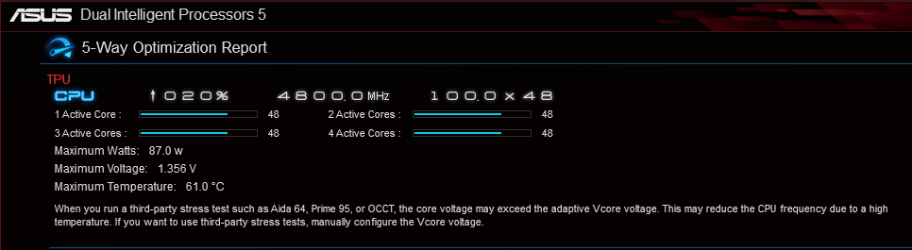
I got "impressive" results. 4.8Ghz at 1.356V, drawing "87watts" with a max temp of "61 degrees c"..
Curious to say the least.... The program mentions that syntetic benchmarks like Aida 64 etc will produce way higher temps, but ai-suite overclocks the cpu to real life scenarios like gaming etc... So thats why it has low temps and high frequencies, but im not convinced...

I am running an air cooler for heavens sake! A noctua NH-u14s!
My cpu (at stock), hit max ~60c on syntetic benchmarks with almost no chassi fan airflow (like my pc silent). This looked way too good to be true... Can my temp probe be faulty or something? OC result.PNG
 

My Computer My Computer

At a glance

Windows 10 64BitIntel i7 6700K Cooled by Noctua NH-U14S16GB 2133MHZ DDR4 CorsairASUS Direct CUII OC GTX 660
Computer type
PC/Desktop
Computer Manufacturer/Model Number
Custom Built
OS
Windows 10 64Bit
CPU
Intel i7 6700K Cooled by Noctua NH-U14S
Motherboard
ASUS Z170 Pro Gaming
Memory
16GB 2133MHZ DDR4 Corsair
Graphics Card(s)
ASUS Direct CUII OC GTX 660
Sound Card
Supreme FX (On-Board)
Monitor(s) Displays
1: 24" Asus 144hz 2: 21.5" Benq 3: 20" Hp 2009m
Screen Resolution
1:1920x1080 2:1920x1080 3:1600:900
Hard Drives
Primary/OS: Samsung 850 EVO SSD 250GB
Secondary/Main: Seagate 1TB SSHD 3.5"
Media/Backups: WD Green 2TB HDD 3.5"
PSU
Corsair RM 650W
Case
Fractal Design R4
Cooling
2 140mm Noctua NF-A14 ULN, Noctua NH-U14S Cpu cooler
Keyboard
Corsair K70 RGB
Mouse
ROCCAT Kone XTD
Internet Speed
100 Mbit/s Download 100MBit/s Upload
Antivirus
F-Secure SAFE
Browser
Chrome, Firefox
Other Info
I hope hanging up your harddrives in rubber-bands for noise reasons isn't too harmful for the drives :S, but eh, rather silence than lasting drives.. :|
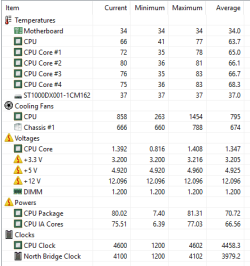
Hm.. Ok this looks more realistic. I manually set the cpu from 4.8ghz to 4.6ghz, and forced the voltage down to offset "0". Now the cpu peaks at 1.4v, not a worrying 1.5v... Running Aida64 for a while i see that the cpu sits around 65-70c and peaks to a maximum of 83c. (neither speedfan nor AiSuite sees these peaks, only aida64 does... All other programs tells me the cpu is running at 65c.. Now my pc is bearly auidble at this unrealistic 100% load. Cpu fan is att 800rpm... What are normal stats for a 6700K?
ok.PNG
 

My Computer My Computer

At a glance

Windows 10 64BitIntel i7 6700K Cooled by Noctua NH-U14S16GB 2133MHZ DDR4 CorsairASUS Direct CUII OC GTX 660
Computer type
PC/Desktop
Computer Manufacturer/Model Number
Custom Built
OS
Windows 10 64Bit
CPU
Intel i7 6700K Cooled by Noctua NH-U14S
Motherboard
ASUS Z170 Pro Gaming
Memory
16GB 2133MHZ DDR4 Corsair
Graphics Card(s)
ASUS Direct CUII OC GTX 660
Sound Card
Supreme FX (On-Board)
Monitor(s) Displays
1: 24" Asus 144hz 2: 21.5" Benq 3: 20" Hp 2009m
Screen Resolution
1:1920x1080 2:1920x1080 3:1600:900
Hard Drives
Primary/OS: Samsung 850 EVO SSD 250GB
Secondary/Main: Seagate 1TB SSHD 3.5"
Media/Backups: WD Green 2TB HDD 3.5"
PSU
Corsair RM 650W
Case
Fractal Design R4
Cooling
2 140mm Noctua NF-A14 ULN, Noctua NH-U14S Cpu cooler
Keyboard
Corsair K70 RGB
Mouse
ROCCAT Kone XTD
Internet Speed
100 Mbit/s Download 100MBit/s Upload
Antivirus
F-Secure SAFE
Browser
Chrome, Firefox
Other Info
I hope hanging up your harddrives in rubber-bands for noise reasons isn't too harmful for the drives :S, but eh, rather silence than lasting drives.. :|
We don't know your ambient temps, so it's impossible to judge your results. Maybe your room is 18C, maybe it's 29C.

4.5 to 4.6 is an average stable overclock, at maybe 1.35 to 1.4 volts, so you may just have gotten lucky with a good chip.

I'd pay more attention to known benchmarks like Aida 64, Intel Extreme Tuning Utility, or Prime 95 than I would with some Asus tool that most Asus overclocker's would ignore.

What was the max fan CPU fan speed recorded in the Asus suite test, where temps peaked at 61 and the clock reached 4.8?--and at what ambient temp?

The Noctua 14S is one of the best single tower coolers out there, so I wouldn't discount it, but I'd run other tests with other benchmarks.

Prime 95 is an unrealistic workload, but Intel XTU is reasonable and a more accurate representation of what you might encounter in day to day tasks.

https://mega.nz/#!ywAFDQQQ!hEQCeRXDKpHoeRYEaspux3ZA9Smx6tp8h0leb7ZHdJo

above link is to a good realistic x264 encoding stress test.

I'd just try to keep vcore below 1.4 and long term temps out of the 80s.

I've got a similar PC to yours: 6600K with a Noctua NH-U12S cooler and I much prefer silence too.

Here's some actual temps I've had. All of these are in a warm room--27C or 81F:

Using the x264 test above, not overclocked, all fans set in UEFI to "silent" mode:

vcore max 1.17;
max temp of hottest core: 49
max RPM of CPU fan: 1018
max RPM of case fans: 480
max watts of CPU package: 41

Intel Extreme Tuning Utility stress test for 30 minutes; not overclocked; all fans in silent mode

vcore max 1.10;
max temp of hottest core: 47
max RPM of CPU fan: 1011
max RPM of case fans: 479
max watts of CPU package: 34

Intel Extreme Testing Utility; overclocked to 4.2 using a preset in UEFI; all fans in silent mode

vcore max 1.34;
max temp of hottest core: 73
max RPM of CPU fan: 700
max RPM of case fans: 699
max watts of CPU package: 69

I also ran Prime 95 without overclocking, fans in silent mode. None of Prime 95's 3 tests pushed the hottest core beyond 53. CPU fan and both case fans all remained below 700 RPM. Vcore never exceeded 1.09 and CPU package power never went above 44 watts.
 

My Computer My Computer

At a glance

Windows 7 Home Premium SP1, 64-bitIntel Skylake i5-6600K, not overclocked8 GB HyperX DDR4-2666 (2 x 4 GB)none; graphics are integrated on CPU
Computer type
PC/Desktop
Computer Manufacturer/Model Number
Ignatz Special; 4 speed manual gearbox; factory air conditioning; one of one
OS
Windows 7 Home Premium SP1, 64-bit
CPU
Intel Skylake i5-6600K, not overclocked
Motherboard
AsRock Z170M Extreme 4, micro ATX
Memory
8 GB HyperX DDR4-2666 (2 x 4 GB)
Graphics Card(s)
none; graphics are integrated on CPU
Sound Card
onboard: Realtek ALC1150; external: USB Behringer UF0-202
Monitor(s) Displays
Dell S2340M 23 inch IPS
Screen Resolution
1600 x 900
Hard Drives
System: Crucial MX100 series SSD, 128 GB;
Data: Samsung Spinpoint 103SJ, 1 TB;
Backup: WD Caviar Green WD30EZRX-00D8PB0, 3 TB
PSU
Rosewill SilentNight 500 watt fanless, semi-modular
Case
Antec Solo II
Cooling
Noctua NH-U12S; Noctua F12 intake, Noctua S12A exhaust
Keyboard
Microsoft 200 6JH-00001 USB
Mouse
Dell or Microsoft optical wired; USB
Antivirus
Microsoft Security Essentials and Malwarebytes Premium
Browser
Pale Moon
Other Info
All fans PWM; speeds at idle: CPU circa 500 rpm; intake circa 600 rpm; exhaust circa 600 rpm; CPU temps 27 idle and 47 C load in a warm room (27 C/81 F) when running Intel Extreme Tuning Utility stress test.
Idle temps: This was done with the "standard" fan mode, meaning all fans are atleast on, but at their lowest speed.
Asus utility says the CPU is running at 2Ghz, 0.8v.
3.PNG

4.8Ghz was very stable, and i probably could have kept it, but 4.6 is enough and the computer is quieter.
4.6Ghz is reached with Stock voltage, which peak at around 1.4, stays at 1.35. The program is told to not add any additional voltage!.

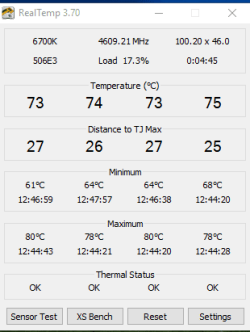
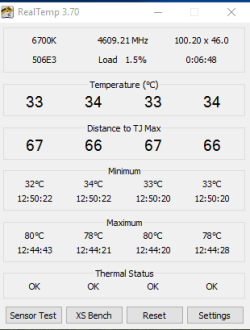
As for the test you gave me, here are the results. Noticed that Realtemp actually gave me "real temps"...
I increased the cpu fan curve, since the ASUS utility sees the cpu as 10c lower in temps than what realtemp does...
1.PNG
2.PNG

I am now going to try to undervolt the cpu at 4.6Ghz and see how low it can go... Thank you for the test btw!
 

My Computer My Computer

At a glance

Windows 10 64BitIntel i7 6700K Cooled by Noctua NH-U14S16GB 2133MHZ DDR4 CorsairASUS Direct CUII OC GTX 660
Computer type
PC/Desktop
Computer Manufacturer/Model Number
Custom Built
OS
Windows 10 64Bit
CPU
Intel i7 6700K Cooled by Noctua NH-U14S
Motherboard
ASUS Z170 Pro Gaming
Memory
16GB 2133MHZ DDR4 Corsair
Graphics Card(s)
ASUS Direct CUII OC GTX 660
Sound Card
Supreme FX (On-Board)
Monitor(s) Displays
1: 24" Asus 144hz 2: 21.5" Benq 3: 20" Hp 2009m
Screen Resolution
1:1920x1080 2:1920x1080 3:1600:900
Hard Drives
Primary/OS: Samsung 850 EVO SSD 250GB
Secondary/Main: Seagate 1TB SSHD 3.5"
Media/Backups: WD Green 2TB HDD 3.5"
PSU
Corsair RM 650W
Case
Fractal Design R4
Cooling
2 140mm Noctua NF-A14 ULN, Noctua NH-U14S Cpu cooler
Keyboard
Corsair K70 RGB
Mouse
ROCCAT Kone XTD
Internet Speed
100 Mbit/s Download 100MBit/s Upload
Antivirus
F-Secure SAFE
Browser
Chrome, Firefox
Other Info
I hope hanging up your harddrives in rubber-bands for noise reasons isn't too harmful for the drives :S, but eh, rather silence than lasting drives.. :|
Back
Top