ridiculous...can someone help

mikamika

New member
Local time
3:06 PM
Messages
22
This is stupid...

I am the ONLY person in my family who used this computer....I am the only one with an account on this computer and therefore am the ONLY administrator on here, with obviously full access.

So how is it when I go to my photos 80% of my photos cant be seen, and when I click them it says

"Cannot open as you do not have permission to view this photo file location"

I tried moving them and it says I cant move them as you need permission from the administrator!

Can someone help before my head explodes...this is driving me up the damn wall
 

My Computer My Computer

At a glance

windows 7
OS
windows 7

My Computer My Computer

At a glance

Windows 7 Professional 64 biti7 9206 gigabytesnVidia Quadro FX 1800
Computer Manufacturer/Model Number
Custom machine
OS
Windows 7 Professional 64 bit
CPU
i7 920
Motherboard
ASUS P6T Deluxe V2
Memory
6 gigabytes
Graphics Card(s)
nVidia Quadro FX 1800
Sound Card
Creative SB Audigy 2
Monitor(s) Displays
IBM 21" CRT
Screen Resolution
1600 x 1200
Hard Drives
Hitachi 1 TB Main Drive
Western Digital 1 TB Storage
Western Digital 2 TB Projects
Keyboard
Logitec Access 600
Mouse
Logitec M100
What antivirus are you running? Firewall?

Can you run a scan of your system using Malwarebytes?

When did the issue start happening? Recently, or has it always been this way?

Did you add the hard drive that the photos are on recently?
 

My Computer My Computer

At a glance

W7 Professional x64AMD Athlon II X3 445 Rana 3.10 GHzPNY XLR DDR3 1600 4x2GBNVIDIA GeForce GTS 450 (fermi) 1GB GDDR5
Computer Manufacturer/Model Number
Pugh Technologies
OS
W7 Professional x64
CPU
AMD Athlon II X3 445 Rana 3.10 GHz
Motherboard
MSI 870A-G54
Memory
PNY XLR DDR3 1600 4x2GB
Graphics Card(s)
NVIDIA GeForce GTS 450 (fermi) 1GB GDDR5
Sound Card
Realtek ALC892 onboard
Monitor(s) Displays
ASUS VE205t, Viewsonic VX2035WM
Screen Resolution
1600x900, 1600x1050
Hard Drives
977GB Hitachi Hitachi HDS721010CLA332
244GB Western Digital WDC WD2500AAJS-65B4A0
488GB Western Digital WDC WD5000AAJS-00A8B0
488GB Western Digital WDC WD5000AAKS-00UU3A0
PSU
Antec EarthWatts EA650 650W
Case
ThermalTake Armor A90 Mid Tower
Cooling
3x 120mm in, 1x 120mm & 200mm out, self built hydro-cooler
Keyboard
Logitec 55
Mouse
Razer Deathadder
Internet Speed
20 Mbps D/L, 9 Mbps U/L
This is stupid...

I am the ONLY person in my family who used this computer....I am the only one with an account on this computer and therefore am the ONLY administrator on here, with obviously full access.

So how is it when I go to my photos 80% of my photos cant be seen, and when I click them it says

"Cannot open as you do not have permission to view this photo file location"

I tried moving them and it says I cant move them as you need permission from the administrator!

Can someone help before my head explodes...this is driving me up the damn wall


Are you trying to access/move them from a library or from search results? If Yes, then it's youur Windows Search Index is corrupt, and has not updated properly.


Try this:

http://www.sevenforums.com/tutorials/17880-index-rebuild.html
  1. Click the Start Orb :ORB:
  2. type "index" (without quotes)
  3. click "Indexing Options" from the search results
  4. Click "Advanced"
  5. Under "Index Settings", click "Rebuild"
  6. Give the index time to rebuild, which could take anything from a few minutes to several hours. Overnight works for me, but only because I need to index over 500,000 files
If possible, can you take screenshot of the Explorer Window that you are trying to move file from so we can see for ourselves?
 
Last edited by a moderator:

My Computer My Computer

At a glance

Windows 7 Professional 32-bit SP1AMD A4/A63.00GB EDOVMware SVGA 3D
Computer type
PC/Desktop
Computer Manufacturer/Model Number
Virtual Machine
OS
Windows 7 Professional 32-bit SP1
CPU
AMD A4/A6
Motherboard
Intel Corporation 440BX Desktop Reference Platform
Memory
3.00GB EDO
Graphics Card(s)
VMware SVGA 3D
Sound Card
High Definition Audio Device
Monitor(s) Displays
Generic Non-PnP Monitor on VMware SVGA 3D
Screen Resolution
1440x900
Hard Drives
1 x 60GB VMware Virtual SATA Hard Drive ATA Device
Antivirus
Kaspersky Total Security
Ok let me get back to you.

Firewall - Zonealarm
Antivirus - AVG

I did the indexing thing and it didnt work, permissions seems fine. ran a scan, no infections etc etc.

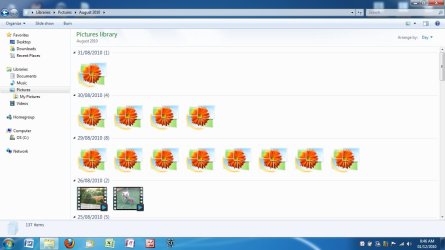
Here are screen shots.

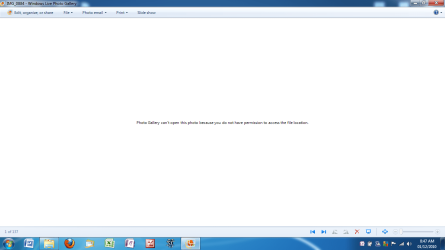
Screen shot 1 - photo folders. The pictures with the default "flower" images are the ones that don't work. When I click on them, I get this - See screen shot 2

Screen shot 2 - ANNOYING
 

Attachments

  • 1.jpg
    1.jpg
    80.5 KB · Views: 35
  • 2.png
    2.png
    33.8 KB · Views: 32

My Computer My Computer

At a glance

windows 7
OS
windows 7
It sounds like something could be corrupt, but I'm not sure.

Where are the files stored? Assuming you are using the Document folders on your C drive, did you pull these photos from another computer? Have you switched accounts? I always store my user data on a D drive so I don't have to deal with permissions issues.

Did you try taking ownership?
 

My Computer My Computer

At a glance

Windows 7 Ultimate x64 SP1Intel Core i7-260012 GB Patriot Extreme DDR3-1333Nvidia GTX 470
OS
Windows 7 Ultimate x64 SP1
CPU
Intel Core i7-2600
Motherboard
Gigabyte GA-P67A-UD3P-B3
Memory
12 GB Patriot Extreme DDR3-1333
Graphics Card(s)
Nvidia GTX 470
Monitor(s) Displays
Dell UltraSharp 2209WA
Hard Drives
OCZ Agility3 240 GB, WD5001AALS, WD7501AALS
PSU
OCZ ModStream 700W
Case
CoolerMaster HAF 912 Advanced
Cooling
CoolerMaster Hyper 212 Plus
Sorry I should have mentioned that part:

In the process of switching computers i took most of these photos of my wife's laptop, put them onto a memory stick, and transferred them over to this laptop.
 

My Computer My Computer

At a glance

windows 7
OS
windows 7
That is likely causing the issues. I have never used the "my" folders, even going back to XP. I prefer using separate data partitions to avoid these issues (and keep my data isolated). You'll have to take ownership of the files.
 

My Computer My Computer

At a glance

Windows 7 Ultimate x64 SP1Intel Core i7-260012 GB Patriot Extreme DDR3-1333Nvidia GTX 470
OS
Windows 7 Ultimate x64 SP1
CPU
Intel Core i7-2600
Motherboard
Gigabyte GA-P67A-UD3P-B3
Memory
12 GB Patriot Extreme DDR3-1333
Graphics Card(s)
Nvidia GTX 470
Monitor(s) Displays
Dell UltraSharp 2209WA
Hard Drives
OCZ Agility3 240 GB, WD5001AALS, WD7501AALS
PSU
OCZ ModStream 700W
Case
CoolerMaster HAF 912 Advanced
Cooling
CoolerMaster Hyper 212 Plus
Windows is simply doing its job...the accounts that had access to those files do not exist on the new system they were copied to, so access is denied. You have to tell the operating system that you are now the owner of those files. Nothing to get bent about.
 

My Computer My Computer

At a glance

Windows 7 Ultimate RTM (Technet)3.00 gigahertz Intel Core2 Duo E84004GBATI Radeon X1950 Pro
Computer Manufacturer/Model Number
Custom
OS
Windows 7 Ultimate RTM (Technet)
CPU
3.00 gigahertz Intel Core2 Duo E8400
Motherboard
ASUSTeK Computer INC. P5K/EPU Rev 1.xx
Memory
4GB
Graphics Card(s)
ATI Radeon X1950 Pro
Sound Card
Built in HD Audio
Monitor(s) Displays
22" Gateway LCD
Screen Resolution
1920 x 1200
Hard Drives
ST3160023A [Hard drive] (160.04 GB) -- drive 0, rev 8.01, ST3500630AS [Hard drive] (500.11 GB) -- drive 2, rev 3.AAK
ST3500630AS [Hard drive] (500.11 GB) -- drive 1, rev 3.AAK
Keyboard
Logitech G11
Mouse
Microsoft Wireless Laser Mouse 5000
Internet Speed
13.44 Mbps
Then how is, although I have set myself as owner, and given myself full permission, they still do not open
 

My Computer My Computer

At a glance

windows 7
OS
windows 7
I had a permissions problem a while ago and was being denied access to this and that folder. Upon checking the permissions tab things seemed to look good. In the end I had to take ownership and then reset the permissions to get accessto those folders . I have no idea why but it all went away.
 

My Computer My Computer

At a glance

W7x64 Ult.i7 97512GB Corsair DomEvga GTX285
Computer Manufacturer/Model Number
HB
OS
W7x64 Ult.
CPU
i7 975
Motherboard
P6T7 SC
Memory
12GB Corsair Dom
Graphics Card(s)
Evga GTX285
Sound Card
OB
Monitor(s) Displays
HP LP2475
Screen Resolution
1920x1200
Hard Drives
Velociraptors Raid0 BU
Crucial M4 OS
WD RE4 Data
PSU
PC Power & Cooling 950
Case
Chieftec Bravo
Cooling
Air 6 GentleTyphoon
Keyboard
Logitech Illuminated
Mouse
Logitech MX518
This is stupid...

I am the ONLY person in my family who used this computer....I am the only one with an account on this computer and therefore am the ONLY administrator on here, with obviously full access.

So how is it when I go to my photos 80% of my photos cant be seen, and when I click them it says

"Cannot open as you do not have permission to view this photo file location"

I tried moving them and it says I cant move them as you need permission from the administrator!

Can someone help before my head explodes...this is driving me up the damn wall

This is the genius windows! I had such messages a lot of time ! restart your system does not fix it?
 

My Computer My Computer

At a glance

windows
OS
windows
nothing seems to work. Indexed, as I am the only user/admin I have full access, but I did reset it anyhow. nothing....
 

My Computer My Computer

At a glance

windows 7
OS
windows 7
nothing seems to work. Indexed, as I am the only user/admin I have full access, but I did reset it anyhow. nothing....
If you are going to keep skipping the solution, nothing else is going to work. Follow the guide above to take ownership. You may be the only user and you may be the admin...but this isn't XP. Things have changed, and have been changed for four years now.
 

My Computer My Computer

At a glance

Windows 7 Ultimate x64 SP1Intel Core i7-260012 GB Patriot Extreme DDR3-1333Nvidia GTX 470
OS
Windows 7 Ultimate x64 SP1
CPU
Intel Core i7-2600
Motherboard
Gigabyte GA-P67A-UD3P-B3
Memory
12 GB Patriot Extreme DDR3-1333
Graphics Card(s)
Nvidia GTX 470
Monitor(s) Displays
Dell UltraSharp 2209WA
Hard Drives
OCZ Agility3 240 GB, WD5001AALS, WD7501AALS
PSU
OCZ ModStream 700W
Case
CoolerMaster HAF 912 Advanced
Cooling
CoolerMaster Hyper 212 Plus
nothing seems to work. Indexed, as I am the only user/admin I have full access, but I did reset it anyhow. nothing....

Are your files on a local partition or an external drive?
You may accidently activated something that prevents you to access them. Did you try the right click>propriety on a picture to see what is there ?
 

My Computer My Computer

At a glance

Windows 7
OS
Windows 7

My Computer My Computer

At a glance

Win 10 Pro x64Intel I5-2500K @3.3GHz16GB G.Skill Ripjaws X (4x4GB)EVGA GeForce 750 Ti SC 2GB
Computer type
PC/Desktop
Computer Manufacturer/Model Number
Self Built
OS
Win 10 Pro x64
CPU
Intel I5-2500K @3.3GHz
Motherboard
Asrock P67 Extreme4
Memory
16GB G.Skill Ripjaws X (4x4GB)
Graphics Card(s)
EVGA GeForce 750 Ti SC 2GB
Sound Card
ASUS Xonar DG 5.1 Channels 24-bit 96KHz PCI Interface Sound
Monitor(s) Displays
auria eq2367
Screen Resolution
1920 x 1080
Hard Drives
250GB Samsung 850 EVO SSD
1TB WD Blue
1TB Hitachi
PSU
SeaSonic X 650W 80 Plus Gold
Case
Corsair Obsidian 750D
Cooling
Corsair H60, Three 140mm case fans
Keyboard
Logitech Wireless Keyboard K520
Mouse
Logitech Wireless Mouse M310
Internet Speed
Wave Broadband ~ 100 dn 5 up
Antivirus
Windows Defender, Malwarebytes Premium
Browser
Edge, IE11, Chrome
Other Info
Laptop specs: HP g7-1365dx /
CPU: AMD A6-3420M APU with Radeon(tm) HD Graphics /
RAM: Crucial 8Gb (2x4Gb) /
SSD: Crucial M4-CT128M4SSD2 ATA Device/ FW 000F /
GFX: AMD Radeon HD 6520G /
OS: Windows 10 Pro x64
  • Like
Reactions: JMH
At your place, I would check the active processes in the task manager to check up what is running. Maybe there a suspicious process causing what you are encountering.
 

My Computer My Computer

At a glance

Windows 7
OS
Windows 7
At your place, I would check the active processes in the task manager to check up what is running. Maybe there a suspicious process causing what you are encountering.
The OP has already run scans to check for malware. This is the time-honored, classic "take ownership" issue.
 

My Computer My Computer

At a glance

Windows 7 Ultimate x64 SP1Intel Core i7-260012 GB Patriot Extreme DDR3-1333Nvidia GTX 470
OS
Windows 7 Ultimate x64 SP1
CPU
Intel Core i7-2600
Motherboard
Gigabyte GA-P67A-UD3P-B3
Memory
12 GB Patriot Extreme DDR3-1333
Graphics Card(s)
Nvidia GTX 470
Monitor(s) Displays
Dell UltraSharp 2209WA
Hard Drives
OCZ Agility3 240 GB, WD5001AALS, WD7501AALS
PSU
OCZ ModStream 700W
Case
CoolerMaster HAF 912 Advanced
Cooling
CoolerMaster Hyper 212 Plus
Hey Deacon.

Sorry should have stated, I have followed that guide and still nothing. I have granted permission, taken ownership, just like that guide says and nothing.

Just frustrating is all
 

My Computer My Computer

At a glance

windows 7
OS
windows 7
Ah, was wondering why you skipped it. Anyway, if that doesn't work...that would be a new one for me. Do you have an external drive? You could try booting from a BartPE disc or something like that, and moving them off to an external drive.
 

My Computer My Computer

At a glance

Windows 7 Ultimate x64 SP1Intel Core i7-260012 GB Patriot Extreme DDR3-1333Nvidia GTX 470
OS
Windows 7 Ultimate x64 SP1
CPU
Intel Core i7-2600
Motherboard
Gigabyte GA-P67A-UD3P-B3
Memory
12 GB Patriot Extreme DDR3-1333
Graphics Card(s)
Nvidia GTX 470
Monitor(s) Displays
Dell UltraSharp 2209WA
Hard Drives
OCZ Agility3 240 GB, WD5001AALS, WD7501AALS
PSU
OCZ ModStream 700W
Case
CoolerMaster HAF 912 Advanced
Cooling
CoolerMaster Hyper 212 Plus
Back
Top