ridiculous...can someone help

Usually when encrypted files are being copied to external media, windows (or the OS) always asks that doing so would remove the encryption.
If this was true, what would be the point in encrypting them at all? If I got physical access to your computer and copied files off (which would break the encryption)...then they weren't really encrypted.
 

My Computer My Computer

At a glance

Windows 7 Ultimate x64 SP1Intel Core i7-260012 GB Patriot Extreme DDR3-1333Nvidia GTX 470
OS
Windows 7 Ultimate x64 SP1
CPU
Intel Core i7-2600
Motherboard
Gigabyte GA-P67A-UD3P-B3
Memory
12 GB Patriot Extreme DDR3-1333
Graphics Card(s)
Nvidia GTX 470
Monitor(s) Displays
Dell UltraSharp 2209WA
Hard Drives
OCZ Agility3 240 GB, WD5001AALS, WD7501AALS
PSU
OCZ ModStream 700W
Case
CoolerMaster HAF 912 Advanced
Cooling
CoolerMaster Hyper 212 Plus
Ok, well thanks for trying everyone, I appreciate it. I suppose the thing is that confuses me the most is that this wasn't always the case - Go back 3-4 days ago, the pictures were fine, then bam, turned green and gone.

Again I appreciate all the time you guys/gals have put in trying to help me.
 

My Computer My Computer

At a glance

windows 7
OS
windows 7
Go back 3-4 days ago, the pictures were fine, then bam, turned green and gone.

Try a System Restore point before they screwed up but after you put them on your PC.

That may put things right.
Just in case.
http://www.sevenforums.com/tutorials/700-system-restore.html

When this window opens check the box "Show other restore points." This will give you more options to choose from. If one restore point doesn't work try one next to it in time but between the good picture point and the mess up.
If they restore make a copy of all pictures in new folder. Copy/ paste. Then burn new folder pictures to CD/DVD or Flash drive for a back-up.


My Computer My Computer

At a glance

Windows7 Pro 64bit SP-1; Windows XP Pro 32bitIntel Core i7-870 Lynnfield 2.93GHz LGA 1156 ...8GB@1400MHz Crucial Ballistix DDR3-1600 4x2GBASUS ENGTX460 DirectCU/2DI/1GD5 1GB 256-bit G...
Computer Manufacturer/Model Number
Hopalong/ Godzilla
OS
Windows7 Pro 64bit SP-1; Windows XP Pro 32bit
CPU
Intel Core i7-870 Lynnfield 2.93GHz LGA 1156 95W Quad-Core
Motherboard
ASUS P7P55D-E PRO
Memory
8GB@1400MHz Crucial Ballistix DDR3-1600 4x2GB
Graphics Card(s)
ASUS ENGTX460 DirectCU/2DI/1GD5 1GB 256-bit GDDR5
Sound Card
VIA Onboard
Monitor(s) Displays
Asus VS248H-P 24"; Samsung SyncMaster 941BW 19"ws
Screen Resolution
1920x1080; 1440x900
Hard Drives
Samsung 830 120GB SSD
Intel 320 120GB SSD
Western Digital Caviar Black WD7501AALS 750GB 7200 RPM SATA 3.0Gb/s
Western Digital Caviar Black WD6401AALS 640GB 7200 RPM SATA 3.0Gb/s
PSU
COOLER MASTER Silent Pro RS850-AMBAJ3-US 850W Modular
Case
COOLER MASTER HAF 932 RC-932-KKN5-GP Black
Cooling
Scythe "Mugen-2 Rev.B" (2 ScytheKaze-Jyuni PWM fans)
Keyboard
Logitech K-320
Mouse
Kensington
Antivirus
Avast Inernet Suite
Browser
IE 9 ; Chrome
I sent a message to a Mac friend of mine, asking for something like Recuva, but for OSX, just as an option.
 

My Computer My Computer

At a glance

Windows 7 Ultimate x64 SP1Intel Core i7-260012 GB Patriot Extreme DDR3-1333Nvidia GTX 470
OS
Windows 7 Ultimate x64 SP1
CPU
Intel Core i7-2600
Motherboard
Gigabyte GA-P67A-UD3P-B3
Memory
12 GB Patriot Extreme DDR3-1333
Graphics Card(s)
Nvidia GTX 470
Monitor(s) Displays
Dell UltraSharp 2209WA
Hard Drives
OCZ Agility3 240 GB, WD5001AALS, WD7501AALS
PSU
OCZ ModStream 700W
Case
CoolerMaster HAF 912 Advanced
Cooling
CoolerMaster Hyper 212 Plus
Thanks, I appreciate that :)

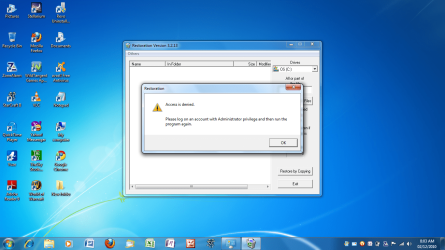
And on to the next wall... As you are aware I am the only "user" on here, and have full administrator rights.

Thought I would try "restoration" on here but am faced with yet another box telling me i need admin rights. Which I clearly have
 

Attachments

  • Untitled.png
    Untitled.png
    247.3 KB · Views: 10

My Computer My Computer

At a glance

windows 7
OS
windows 7
Start> All Programs> Accesories> System Tools> Right click System Restore> Left click run as Administrator.

There may be a shorter way but this will work.

Mike
 

My Computer My Computer

At a glance

Windows7 Pro 64bit SP-1; Windows XP Pro 32bitIntel Core i7-870 Lynnfield 2.93GHz LGA 1156 ...8GB@1400MHz Crucial Ballistix DDR3-1600 4x2GBASUS ENGTX460 DirectCU/2DI/1GD5 1GB 256-bit G...
Computer Manufacturer/Model Number
Hopalong/ Godzilla
OS
Windows7 Pro 64bit SP-1; Windows XP Pro 32bit
CPU
Intel Core i7-870 Lynnfield 2.93GHz LGA 1156 95W Quad-Core
Motherboard
ASUS P7P55D-E PRO
Memory
8GB@1400MHz Crucial Ballistix DDR3-1600 4x2GB
Graphics Card(s)
ASUS ENGTX460 DirectCU/2DI/1GD5 1GB 256-bit GDDR5
Sound Card
VIA Onboard
Monitor(s) Displays
Asus VS248H-P 24"; Samsung SyncMaster 941BW 19"ws
Screen Resolution
1920x1080; 1440x900
Hard Drives
Samsung 830 120GB SSD
Intel 320 120GB SSD
Western Digital Caviar Black WD7501AALS 750GB 7200 RPM SATA 3.0Gb/s
Western Digital Caviar Black WD6401AALS 640GB 7200 RPM SATA 3.0Gb/s
PSU
COOLER MASTER Silent Pro RS850-AMBAJ3-US 850W Modular
Case
COOLER MASTER HAF 932 RC-932-KKN5-GP Black
Cooling
Scythe "Mugen-2 Rev.B" (2 ScytheKaze-Jyuni PWM fans)
Keyboard
Logitech K-320
Mouse
Kensington
Antivirus
Avast Inernet Suite
Browser
IE 9 ; Chrome
Thanks, I appreciate that :)

And on to the next wall... As you are aware I am the only "user" on here, and have full administrator rights.

Thought I would try "restoration" on here but am faced with yet another box telling me i need admin rights. Which I clearly have

Just restart your system and check back !
 

My Computer My Computer

At a glance

Windows 7
OS
Windows 7
Have you made a lot of System settings changes which might have borked your User Accounts or OS?

If so you might try System Restoring to your earliest Restore point, or to a System Image you hopefully made after install.

If you keep getting these annoying Admin prompts and suspect it is from a series of random settings changes which can't be reversed, I would consider clean reinstalling. We can help you get a perfect reinstall.
 
Usually when encrypted files are being copied to external media, windows (or the OS) always asks that doing so would remove the encryption.
If this was true, what would be the point in encrypting them at all? If I got physical access to your computer and copied files off (which would break the encryption)...then they weren't really encrypted.
You will require to login with your user name/password.

The way default is set up, the files are not encrypted and anybody putting in a simple Linux Live CD can access your files, even if you have put a login user name/p'word or any admin can take ownership and access.

Once you encrypt the files in Windows, even if you get local access (say somebody steals your laptop), nobody can access / copy your encrypted files without you logging in. It is only once you log in and select copy that windows will ask you to break the encryption on the files being copied. And this is only on the target media, your original files remain encrypted. Unless of course you choose 'cut'.

Coming back to the OP's issue, if everything was ok 3-4 days back, then apparently seems to be a case of data corruption as I do not think files would simply get encrypted on their own and that also all reduced to 8kb size. Probably running a chkdsk in this case would help and in no way cause any harm.
 

My Computer My Computer

At a glance

Windows 7 x64
OS
Windows 7 x64
Once you encrypt the files in Windows, even if you get local access (say somebody steals your laptop), nobody can access / copy your encrypted files without you logging in. It is only once you log in and select copy that windows will ask you to break the encryption on the files being copied. And this is only on the target media, your original files remain encrypted. Unless of course you choose 'cut'.
That isn't really encryption, then. Encryption involves a key...and without said key, there's no way to unencrypt. It has nothing to do with login of the system. Anyone can take a laptop/desktop and reset a password to allow them to login, gaining access to files. That wouldn't be possible if those files were encrypted.
 

My Computer My Computer

At a glance

Windows 7 Ultimate x64 SP1Intel Core i7-260012 GB Patriot Extreme DDR3-1333Nvidia GTX 470
OS
Windows 7 Ultimate x64 SP1
CPU
Intel Core i7-2600
Motherboard
Gigabyte GA-P67A-UD3P-B3
Memory
12 GB Patriot Extreme DDR3-1333
Graphics Card(s)
Nvidia GTX 470
Monitor(s) Displays
Dell UltraSharp 2209WA
Hard Drives
OCZ Agility3 240 GB, WD5001AALS, WD7501AALS
PSU
OCZ ModStream 700W
Case
CoolerMaster HAF 912 Advanced
Cooling
CoolerMaster Hyper 212 Plus
Once you encrypt the files in Windows, even if you get local access (say somebody steals your laptop), nobody can access / copy your encrypted files without you logging in. It is only once you log in and select copy that windows will ask you to break the encryption on the files being copied. And this is only on the target media, your original files remain encrypted. Unless of course you choose 'cut'.
That isn't really encryption, then. Encryption involves a key...and without said key, there's no way to unencrypt. It has nothing to do with login of the system. Anyone can take a laptop/desktop and reset a password to allow them to login, gaining access to files. That wouldn't be possible if those files were encrypted.
AFAIK that key is generated by windows and linked to your login. If the password is reset, I believe you will lose the encrypted files.

Only encryption provides the best security against your files access. Of course encryption does add overhead to the system.
 

My Computer My Computer

At a glance

Windows 7 x64
OS
Windows 7 x64
Back
Top