ridiculously low frames on CS:GO

chaosrealm93

New member
Member
VIP
Local time
2:32 AM
Messages
174
alright, here's the story. i get random sustained frame drops (from about 50-70 to 30-10) on CS:GO.

my system:

Windows 7 Pro 64 bit
AMD Phenom ii 940 @ 3.0 GHz
ASUS M3A79-T Deluxe
Kingston HyperX 4GB 1066 MHz
EVGA GTX 660 Ti 2GB GDDR5
1680 x 1050

even with an overclock using EVGA's precision, 170%+ on the core speed and 600%+ on the memory speed, i only get passable frames (hovers around 30 FPS). this is really confusing to me since this is a source game and it should run on pretty much any spec computer. i only have chrome (3-4 tabs) and itunes open in the background. any good guesses?

and no, im not using any VSYNC options
 
Last edited:

My Computer

Computer type
PC/Desktop
OS
Windows 7 Pro 64 bit
CPU
Intel i7 6700k
Motherboard
ASUS Z-170-A
Memory
Kingston HyperX Fury 16GB 2133MHz
Graphics Card(s)
EVGA GTX 1060 6GB
Sound Card
N/A
Monitor(s) Displays
Viewsonic VX2240w
Screen Resolution
1680 x 1050
Hard Drives
Sandisk Ultra II 480GB SSD,
WD Caviar Black 1TB
PSU
Corsair RM750x
Case
Corsair 550D
Cooling
CoolerMaster Hyper 212
Keyboard
$20 Logitech El Cheapo
Mouse
Logitech G500s
Antivirus
avast! free antivirus
Browser
Google Chrome
Are your drivers up to date yeah? VSYNC for me is a must! cannot bear screentearing, looks horrendous but anyway, what usage of your gpu is being used?
 

My Computer

Computer type
Laptop
Computer Manufacturer/Model Number
Packard Bell
OS
Windows 7 Home Premium 64Bit
CPU
AMD A6-3420M 1.5GHZ OC - 2.0GHZ
Memory
4GB DDR3 1600MHZ
Graphics Card(s)
AMD RADEON 6520G+AMD RADEON HD7470M 1GB DDR3
Screen Resolution
1366x768
Hard Drives
500GB SATA
Internet Speed
18Mb Unlimited
Antivirus
AVAST!
Browser
MOZILLA FIREFOX
yup, my drivers are updated

is it possible 2GB of VRAM isnt enough to run CS? LOL
 

My Computer

Computer type
PC/Desktop
OS
Windows 7 Pro 64 bit
CPU
Intel i7 6700k
Motherboard
ASUS Z-170-A
Memory
Kingston HyperX Fury 16GB 2133MHz
Graphics Card(s)
EVGA GTX 1060 6GB
Sound Card
N/A
Monitor(s) Displays
Viewsonic VX2240w
Screen Resolution
1680 x 1050
Hard Drives
Sandisk Ultra II 480GB SSD,
WD Caviar Black 1TB
PSU
Corsair RM750x
Case
Corsair 550D
Cooling
CoolerMaster Hyper 212
Keyboard
$20 Logitech El Cheapo
Mouse
Logitech G500s
Antivirus
avast! free antivirus
Browser
Google Chrome
Nono, what about in other games? i can run CSGO on high with40+fps lol
 

My Computer

Computer type
Laptop
Computer Manufacturer/Model Number
Packard Bell
OS
Windows 7 Home Premium 64Bit
CPU
AMD A6-3420M 1.5GHZ OC - 2.0GHZ
Memory
4GB DDR3 1600MHZ
Graphics Card(s)
AMD RADEON 6520G+AMD RADEON HD7470M 1GB DDR3
Screen Resolution
1366x768
Hard Drives
500GB SATA
Internet Speed
18Mb Unlimited
Antivirus
AVAST!
Browser
MOZILLA FIREFOX
here's the list of games i have and the frame rates beside them. i dont run fraps or any frame-counting software

arma 3 - VEEERRRRRY low FPS
CSGO - low 30s
CSS - 200+
DOD:S - 200+
GTA IV - 50s?
TF2 - 100+

whats funny is i played a bit of CSGO this morning, same sever i always go on, but with only 10 or so people on and my frames went up to 90+. is it possible for the network (the sever im playing on, my ISP and my network port on my PC) to be the problem?
 

My Computer

Computer type
PC/Desktop
OS
Windows 7 Pro 64 bit
CPU
Intel i7 6700k
Motherboard
ASUS Z-170-A
Memory
Kingston HyperX Fury 16GB 2133MHz
Graphics Card(s)
EVGA GTX 1060 6GB
Sound Card
N/A
Monitor(s) Displays
Viewsonic VX2240w
Screen Resolution
1680 x 1050
Hard Drives
Sandisk Ultra II 480GB SSD,
WD Caviar Black 1TB
PSU
Corsair RM750x
Case
Corsair 550D
Cooling
CoolerMaster Hyper 212
Keyboard
$20 Logitech El Cheapo
Mouse
Logitech G500s
Antivirus
avast! free antivirus
Browser
Google Chrome
Hi there :),

What settings are you running cs:go at? Is it all on very high and a native resolution of your monitor?

How are you monitoring fps? Through console or a 3rd party like fraps?

2GB of vram is 4x more than you really need as you previously mentioned, any modern pc with a OK gpu should fly with source games and your gpu is certainly sufficient.
 

My Computer

Computer type
PC/Desktop
Computer Manufacturer/Model Number
GIGABYTE Rig (Custom)
OS
Windows 7 Professional (x64/SP1) /Linux Mint 16
CPU
Intel i5-3570k 3.40 GHz @ 4.6 GHz
Motherboard
GIGABYTE Z77X-D3H
Memory
8GB (2133MHz) DDR3
Graphics Card(s)
Asus GTX560 Ti (Nvidia)
Monitor(s) Displays
HP 23", Acer 19" and a Dell 17"
Screen Resolution
1080p, 1440x900 and 1280x1024
Hard Drives
Sandisk Extreme 120GB (SSD), WD 2TB green and 4 other HDDs
PSU
Antec 620w High Current Gamer
Case
Corsair Obsidian 600D
Cooling
CPU - Antec KÜHLER H₂O 920
Keyboard
Steelseries 6Gv2
Mouse
Roccat LUA
Internet Speed
4 - 6mb/s
Antivirus
ESET NOD32
Browser
Chrome/Firefox
Other Info
Intel Gigabit CT (PCIE NIC) and Thinkpad T61p,
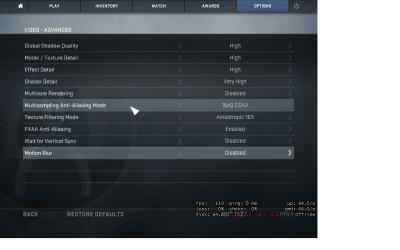
i have all my settings turned to high and its running at my native monitor res (1680x1050). i have AA and FXAA turned off, it seems to help improve FPS a bit.

i dont run any sort of screen capture of FPS monitoring software. i monitor my FPS using the "net_graph 1" command in-game
 

My Computer

Computer type
PC/Desktop
OS
Windows 7 Pro 64 bit
CPU
Intel i7 6700k
Motherboard
ASUS Z-170-A
Memory
Kingston HyperX Fury 16GB 2133MHz
Graphics Card(s)
EVGA GTX 1060 6GB
Sound Card
N/A
Monitor(s) Displays
Viewsonic VX2240w
Screen Resolution
1680 x 1050
Hard Drives
Sandisk Ultra II 480GB SSD,
WD Caviar Black 1TB
PSU
Corsair RM750x
Case
Corsair 550D
Cooling
CoolerMaster Hyper 212
Keyboard
$20 Logitech El Cheapo
Mouse
Logitech G500s
Antivirus
avast! free antivirus
Browser
Google Chrome
Ahh ok and what kind of fps do you get with the settings maxed out and the resolution on 800x600?

Have you monitored the gpu temps whilst running CS:GO?
 

My Computer

Computer type
PC/Desktop
Computer Manufacturer/Model Number
GIGABYTE Rig (Custom)
OS
Windows 7 Professional (x64/SP1) /Linux Mint 16
CPU
Intel i5-3570k 3.40 GHz @ 4.6 GHz
Motherboard
GIGABYTE Z77X-D3H
Memory
8GB (2133MHz) DDR3
Graphics Card(s)
Asus GTX560 Ti (Nvidia)
Monitor(s) Displays
HP 23", Acer 19" and a Dell 17"
Screen Resolution
1080p, 1440x900 and 1280x1024
Hard Drives
Sandisk Extreme 120GB (SSD), WD 2TB green and 4 other HDDs
PSU
Antec 620w High Current Gamer
Case
Corsair Obsidian 600D
Cooling
CPU - Antec KÜHLER H₂O 920
Keyboard
Steelseries 6Gv2
Mouse
Roccat LUA
Internet Speed
4 - 6mb/s
Antivirus
ESET NOD32
Browser
Chrome/Firefox
Other Info
Intel Gigabit CT (PCIE NIC) and Thinkpad T61p,
i get 70-80 FPS with 800x600 (settings maxed). temps are around 40-50.

this was tested on the same sever i always go onwith 10 or so ppl on
 

Attachments

  • 800x600 settings.png
    800x600 settings.png
    80.7 KB · Views: 0

My Computer

Computer type
PC/Desktop
OS
Windows 7 Pro 64 bit
CPU
Intel i7 6700k
Motherboard
ASUS Z-170-A
Memory
Kingston HyperX Fury 16GB 2133MHz
Graphics Card(s)
EVGA GTX 1060 6GB
Sound Card
N/A
Monitor(s) Displays
Viewsonic VX2240w
Screen Resolution
1680 x 1050
Hard Drives
Sandisk Ultra II 480GB SSD,
WD Caviar Black 1TB
PSU
Corsair RM750x
Case
Corsair 550D
Cooling
CoolerMaster Hyper 212
Keyboard
$20 Logitech El Cheapo
Mouse
Logitech G500s
Antivirus
avast! free antivirus
Browser
Google Chrome
It's definitely an improvement but I fear not by enough, am guessing your drivers all all up to date and your bios is on the latest stable revision. Your gpu temps don't look like they rise too much. How is your gpu cooled and what is its idle temp?

How stressed is your cpu when running cs:go?
Have you tried running CS:GO when your gpu is @ stock settings?

I understand this is a pain but it's hard to decipher issues without data.
 

My Computer

Computer type
PC/Desktop
Computer Manufacturer/Model Number
GIGABYTE Rig (Custom)
OS
Windows 7 Professional (x64/SP1) /Linux Mint 16
CPU
Intel i5-3570k 3.40 GHz @ 4.6 GHz
Motherboard
GIGABYTE Z77X-D3H
Memory
8GB (2133MHz) DDR3
Graphics Card(s)
Asus GTX560 Ti (Nvidia)
Monitor(s) Displays
HP 23", Acer 19" and a Dell 17"
Screen Resolution
1080p, 1440x900 and 1280x1024
Hard Drives
Sandisk Extreme 120GB (SSD), WD 2TB green and 4 other HDDs
PSU
Antec 620w High Current Gamer
Case
Corsair Obsidian 600D
Cooling
CPU - Antec KÜHLER H₂O 920
Keyboard
Steelseries 6Gv2
Mouse
Roccat LUA
Internet Speed
4 - 6mb/s
Antivirus
ESET NOD32
Browser
Chrome/Firefox
Other Info
Intel Gigabit CT (PCIE NIC) and Thinkpad T61p,
yup, all my drivers and BIOS are up to date. my GPU is stock/air cooled by a blower style cooler. the idle temp is also around 40-ish.

the GPU doesnt seem to be stressed at all playing CSGO. the fans dont spin any faster. if im not mistaken, CSGO is still using the source engine which made its debut almost 10 years ago. any source game shouldnt be a benchmark by any means nowadays.

i've tried running the game both factory clocked and overclocked with the aforementioned 150%+ on the core clock speed and 600%+ on the memory speed using EVGA's precision tool. the overclocked settings seem to work well at first, but eventually it lags again eventually.

im just glad and appreciate the fact that someones willing to sit down and help me fix this stupid problem :)
 

My Computer

Computer type
PC/Desktop
OS
Windows 7 Pro 64 bit
CPU
Intel i7 6700k
Motherboard
ASUS Z-170-A
Memory
Kingston HyperX Fury 16GB 2133MHz
Graphics Card(s)
EVGA GTX 1060 6GB
Sound Card
N/A
Monitor(s) Displays
Viewsonic VX2240w
Screen Resolution
1680 x 1050
Hard Drives
Sandisk Ultra II 480GB SSD,
WD Caviar Black 1TB
PSU
Corsair RM750x
Case
Corsair 550D
Cooling
CoolerMaster Hyper 212
Keyboard
$20 Logitech El Cheapo
Mouse
Logitech G500s
Antivirus
avast! free antivirus
Browser
Google Chrome
No problem and it's why am here :)

I am guessing your gpu is the culprit but that's a guess. I am also guessing the gpu issue maybe cause by a power issue (psu) but I don't want to make an incorrect and spurious suggestion. The source engine is 10 years but it has been fine tuned and modified extensively and is still very good, even 10 years later but it's starting to show its age.

What is your cpu usage and temp when playing CS:GO? And what's your gpu and cpu usage on another game such as ARMA or one that you know works fine.

I am trying to determine if a component is slacking as that might suggest a driver issue a setup issue or hardware fault.

One more thing, is the Graphics Card seated in the top PCI-E slot of the motherboard. Am guessing it isn't but if it is, it can cause bandwidth issues.
 

My Computer

Computer type
PC/Desktop
Computer Manufacturer/Model Number
GIGABYTE Rig (Custom)
OS
Windows 7 Professional (x64/SP1) /Linux Mint 16
CPU
Intel i5-3570k 3.40 GHz @ 4.6 GHz
Motherboard
GIGABYTE Z77X-D3H
Memory
8GB (2133MHz) DDR3
Graphics Card(s)
Asus GTX560 Ti (Nvidia)
Monitor(s) Displays
HP 23", Acer 19" and a Dell 17"
Screen Resolution
1080p, 1440x900 and 1280x1024
Hard Drives
Sandisk Extreme 120GB (SSD), WD 2TB green and 4 other HDDs
PSU
Antec 620w High Current Gamer
Case
Corsair Obsidian 600D
Cooling
CPU - Antec KÜHLER H₂O 920
Keyboard
Steelseries 6Gv2
Mouse
Roccat LUA
Internet Speed
4 - 6mb/s
Antivirus
ESET NOD32
Browser
Chrome/Firefox
Other Info
Intel Gigabit CT (PCIE NIC) and Thinkpad T61p,
i think you're right about the power issue. theres this button buried 1 level deep in the EVGA precision called "k-boost". it was on and i toggled it off just now to see the difference. frames jumped up to 100+ and the fans spun up responding to the increased load and temperature. that may have been the culprit, but the real test is going to be tonight when i play on the same server but fully populated (32 man)..

and yes, the 660ti is seated in the top-most PCI-E slot
 

My Computer

Computer type
PC/Desktop
OS
Windows 7 Pro 64 bit
CPU
Intel i7 6700k
Motherboard
ASUS Z-170-A
Memory
Kingston HyperX Fury 16GB 2133MHz
Graphics Card(s)
EVGA GTX 1060 6GB
Sound Card
N/A
Monitor(s) Displays
Viewsonic VX2240w
Screen Resolution
1680 x 1050
Hard Drives
Sandisk Ultra II 480GB SSD,
WD Caviar Black 1TB
PSU
Corsair RM750x
Case
Corsair 550D
Cooling
CoolerMaster Hyper 212
Keyboard
$20 Logitech El Cheapo
Mouse
Logitech G500s
Antivirus
avast! free antivirus
Browser
Google Chrome
Excellent news :)

Keep us posted if you would, am always interested in the results :)

Hopefully this is the last we will hear of this and maybe we can play some CSS together.

--Additional
K-boost stops gpu scaling and isn't really necessary. I recommend keeping it disabled for good obvious reasoning unless you really want it and find a fix.

Enable high performance in windows 7 power options if you haven't already. (search power options on the start menu search)
 

My Computer

Computer type
PC/Desktop
Computer Manufacturer/Model Number
GIGABYTE Rig (Custom)
OS
Windows 7 Professional (x64/SP1) /Linux Mint 16
CPU
Intel i5-3570k 3.40 GHz @ 4.6 GHz
Motherboard
GIGABYTE Z77X-D3H
Memory
8GB (2133MHz) DDR3
Graphics Card(s)
Asus GTX560 Ti (Nvidia)
Monitor(s) Displays
HP 23", Acer 19" and a Dell 17"
Screen Resolution
1080p, 1440x900 and 1280x1024
Hard Drives
Sandisk Extreme 120GB (SSD), WD 2TB green and 4 other HDDs
PSU
Antec 620w High Current Gamer
Case
Corsair Obsidian 600D
Cooling
CPU - Antec KÜHLER H₂O 920
Keyboard
Steelseries 6Gv2
Mouse
Roccat LUA
Internet Speed
4 - 6mb/s
Antivirus
ESET NOD32
Browser
Chrome/Firefox
Other Info
Intel Gigabit CT (PCIE NIC) and Thinkpad T61p,
windows power options only let you set the condition under which the PC will fall asleep though. i dont really see it helping gaming performance

in theory, shouldnt k-boost HELP performance? from what i read, it locks the card at boost clocks, so its always running at maximum. so by eliminating the throttling, shouldnt it run better?

and sure! add me up: DARKLY Byuntaeng
 

My Computer

Computer type
PC/Desktop
OS
Windows 7 Pro 64 bit
CPU
Intel i7 6700k
Motherboard
ASUS Z-170-A
Memory
Kingston HyperX Fury 16GB 2133MHz
Graphics Card(s)
EVGA GTX 1060 6GB
Sound Card
N/A
Monitor(s) Displays
Viewsonic VX2240w
Screen Resolution
1680 x 1050
Hard Drives
Sandisk Ultra II 480GB SSD,
WD Caviar Black 1TB
PSU
Corsair RM750x
Case
Corsair 550D
Cooling
CoolerMaster Hyper 212
Keyboard
$20 Logitech El Cheapo
Mouse
Logitech G500s
Antivirus
avast! free antivirus
Browser
Google Chrome
Windows power options do mainly control sleep and brightness settings and are mainly for laptops, I get where you're coming from but using the balanced setting enables cpu throttling, cpu parking (to a greater extent) and in general affecting cpu performance. There is also PCI Express settings to reduce PCI-E power consumption by reducing data bandwidth again doesn't really have much use on a desktop.

The only setting on the high performance power plan you may wish to modify is the cpu throttling as it is at 100% and theoretically disables speed stepping. change minimum cpu frequency to 0% or 5%.

K-boost basically from what I can find locks your frequencies and voltages to the maximum settings so they don't clock down at any point theoretically increase performance by reducing fps drops from the fluctuations in voltages and frequencies. Personally I can only see this being of real use in serious gpu hogs such as bench marks, this my opinion and hypothesis on which others can freely disagree. For accurate terminology and the facts about 'K-Boost' read the help file on the OC software.
 

My Computer

Computer type
PC/Desktop
Computer Manufacturer/Model Number
GIGABYTE Rig (Custom)
OS
Windows 7 Professional (x64/SP1) /Linux Mint 16
CPU
Intel i5-3570k 3.40 GHz @ 4.6 GHz
Motherboard
GIGABYTE Z77X-D3H
Memory
8GB (2133MHz) DDR3
Graphics Card(s)
Asus GTX560 Ti (Nvidia)
Monitor(s) Displays
HP 23", Acer 19" and a Dell 17"
Screen Resolution
1080p, 1440x900 and 1280x1024
Hard Drives
Sandisk Extreme 120GB (SSD), WD 2TB green and 4 other HDDs
PSU
Antec 620w High Current Gamer
Case
Corsair Obsidian 600D
Cooling
CPU - Antec KÜHLER H₂O 920
Keyboard
Steelseries 6Gv2
Mouse
Roccat LUA
Internet Speed
4 - 6mb/s
Antivirus
ESET NOD32
Browser
Chrome/Firefox
Other Info
Intel Gigabit CT (PCIE NIC) and Thinkpad T61p,
oh, turned out i was already using high performance haha.

nothing to do but wait till tonight..
 

My Computer

Computer type
PC/Desktop
OS
Windows 7 Pro 64 bit
CPU
Intel i7 6700k
Motherboard
ASUS Z-170-A
Memory
Kingston HyperX Fury 16GB 2133MHz
Graphics Card(s)
EVGA GTX 1060 6GB
Sound Card
N/A
Monitor(s) Displays
Viewsonic VX2240w
Screen Resolution
1680 x 1050
Hard Drives
Sandisk Ultra II 480GB SSD,
WD Caviar Black 1TB
PSU
Corsair RM750x
Case
Corsair 550D
Cooling
CoolerMaster Hyper 212
Keyboard
$20 Logitech El Cheapo
Mouse
Logitech G500s
Antivirus
avast! free antivirus
Browser
Google Chrome
alrighty.... played a few games on some different maps. here are the results..

ad_egon_world_ecg_ve
avg 50-60 FPS
*the last round of the game i got 10-20 fps, even while spectating

cs_office
started off at 80, then dropped to 10-30 when i entered "new" areas of the map

de_oil (different server, 18 players)
avg 150 FPS, sv remained stable at 128

de_cache (different server, 26 players)
avg 80 FPS, sv remained stable at 128

this baffles me. it seems like the FPS dramatically drops whenever theres a lot of player activity and/or i enter a new part of the map. is it possible for other things to bottleneck the game, such as the HDD and RAM? both these components are 4+ years old.

also i noticed the "sv" value in the "net_graph" fluctuates randomly and it seems to have somewhat of a correlation to FPS. could this be a sign my network chip/motherboard is beginning to die? or a problem on the server im playing on?
 

My Computer

Computer type
PC/Desktop
OS
Windows 7 Pro 64 bit
CPU
Intel i7 6700k
Motherboard
ASUS Z-170-A
Memory
Kingston HyperX Fury 16GB 2133MHz
Graphics Card(s)
EVGA GTX 1060 6GB
Sound Card
N/A
Monitor(s) Displays
Viewsonic VX2240w
Screen Resolution
1680 x 1050
Hard Drives
Sandisk Ultra II 480GB SSD,
WD Caviar Black 1TB
PSU
Corsair RM750x
Case
Corsair 550D
Cooling
CoolerMaster Hyper 212
Keyboard
$20 Logitech El Cheapo
Mouse
Logitech G500s
Antivirus
avast! free antivirus
Browser
Google Chrome
Try turning on multicore rendering, that should boost fps since you're using a quad core. Source games are heavy on the cpu. I saw you had that option disabled in the screenshot.
 

My Computer

Computer type
PC/Desktop
Computer Manufacturer/Model Number
custom build
OS
Windows 10 64bit
CPU
AMD Phenom II X4 925 (Deneb)(2.8GHz) OC 3.4GHz
Motherboard
M5A78L-MLX Plus
Memory
Corsair Vengeance DDR3 4GBX2 (8192MB)
Graphics Card(s)
XFX HD 6870 1GB (OC)- 940MHz core, mem 1150MHz
Monitor(s) Displays
Vizio 26' 1920x1080 / Acer 1336x768
Screen Resolution
1920x1080 60Hz /1336x768
Hard Drives
Kingston Digital 60GB SSDNow V300/500gb HDD Western Digital 7200rpm (/WD 160GB HDD 7200rpm
PSU
CORSAIR CX600 600w
Case
AZZA Orion 202 EVO
Cooling
cooler master hyper TX3 cpu cooler
Keyboard
Razer DeathStalker
Mouse
Logitech Optical Gaming Mouse G400
Antivirus
Defualt on win 10
Browser
Firefox
Other Info
cpu is overclocked in bios
Well you cant judge the failure of components solely on a single game, if other games and more importantly different game engines run well the we can isolate the issue to CS GO and not your pc. Am I right in saying these are your standard fps results? They seem good to me. (Apart from CS:GO of course :()

arma 3 - VEEERRRRRY low FPS (Depending on the settings your cpu is on the border of the required specs)
CSGO - low 30s (Game poorly optimized? Or setup wrong???)
CSS - 200+ (Good, it's on 2010 source engine)
DOD:S - 200+ (Good - Exact same engine as CSS)
GTA IV - 50s? (Impertinent result, although it depends on the settings)
TF2 - 100+ (Normal, this is an updated version of source)

Has it always performed this poorly? I forgot to ask :banghead: . Anyway another thing to try is increase the priority rank of CS:GO.exe in task manager. I read here the game is poorly optimized on some maps and very cpu hungry.

--------------------

Do try multicore rendering as M1GU31 suggested as it may improve a little fps but I doubt it's the cause of the severe fps fluctuations. Have you tried running everything on low settings, a low resolution and then check fps. Slowly rise the settings up individually and look for severe fps drop.

The HDD and RAM shouldn't reduce your fps by much if any and would mostly slow you at the loading screens when compared with faster ram and storage devices. High Speed RAM - Is it Worth it? DDR3 1333MHz vs 2400MHz Test This should demonstrate the difference of high speed ram in games and the SSD would just reduce loading times and in fact all my games run off my HDD. I reserve SSD space for the OS, large applications such as the adobe suite and frequently used applications such as Chrome and Thunderbird.

Normally motherboards just die, you predict there lifespan in years and buy a new one before it 'dies'. I doubt it's dying and if it is normally you receive a lot of bsod's and kernel panics or it simply wont boot. As for your NIC (network chip) again like your motherboard it either works or doesn't and will show little sign of failure and will rarely fail prematurely. Do try other servers though if you haven't already, I'd imagine player count would contribute to greater load and lower fps.

Sorry for the long post :sleepy:
 

My Computer

Computer type
PC/Desktop
Computer Manufacturer/Model Number
GIGABYTE Rig (Custom)
OS
Windows 7 Professional (x64/SP1) /Linux Mint 16
CPU
Intel i5-3570k 3.40 GHz @ 4.6 GHz
Motherboard
GIGABYTE Z77X-D3H
Memory
8GB (2133MHz) DDR3
Graphics Card(s)
Asus GTX560 Ti (Nvidia)
Monitor(s) Displays
HP 23", Acer 19" and a Dell 17"
Screen Resolution
1080p, 1440x900 and 1280x1024
Hard Drives
Sandisk Extreme 120GB (SSD), WD 2TB green and 4 other HDDs
PSU
Antec 620w High Current Gamer
Case
Corsair Obsidian 600D
Cooling
CPU - Antec KÜHLER H₂O 920
Keyboard
Steelseries 6Gv2
Mouse
Roccat LUA
Internet Speed
4 - 6mb/s
Antivirus
ESET NOD32
Browser
Chrome/Firefox
Other Info
Intel Gigabit CT (PCIE NIC) and Thinkpad T61p,
Back
Top