
Right click context menu not Aero enabled

Munch

New member
Local time
5:01 PM
Messages
15
Location
Belgrade, Serbia
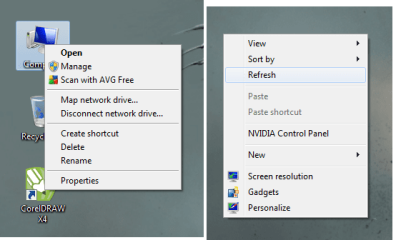
When I right click on a certain icon (eg Computer, Firefox shortcut...) the menu looks low graph and old style, like on XP e.g. and Aero is enabled. But when I rightclick on my desktop the buttons and the menu seem normal.

Anyway I can fix this?

I added image so You can see what it really looks like...
 

Attachments
  • Untitled.png
    Untitled.png
    29.4 KB · Views: 76

My Computer

OS
Windows 7
CPU
Intel Core2Quad Q9400
Motherboard
Gigabyte P35-DS3
Memory
3GB Kingston DDR2
Graphics Card(s)
nVidia GForce 8600GT
Monitor(s) Displays
Samsung Syncmaster 2243NW
Screen Resolution
1680x1050 + 1440x900
Hard Drives
WD 640GB
WD 160GB
WB 80GB
Keyboard
Razer Tarantula
Mouse
Razer Lachesis
Internet Speed
2MB/s
Hi Munch,

To be honest, I can;t see much difference, maybe a slightly darker font on the First one. Perhaps it's easier to see when your at the desktop. :)

Here's a few things to check anyway.
  • Graphics card drivers are up to date from the manufacturers website
  • Try a different theme
  • Right Click on Computer, select properties, click on advanced system settings, Under performance - click settings, adjust for best appearance

Hope this helps
 

My Computer

Computer Manufacturer/Model Number
Custom Hack job
OS
Windows 7 Ultimate 64 bit
CPU
Intel(R) Core(TM)2 Quad CPU Q8200 @ 2.33GHz
Motherboard
GigaByte EP45-UD3
Memory
8 GB Kingston
Graphics Card(s)
Nvidia GeForce 9600GT
Sound Card
Soundblaster Audigy
Monitor(s) Displays
AOC x2 22"
Hard Drives
2 x Samsung 500GB (RAID)
2 x Samsung 2TB
1 x WD Green 2TB
1 x Seagate 1TB
1 x Samsung 500GB
PSU
Thermaltake QFan 750W
Case
CM Scout Gaming
Cooling
Coolermaster V10
Keyboard
Microsoft Wireless Keyboard 1000
Mouse
Microsoft Wireless Optical 2000
Internet Speed
320
Other Info
Winfast PVR2000CP
LG DVD-RAM DVD/RW/DL Super Multi
Linksys WMP300Nx2 Wireless Adapter
I have tried all the things You said...
its adjusted for best performance, tried a couple of themes, and installed the latest drivers just after installing the system yesterday.

Heres a screen capture of what it looks like and where it appears.
Screenr - @mekan_zec: Buggy rightclick menu

I know its not a big deal but its really annoying, surprisingly, and kinda like it when its all perfect xD
 

My Computer

OS
Windows 7
CPU
Intel Core2Quad Q9400
Motherboard
Gigabyte P35-DS3
Memory
3GB Kingston DDR2
Graphics Card(s)
nVidia GForce 8600GT
Monitor(s) Displays
Samsung Syncmaster 2243NW
Screen Resolution
1680x1050 + 1440x900
Hard Drives
WD 640GB
WD 160GB
WB 80GB
Keyboard
Razer Tarantula
Mouse
Razer Lachesis
Internet Speed
2MB/s
Hi Munch, Welcome to SF,

I guess its the issue with AVG on your Context Menu.

To Fix the problem Download ShellExView

The rule is to disable non-Microsoft context menu handlers *one-by-one* and verify if the problem is solved. If disabling one does not solve the problem, undo the disabled item and disable the next non-Microsoft handler. Do the same until the problem is solved and finally identify the culprit. Scroll right to see the Company Name column in ShellExView.

Hope this helps
Captain
 

My Computer

Computer Manufacturer/Model Number
Samsung NP550P5C-S02IN
OS
Windows 7 Ultimate - 64-bit | Windows 8 Pro - 64-bit
CPU
Intel® Core™ i7 Processor 3,610QM (2.30Hz, 6MB L3 Cach
Memory
8 GB
Graphics Card(s)
NVIDIA® GeForce® GT 650M 2GB Graphics, Optimus™ techno
Sound Card
SoundAlive™ JBL 3 Speakers (With sub-Woofer)
Monitor(s) Displays
39.62cm (15.6) SuperBright 300nit HD+ LED Display
Screen Resolution
1,600 x 900, Anti-Reflective
Hard Drives
1TB S-ATA II Hard Drive (5,400RPM)
Thanks for the welcome :)
I do have AVG...can I do something in it to fix this?
If not, could You please write a bit more precisely about what I should do in the ShellExView app because I kinda dont understand anything :P
 

My Computer

OS
Windows 7
CPU
Intel Core2Quad Q9400
Motherboard
Gigabyte P35-DS3
Memory
3GB Kingston DDR2
Graphics Card(s)
nVidia GForce 8600GT
Monitor(s) Displays
Samsung Syncmaster 2243NW
Screen Resolution
1680x1050 + 1440x900
Hard Drives
WD 640GB
WD 160GB
WB 80GB
Keyboard
Razer Tarantula
Mouse
Razer Lachesis
Internet Speed
2MB/s
Okay, nevermind, I have disabled the AVG shell extension and now it all works except the context menu of 'Computer' ...but I guess I can live with that

Thanks both for help!
 

My Computer

OS
Windows 7
CPU
Intel Core2Quad Q9400
Motherboard
Gigabyte P35-DS3
Memory
3GB Kingston DDR2
Graphics Card(s)
nVidia GForce 8600GT
Monitor(s) Displays
Samsung Syncmaster 2243NW
Screen Resolution
1680x1050 + 1440x900
Hard Drives
WD 640GB
WD 160GB
WB 80GB
Keyboard
Razer Tarantula
Mouse
Razer Lachesis
Internet Speed
2MB/s
Thanks for the welcome :)
I do have AVG...can I do something in it to fix this?
If not, could You please write a bit more precisely about what I should do in the ShellExView app because I kinda dont understand anything :P

Sorry i thought that the screen shot was yours.

Download ShellExView and open it. Then sort it by Company Name. Then disable all the Non-Microsoft application from that list.

Hope this helps,
Captain
 

My Computer

Computer Manufacturer/Model Number
Samsung NP550P5C-S02IN
OS
Windows 7 Ultimate - 64-bit | Windows 8 Pro - 64-bit
CPU
Intel® Core™ i7 Processor 3,610QM (2.30Hz, 6MB L3 Cach
Memory
8 GB
Graphics Card(s)
NVIDIA® GeForce® GT 650M 2GB Graphics, Optimus™ techno
Sound Card
SoundAlive™ JBL 3 Speakers (With sub-Woofer)
Monitor(s) Displays
39.62cm (15.6) SuperBright 300nit HD+ LED Display
Screen Resolution
1,600 x 900, Anti-Reflective
Hard Drives
1TB S-ATA II Hard Drive (5,400RPM)
Computer context menu is OK now.
Thanks again!

Am I supposed to mark the thread as solved? And if so how? :P
 

My Computer

OS
Windows 7
CPU
Intel Core2Quad Q9400
Motherboard
Gigabyte P35-DS3
Memory
3GB Kingston DDR2
Graphics Card(s)
nVidia GForce 8600GT
Monitor(s) Displays
Samsung Syncmaster 2243NW
Screen Resolution
1680x1050 + 1440x900
Hard Drives
WD 640GB
WD 160GB
WB 80GB
Keyboard
Razer Tarantula
Mouse
Razer Lachesis
Internet Speed
2MB/s
Computer context menu is OK now.
Thanks again!

Am I supposed to mark the thread as solved? And if so how? :P

Glad that you got it working :D
 

My Computer

Computer Manufacturer/Model Number
Samsung NP550P5C-S02IN
OS
Windows 7 Ultimate - 64-bit | Windows 8 Pro - 64-bit
CPU
Intel® Core™ i7 Processor 3,610QM (2.30Hz, 6MB L3 Cach
Memory
8 GB
Graphics Card(s)
NVIDIA® GeForce® GT 650M 2GB Graphics, Optimus™ techno
Sound Card
SoundAlive™ JBL 3 Speakers (With sub-Woofer)
Monitor(s) Displays
39.62cm (15.6) SuperBright 300nit HD+ LED Display
Screen Resolution
1,600 x 900, Anti-Reflective
Hard Drives
1TB S-ATA II Hard Drive (5,400RPM)

My Computer

Computer Manufacturer/Model Number
Custom Hack job
OS
Windows 7 Ultimate 64 bit
CPU
Intel(R) Core(TM)2 Quad CPU Q8200 @ 2.33GHz
Motherboard
GigaByte EP45-UD3
Memory
8 GB Kingston
Graphics Card(s)
Nvidia GeForce 9600GT
Sound Card
Soundblaster Audigy
Monitor(s) Displays
AOC x2 22"
Hard Drives
2 x Samsung 500GB (RAID)
2 x Samsung 2TB
1 x WD Green 2TB
1 x Seagate 1TB
1 x Samsung 500GB
PSU
Thermaltake QFan 750W
Case
CM Scout Gaming
Cooling
Coolermaster V10
Keyboard
Microsoft Wireless Keyboard 1000
Mouse
Microsoft Wireless Optical 2000
Internet Speed
320
Other Info
Winfast PVR2000CP
LG DVD-RAM DVD/RW/DL Super Multi
Linksys WMP300Nx2 Wireless Adapter
Back
Top