Right-Click Menu a tad bare

Plexus

New member
Local time
9:54 PM
Messages
2
In XP if I right-click in any folder I can click New and have my choice of New Folder, New Word Doc, New Excel File, New Notepad file, etc, but in Windows 7 all I get is New > Folder.
All of those options are available if I right-click the Desktop.

Surely there's a way to get this going in various folders?

Thanks in advance!

Charlie

 
Last edited by a moderator:

My Computer

OS
Windows 7 RTM
Plexus, do not put links in to other websites and such here. It would be considered spamming or advertising.

Second, does this happen only in certain folders, or in all of them?

~Lordbob
 

My Computer

Computer Manufacturer/Model Number
Hera
OS
Windows 7 Ultimate x64, Mint 9
CPU
Intel i5-2500k
Motherboard
ASUS P8P67 Pro
Memory
2x 4Gb Corsair VENGEANCE DDR3-1600
Graphics Card(s)
NVidia GeForce N260GTX Twin Frozr
Sound Card
Realtek HD OnBoard Audio
Monitor(s) Displays
ASUS 24" Monitor
Screen Resolution
1920x1080
Hard Drives
G.SKILL Phoenix Series 60GB SATA II MLC Internal Solid State Drive (SSD)
SAMSUNG Spinpoint F3R 1TB 7200 RPM 32MB Cache SATA II
PSU
Cooler Master Real Power Pro 750W
Case
Cooler Master Haf 932
Cooling
Fans
Keyboard
Razer Tarantula
Mouse
Razer Lachesis
Internet Speed
not fast enough
Well it was advertising, but I won't do it anymore. :-)

It was happening in all folders accept for the Desktop. I figured it was the UAC, though, and once I disabled that through MSCONFIG > Tools, I can right-click in any folder and make a new whatever I want.

Thanks!
 

My Computer

OS
Windows 7 RTM
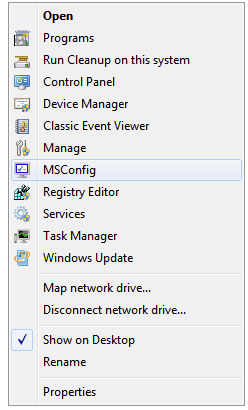
Btw, if one wants more useful items on a relatively bare right click context menu, there is a cool reg hack/tweak that enable one to add lots of useful direct links to items (with icons in the menu) to the "Computer" right click context menu. Stuff like, MSConfig, task manager, device manager, windows update, etc. etc. Available items can be added (or subsequently removed) individually so you can add just what you want, but if one added all those available, the Computer right click context menu would look like the screen shot below. Further info and the reg files are available here.

Btw, the Programs menu item in the screen shot below refers to "programs and features." And "run clean up on this system" refers to windows disk cleanup.
 

Attachments

  • 2009-09-24_213418.png
    2009-09-24_213418.png
    6.1 KB · Views: 8

My Computer

Computer Manufacturer/Model Number
HP DV8t quad
OS
Windows 7 Ultimate x64 (Retail)
CPU
i7-Q 720
Motherboard
Motherboard Chipset Intel Ibex Peak-M PM55, Intel Lynnfield
Memory
6 GB
Graphics Card(s)
nVidia GeForce GT 230M (1GB)
Sound Card
IDT High Definition Audio CODEC
Monitor(s) Displays
18.4 inch HP Infinity FHD (Samsung 184HT03-001)
Screen Resolution
1920 x 1080
Hard Drives
Hitachi 500GB 7200 rpm (x2)
Seagate FreeAgent 1.5 TB External USB (x2)
Thermaltake BlacX eSATA/USB 2.0 3.5/2.5 HD dock
Cooling
Zalman NC-2000 notebook cooling pad
Keyboard
laptop
Mouse
Logitech VX Revolution
Other Info
Backup Unit: Lenovo T61p
Back
Top