Solved Right Click Menu Display Problem

hasanhizli

New member
Local time
9:08 PM
Messages
21
Hi all,

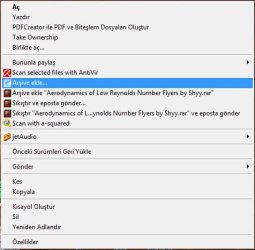
I have a strange problem. When I right click on a file (.exe, .dll, .jpeg, ...) I end up with a screen as in the attachment. (It should be like in http://images.maketecheasier.com/2009/12/win7-right-click-copy-move-to.gif )

However, there is no problem when I right click on desktop, it is as it should be (no blue band). I have a desktop PC and a laptop and both has the same problem. I tried system restore but no solutions:( What can be the reason? A virus or a malware (despite Avira and A-squared installed)?
 

Attachments

  • Adsız.jpg
    Adsız.jpg
    26.6 KB · Views: 28

My Computer

Computer Manufacturer/Model Number
ASUS
OS
Win7 Ultimate
CPU
T9600
Memory
4GB
Graphics Card(s)
Nvidea 240M
Is it always the same entry that shows in blue? If yes, what is it (hard to read the entries in your language). Anyhow, the desktop right click menu is different to other right click menus.
 

My Computer

Computer Manufacturer/Model Number
HP, Dell, Gateway, Toshiba - 4 laptops and 2 desktops
OS
Vista, Windows7, Mint Mate, Zorin, Windows 8
CPU
from 1.6GHz Duo to i7
Monitor(s) Displays
2x HP w2207
Hard Drives
5x HDD, 7x SSD, 12x Externals
Keyboard
with trackball - no mices
Mouse
Trackball mice
Internet Speed
DSL 6000
Would help if you could translate it to English...
 

My Computer

Computer Manufacturer/Model Number
Custom Build
OS
W7 RTM Ultimate x64
CPU
Intel Q8400 @ 2.66GHZ
Motherboard
Gigabyte GA-EG45M-UD2H
Memory
4GB DDR2-800
Graphics Card(s)
Gainward GTS 450 GLH 1GB Edition
Sound Card
Integrated 8 Channel
Monitor(s) Displays
AOC 23.6 Inch Widescreen LCD
Screen Resolution
1920x1080
Hard Drives
Seagate 500GB Internal
Western Digital 1TB Internal

Hitachi 1TB External
PSU
Apevia Java Power 500W
Case
Cooler Master HAF 922 Black
Cooling
Stock Intel CPU Fan
Keyboard
HP SK-2960 Multimedia Keyboard
Mouse
Logitech M350 Wireless Gaming Mouse
Internet Speed
1.5MB
All the entries are in blue (winrar commands, copy, cut, etc.) I will format win7 on my desktop PC but dont want to do the same for my laptop. I want to learn the magic behind this. If you want english version of the menu, it is as follows:

Open
Print
Create PDF and Bitmaps using PDF creator
open with
----------
Share with
Scan selected files with avira
add to archive
and regular winrar stuff
jetaudio
----------
load previous versions
----------
send
----------
cut
copy
----------
create shortcut
delete
rename
-----------
properties
 

My Computer

Computer Manufacturer/Model Number
ASUS
OS
Win7 Ultimate
CPU
T9600
Memory
4GB
Graphics Card(s)
Nvidea 240M
Problem Solved:

The reason is a beta version of a-squared ant malware installed. After uninstall it, the problem disappeared.
 

My Computer

Computer Manufacturer/Model Number
ASUS
OS
Win7 Ultimate
CPU
T9600
Memory
4GB
Graphics Card(s)
Nvidea 240M
Back
Top