Right Click Menu/Pull-Down Menu Problems

CanNotRecall

New member
Local time
10:25 AM
Messages
2
I recently bought a new laptop that came installed with Windows 7 Home Premium. For a few days, everything was fine; I transfered over some files, downloaded the usual programs, installed required updates, etc. Then, this happened: (Refer to attachments, I guess...)
Scr62.jpg

Scr2.png

Scr3.png

Scr5.png

Scr4.png

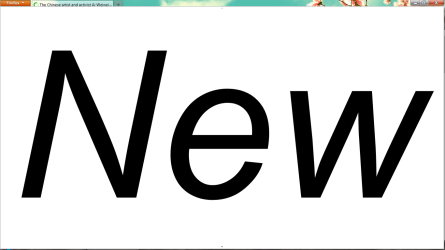
Image 1 is what happens when I right-click the desktop.
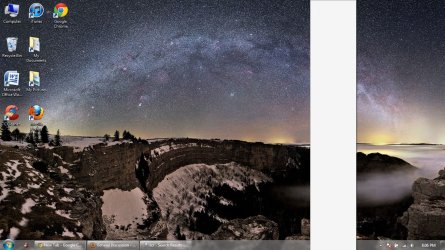
Image 2 is Chrome's menu.
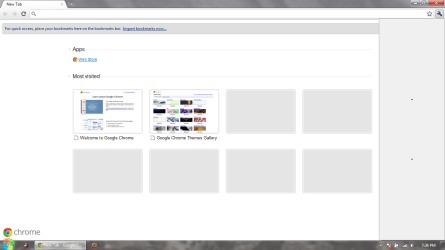
Image 3 is Firefox's menu.
Images 4 & 5 are Paint, what I had to go through to save these screenshots.

Apparently, this is only a problem with my User Account. The Guest account seems to have no problems akin to this in the time I spent over there.
Now, being the perfectionist/idiot I am, I ran System Restore twice. The first time mediated the problem for around 30 minutes, and the second time 5 minutes.

So, I suspect the problem lies in something I transferred over, but since this is a new computer/OS, I have no idea.

Any help would be appreciated. Thank you very much.
 

My Computer

OS
Windows 7 64 bit

My Computer

Computer Manufacturer/Model Number
Something I threw together
OS
Windows 7 Ultimate x64
CPU
Intel Core i7-2600K
Motherboard
Asus P8P67
Memory
16 GB G Skill F3-10666 CL9D-4GBRL
Graphics Card(s)
ATI Radeon HD 6870
Sound Card
ATI Radeon HDMI / Realtek ALC892
Monitor(s) Displays
2 x 22" standard monitors / LG32LC56v TV to watch films
Screen Resolution
1920 x1080
Hard Drives
2 x OCZ Vertex2 111.79GB
3 x Samsung103SJ
1 x Samsung103UJ
1 x WD3200BEVT
1 x Hitachi5K320-160
PSU
Thermaltake Toughpower Cable Management 750W
Case
Antec 300
Cooling
Noctua NH-U12P SE2 and 5 120mm Case fans
Keyboard
Microsoft Comfort Curve Keyboard 2000
Mouse
Hama M3110 / Logitech M305
Internet Speed
16000
Other Info
I have also used Fedora, Suse, Ubuntu Linux
And all other Windows from 95 to date except ME
Looks like something or somebody set menu font size to 500 instead 9.

Try to go through applying different Themes (Right click on the Desktop - Personalize)

If menu does not allow you to get there, start this file manually first
Code:
C:\Windows\Resources\Ease of Access Themes\classic.theme
It is a Classic Windows theme.

And it is a good idea to check for viruses.
Microsoft has a FREE antivirus solution Microsoft Security Essentials
Virus, Spyware & Malware Protection | Microsoft Security Essentials
 

My Computer

Computer type
PC/Desktop
OS
Windows 8.1 ; Windows 7 x86 (Dec2008-Jan2013)
Other Info
"The scale icon at the top right of a post or tutorial is how you can give rep to the member."
Thanks for the replies. Changing the themes seems to work. The thing is, I am the only person using this laptop, so the fact that something like that changed without my permission is unsettling. I am well aware of Microsoft Security Essentials, but my computer came preloaded with a free 12-month trial of McAfee. As much as I hate the product, it's free, so I thought I'd just abuse it for as long as possible. Would it be sensible to uninstall that and install MSE in its place?
 

My Computer

OS
Windows 7 64 bit
As long as you update antivirus regularly, you should be just fine with McAfee.

The problem could be caused by a side error during installation of third party software or theme.
As long as you scanned your computer with latest antivirus updates and there is nothing suspicious, I would not worry about it much.

If this thing will return and you will notice something suspicious - that would be the time to be alarmed.
 

My Computer

Computer type
PC/Desktop
OS
Windows 8.1 ; Windows 7 x86 (Dec2008-Jan2013)
Other Info
"The scale icon at the top right of a post or tutorial is how you can give rep to the member."
Back
Top