Right Mouse Button

MrsSlater070504

New member
Local time
1:43 AM
Messages
10
Location
Maryland
Hey all,

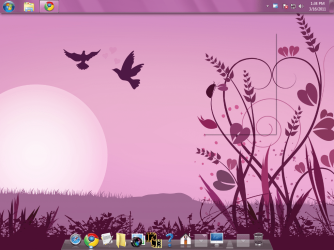
I am new here so please bare with me. I just upgraded my Vista to Windows 7 Home Premium yesterday. Finally after a long wait to get it done, my pc is amazing and I love it so far. However one problem is driving me nuts. I have a brand new mouse it's a logitech and it's wireless, I have fresh batteries in it and I have re-set the pc numerous times as well as checked all mouse settings. I have looked everywhere and when I right click on the mouse (any mouse I connect to the pc at this point) it only opens up with a white or pink box as show in the picture below. Nothing pops up. I really use that right click a lot, I hope you all can help. I can't even right click on start menu, same thing happens, so its hard to fix it..
:eek:
 

Attachments

  • pc.png
    pc.png
    196.5 KB · Views: 26

My Computer

OS
Windows 7
Hi there, and welcome to the forums.

Have a look at this excellent tutorial, it might solve it for you.
 

My Computer

Computer Manufacturer/Model Number
Toshiba Satellite L500
OS
Windows 7 Home Premium x64 OEM --> RTM clean install
CPU
Intel T4400
Motherboard
? - laptop inbuilt ?
Memory
4Gb
Graphics Card(s)
? - Mobile Intel(R) 4 Series Express Chipset Family ?
Sound Card
Realtek
Monitor(s) Displays
? + extended to a 42" LG55PC plasma tele!
Screen Resolution
1366 * 768
Hard Drives
320Gb 5500rpm
PSU
?
Case
?
Cooling
?
Internet Speed
3Meg, when it works.
Other Info
A LOWLY LAPTOP!
It didn't solve the problem, thanks for the help. Let me know if you have any more ideas.

-Jenn
 

My Computer

OS
Windows 7
First, have you tried a known working mouse on your system to see whether the problem is the system or the mouse?

Then, have you downloaded the most recent drivers for your mouse? You might try going to Device Manager, (under Mouse and Other Pointing Devices) and deleting the mouse. Reboot and let the system reinstall the driver for it. Sometimes a program, bad driver or conflicts that destroy or corrupt files will necessitate a REinstallation.

There's also some help on-line -- by way of example, take a look at these articles, and there's more on Google:

Logitech Wireless Mouse - How To Information | eHow.com

Logitech Cordless Mouse Right click not working
 

My Computer

Computer Manufacturer/Model Number
HP Pavillion dv5t (generation 1)
OS
Vista 64 bit and 32 bit (SP2)
CPU
Intel(R) Core(TM)2 Duo Processor T9400 (2.53 GHz
Memory
4GB DDR2 System Memory (2 Dimm)
Graphics Card(s)
512 MB NVIDIA GeForce 9600M GT
Monitor(s) Displays
15.4" diagonal WSXGA+ High-Definition HP BrightView Widescre
Screen Resolution
1680 x 1050
Hard Drives
320GB 5400RPM SATA Hard Drive with HP ProtectSmart Hard Drive Protection
Keyboard
Built-in HP
Mouse
Built in - Synaptics TouchPad V6.5 on PS/2 Port
Internet Speed
Max
Other Info
~ Intel Next-Gen Wireless-N Mini-card w/Bluetooth ~ Blu-Ray ROM DVD+/-R/RW ~ Integ. HDTV Hybrid Tuner ~ 12 Cell Battery ~ MS Office (Home Premium) 2007 ~
Hi Jennifer and welcome to Windows 7 Forums :party:

I can't see anything in your picture. :confused:

In your mouse properties, have you clicked on Restore Defaults?
 

My Computer

Computer type
PC/Desktop
Computer Manufacturer/Model Number
Dwarf Dwf/11/2012 r09/2013
OS
Windows 8.1 Pro RTM x64
CPU
Intel Core-i5-3570K 4-core @ 3.4GHz (Ivy Bridge) (OC 4.4GHz)
Motherboard
ASRock Z77 Extreme4-M
Memory
4 x 4GB DDR3-1600 Corsair Vengeance CMZ8GX3M2A1600C9B (16GB)
Graphics Card(s)
MSI GeForce GTX770 Gaming OC 2GB
Sound Card
Realtek High Definition on board solution (ALC 898)
Monitor(s) Displays
ViewSonic VA1912w Widescreen (VGA)
Screen Resolution
1440x900
Hard Drives
OCZ Agility 3 SSD 120GB SATA III x2 (RAID 0)
Samsung HD501LJ 500GB SATA II x2
Hitachi HDS721010CLA332 1TB SATA II
Iomega 1.5TB Ext USB 2.0
WD 2.0TB Ext USB 3.0
PSU
XFX Pro Series 850W Semi-Modular
Case
Gigabyte IF233
Cooling
1 x 120mm Front Inlet 1 x 120mm Rear Exhaust
Keyboard
Microsoft Comfort Curve Keyboard 3000 (USB)
Mouse
Microsoft Comfort Mouse 3000 for Business (USB)
Internet Speed
NetGear DG834Gv3 ADSL Modem/Router (Ethernet) ~4.0 Mb/s (O2)
Antivirus
Avast! 8.0.1497
Browser
IE 11
Other Info
Optical Drive: HL-DT-ST BD-RE BH10LS30 SATA Bluray
Lexmark S305 Printer/Scanner/Copier (USB)
WEI Score: 8.1/8.1/8.5/8.5/8.25
Asus Eee PC 1011PX Netbook (Windows 7 x86 Starter)
I am sorry, I got a better one now. Its just a white box, I restored the settings yes. All the mouses I use on this computer, wired and wireless are doing this. I never had this issue until I upgraded.
 

Attachments

  • pc.png
    pc.png
    1.1 KB · Views: 12

My Computer

OS
Windows 7
I have an idea, just for something to try. Let's try turning off Windows Aero, and see if you still see the difficulty.

Please do the following:
> Start
> Control Panel
> Personalization
In the box displaying themes, scroll down until you see Windows Classic, and click on that. If you then right click on things, do you still have no menu?
 

My Computer

Computer Manufacturer/Model Number
HP 6000 Pro Micro Tower
OS
W7 Professional x64
CPU
Core 2 Duo 2.93
Memory
2 GB
Graphics Card(s)
ATI Radeon 4695
Monitor(s) Displays
Two HP 17's
Hard Drives
150GB Sata Drive
Case
Tiny. Kinda cute.
Keyboard
HP Supplied. Surprisingly nice.
Mouse
Gateway Mouse from an E2610D
Internet Speed
45 mbps
@ WebMattR

I did exactly what you told me to do. Went to Classic clicked that, it was still the same thing. If I go over a picture to save it, or just right click in general, that whole right click doesn't want to work.


@ ImPerfect1

I plugged in my old mouse (wired by the back of the pc) and it doesn't work either. The drivers say they work fine. I unistalled, restarted, let it reinstall and it still wasn't working.

I am beginning to think something went wrong when I upgraded. Which is really horrible for me cause it took a very long time.

Thank you All :)
 

My Computer

OS
Windows 7
Was that your only option? That is why I always do clean installs, I have had bad times with upgrades. Have you tried going to safe mode and see if the problem persists?
 

My Computer

Computer type
PC/Desktop
Computer Manufacturer/Model Number
HP
OS
Windows Seven Ultimate x64 SP1
CPU
Intel Core i7 x980 @ 3.33GHz
Memory
12.0 GB
Graphics Card(s)
Nvidia GeForce GTX 260
I believe this can sometimes happen when Windows 7 install misinterprets a reg entry in Vista, during an upgrade. Try this if you are confident with using the registry.

Back up your registry first!
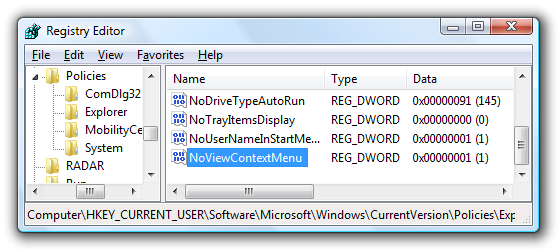
Open up regedit.exe through the start menu search or run box, and then browse down to the following key (create the key if it does not exist)
HKEY_CURRENT_USER\Software\Microsoft\Windows\CurrentVersion\Policies\Explorer
image72.png

Create a new 32-bit DWORD value on the right-hand side named NoViewContextMenu with one of these values:
  • Enable Context Menus: 0
  • Disable Context Menus: 1
The change should be instant, whether enabling or disabling the context menus.
Note that this setting could also be set under HKEY_LOCAL_MACHINE as well, so you should check both places if this doesn’t work.
 

My Computer

Computer Manufacturer/Model Number
Three desktops and one laptop with good specs..
OS
Vista and now 7 in 32 and 64 bit.
That did not work either. Maybe I am doing something wrong. I put what you told me to do, but I didn't have a list of things in there as you did. LOCAL_Machine wasn't it, the first one worked. But still my problem isn't solved. :(
 

My Computer

OS
Windows 7
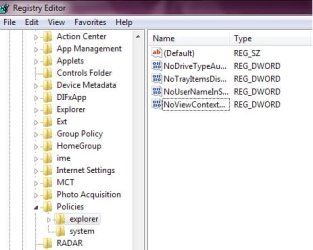
here is what I got and my problem still isn't fixed.

:cry:
 

Attachments

  • registy.jpg
    registy.jpg
    26.5 KB · Views: 6

My Computer

OS
Windows 7
The list will be different, no worry about that. But did you put a "0" in as advised?
 

My Computer

Computer Manufacturer/Model Number
Three desktops and one laptop with good specs..
OS
Vista and now 7 in 32 and 64 bit.
@Davehc
I went into the registry and being as there was a NoContextView key already, I changed the value from 1, to 0. It did nothing to fix the problem.
I switched it back to 1, and still nothing.
The only time the right click does work? Is IN the registry.
Which is odd.

Does anyone know what could be the cause of this, if the registry wont even fix it?

-Jenn
 

My Computer

OS
Windows 7
And you rebooted after the registry change, so that window could regregister it?
 

My Computer

Computer Manufacturer/Model Number
Three desktops and one laptop with good specs..
OS
Vista and now 7 in 32 and 64 bit.
Yes I did. I still get that white box. And even in browsers if I hit like FILE EDIT etc it does it now.
 

My Computer

OS
Windows 7
My brother found out what the problem was.
A program called "Y'z Shadow" was causing the problem.

Thank you for your help everyone. :)
 

My Computer

OS
Windows 7
I have been watching your posts with this mouse problem and I'm glad your problem is solved. I don't think anybody here new you had Y'z Shadow installed. Thanks for posting back to let us know how your brother fix it.
 

My Computer

Computer type
PC/Desktop
Computer Manufacturer/Model Number
Home made Desktop
OS
Windows 10 Pro. 64/ version 1709 Windows 7 Pro/64
CPU
Intel i7-6800K @ 4.3
Motherboard
ASUS X-99 Deluxe II
Memory
Corsair Platinum 16 gig @2400
Graphics Card(s)
EVGA GTX 1070 OC
Monitor(s) Displays
Asus 27" LED LCD/VE278Q
Screen Resolution
1920-1080 or 1280-720 HDMI
Hard Drives
INTEL SSD 730-240 Gb Sata 3.0/
PSU
EVGA Platium 1200W
Case
Phanteks Luxe Tempered Glass 8 fans/ one radiator
Cooling
XSPC/ Water Cooled CPU
Keyboard
Das 4 Professional
Mouse
Logitech M705/MX Anywhere 2-S
Internet Speed
100 mbits
Antivirus
Microsoft Security Essentials/ Malwarebytes Premium 3.0/ SAS
Browser
I.E. 11 default/Firefox/ ISP Time Warner Cable/Spectrum
Other Info
LG BluRay Burner/
Sound system-KLipsch-THX/
Icy Dock ssd Hot Swap bays.
I didn't even know I had that installed, weird. so weird, I am having issues trying to get it out of my pc :(
 

My Computer

OS
Windows 7
I didn't even know I had that installed, weird. so weird, I am having issues trying to get it out of my pc :(
When you say you're having troubles getting it out of your PC, what do you precisely mean?
 

My Computer

Computer Manufacturer/Model Number
HP 6000 Pro Micro Tower
OS
W7 Professional x64
CPU
Core 2 Duo 2.93
Memory
2 GB
Graphics Card(s)
ATI Radeon 4695
Monitor(s) Displays
Two HP 17's
Hard Drives
150GB Sata Drive
Case
Tiny. Kinda cute.
Keyboard
HP Supplied. Surprisingly nice.
Mouse
Gateway Mouse from an E2610D
Internet Speed
45 mbps
Back
Top