Right Side Start menu icons

RBCC

New member
Member
VIP
Local time
5:19 AM
Messages
119
Where in the registry can I change the icons for these items:
Default Icons, Device and Printers and games on the right side of the start menu? John:D:o
 

My Computer

Computer Manufacturer/Model Number
Gateway
OS
Windows 7 Ultimate
CPU
Turion 64 Bit
Memory
2 GIG
Hi John,

When you say the icons, do you mean the icon your User Account picture changes to as you hover over each item on the list (i.e. Camera/Printer, round Windows logo/green check, and Blue question mark)? And I think you mean Default Programs not Default Icons :)

Cheers,

Walker
Windows Outreach Team
 

My Computer

Computer Manufacturer/Model Number
HP Pavilion dm3 (netbook) *** 27" iMac (Dual-Boot)
OS
Windows 7 Home Premium (64-bit) *** Windows XP SP3 (32-bit), OSX 10.6
CPU
AMD Athlon Neo X2 1.6GHz *** Intel Core i7 Quad Core 2.8GHz
Memory
4.00 GB *** 4.00 GB
Graphics Card(s)
ATI Radeon HD 3200, 384MB *** ATI Radeon HD 4850, 1GB
Sound Card
ATI High Definition Audio *** ATI High Definition Audio
Monitor(s) Displays
LG Flatron W2053TX
Screen Resolution
1600 x 900 (monitor), 1266 x 768 (laptop) *** 2560 x 1440
Hard Drives
300 GB SATA (internal), 500 GB HP SimpleSave (external) *** 1 TB SATA (internal), 160 GB LaCie (external)
Mouse
Logitech Cordless Optical Mouse for Notebooks
Internet Speed
Broadband
its not in the registry....
you can find when here:
C:/Windows/System32/imageres.dl

use res hacker and change them

+rep if helped
 

My Computer

OS
Win 7
CPU
Intel Core 2 Quad Q6600
Motherboard
P35 Neo Combo
Memory
G.Skill 2x2GB CL5-5-5-15
Graphics Card(s)
XFX 8800GT 670M 512MB DDR3
Monitor(s) Displays
Samsung 26inch
Hard Drives
500Gb
Case
NZXT Nemesis Elite
its not in the registry....
you can find when here:
C:/Windows/System32/imageres.dl

use res hacker and change them

+rep if helped

Is it a fair practice to ask for reps ?
 

My Computer

Computer type
PC/Desktop
Computer Manufacturer/Model Number
Self Assembled
OS
Microsoft Windows 10 Pro Insider Preview 64-bit
CPU
Intel(R) Core(TM) i3-4130 CPU @ 3.40GHz
Motherboard
Gigabyte Technology Co., Ltd. B85M-D3H
Memory
Corsair Vengence 4GB x2 (8.00GB Dual-Channel DDR3 @ 798MHz)
Graphics Card(s)
2047MB GeForce GTS 450 (ZOTAC International)
Sound Card
Onboard (Realtek High Definition Audio)
Monitor(s) Displays
LG Flatron E2040T
Screen Resolution
1600x900
Hard Drives
Western Digital 1 TB
Seagate 500 GB
PSU
Corsair VS550
Case
Cooler Master K380
Cooling
Cooler Master Seidon 120V Plus
Keyboard
Logitech MK260r
Mouse
Logitech MK260r
Internet Speed
PMPL Broadband
Antivirus
Windows Defender + MBAM
Browser
Firefox
Other Info
Dell Studio 15" Laptop
its not in the registry....
you can find when here:
C:/Windows/System32/imageres.dl

use res hacker and change them

+rep if helped

Is it a fair practice to ask for reps ?

No it's not, please don't ask for rep, rep will be given accordingly.
 

My Computer

Computer Manufacturer/Model Number
Custom Build
OS
W7 RTM Ultimate x64
CPU
Intel Q8400 @ 2.66GHZ
Motherboard
Gigabyte GA-EG45M-UD2H
Memory
4GB DDR2-800
Graphics Card(s)
Gainward GTS 450 GLH 1GB Edition
Sound Card
Integrated 8 Channel
Monitor(s) Displays
AOC 23.6 Inch Widescreen LCD
Screen Resolution
1920x1080
Hard Drives
Seagate 500GB Internal
Western Digital 1TB Internal

Hitachi 1TB External
PSU
Apevia Java Power 500W
Case
Cooler Master HAF 922 Black
Cooling
Stock Intel CPU Fan
Keyboard
HP SK-2960 Multimedia Keyboard
Mouse
Logitech M350 Wireless Gaming Mouse
Internet Speed
1.5MB
its not in the registry....
you can find when here:
C:/Windows/System32/imageres.dl

use res hacker and change them

+rep if helped

Is it a fair practice to ask for reps ?

No it's not, please don't ask for rep, rep will be given accordingly.
Also could make you loose your current rep (neg rep from a staff member), which happened to me way back when i was a newbie ;)
 
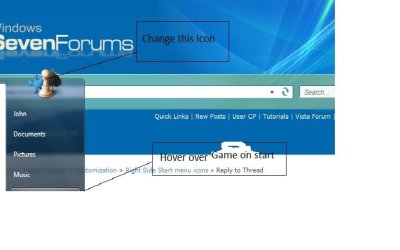
I sent along a picture

When you haver over games the icon on the top of the start menu changes, how do change that icon. See pic:D
 

Attachments

  • desk.jpg
    desk.jpg
    29.1 KB · Views: 34

My Computer

Computer Manufacturer/Model Number
Gateway
OS
Windows 7 Ultimate
CPU
Turion 64 Bit
Memory
2 GIG
When you haver over games the icon on the top of the start menu changes, how do change that icon. See pic:D
Hi John!

Excellent idea, pal. I never play games, so I never looked on it .... searching for a wayout if possible, looking this thread if anybody knows it .
 

My Computer

Computer type
PC/Desktop
Computer Manufacturer/Model Number
Self Assembled
OS
Microsoft Windows 10 Pro Insider Preview 64-bit
CPU
Intel(R) Core(TM) i3-4130 CPU @ 3.40GHz
Motherboard
Gigabyte Technology Co., Ltd. B85M-D3H
Memory
Corsair Vengence 4GB x2 (8.00GB Dual-Channel DDR3 @ 798MHz)
Graphics Card(s)
2047MB GeForce GTS 450 (ZOTAC International)
Sound Card
Onboard (Realtek High Definition Audio)
Monitor(s) Displays
LG Flatron E2040T
Screen Resolution
1600x900
Hard Drives
Western Digital 1 TB
Seagate 500 GB
PSU
Corsair VS550
Case
Cooler Master K380
Cooling
Cooler Master Seidon 120V Plus
Keyboard
Logitech MK260r
Mouse
Logitech MK260r
Internet Speed
PMPL Broadband
Antivirus
Windows Defender + MBAM
Browser
Firefox
Other Info
Dell Studio 15" Laptop
You can change it. You just gotta edit imageres.dll (i believe thats the only one you have to edit)
 
I think this link may help you...

"http://www.virtualplastic.net/html/icn_reg.html"


its registry and I didnt get the shell32 link in registry but I made it and have successfully done for changing the system default folder...
folder could also be done from imageres.dll but I was unaware of that earlier.
 

My Computer

OS
Windows 7 enterprise 32 bit
If I'm not mistaken, if you change the icon for an item, the new icon appears everywhere in the system, wherever the old icon used to appear. For example, if you change the icon for a program on the Desktop, the new icon for that program would appear in the Start Menu, if you pinned it to the Start Menu, or in Windows Explorer if you looked for the program's folder there. So rather than trying to go into the Start Menu (as you are) to change an app's icon, why not just change it from the Desktop or some other easier location. The change should apply to it's location in the Start Menu when you're done.

Here are a few interesting tutorials that might help (one of which was written by Arc!):
Folder Icon Change
User Folders - Change Default Icon
How to Change Windows 7 System Icons Using Resource Hacker
Windows 7 Tray Icons Changer by =Kishan-Bagaria on deviantART
 

My Computer

Computer Manufacturer/Model Number
HP Pavillion dv5t (generation 1)
OS
Vista 64 bit and 32 bit (SP2)
CPU
Intel(R) Core(TM)2 Duo Processor T9400 (2.53 GHz
Memory
4GB DDR2 System Memory (2 Dimm)
Graphics Card(s)
512 MB NVIDIA GeForce 9600M GT
Monitor(s) Displays
15.4" diagonal WSXGA+ High-Definition HP BrightView Widescre
Screen Resolution
1680 x 1050
Hard Drives
320GB 5400RPM SATA Hard Drive with HP ProtectSmart Hard Drive Protection
Keyboard
Built-in HP
Mouse
Built in - Synaptics TouchPad V6.5 on PS/2 Port
Internet Speed
Max
Other Info
~ Intel Next-Gen Wireless-N Mini-card w/Bluetooth ~ Blu-Ray ROM DVD+/-R/RW ~ Integ. HDTV Hybrid Tuner ~ 12 Cell Battery ~ MS Office (Home Premium) 2007 ~
if you mean to change the source icon for the system Icons, you will need to change the system file... imageres.dll to be precise. however all risk is yours if you damage this file. So if you are going for the change in system file, you will need some tools like restorator.

google restorator and you can get the trial version which is time bound so you can change your system file.

All you do to your system is your responsibility
 

My Computer

OS
Windows 7 enterprise 32 bit
Back
Top