
Right Version of Bios?

NewToit

New member
VIP
Local time
8:47 PM
Messages
50
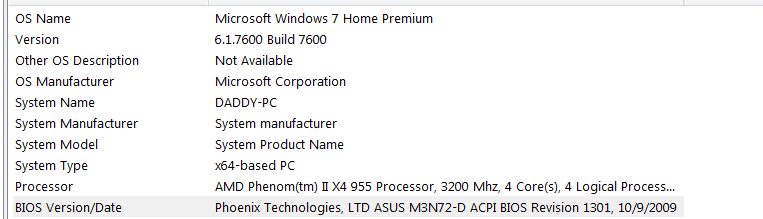
I have been having some VERY serious issues with my computer. How do I tell if I downloaded and 'flashed' the proper bios version? Do I need to contact ASUS? Can someone tell if I have the right version by looking? What do I do? I might have put the wrong version on? I might not have..... Is there only 1 version?
 

Attachments
  • Capture.PNG
    Capture.PNG
    6.6 KB · Views: 51

My Computer

OS
Win 7
CPU
Phen 965 AMD
Motherboard
Asus m3n72-d
Memory
4gig ddr kingston
Graphics Card(s)
Nvidia 9800 something or other - good card
Sound Card
On MoBo
Monitor(s) Displays
Acer standard 19 ' / Sony Bravia 42'
Screen Resolution
I change it sometimes
Hard Drives
500gb
500gb

Western Digital

My Computer

Computer Manufacturer/Model Number
Custom
OS
Windows 7 Professional x64
CPU
Intel i7 2600K OC'd @ 4620 MHz
Motherboard
Asus P8Z68-V Pro
Memory
16GB GSkill Sniper 2133 Mhz (4x4GB)
Graphics Card(s)
EVGA GeForce GTX 480 SuperClocked+
Sound Card
Realtek High Definition Audio
Monitor(s) Displays
2x Acer S273HLbmii 27"
Screen Resolution
2 x 1920x1080
Hard Drives
64GB Crucial M4 SSD

Storage: Hitachi 1TB 5400RPM, Samsung 1.5TB 5400RPM
PSU
Corsair HW Series 750w (modular)
Case
Cooler Master HAF 932 Advanced Blue Edition
Cooling
CM Hyper 212+ CPU cooler, 3x 230mm + 1x 140mm case fans
Keyboard
Logitech MK320 (wireless)
Mouse
Logitech MK320 (wireless)
Internet Speed
30 Mb/s : 2 Mb/s
According to the official Asus website these are the bios versions you might have, you likely have one of teh first two:

M3N72-D BIOS 1402

M3N72-D BIOS 1301

1102 BIOS for M3N72-D

1002 BIOS for M3N72-D

0902 BIOS for M3N72-D

0701 BIOS for M3N72-D

0603 BIOS for M3N72-D

0502 BIOS of M3N72-D

M3N72-D BIOS 0404

M3N72-D BIOS 0305

M3N72-D BIOS 0202

If you want the latest correct bios:

Go to: ASUSTeK Computer Inc.-Support-

In the "Input Model to Search" Box on the Left Input Your Model # (M3N72-D)

One option should come up in the list (M3N72-D)

Pick your operating system (Win 7 x??)

You will see a list of downloads --

BIOS (11) [BIOS HISTORY]
BIOS-Utilities (1)
Chipset (1)
AUDIO (1)
Utilities (2)
Manual (12)

EDIT: Wow, I take forever to type :)
 

My Computer

Computer Manufacturer/Model Number
Apple Macbook Pro (April 2009)
OS
W7 Ult. x64 | OS X
CPU
Intel Mobile Core 2 Duo 2.93Ghz [T9800 Penryn]
Motherboard
NVIDIA nForce 730i Rev. B1 [Mac-F2268EC8 (U2E1)]
Memory
4096MB Samsung DDR3 Dual Channel [PC3-8500F 1066Mhz]
Graphics Card(s)
NVIDIA GeForce 9600M GT 512MB [G96M Rev. C1]
Sound Card
SB X-Fi Surround 5.1 USB | Onboard Realtek (Disabled)
Monitor(s) Displays
Acer x223wbd 22" | Apple Anti-Glare 17" (Disabled)
Screen Resolution
{Current} 1440x900 {Acer} 1680x1050 {Apple} 1920x1200
Hard Drives
{Internal}
Seagate Momentus 320GB 2.5" 7200RPM [ST9320421AS]

{Externals}
LaCie 320GB USB 2.0 HDD [301284UR]
LaCie 750GB USB 2.0 FW400 eSATA HDD [301314U]
LaCie 1TB USB 2.0 HDD [301304UR]
PSU
Magsafe
Case
Aluminum/Unibody (MBP52)
Cooling
2 x 6000 RPM Fans
Keyboard
Logitech G-15v2 [PN 920-000379]
Mouse
Logitech G-9 [PN 910-000338]
Internet Speed
12Mbps/2.5Mbps w/ 24Mbps Speed Boost [Comcast]
Other Info
Logitech X-540 Speakers [PN 970223-0122]
Sennheiser PC-151 Headset
I get the feeling that you are not particularly experienced in flashing a BIOS. If that is the case, I would suggest describing the kind of problems that you are having, before flashing it again, because there is a certain amount of risk to having a bad flash (which could be he cause of your current problems). A flash is something that should only be done if it is actually needed. Personally, I prefer to buy replacement BIOS chips, which already have the latest BIOS flashed in them.

EDIT: After looking at a picture of your chip, you may want to disregard what I said about replacing it, because it is not socketed like mine. It's looks like it requires soldering:

http://cgi.ebay.com/BIOS-Chip-ASUS-...ViewItemQQptZMotherboards?hash=item5882aa7501
 

My Computer

Computer Manufacturer/Model Number
DIY
OS
W7x64 Pro, SuSe 12.1/** W7 x64 Pro, XP MCE
CPU
Phenom II 1090T w/Noctua NH-D14 /**4400+ X2 w/CM Hyper TX 3
Motherboard
ASRock 890FX Deluxe 4/**A8N-SLI
Memory
2 x 2GB Patriot PGS34g1600LLKA/**4x1GB Corsair VS
Graphics Card(s)
EVGA GTX460 SC/**EVGA 8800GTS
Sound Card
Asus Xonar D2X/**Xonar D1
Monitor(s) Displays
Acer X233H, Dell E152FPc /**LG M237-WD
Screen Resolution
1920x1080 & 1024x768/**1980x1080
Hard Drives
WDC 2TB, 1.5TB, 1TB, 500GB,Seagate 500GB , Maxtor 80GB /**500GB Seagate & WDC 1TB Black
PSU
CM RS600 w/ APC BX1000G/**Antec 500 TP w/ APC BX1000
Case
HAF922/**Antec 1040IIB
Cooling
3x200mm, 1x140 and 1x120mm/**5x80mm fans
Keyboard
Logitech Media USB/**Saitek Eclipse
Mouse
Cordless Trackman Wheel/**Ditto
Internet Speed
3.3Mbps
Other Info
SB 560 5.1 w/ Sennheiser RS140/**Creative T20 speakers, Dvico FusionHDTV7 Gold RT, Cisco E3000, HP 5510V AIO, Linksys E3000, Belkin F5U237 hub and **F5D8055 adapter
(** = 2nd rig)
Thanks everyone! Got it! Works!
 

My Computer

OS
Win 7
CPU
Phen 965 AMD
Motherboard
Asus m3n72-d
Memory
4gig ddr kingston
Graphics Card(s)
Nvidia 9800 something or other - good card
Sound Card
On MoBo
Monitor(s) Displays
Acer standard 19 ' / Sony Bravia 42'
Screen Resolution
I change it sometimes
Hard Drives
500gb
500gb

Western Digital
Although I rarely recommend flashing a BIOS [for the obvious risk factor] for future reference, always create a backup of your current BIOS before flashing. That's standard protocol.
 

My Computer

Computer Manufacturer/Model Number
NVIDIA
OS
Windows 7 Enterprise x64
CPU
AMD Athlon 64X2 Dual Core 3800+
Motherboard
GeForce 6100-M9
Memory
OCZ Platinum Dual Channel - 4x1Gb
Graphics Card(s)
NVIDIA GeForce 8800 GT PCI Express x16
Sound Card
Creative Audigy Sound Blaster Extreme PCI
Monitor(s) Displays
Compaq 7500
Screen Resolution
1024x768
Hard Drives
C: Seagate ST3250318AS SataII - 250Gb

D: Seagate ST3500418AS SataII - 500Gb
PSU
OCZ 600w Dual 12v Rails
Case
Thermaltake
Cooling
OCZ Heatsinks, Fans, and Thermal Paste on CPU & Chipsets
Keyboard
Logitech
Mouse
Radio Shack PS2
Internet Speed
Cable
Other Info
Dual Pioneer DVD/RW optical drives. LG CD/RW optical drive.
Back
Top