RMVB in Windows 7 x64

westwood

New member
Local time
6:42 PM
Messages
2
Hi,

Where can I get codecs for RMVB for Windows 7 x64 ? Am currently using Media Player Classic Home Cinema for x64. There is no video, only sound.

Or will Media Player Classic Home Cinema for x64 soon support RMVB ?

Many thanks
 

My Computer

OS
windows 7 x64
RMVB is a real player codec, dont know if it plays outside this may do, have you tried a codec pack
 

My Computer

Computer type
PC/Desktop
Computer Manufacturer/Model Number
Pauly Special
OS
Win7 Ultimate X64
CPU
Intel i5 3570K
Motherboard
Gigabyte Z77X-DS3H
Memory
8GB DDR3 1600
Graphics Card(s)
Onboard
Sound Card
Onboard
Screen Resolution
1280x1024
Hard Drives
Samsung 840 Evo SSD (OS)
1TB Spinner (Data)
PSU
800W Arctic
Case
Cooler Master
Cooling
3x120mm Fans
Keyboard
MS Wireless
Mouse
MS Wireless
Internet Speed
20M
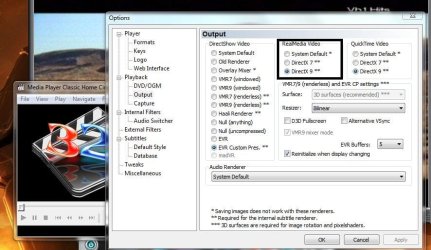
Open mpc-hc and go to View -> Options -> Output
Poke around the settings. I never needed to use RMVB in Win7, so I can't help much.

Capture.JPG
 

My Computer

Computer type
Laptop
Computer Manufacturer/Model Number
Custom
OS
Windows 7 Home Premium x64
CPU
Intel Core i5 2500K
Motherboard
MSI MS-7750
Memory
8GB DDR3
Graphics Card(s)
nVidia GeForce GTX650 Ti BOOST
Sound Card
Realtek
Monitor(s) Displays
21' Philips
Screen Resolution
Full HD
Hard Drives
1TB
PSU
500W
The problem is not so much RMVB codecs nor Windows 7. It is actually Windows 7 x64.

Am currently using Media Player Classic Home Cinema for x64, so that it's compatible with my Win 7 x64. In its current form, it doesn't play RMVB files.

But I suspect RMVB codecs for x64 are not available anywhere. I also don't see Media Player Classic Home Cinema x64 announcing plans to support RMVB.

So I how can play RMVB on Win 7 x64? Anyone successfully done so so far ?


Thank you.
 

My Computer

OS
windows 7 x64

My Computer

Computer type
PC/Desktop
Computer Manufacturer/Model Number
Pauly Special
OS
Win7 Ultimate X64
CPU
Intel i5 3570K
Motherboard
Gigabyte Z77X-DS3H
Memory
8GB DDR3 1600
Graphics Card(s)
Onboard
Sound Card
Onboard
Screen Resolution
1280x1024
Hard Drives
Samsung 840 Evo SSD (OS)
1TB Spinner (Data)
PSU
800W Arctic
Case
Cooler Master
Cooling
3x120mm Fans
Keyboard
MS Wireless
Mouse
MS Wireless
Internet Speed
20M
Or you could try VLC.
Real Player is awful in my opinion.
 

My Computer

Computer type
Laptop
Computer Manufacturer/Model Number
Custom
OS
Windows 7 Home Premium x64
CPU
Intel Core i5 2500K
Motherboard
MSI MS-7750
Memory
8GB DDR3
Graphics Card(s)
nVidia GeForce GTX650 Ti BOOST
Sound Card
Realtek
Monitor(s) Displays
21' Philips
Screen Resolution
Full HD
Hard Drives
1TB
PSU
500W

My Computer

Computer type
PC/Desktop
Computer Manufacturer/Model Number
n/a
OS
W7 Ultimate SP1, LM19.2 MATE, W10 Home 1703, W10 Pro 1703 VM, #All 64 bit
CPU
AMD Phenom II x6 1100T, 3.3 GHz
Motherboard
ASUS M4A88T-M/USB3 (AM3)
Memory
12GB DDR3 1333 G-Skill (4GB x 2), G-Skill (2GB x 2)
Graphics Card(s)
NVIDIA GeForce GTX 660
Sound Card
Realtek?
Monitor(s) Displays
Samsung S23B350
Screen Resolution
1920x1080
Hard Drives
WD Green 2TB (SATA), WD Green 3TB (SATA), WD Blue 4TB (SATA), WD Blue 6TB (SATA)
PSU
Cooler Master
Case
Antec GX300 Tower
Cooling
3x Antec TRICOOL 120mm Fans
Mouse
Wired Optical
Internet Speed
DSL
Antivirus
Avast
Browser
Pale Moon (64 bit)
Other Info
2018-12-27 Upgraded HDDs
2015-12-10 Upgraded case, graphics card, storage
2015-08-15 Upgraded motherboard & RAM
2015-07-15 Upgraded LM17.1 to LM17.2
hey guys, Im realy lost here. I randomly chose this thread randomly just cause i wanted to know how to make a post... I need to ask a question and its not been asked yet so please tell where i need to go. thanks!
 
Last edited:

My Computer

OS
Windows 7 Starter x32
Memory
160GB
Graphics Card(s)
Intel(R) Graphics Media Accelerator Driver for Mobile
Hard Drives
Intel atom n450
Case
uGear
Depends on what you want

hey guys, Im realy lost here. I randomly chose this thread randomly just cause i wanted to know how to make a post... I need to ask a question and its not been asked yet so please tell where i need to go. thanks!

Without knowing what your problem is, it is hard to provide specific advice. :)

Generic posting steps:

  1. Go to this page: http://www.sevenforums.com/
  2. Choose the category that seems to be related to your problem.
  3. Check the forum rules.
  4. There should be an orange button labelled "New Thread" (at the top of the page).
  5. Click on the "New Thread" button and then compose your message/question.
 

My Computer

Computer type
PC/Desktop
Computer Manufacturer/Model Number
n/a
OS
W7 Ultimate SP1, LM19.2 MATE, W10 Home 1703, W10 Pro 1703 VM, #All 64 bit
CPU
AMD Phenom II x6 1100T, 3.3 GHz
Motherboard
ASUS M4A88T-M/USB3 (AM3)
Memory
12GB DDR3 1333 G-Skill (4GB x 2), G-Skill (2GB x 2)
Graphics Card(s)
NVIDIA GeForce GTX 660
Sound Card
Realtek?
Monitor(s) Displays
Samsung S23B350
Screen Resolution
1920x1080
Hard Drives
WD Green 2TB (SATA), WD Green 3TB (SATA), WD Blue 4TB (SATA), WD Blue 6TB (SATA)
PSU
Cooler Master
Case
Antec GX300 Tower
Cooling
3x Antec TRICOOL 120mm Fans
Mouse
Wired Optical
Internet Speed
DSL
Antivirus
Avast
Browser
Pale Moon (64 bit)
Other Info
2018-12-27 Upgraded HDDs
2015-12-10 Upgraded case, graphics card, storage
2015-08-15 Upgraded motherboard & RAM
2015-07-15 Upgraded LM17.1 to LM17.2
Thanks , and happy new year eve if your in canada :cool::D
 

My Computer

OS
Windows 7 Starter x32
Memory
160GB
Graphics Card(s)
Intel(R) Graphics Media Accelerator Driver for Mobile
Hard Drives
Intel atom n450
Case
uGear
Back
Top