
S salhzmzm New member Local time 3:00 PM Messages 2 Jul 7, 2011 #1 Hi When I open RoboForm Editor, I got this error message Yesterday, every thing was working fine but today when I turned on my PC and I want to use it to get my password, I got this error What is the problem?? Thanks in advance. My Computer OSWindows 7 Ultimate x64
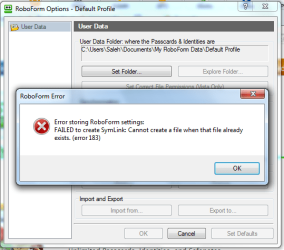
Hi When I open RoboForm Editor, I got this error message Yesterday, every thing was working fine but today when I turned on my PC and I want to use it to get my password, I got this error What is the problem?? Thanks in advance.
A Guy Righteous Dude Guru VIP SF Team Local time 1:00 PM Messages 33,043 Location Bay Area Jul 9, 2011 #2 Welcome to Seven Forums salhzmzm. The first thing I would try, is use System Restore to return to a point before the problem started. http://www.sevenforums.com/tutorials/700-system-restore.html If that doesn't help, suggest reinstalling RoboForms. Just download the installer and run it. No need to uninstall or alter your current installation. Let us know if you still have the problem after these suggestions. A Guy My Computer Computer typePC/DesktopOSWindows 10 Home x64CPUINTEL Core i5-750 Quad-Core 3.37GHzMotherboardASUS P7P55DMemoryHyperX Fury Black Series 8GB (2 x 4GB) 1866MhzGraphics Card(s)EVGA GeForce GTX 750 Superclocked 1GB 128-Bit GDDR5Monitor(s) DisplaysLG 32MA68HY 32" IPSScreen Resolution1920 x 1080Hard DrivesSamsung 840 Evo 120GB, SEAGATE 500GB Barracuda® 7200.12, SATA 3 Gb/s, 7200 RPM, 16MB cachePSUANTEC TruePower New TP-550, 80 PLUS, 550WCaseANTEC Three Hundred IllusionCoolingCOOLER MASTER Hyper 212 Plus, 4 x 120mm 1 x 140mm Noctua'sInternet Speed85 + MbpsAntivirusAvastBrowserVivaldi
Welcome to Seven Forums salhzmzm. The first thing I would try, is use System Restore to return to a point before the problem started. http://www.sevenforums.com/tutorials/700-system-restore.html If that doesn't help, suggest reinstalling RoboForms. Just download the installer and run it. No need to uninstall or alter your current installation. Let us know if you still have the problem after these suggestions. A Guy
S salhzmzm New member Thread Starter Local time 3:00 PM Messages 2 Jul 10, 2011 #3 Thanks for your reply. It works after reinstalling couple of times. My Computer OSWindows 7 Ultimate x64
A Guy Righteous Dude Guru VIP SF Team Local time 1:00 PM Messages 33,043 Location Bay Area Jul 10, 2011 #4 Glad you got it fixed. Stick around and join us here. A great group of people, and so much to learn. A Guy My Computer Computer typePC/DesktopOSWindows 10 Home x64CPUINTEL Core i5-750 Quad-Core 3.37GHzMotherboardASUS P7P55DMemoryHyperX Fury Black Series 8GB (2 x 4GB) 1866MhzGraphics Card(s)EVGA GeForce GTX 750 Superclocked 1GB 128-Bit GDDR5Monitor(s) DisplaysLG 32MA68HY 32" IPSScreen Resolution1920 x 1080Hard DrivesSamsung 840 Evo 120GB, SEAGATE 500GB Barracuda® 7200.12, SATA 3 Gb/s, 7200 RPM, 16MB cachePSUANTEC TruePower New TP-550, 80 PLUS, 550WCaseANTEC Three Hundred IllusionCoolingCOOLER MASTER Hyper 212 Plus, 4 x 120mm 1 x 140mm Noctua'sInternet Speed85 + MbpsAntivirusAvastBrowserVivaldi
Glad you got it fixed. Stick around and join us here. A great group of people, and so much to learn. A Guy