Roboform Free Version

huffman

New member
Pro User
Local time
8:23 PM
Messages
715
I have used the free Roboform on several computers and never had an issue.

Since clean installing Win 7 after a crash, I can not get Roboform to "Auto Save". I contacted Roboform and they gave me several suggestions which I followed, none of which solved my problem.

In IE8 under "Manage Addons" everything concerning Roboform is enabled:
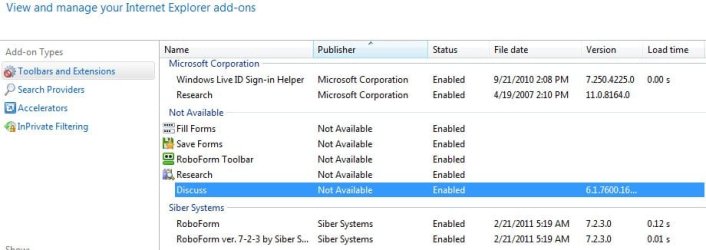
roboform.jpg

I was wondering if anyone had any suggestions to get "Auto Save" to work?

Also is there any free programs similar to Roboform that I could use?

Thanks very much
 

My Computer

OS
Windows 7 Pro
CPU
Intel(R) Pentium(R) Duel CPU E2200 2.20 Ghz
Motherboard
GA-G41M-ES2L
Memory
4 gb 2.96 Usable
Graphics Card(s)
Onboard
Sound Card
Onboard
Hard Drives
2 - 1TB WD Sata Drives
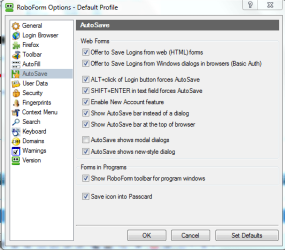
In roboform, click on the taskbar icon, click Options, then click Autosave. Check what you have enabled/disabled there. This is what mine looks like.

Capture.PNG

As for alternatives, I've tested Lastpass and I was really impressed.

LastPass - Password Manager, Form Filler, Password Management

Unlike roboform, lastpass stores your passes online, though I think you can backup those locally. The passes are encrypted on the online server but NOT the master password. So theoretically even if somebody were to hack into those servers, they wouldnt be able to decrypt. Lastpass is free and provides as much functionality as robo. I was seriously thinking of switching but was prevented by sheer laziness. Give it a shot.
 

My Computer

Computer Manufacturer/Model Number
Too many to describe...
OS
Windows 7 x64 pro/ Windows 7 x86 Pro/ XP SP3 x86
In roboform, click on the taskbar icon, click Options, then click Autosave. Check what you have enabled/disabled there.

Where do I find this ??
 

My Computer

OS
Windows 7 Pro
CPU
Intel(R) Pentium(R) Duel CPU E2200 2.20 Ghz
Motherboard
GA-G41M-ES2L
Memory
4 gb 2.96 Usable
Graphics Card(s)
Onboard
Sound Card
Onboard
Hard Drives
2 - 1TB WD Sata Drives
Dont you have an icon like this in the taskbar?

Capture.PNG

There would also be a process called robotaskbaricon.exe in task manager.
 

My Computer

Computer Manufacturer/Model Number
Too many to describe...
OS
Windows 7 x64 pro/ Windows 7 x86 Pro/ XP SP3 x86
Thanks Bill2 for the reply.

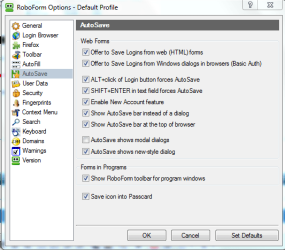
I finally found the Auto Save and it looks just like yours.

Capture.PNG

After the third or fourth time installing Roboform I think I have finally got it working :D.
 

My Computer

OS
Windows 7 Pro
CPU
Intel(R) Pentium(R) Duel CPU E2200 2.20 Ghz
Motherboard
GA-G41M-ES2L
Memory
4 gb 2.96 Usable
Graphics Card(s)
Onboard
Sound Card
Onboard
Hard Drives
2 - 1TB WD Sata Drives
Back
Top