RocketDock replacement

Static

New member
Power User
Local time
5:48 PM
Messages
173
I've been using Rocketdock for a year or 2 now. It has had its bugs with my windows 7. It finally has gotten to me. It hasn't been updated in years.

What is a good replacement that gets current updates and has similar options with minimal bugs?
 

My Computer

OS
Windows 7 RC - 7100 64bit
CPU
AMD Athlon(tm) 64 x2 4800+ 2.50Ghz Dual Core
Motherboard
Hewlett Packard
Memory
4 gig Kingston DDR2
Graphics Card(s)
XFX Nvidia GeForce GTS 250
Sound Card
na
Monitor(s) Displays
22" Samsung LCD Syncmaster
Screen Resolution
1680x1050
Hard Drives
300gig Western Digital
PSU
BFG Tech 550watt
Case
Crap stock Dell
Cooling
Side panel open on case, and a box fan blowing in.
Keyboard
G15
Mouse
G9
Internet Speed
Bike Messenger
Last edited:

My Computer

Computer Manufacturer/Model Number
Home Grown
OS
Windows 7 Ultimate (64)
CPU
i7-2600K
Motherboard
Asus P8P67-M Pro
Memory
G.SKILL Ripjaws X Series 8GB (2 x 4GB)
Graphics Card(s)
ATI 5750
Sound Card
On-Board
Monitor(s) Displays
LG W2486L
Screen Resolution
1920X1080
Hard Drives
Intel X-25M 80 Gig SSD | Intel X-25M 160 Gig SSD | WD Black 500MB - External eSata
PSU
Zalman ZM770-XT 770 Watts
Case
Antec 180 mini
Cooling
Cooler Master V8
Internet Speed
15MB - Cable
Other Info
Sissy OC - 4.6 @ 1.3175 24/7 | 18' Idle - 55' Load
I use the free Object Dock. I'd have gone with Rocket Dock if I changed the dock a lot. But I just wanted a working dock, and Object Dock has been working great. A Guy
 

My Computer

Computer type
PC/Desktop
OS
Windows 10 Home x64
CPU
INTEL Core i5-750 Quad-Core 3.37GHz
Motherboard
ASUS P7P55D
Memory
HyperX Fury Black Series 8GB (2 x 4GB) 1866Mhz
Graphics Card(s)
EVGA GeForce GTX 750 Superclocked 1GB 128-Bit GDDR5
Monitor(s) Displays
LG 32MA68HY 32" IPS
Screen Resolution
1920 x 1080
Hard Drives
Samsung 840 Evo 120GB, SEAGATE 500GB Barracuda® 7200.12, SATA 3 Gb/s, 7200 RPM, 16MB cache
PSU
ANTEC TruePower New TP-550, 80 PLUS, 550W
Case
ANTEC Three Hundred Illusion
Cooling
COOLER MASTER Hyper 212 Plus, 4 x 120mm 1 x 140mm Noctua's
Internet Speed
85 + Mbps
Antivirus
Avast
Browser
Vivaldi

My Computer

Computer Manufacturer/Model Number
Mc Donald's
OS
Mc Donald OS Version Beta
CPU
Awesome Beef Patty
Motherboard
Lettuce (It's green!)
Memory
Pro 1 KB Memory
Graphics Card(s)
Tomato FX10
Sound Card
The Box
Monitor(s) Displays
Yummy 5-D Touch
Screen Resolution
20 x 20
Hard Drives
The Top Bun and the Bottom Buns
PSU
Um.
Case
The Box With Pics!
Cooling
That's Why i Have a Refrigerator
Keyboard
N/A
Mouse
N/A
Internet Speed
Same as McDonald's Wi-fi
Other Info
Note : This is not real. (Hope You Knew That)

My Computer

Computer Manufacturer/Model Number
Gateway/NV7923u & NV79C52u Laptops
OS
windows 7 professional & ultimate 64bit laptops
CPU
2.27 boost to 2.53 & 2.53 boost to 2.80
Motherboard
Mobile Intel® HM55 Express Chipset ???
Memory
4GB
Graphics Card(s)
Intel® Graphics Media Accelerator HD
Sound Card
realtek High-definition audio support
Monitor(s) Displays
17.3 " HD 1600 x 900
Hard Drives
hatachi Travelstar 5400 500GB & west digital 500GB
Internet Speed
35MB fios
He's asking for an alternative because it hangs on him.
 

My Computer

Computer Manufacturer/Model Number
Mc Donald's
OS
Mc Donald OS Version Beta
CPU
Awesome Beef Patty
Motherboard
Lettuce (It's green!)
Memory
Pro 1 KB Memory
Graphics Card(s)
Tomato FX10
Sound Card
The Box
Monitor(s) Displays
Yummy 5-D Touch
Screen Resolution
20 x 20
Hard Drives
The Top Bun and the Bottom Buns
PSU
Um.
Case
The Box With Pics!
Cooling
That's Why i Have a Refrigerator
Keyboard
N/A
Mouse
N/A
Internet Speed
Same as McDonald's Wi-fi
Other Info
Note : This is not real. (Hope You Knew That)

My Computer

Computer Manufacturer/Model Number
Gateway/NV7923u & NV79C52u Laptops
OS
windows 7 professional & ultimate 64bit laptops
CPU
2.27 boost to 2.53 & 2.53 boost to 2.80
Motherboard
Mobile Intel® HM55 Express Chipset ???
Memory
4GB
Graphics Card(s)
Intel® Graphics Media Accelerator HD
Sound Card
realtek High-definition audio support
Monitor(s) Displays
17.3 " HD 1600 x 900
Hard Drives
hatachi Travelstar 5400 500GB & west digital 500GB
Internet Speed
35MB fios
Stardock Object Dock seems to be working fine for me. Thank you!


Edit: It's not working as well as I'd wish. But o well. If I put a shortcut on the desktop of a game, and drag it onto the dock, it sets the dock's icon directory to the shortcut, not the application the shortcut was meant for. Meaning once I delete the shortcut off the desktop (the entire point of a dock) the icons on the dock get errors and send you nowhere.

Now you might say, link the program itself for each one by hand!

1. That's annoying and a few extra useless steps that I don't understand why I'd have to do.

2. I run many of my applications and games thru steam. Even if they aren't standard steam games. And as far as I know, besides opening steam itself, the only other way to get to a non-steam application thru steam is to add it and create a desktop shortcut (since there is no true directory for apps run thru steam), which I eventually delete because I want the dock, which then gives me errors.

Workaround: I just made all the shortcuts I wanted, and made a new "Shortcuts" folder in my Object dock directory. Stupidly annoying and in my opinion bad programming that the icons on the dock are for the shortcut, not a new shortcut to the actual program I want to run.
 
Last edited:

My Computer

OS
Windows 7 RC - 7100 64bit
CPU
AMD Athlon(tm) 64 x2 4800+ 2.50Ghz Dual Core
Motherboard
Hewlett Packard
Memory
4 gig Kingston DDR2
Graphics Card(s)
XFX Nvidia GeForce GTS 250
Sound Card
na
Monitor(s) Displays
22" Samsung LCD Syncmaster
Screen Resolution
1680x1050
Hard Drives
300gig Western Digital
PSU
BFG Tech 550watt
Case
Crap stock Dell
Cooling
Side panel open on case, and a box fan blowing in.
Keyboard
G15
Mouse
G9
Internet Speed
Bike Messenger
Stardock Object Dock seems to be working fine for me. Thank you!


Edit: It's not working as well as I'd wish. But o well. If I put a shortcut on the desktop of a game, and drag it onto the dock, it sets the dock's icon directory to the shortcut, not the application the shortcut was meant for. Meaning once I delete the shortcut off the desktop (the entire point of a dock) the icons on the dock get errors and send you nowhere.

Now you might say, link the program itself for each one by hand!

1. That's annoying and a few extra useless steps that I don't understand why I'd have to do.

2. I run many of my applications and games thru steam. Even if they aren't standard steam games. And as far as I know, besides opening steam itself, the only other way to get to a non-steam application thru steam is to add it and create a desktop shortcut (since there is no true directory for apps run thru steam), which I eventually delete because I want the dock, which then gives me errors.

Workaround: I just made all the shortcuts I wanted, and made a new "Shortcuts" folder in my Object dock directory. Stupidly annoying and in my opinion bad programming that the icons on the dock are for the shortcut, not a new shortcut to the actual program I want to run.

The best way is to just drag the program from the start menu to object dock, works for me ;)

Just make sure you have "enable context menus dragging & dropping" ticked in your start menu properties
 

My Computer

Computer Manufacturer/Model Number
Hewlett Packard Compaq Presario CQ60-305au
OS
Windows Seven Home Premium 32bit SP1
CPU
AMD Athlon QI46 2.1Ghz
Motherboard
Wistron 303c
Memory
2048 Mb DDR2 SD RAM
Graphics Card(s)
NVidea GE GoForce 8200M G/256mb dedicated graphics memory
Sound Card
MCP78S NVidea high definition
Monitor(s) Displays
15.6" High definition Brightview Widescreen
Screen Resolution
1336x768
Hard Drives
Toshiba MK2555GSX ATA
I use the free Object Dock. I'd have gone with Rocket Dock if I changed the dock a lot. But I just wanted a working dock, and Object Dock has been working great. A Guy

Can you tell me if you change the orientation from horizontal to vertical if there's a way to reverse the order of the icons with one button or setting? That's my one gripe about RocketDocks. When horizontal the leftmost icon becomes topmost when I change the orientation to vertical. Having to mouse way up to the top of the screen is a bummer!!
 

My Computer

Computer Manufacturer/Model Number
HP Media Center
OS
Windows 7 32 bit
CPU
AMD 5200+ dual core
Memory
2 GB
Graphics Card(s)
NVidia GeForce 6150SE 128 MB
Monitor(s) Displays
CRT
Screen Resolution
1280x1024
Hard Drives
500 GB Sata internal :

SIIG USB 3.0 docking stations w/WD Caviar Black 6 Gb/s drives
Keyboard
PS/2
Mouse
PS/2 Wheel Mouse
Other Info
SIIG USB 3.0 PCIexpress card.
I'm Dizzy.
 

My Computer

Computer Manufacturer/Model Number
Mc Donald's
OS
Mc Donald OS Version Beta
CPU
Awesome Beef Patty
Motherboard
Lettuce (It's green!)
Memory
Pro 1 KB Memory
Graphics Card(s)
Tomato FX10
Sound Card
The Box
Monitor(s) Displays
Yummy 5-D Touch
Screen Resolution
20 x 20
Hard Drives
The Top Bun and the Bottom Buns
PSU
Um.
Case
The Box With Pics!
Cooling
That's Why i Have a Refrigerator
Keyboard
N/A
Mouse
N/A
Internet Speed
Same as McDonald's Wi-fi
Other Info
Note : This is not real. (Hope You Knew That)
To fix rocketdock on x64 you have to use mklink - to do that, you open cmd with admin privileges (Start => search cmd => rightclick on it and choose Run as admiistrator) and once in command prompt, you type..

mklink /D C:\Destination C:\Source

so something like this..

mklink /D "C:\Program Files (x86)\Internet Explorer" "C:\Program Files\Internet Explorer"

will link your IE program directory over to your 32 bit programs directory.. however if you run that particular (bad) example, you should see something like..

Cannot create a file when that file already exists.

But we can create a link for our x64 folder :)

Code:
C:\Windows\system32>mklink /D "C:\Program Files (x86)\Internet Explorer x64" "C:\Program Files\Internet Explorer"
symbolic link created for C:\Program Files (x86)\Internet Explorer x64 <<===>> C:\Program Files\Internet Explorer

In most cases, when the link name is exactly the same as the x64 folder version, you're good to go with rocketdock. If you change the name however, change your link path in the shortcuts to the x86 path and you're set..

btw, I know this thread is OLD but it came up when searching for an alternative to rocketdock on google (I just want something thats actually actively developed, sick of lazy and abandoned projects!) and figured I'd let anyone who's seen this problem know how to resolve it, its far too common and I wish like hell I could find the rocketdock source, I'd just fix it since those lazy sob's wont.. so freaking simple of a fix too!


My Computer

OS
Windows 7 Professional x64
To fix rocketdock on x64 you have to use mklink - to do that, you open cmd with admin privileges (Start => search cmd => rightclick on it and choose Run as admiistrator) and once in command prompt, you type..

mklink /D C:\Destination C:\Source

so something like this..

mklink /D "C:\Program Files (x86)\Internet Explorer" "C:\Program Files\Internet Explorer"

will link your IE program directory over to your 32 bit programs directory.. however if you run that particular (bad) example, you should see something like..

Cannot create a file when that file already exists.

But we can create a link for our x64 folder :)

Code:
C:\Windows\system32>mklink /D "C:\Program Files (x86)\Internet Explorer x64" "C:\Program Files\Internet Explorer"
symbolic link created for C:\Program Files (x86)\Internet Explorer x64 <<===>> C:\Program Files\Internet Explorer

In most cases, when the link name is exactly the same as the x64 folder version, you're good to go with rocketdock. If you change the name however, change your link path in the shortcuts to the x86 path and you're set..

btw, I know this thread is OLD but it came up when searching for an alternative to rocketdock on google (I just want something thats actually actively developed, sick of lazy and abandoned projects!) and figured I'd let anyone who's seen this problem know how to resolve it, its far too common and I wish like hell I could find the rocketdock source, I'd just fix it since those lazy sob's wont.. so freaking simple of a fix too!


thanks for the update
 

My Computer

Computer Manufacturer/Model Number
Gateway/NV7923u & NV79C52u Laptops
OS
windows 7 professional & ultimate 64bit laptops
CPU
2.27 boost to 2.53 & 2.53 boost to 2.80
Motherboard
Mobile Intel® HM55 Express Chipset ???
Memory
4GB
Graphics Card(s)
Intel® Graphics Media Accelerator HD
Sound Card
realtek High-definition audio support
Monitor(s) Displays
17.3 " HD 1600 x 900
Hard Drives
hatachi Travelstar 5400 500GB & west digital 500GB
Internet Speed
35MB fios
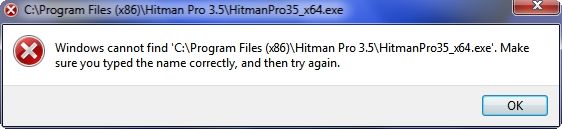
Any suggestions how to get Object Dock to recognize shortcuts to programs located in the (x64) Win 7 Program Files? I like using Object Dock, but so far it will only recognize the programs located in the (x86) Program Files. Every time I try to access a x64 program from ObjectDock I get this kind of a message...

ObjectDockMessage.jpg


~Maxx~

Win7_50.png
 

My Computer

Computer Manufacturer/Model Number
HP HPE 270f
OS
Windows 7 x64 Home Premium
CPU
Intel Core i7 930 @ 2.8 Ghz Socket 1366 LGA
Motherboard
Pegatron Truckee v1.04E41
Memory
8 GB 1366 Mhz DDR3 (PC3-10700) RAM
Graphics Card(s)
ATI Radeon 5770 1 GB DDR5 RAM
Sound Card
Realtech High Definition
Monitor(s) Displays
32" Sony Bravia
Screen Resolution
1366 X 768
Hard Drives
Intel 25nm 120 GB Series 320 SSD HD Tune- 265 MBps Read/ 130 MBps Write

LaCie 1TB + 1TB RAID 0 eSATA Drive HD Tune- 160 MBps Read/ 90 MBps Write
Keyboard
Logitech Illuminated
Mouse
Logitech MX Revolution
Internet Speed
36.4 Mbps Maximum on a 37 Mbps Motorola SB501 Modem

My Computer

Computer Manufacturer/Model Number
HP, Dell, Gateway, Toshiba - 4 laptops and 2 desktops
OS
Vista, Windows7, Mint Mate, Zorin, Windows 8
CPU
from 1.6GHz Duo to i7
Monitor(s) Displays
2x HP w2207
Hard Drives
5x HDD, 7x SSD, 12x Externals
Keyboard
with trackball - no mices
Mouse
Trackball mice
Internet Speed
DSL 6000
While I was having an SSD installed in my Win 7 desktop I was using my Vista Laptop which has Rocket Dock installed and as soon as I saw it I realized how much the Win 7 taskbar butchers the fine artwork put into the 3rd party icons that Rocket Dock and Object Dock do such a fine way of presenting which is why I am hoping that I will be able to use Object Dock for my x64 programs as well as the x32 ones.

~Maxx~

.
Win7_50.png
 

My Computer

Computer Manufacturer/Model Number
HP HPE 270f
OS
Windows 7 x64 Home Premium
CPU
Intel Core i7 930 @ 2.8 Ghz Socket 1366 LGA
Motherboard
Pegatron Truckee v1.04E41
Memory
8 GB 1366 Mhz DDR3 (PC3-10700) RAM
Graphics Card(s)
ATI Radeon 5770 1 GB DDR5 RAM
Sound Card
Realtech High Definition
Monitor(s) Displays
32" Sony Bravia
Screen Resolution
1366 X 768
Hard Drives
Intel 25nm 120 GB Series 320 SSD HD Tune- 265 MBps Read/ 130 MBps Write

LaCie 1TB + 1TB RAID 0 eSATA Drive HD Tune- 160 MBps Read/ 90 MBps Write
Keyboard
Logitech Illuminated
Mouse
Logitech MX Revolution
Internet Speed
36.4 Mbps Maximum on a 37 Mbps Motorola SB501 Modem
Back
Top