RocketDock Stack Docklet 64 bit Problem

SupermaNn

New member
Member
Local time
1:50 PM
Messages
53
I have RocketDock, made a new folder, put shortcuts to all my programs in there. all the 32 bit programs work fine when i click them, but the 64 bit programs are all missing their icons, and do nothing when you click them. anyone know how to fix this?
 

My Computer

Computer Manufacturer/Model Number
Acer Aspire 7551-7422
OS
Windows Home Premium 64bit
CPU
AMD Phenom II N970 Quad-core processor 2.20 GHz
Memory
4GB
Graphics Card(s)
ATI Mobility Radeon HD 4250
Sound Card
RealTek high definition audio/ATI high definition audio devi
Monitor(s) Displays
Generic PnP Monitor (1600x900)
Hard Drives
500GB
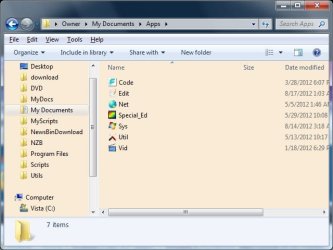
64 bit Windows runs 32 bit programs(like RocketDock) under Windows On Windows emulator(WOW.) To avoid conflicts some redirection is done with registry entries and folder trees. That's why 32 bit programs are installed in Program Files (x86) instead of Program Files. Try installing a 64 bit program in a neutral folder like C:\Utils\AppName, then put the shortcut in RocketDock and see if that works. I have RocketDock on 64 bit Vista. I don't have that many native 64 bit apps. But I didn't notice any problems. Rather than copying any shortcuts from the Start menu, I made my own inside a folder with categorized subfolders. This folder I call Apps. I just dragged the subfolders onto RocketDock.

Here's a screen shot of my Apps folder contents

Apps.jpg
 

My Computer

Computer Manufacturer/Model Number
HP Media Center
OS
Windows 7 32 bit
CPU
AMD 5200+ dual core
Memory
2 GB
Graphics Card(s)
NVidia GeForce 6150SE 128 MB
Monitor(s) Displays
CRT
Screen Resolution
1280x1024
Hard Drives
500 GB Sata internal :

SIIG USB 3.0 docking stations w/WD Caviar Black 6 Gb/s drives
Keyboard
PS/2
Mouse
PS/2 Wheel Mouse
Other Info
SIIG USB 3.0 PCIexpress card.
Back
Top