

This post is about how to get rid of a Rogue Virus in your computer. Before i get to that, i just want to say i am posting this because it will come in very handy for you guys in the future if you encounter these types of rogue virus (the list is shown in the picture below as an attachment.) I have encountered it once but it gotten worse to the point where i wasnt able to fix it untill i saw this website (link provided below). It really helps and i even got rid of one from my classmate's computer that was infected by one. So i thought i be generous to help you guys out and share the link and the description and how to delete, remove and recover your computer without wiping your hdd clean. I do not take any credit but to just post an interesting topic that is very useful and has important information.
P.S.- It would be nice to have this topic stickied.
[EDIT] Also, the downloadable files are for Windows XP, Vista, and 7.
Automated Removal Instructions for XP Security Tool 2010, XP Defender Pro, Vista Security Tool 2010, and Vista Defender Pro using Malwarebytes' Anti-Malware:
1. For the first part of this removal guide you will need to use a different computer than the infected one. This is also a tricky rogue to remove, so please follow the instructions carefully. If you are concerned about whether or not you can do this, do not be, as I have made these instructions easy to follow for people of any computer expertise.
2. From another computer, please download Malwarebytes' Anti-Malware, or MBAM, and the reg files from the following locations and save it to an external media such as an external hard drive or a USB flash drive. We will then use the external drive or flash drive to to transfer these files to your infected computer. If you do not own a USB flash drive, you can get one from any local or online computer store for a small price. Some examples of good and cheap ones can be found at Newegg and Best Buy. The files that you should download onto this device are:
Malwarebytes' Anti-Malware Download Link - Everyone should download this
http://download.bleepingcomputer.com/malwarebytes/mbam-setup.exe
FixExe.reg - Everyone should download this
http://download.bleepingcomputer.com/reg/antivirus-vista-2010/FixExe.reg
3. Once you have downloaded all the necessary files to a removable device, you need to plug it into your infected computer so it can access them.
4. On the infected computer make sure XP Internet Security 2010, Antivirus Vista 2010, or Win 7 Antispyware 2010 is running. If it is not, you can launch it by running any program on your computer as that will trigger the rogue program to run. Once running, do not close it during the entire length of this guide.
5. Now open the drive that corresponds to the removable media that you copied the programs from step 2 onto. Once open, double-click on the FixExe.reg file. When Windows prompts whether or not you want to allow the data to be added to your computer, click on the Yes button.
6. Now you should be able to run the mbam-setup.exe file that you saved on your removable media in step 2. Double-click on this file to install MalwareBytes' on to your computer. When the installation begins, keep following the prompts in order to continue with the installation process. Do not make any changes to default settings and when the program has finished installing, make sure you leave both the Update Malwarebytes' Anti-Malware and Launch Malwarebytes' Anti-Malware checked. Then click on the Finish button. If you already have MalwareBytes' installed, simply launch it now and continue to step 8.
7. MBAM will now automatically start and you will see a message stating that you should update the program before performing a scan. As MBAM will automatically update itself after the install, you can press the OK button to close that box and you will now be at the main program as shown below.
This topic was created to provide a very brief introduction as to what RKill does and to provide a way a way for people to report false positives of processes that are terminated. Even though false positives may occur, this should not be considered a problem as you can always launch the programs again or reboot your computer as no files are removed by running RKill. This topic is not to be used as a support topic for getting RKill to run or for removing specific malware. All information that I can provide on getting RKill to run will already be given in this topic and if you need help removing malware you can follow the steps here or ask in the Am I Infected? forum.
RKill is a program developed at BleepingComputer.com that was originally designed for the use in our malware removal guides. It was created so that we could have an easy to use tool that kills known processes that stop the use of our normal anti-malware applications. Simple as that. Nothing fancy. Just kill known malware processes so that anti-malware programs can do their job.
So in summary, RKill just kills processes, imports a Registry file that removes incorrect file associations and fixes policies that stop us from using certain tools. Then it kills Explorer.exe so it will restart and enable some of the Registry changes. When done, RKill will then create a log listing all processes that were terminated while the program was running. Please note that this will include processes that were terminated manually by the user as well as RKill. Other than what is listed above, it does nothing else.
Since RKill only terminates processes, after running it you should not reboot your computer as any malware processes that are set to start automatically, will just start up again. Instead, after running RKill you should then scan your computer using your malware removal tool of choice. If there is a problem after running RKill, just reboot your computer and you will be back ti where you started before running the program. Some great free tools that you can use to scan your computer after running RKill include MalwareBytes' Anti-Malware & SuperAntiSpyware, and Dr.Web CureIt.
RKill can be downloaded from the following locations. Please note that the other filenames below are RKill as well, just renamed in order to allow it run by certain malware.
RKill.com Download Link: http://download.bleepingcomputer.com/grinler/RKill.com
Rkill.exe Download Link: http://download.bleepingcomputer.com/grinler/RKill.exe
Rkil.pif Download Link: http://download.bleepingcomputer.com/grinler/RKill.pif
RKill.scr Download Link: http://download.bleepingcomputer.com/grinler/RKill.scr
eXplore.exe Download Link: http://download.bleepingcomputer.com/grinler/eXplorer.exe
iExplore.exe Download Link: http://download.bleepingcomputer.com/grinler/iExplore.exe
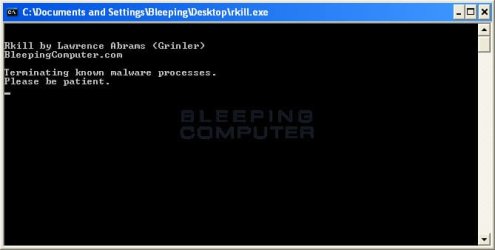
When RKill is run it will display a console screen similar to the one below (in cmd-like format shown in pix below)
That console screen will continue to run until it RKill has finished. Once finished, the box will close and a log will be displayed showing all of the processes that were terminated by RKill and while RKill was running.
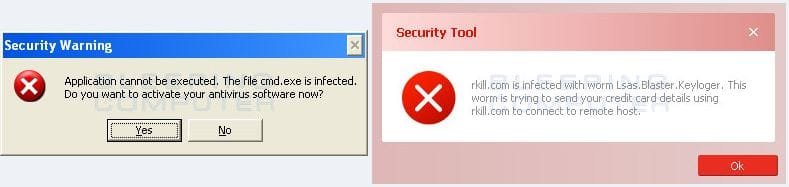
Depending on the malware that is installed on the computer, when you run RKill you may see a message from the malware stating that the program could not be run because it is a virus or is infected. Examples of these warnings are (shown in pix below the cmd-like format picture)
These warnings are just fake alerts by the malware that has hijacked your computer trying to protect itself. Two methods that you can try to get past this and allow RKill to run are:
When you receive the warning message, leave the message on the screen and try running RKill again.
If that does not work, just keep launching RKill until it catches and stays up long enough to kill the malware
Yes, both methods are not elegant, but they will work if you keep trying. Unfortunately, there is not much better I can do at this point for some malware that are very tenacious at killing all processes that run.
On a final note, when you download and run RKill, certain anti-virus programs may state that the program is a security risk. This is because some of the tools used by RKill can be used for good or bad, though the programs themselves are perfectly harmless, and most anti-virus programs just lump them into the bad category. I assure you we are using them only for good purposes.
P.S.- It would be nice to have this topic stickied.
[EDIT] Also, the downloadable files are for Windows XP, Vista, and 7.
Method #1: Reg File and MalwareBytes
LINK===> How to remove XP Security Tool 2010, XP Defender Pro, and Vista Security Tool 2010 (Uninstall Guide)Automated Removal Instructions for XP Security Tool 2010, XP Defender Pro, Vista Security Tool 2010, and Vista Defender Pro using Malwarebytes' Anti-Malware:
1. For the first part of this removal guide you will need to use a different computer than the infected one. This is also a tricky rogue to remove, so please follow the instructions carefully. If you are concerned about whether or not you can do this, do not be, as I have made these instructions easy to follow for people of any computer expertise.
2. From another computer, please download Malwarebytes' Anti-Malware, or MBAM, and the reg files from the following locations and save it to an external media such as an external hard drive or a USB flash drive. We will then use the external drive or flash drive to to transfer these files to your infected computer. If you do not own a USB flash drive, you can get one from any local or online computer store for a small price. Some examples of good and cheap ones can be found at Newegg and Best Buy. The files that you should download onto this device are:
Malwarebytes' Anti-Malware Download Link - Everyone should download this
http://download.bleepingcomputer.com/malwarebytes/mbam-setup.exe
FixExe.reg - Everyone should download this
http://download.bleepingcomputer.com/reg/antivirus-vista-2010/FixExe.reg
3. Once you have downloaded all the necessary files to a removable device, you need to plug it into your infected computer so it can access them.
4. On the infected computer make sure XP Internet Security 2010, Antivirus Vista 2010, or Win 7 Antispyware 2010 is running. If it is not, you can launch it by running any program on your computer as that will trigger the rogue program to run. Once running, do not close it during the entire length of this guide.
5. Now open the drive that corresponds to the removable media that you copied the programs from step 2 onto. Once open, double-click on the FixExe.reg file. When Windows prompts whether or not you want to allow the data to be added to your computer, click on the Yes button.
6. Now you should be able to run the mbam-setup.exe file that you saved on your removable media in step 2. Double-click on this file to install MalwareBytes' on to your computer. When the installation begins, keep following the prompts in order to continue with the installation process. Do not make any changes to default settings and when the program has finished installing, make sure you leave both the Update Malwarebytes' Anti-Malware and Launch Malwarebytes' Anti-Malware checked. Then click on the Finish button. If you already have MalwareBytes' installed, simply launch it now and continue to step 8.
7. MBAM will now automatically start and you will see a message stating that you should update the program before performing a scan. As MBAM will automatically update itself after the install, you can press the OK button to close that box and you will now be at the main program as shown below.
Method #2: RKill
Topic Link ==> http://www.bleepingcomputer.com/forums/topic308364.htmlThis topic was created to provide a very brief introduction as to what RKill does and to provide a way a way for people to report false positives of processes that are terminated. Even though false positives may occur, this should not be considered a problem as you can always launch the programs again or reboot your computer as no files are removed by running RKill. This topic is not to be used as a support topic for getting RKill to run or for removing specific malware. All information that I can provide on getting RKill to run will already be given in this topic and if you need help removing malware you can follow the steps here or ask in the Am I Infected? forum.
RKill is a program developed at BleepingComputer.com that was originally designed for the use in our malware removal guides. It was created so that we could have an easy to use tool that kills known processes that stop the use of our normal anti-malware applications. Simple as that. Nothing fancy. Just kill known malware processes so that anti-malware programs can do their job.
So in summary, RKill just kills processes, imports a Registry file that removes incorrect file associations and fixes policies that stop us from using certain tools. Then it kills Explorer.exe so it will restart and enable some of the Registry changes. When done, RKill will then create a log listing all processes that were terminated while the program was running. Please note that this will include processes that were terminated manually by the user as well as RKill. Other than what is listed above, it does nothing else.
Since RKill only terminates processes, after running it you should not reboot your computer as any malware processes that are set to start automatically, will just start up again. Instead, after running RKill you should then scan your computer using your malware removal tool of choice. If there is a problem after running RKill, just reboot your computer and you will be back ti where you started before running the program. Some great free tools that you can use to scan your computer after running RKill include MalwareBytes' Anti-Malware & SuperAntiSpyware, and Dr.Web CureIt.
RKill can be downloaded from the following locations. Please note that the other filenames below are RKill as well, just renamed in order to allow it run by certain malware.
RKill.com Download Link: http://download.bleepingcomputer.com/grinler/RKill.com
Rkill.exe Download Link: http://download.bleepingcomputer.com/grinler/RKill.exe
Rkil.pif Download Link: http://download.bleepingcomputer.com/grinler/RKill.pif
RKill.scr Download Link: http://download.bleepingcomputer.com/grinler/RKill.scr
eXplore.exe Download Link: http://download.bleepingcomputer.com/grinler/eXplorer.exe
iExplore.exe Download Link: http://download.bleepingcomputer.com/grinler/iExplore.exe
When RKill is run it will display a console screen similar to the one below (in cmd-like format shown in pix below)
That console screen will continue to run until it RKill has finished. Once finished, the box will close and a log will be displayed showing all of the processes that were terminated by RKill and while RKill was running.
Depending on the malware that is installed on the computer, when you run RKill you may see a message from the malware stating that the program could not be run because it is a virus or is infected. Examples of these warnings are (shown in pix below the cmd-like format picture)
These warnings are just fake alerts by the malware that has hijacked your computer trying to protect itself. Two methods that you can try to get past this and allow RKill to run are:
When you receive the warning message, leave the message on the screen and try running RKill again.
If that does not work, just keep launching RKill until it catches and stays up long enough to kill the malware
Yes, both methods are not elegant, but they will work if you keep trying. Unfortunately, there is not much better I can do at this point for some malware that are very tenacious at killing all processes that run.
On a final note, when you download and run RKill, certain anti-virus programs may state that the program is a security risk. This is because some of the tools used by RKill can be used for good or bad, though the programs themselves are perfectly harmless, and most anti-virus programs just lump them into the bad category. I assure you we are using them only for good purposes.
Attachments

Last edited:
My Computer
At a glance
Mac OS X Yosemite2.4 GHz Intel Core i78 GB 1600 MHz DDR3NVIDIA GeForce GT 650M
- Computer type
- PC/Desktop
- Computer Manufacturer/Model Number
- Macbook Pro Retina
- OS
- Mac OS X Yosemite
- CPU
- 2.4 GHz Intel Core i7
- Memory
- 8 GB 1600 MHz DDR3
- Graphics Card(s)
- NVIDIA GeForce GT 650M
- Monitor(s) Displays
- Retina
- Screen Resolution
- Retina
- Hard Drives
- 250GB SSD
- Other Info
- Macbook Pro Retina (2013)


