Rollback Win7 ultimate upgrade

dnr53

New member
Local time
8:19 PM
Messages
14
Location
Seven Lakes NC
I bought an upgrade from 7 home premium to ultimate and it is now saying it is counterfeit. It accepted the upgrade activation the first time but within 2 months it said it was counterfeit. I got a new key from the vendor and it activated then 2 months later it says counterfeit again. I would like to rollback to my original home premium but I cannot find a way to do it. Is it possible or do I spend the $200.00 directly to Microsoft as I do not trust these vendors anymore.
Thank you
 

My Computer

Computer Manufacturer/Model Number
dell 8300
OS
Windows 7 Home Premium Family Pack now on two machines one more to go
CPU
3 ghz pentium 4
Motherboard
dell
Memory
2 gig
Graphics Card(s)
ati hd3650 agp
Sound Card
onboard
Monitor(s) Displays
dell
I bought an upgrade from 7 home premium to ultimate and it is now saying it is counterfeit. It accepted the upgrade activation the first time but within 2 months it said it was counterfeit. I got a new key from the vendor and it activated then 2 months later it says counterfeit again. I would like to rollback to my original home premium but I cannot find a way to do it. Is it possible or do I spend the $200.00 directly to Microsoft as I do not trust these vendors anymore.
Thank you

Do you have the original Win 7 dvd for home premium?


Ken
 

My Computer

Computer Manufacturer/Model Number
HP Pavillion dv-7 1005 Tx
OS
Win 8 Release candidate 8400
CPU
[email protected]
Memory
4 gigs
Graphics Card(s)
Nvidia 9600M
Sound Card
HD built-in
Monitor(s) Displays
17" Wxga
Screen Resolution
1440x900
Cooling
none
Internet Speed
45Mb down 5Mb up
yes
 

My Computer

Computer Manufacturer/Model Number
dell 8300
OS
Windows 7 Home Premium Family Pack now on two machines one more to go
CPU
3 ghz pentium 4
Motherboard
dell
Memory
2 gig
Graphics Card(s)
ati hd3650 agp
Sound Card
onboard
Monitor(s) Displays
dell
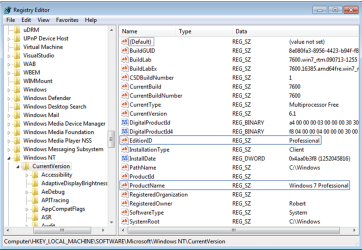
You can make an in-place Upgrade install work between Win7 versions by tricking the installer into thinking it is doing an Upgrade to the same version, which is a Repair Install in Win7 and therefore allowed.

Edit the registry entries shown below to report the retail edition of Windows you intend to upgrade to. To upgrade Ultimate to Home Premium you would use HOMEPREMIUM for the EditionID, and Windows 7 HOMEPREMIUM for the ProductName, typing both exactly. Set a Restore Point first.
Capture.PNG

Once you've changed the Reg keys, run the Home Premium DVD from desktop to do the Upgrade/Repair Install. Afterwards you will need to reactivate at Computer>Properties link as Repair Install always resets activation.
 
Back
Top