Solved router not passing port scan after opening port

ashttreylil

New member
Member
Local time
2:58 AM
Messages
58
1. Is this a wired or wireless connection issue?
wireless
2. Who is your Internet Service Provider (ISP)?
Charter

3. What type of Broadband connection are you using?
Cable

4. What is the exact Make and Model of your Modem, Router or Modem/Router Combo
Netgear WNDR3800, Cisco DPC3008

5. What is the Name of the Anti-Virus, Security or Firewall Software
comodo firewall
 

Attachments

  • 2014-07-17_14-42-21.png
    2014-07-17_14-42-21.png
    8.1 KB · Views: 6
  • 2014-07-17_14-43-13.png
    2014-07-17_14-43-13.png
    12.6 KB · Views: 27
  • 2014-07-17_20-46-19.png
    2014-07-17_20-46-19.png
    3.2 KB · Views: 4
  • ipconfig.txt
    ipconfig.txt
    7.4 KB · Views: 3

My Computer My Computer

At a glance

windows 7 premium x64
OS
windows 7 premium x64
Have you tried a different port to see if that port is being blocked by your ISP?

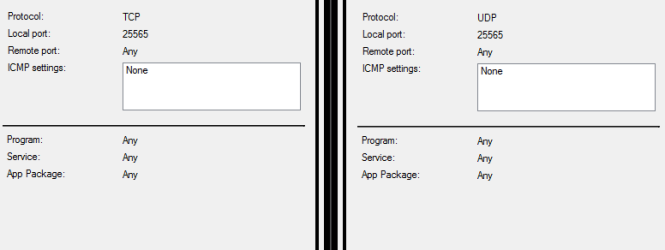
I also see that your parsing TCP to UDP, probably doesn't make a difference to the port being open or closed but it might be better to set them both the same or set to Any.

Another problem you may encounter is your IP may change, most ISP's like to change your IP every so often so you may have to set up a DDNS with a hostname in order to access the services you want remotely.
 

My Computer My Computer

At a glance

Windows 7 Ultimate x64Intil i7-86016Gb Corsair XMS3 1600MHzMSI N470GTXTwin FrozR II
Computer type
PC/Desktop
Computer Manufacturer/Model Number
Self Built
OS
Windows 7 Ultimate x64
CPU
Intil i7-860
Motherboard
Gigabyte GA-P55a-UD6
Memory
16Gb Corsair XMS3 1600MHz
Graphics Card(s)
MSI N470GTXTwin FrozR II
Monitor(s) Displays
Samsung S23A700D
Hard Drives
1x Samsung 840Pro SSD 256Gb for Windows
2x WD Green 2Tb (for Storage)
1x Western Digital Caviar Black 2 TB 7200 RPM (also for storage)
1x Samsung HD501LJ 500Gb for Ubuntu
PSU
Antec TruePower New Blue Modular 750W
Case
Antec 300
Cooling
Cosair H70
Internet Speed
60Mb/s DL, 3Mb/s UL
Antivirus
Norton Internet Security
Browser
IE, FF, Chrome
Have you tried a different port to see if that port is being blocked by your ISP?

I also see that your parsing TCP to UDP, probably doesn't make a difference to the port being open or closed but it might be better to set them both the same or set to Any.

Another problem you may encounter is your IP may change, most ISP's like to change your IP every so often so you may have to set up a DDNS with a hostname in order to access the services you want remotely.

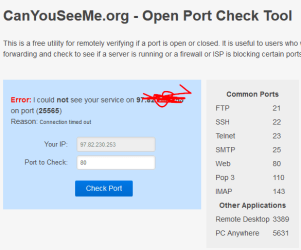
that screenshot just shows port 80 because it resets once you refresh the page, the port im trying to use is 25565. i am trying to run a public server but not a large one, just a small one for a few friends.
 

My Computer My Computer

At a glance

windows 7 premium x64
OS
windows 7 premium x64
Have you tried a different port to see if that port is being blocked by your ISP?

I also see that your parsing TCP to UDP, probably doesn't make a difference to the port being open or closed but it might be better to set them both the same or set to Any.

Another problem you may encounter is your IP may change, most ISP's like to change your IP every so often so you may have to set up a DDNS with a hostname in order to access the services you want remotely.

that screenshot just shows port 80 because it resets once you refresh the page, the port im trying to use is 25565. i am trying to run a public server but not a large one, just a small one for a few friends.

Port checkers I find aren't very reliable as it relies on your ISP to allow a response to made from a port scan. As in most ISPs will block common port scans as they are a potential security attack with regards to reconnaissaince.

The best bet is to test it... I'm assuming it didn't work?

What application are you trying to use? With a high port number like that I am assuming it is some sort of game server? There may be other ports involved that need to be open as well.

If you have any logs on your router that could indicate of traffic that was forwarded then that can help to show that the router is not an issue. For example, your end host/server itself could be an issue.

Have you ensured that the port has been opened in the inbound direction on your server's firewall? Equally, have you ensured that all ports are open in the outbound direction on your server so return traffic can be sent?

Josh :)
 

My Computer My Computer

At a glance

Windows 7 Professional x64 SP1 ; Windows Serv...Intel Core i5 2400 @ 3.10GHz8.0GB DDR3 @ 665MHz (2GBx4)AMD Radeon HD 6870
Computer type
PC/Desktop
Computer Manufacturer/Model Number
Custom Built
OS
Windows 7 Professional x64 SP1 ; Windows Server 2012 R2 Standard
CPU
Intel Core i5 2400 @ 3.10GHz
Motherboard
Foxconn H67MP-S/-V/H67MP
Memory
8.0GB DDR3 @ 665MHz (2GBx4)
Graphics Card(s)
AMD Radeon HD 6870
Sound Card
Realtek High Definition Audio
Monitor(s) Displays
AOC 2243W & SMB1930NW
Screen Resolution
1440x900 & 1920x1080
Hard Drives
977GB Seagate ST31000524AS ATA Drive (SATA)
250GB WD iSCSI attached Drive
PSU
750W Gaming PSU
Case
Novatech Night
Cooling
Fan
Keyboard
Dell Standard PS/2 Keyboard
Mouse
R.A.T 07 Gaming Mouse
Internet Speed
Download: 10 Mbps Ping: 30ms Upload: 0.81 Mbps
Browser
Google Chrome
Other Info
Optiarc DVD RW AD-5260S ATA Device
Port checkers I find aren't very reliable as it relies on your ISP to allow a response to made from a port scan. As in most ISPs will block common port scans as they are a potential security attack with regards to reconnaissaince.

The best bet is to test it... I'm assuming it didn't work?

What application are you trying to use? With a high port number like that I am assuming it is some sort of game server? There may be other ports involved that need to be open as well.

If you have any logs on your router that could indicate of traffic that was forwarded then that can help to show that the router is not an issue. For example, your end host/server itself could be an issue.

Have you ensured that the port has been opened in the inbound direction on your server's firewall? Equally, have you ensured that all ports are open in the outbound direction on your server so return traffic can be sent?

Josh :)

i have not changed anything requarding outbound ports, i am trying to run a minecraft server and the only port it uses is 25565 from numerous searching ive done online. i do have acces to my router and here are the logs. i may need to try to run the server again because when i did a search for the port number the logs only had one result. also is there a different way to check ports other than online scanners? also needlessto say ive tried this with comodo and windows firewall turned off.
 

Attachments

My Computer My Computer

At a glance

windows 7 premium x64
OS
windows 7 premium x64
Port checkers I find aren't very reliable as it relies on your ISP to allow a response to made from a port scan. As in most ISPs will block common port scans as they are a potential security attack with regards to reconnaissaince.

The best bet is to test it... I'm assuming it didn't work?

What application are you trying to use? With a high port number like that I am assuming it is some sort of game server? There may be other ports involved that need to be open as well.

If you have any logs on your router that could indicate of traffic that was forwarded then that can help to show that the router is not an issue. For example, your end host/server itself could be an issue.

Have you ensured that the port has been opened in the inbound direction on your server's firewall? Equally, have you ensured that all ports are open in the outbound direction on your server so return traffic can be sent?

Josh :)

i have not changed anything requarding outbound ports, i am trying to run a minecraft server and the only port it uses is 25565 from numerous searching ive done online. i do have acces to my router and here are the logs. i may need to try to run the server again because when i did a search for the port number the logs only had one result. also is there a different way to check ports other than online scanners? also needlessto say ive tried this with comodo and windows firewall turned off.

Hmm... There is a lot of access on port 23807? Is that forwarded as well? It may well be possible that port 25565 is a connection port and then port 23807 is the streaming port.

Also, I say that you should open all outbound ports is because each time a client connects it will generate a unique source port number. When a response is made this port number will need to be open.

As for a port checker all I can say is to actually sniff the wire with Wireshark and see if the traffic is actually reaching the server.

Josh :)
 

My Computer My Computer

At a glance

Windows 7 Professional x64 SP1 ; Windows Serv...Intel Core i5 2400 @ 3.10GHz8.0GB DDR3 @ 665MHz (2GBx4)AMD Radeon HD 6870
Computer type
PC/Desktop
Computer Manufacturer/Model Number
Custom Built
OS
Windows 7 Professional x64 SP1 ; Windows Server 2012 R2 Standard
CPU
Intel Core i5 2400 @ 3.10GHz
Motherboard
Foxconn H67MP-S/-V/H67MP
Memory
8.0GB DDR3 @ 665MHz (2GBx4)
Graphics Card(s)
AMD Radeon HD 6870
Sound Card
Realtek High Definition Audio
Monitor(s) Displays
AOC 2243W & SMB1930NW
Screen Resolution
1440x900 & 1920x1080
Hard Drives
977GB Seagate ST31000524AS ATA Drive (SATA)
250GB WD iSCSI attached Drive
PSU
750W Gaming PSU
Case
Novatech Night
Cooling
Fan
Keyboard
Dell Standard PS/2 Keyboard
Mouse
R.A.T 07 Gaming Mouse
Internet Speed
Download: 10 Mbps Ping: 30ms Upload: 0.81 Mbps
Browser
Google Chrome
Other Info
Optiarc DVD RW AD-5260S ATA Device
Hmm... There is a lot of access on port 23807? Is that forwarded as well? It may well be possible that port 25565 is a connection port and then port 23807 is the streaming port.

Also, I say that you should open all outbound ports is because each time a client connects it will generate a unique source port number. When a response is made this port number will need to be open.

As for a port checker all I can say is to actually sniff the wire with Wireshark and see if the traffic is actually reaching the server.

Josh :)

the only ports i have fowareded is 25565, im not sure how to open all my outbound ports but i have used wireshark before so i will reinstall it and filter 25565 and see what appears.
 

My Computer My Computer

At a glance

windows 7 premium x64
OS
windows 7 premium x64
heres a netstat i did says 25565 on tcp is listening
 

Attachments

My Computer My Computer

At a glance

windows 7 premium x64
OS
windows 7 premium x64
heres a netstat i did says 25565 on tcp is listening

I should hope so... You are viewing that command on the server so the port should be open ;). It is a question of whether or not the traffic is actually reaching it.

Interestingly enough, your server is also listening on port 23807. Using the router logs a lot of the source IP addresses connecting to you are from the USA. Is that where your clients are based?

Could you try and open TCP and UDP port 23807 and forward it to your server and see what happens.

Many Thanks,
Josh :)
 

My Computer My Computer

At a glance

Windows 7 Professional x64 SP1 ; Windows Serv...Intel Core i5 2400 @ 3.10GHz8.0GB DDR3 @ 665MHz (2GBx4)AMD Radeon HD 6870
Computer type
PC/Desktop
Computer Manufacturer/Model Number
Custom Built
OS
Windows 7 Professional x64 SP1 ; Windows Server 2012 R2 Standard
CPU
Intel Core i5 2400 @ 3.10GHz
Motherboard
Foxconn H67MP-S/-V/H67MP
Memory
8.0GB DDR3 @ 665MHz (2GBx4)
Graphics Card(s)
AMD Radeon HD 6870
Sound Card
Realtek High Definition Audio
Monitor(s) Displays
AOC 2243W & SMB1930NW
Screen Resolution
1440x900 & 1920x1080
Hard Drives
977GB Seagate ST31000524AS ATA Drive (SATA)
250GB WD iSCSI attached Drive
PSU
750W Gaming PSU
Case
Novatech Night
Cooling
Fan
Keyboard
Dell Standard PS/2 Keyboard
Mouse
R.A.T 07 Gaming Mouse
Internet Speed
Download: 10 Mbps Ping: 30ms Upload: 0.81 Mbps
Browser
Google Chrome
Other Info
Optiarc DVD RW AD-5260S ATA Device
turns out opening port 23807 solved the problem. idk what this port does but it plays a part in the application i was attempting to run. also ive found that comodo was partly to blame after i turned it back on to test the connection ceased. my next step will be to allow some applications through via comodo. in the end topic solved, thanks everyone who responded to this topic ^u^
 

My Computer My Computer

At a glance

windows 7 premium x64
OS
windows 7 premium x64
Back
Top