Router port activity: PC shut down.

Holy Moses

Banned
Local time
1:11 AM
Messages
92
Location
Ft. St. John
I'm having a strange problem that I can't find an answer for, or any similar posts.

I just revived a Vista Home Premium PC from the dead after simply cleaning the internals. Runs good now, nice addition.

The problem is, the router port (#3) that the "new" Vista machine is plugged into is showing activity, even after the PC is completely shut down.

I have eliminated the router and the #3 port from the equation. The port light shuts off when other PC's and PS3's are plugged into that port and they are powered down. If I plug the Vista desktop into other ports, those lights stay on indefinitely.

I have eliminated some kind of weird short ??? or something in the ethernet cable by swapping others in, same problem.

If I unplug the Vista desktop's power supply, THEN and only then does the router LAN port activity stop. As soon as I plug the PC power supply back in, the router port flashing light comes back.

Light stays flashing, even when desktop ethernet adapter disabled, and then uninstalled...:shock::confused: Keeps flashing thru reboot, and reinstall of ethernet adpapter driver, and then shut down as well.

Basically this Vista machine is talking thru the router at all times, no matter which router LAN port I choose, or cables I use, even after full OS and tower shut down.

I have no idea where to begin to look for a solution to this as I don't even have any idea of possible causes.

Router/LAN ports: eliminated
Ehternet adapter: eliminated ?? (not sure, but my logic sees it as eliminated)
Cables: eliminated

Any help would be appreciated. Thanks ahead of time.
 

My Computer My Computer

Computer Manufacturer/Model Number
Acer Aspire 6930///Compaq Presario SR5152NX
OS
Windows 7 Professional 32-bit///Vista Home Premium 32-bit
Memory
3GB RAM///2GB RAM
Graphics Card(s)
Built-in, crap///NVIDIA GeForce 6150SE nForce 430
Sound Card
Built-in, alright///Realtek HD audio
Monitor(s) Displays
Built in and 26" LCD/40" LCD (VGA splitter)
Screen Resolution
Laptop: 1366X768 26"Mon: 1366X768 40"Mon:1920X1080
Hard Drives
Internal 350GB///250GB
2 Seagate 1TB HDD Ext.
1 Verbatim 500GB HDD Ext.
Cooling
Stock fans
Keyboard
Intelli-Type Wireless multimedia keyboard
Mouse
MS Wireless Notebook Optical Mouse 3000
Internet Speed
15Mbps Telus DSL
Other Info
2 PS3's, 1 XBOX360, and a Panasonic Blu-Ray player rendering media to various locations in house via PS3 Media Server*****
DIR-655 Xtreme N Gb router w/DAP-1522 bridge/access point******Using Input Director to share keyboard and mouse across all screens and PC's in my room.
Have you maybe got "wake on lan" set to enable in your bios.

bios-wake-on-lan-2.jpg


If you do then your ethernet adapter will still have power/connection to it when the PC is shut down ;)
 

My Computer My Computer

Computer type
PC/Desktop
Computer Manufacturer/Model Number
Self Built
OS
Windows 7 Ultimate 64bit
CPU
AMD Phenom Quad core 9950 black edition
Motherboard
Gigabyte
Memory
16Gb
Graphics Card(s)
2x XFX Radeon 5850
Sound Card
PCI Express X-Fi Titanium / Logitech G35
Monitor(s) Displays
2x HP 2410i
Screen Resolution
1920x1080
Hard Drives
2x 500Gb Seagate
1x 300Gb Seagate
1x 1Tb Seagate
2x 1Tb Hitatchi
PSU
Jean Tech Storm 700W
Case
Cooler Master COSMOS S
Cooling
Akasa Evo Blue Pro
Keyboard
Logitech G15
Mouse
Mad Catz M.M.O. 7
Internet Speed
12mb
Under Power column in the BIOS.....

After AC Power Failure [Stay Off]
Virtualization Technology [Disabled]

Those are the only options under Power column. Nowhere near the selection of options you have in your BIOS.

There is an Advanced column, but nothing with regards to Wake on LAN.
Only thing close ethernet or LAN related....

Onboard LAN [Enabled]
Onboard LAN Boot ROM [Enabled]

I have been thru the BIOS setup and have never seen any Wake On LAN option.

Seemed like a promising solution. Maybe another Wake on LAN setting in Windows that can be accessed??

Thanks for suggestion though.
 

My Computer My Computer

Computer Manufacturer/Model Number
Acer Aspire 6930///Compaq Presario SR5152NX
OS
Windows 7 Professional 32-bit///Vista Home Premium 32-bit
Memory
3GB RAM///2GB RAM
Graphics Card(s)
Built-in, crap///NVIDIA GeForce 6150SE nForce 430
Sound Card
Built-in, alright///Realtek HD audio
Monitor(s) Displays
Built in and 26" LCD/40" LCD (VGA splitter)
Screen Resolution
Laptop: 1366X768 26"Mon: 1366X768 40"Mon:1920X1080
Hard Drives
Internal 350GB///250GB
2 Seagate 1TB HDD Ext.
1 Verbatim 500GB HDD Ext.
Cooling
Stock fans
Keyboard
Intelli-Type Wireless multimedia keyboard
Mouse
MS Wireless Notebook Optical Mouse 3000
Internet Speed
15Mbps Telus DSL
Other Info
2 PS3's, 1 XBOX360, and a Panasonic Blu-Ray player rendering media to various locations in house via PS3 Media Server*****
DIR-655 Xtreme N Gb router w/DAP-1522 bridge/access point******Using Input Director to share keyboard and mouse across all screens and PC's in my room.
For me, as long as the board still has power and the eithernet cable is plugged in the lights keep on flashin, they don't go out unless I unplug the eithernet cable from the machine or unplug the power from the machine. All windows 7 machines in my network.​
 

My Computer My Computer

Computer type
PC/Desktop
Computer Manufacturer/Model Number
Home built
OS
Windows 7 Ult, Windows 8.1 Pro,
CPU
Q9650-4.275GHz, E8600 4.5GHz, E6750-3.8GHz
Motherboard
Evga 780i FTW
Memory
G.Skill PC2 9600 1200Mhz 5 5 5 15 2T
Graphics Card(s)
GTX480
Sound Card
Asus Xonar D2
Monitor(s) Displays
HannsG
Screen Resolution
1680X1050
Hard Drives
GSkill Phoenix Pro 120GB SSD
PSU
ThermalTake Toughpower 1000Watt modular
Case
ThermalTake XaserV
Cooling
Xigmatek S1283
Keyboard
Logitech G15
Mouse
Logitech G9
Internet Speed
T1
Unfortunately that's not a snip from my bios so yours could be under another heading but there is a windows setting that has the same option
 

Attachments

  • wol.PNG
    wol.PNG
    58.2 KB · Views: 163

My Computer My Computer

Computer type
PC/Desktop
Computer Manufacturer/Model Number
Self Built
OS
Windows 7 Ultimate 64bit
CPU
AMD Phenom Quad core 9950 black edition
Motherboard
Gigabyte
Memory
16Gb
Graphics Card(s)
2x XFX Radeon 5850
Sound Card
PCI Express X-Fi Titanium / Logitech G35
Monitor(s) Displays
2x HP 2410i
Screen Resolution
1920x1080
Hard Drives
2x 500Gb Seagate
1x 300Gb Seagate
1x 1Tb Seagate
2x 1Tb Hitatchi
PSU
Jean Tech Storm 700W
Case
Cooler Master COSMOS S
Cooling
Akasa Evo Blue Pro
Keyboard
Logitech G15
Mouse
Mad Catz M.M.O. 7
Internet Speed
12mb
For me, as long as the board still has power and the eithernet cable is plugged in the lights keep on flashin, they don't go out unless I unplug the eithernet cable from the machine or unplug the power from the machine. All windows 7 machines in my network.​

Strange. My Win 7 PC shuts down and the corresponding router port light goes out. As well with my PS3's.

As long as no real security threat exists where some power is diverted and some obscure device is feeding info from that PC, I am not too worried about it.

As my HDD should not even have access without power, and my security is pretty tight on the the drive....by my logic... there should be no data security risks....but that port light activity just has me curious.

If you tell me not to worry, I won't.
 

My Computer My Computer

Computer Manufacturer/Model Number
Acer Aspire 6930///Compaq Presario SR5152NX
OS
Windows 7 Professional 32-bit///Vista Home Premium 32-bit
Memory
3GB RAM///2GB RAM
Graphics Card(s)
Built-in, crap///NVIDIA GeForce 6150SE nForce 430
Sound Card
Built-in, alright///Realtek HD audio
Monitor(s) Displays
Built in and 26" LCD/40" LCD (VGA splitter)
Screen Resolution
Laptop: 1366X768 26"Mon: 1366X768 40"Mon:1920X1080
Hard Drives
Internal 350GB///250GB
2 Seagate 1TB HDD Ext.
1 Verbatim 500GB HDD Ext.
Cooling
Stock fans
Keyboard
Intelli-Type Wireless multimedia keyboard
Mouse
MS Wireless Notebook Optical Mouse 3000
Internet Speed
15Mbps Telus DSL
Other Info
2 PS3's, 1 XBOX360, and a Panasonic Blu-Ray player rendering media to various locations in house via PS3 Media Server*****
DIR-655 Xtreme N Gb router w/DAP-1522 bridge/access point******Using Input Director to share keyboard and mouse across all screens and PC's in my room.
Unfortunately that's not a snip from my bios so yours could be under another heading but there is a windows setting that has the same option


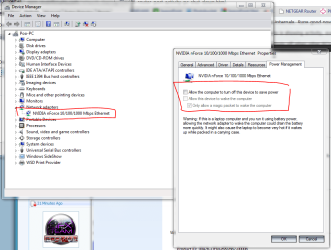
I have "allow the computer to turn off this device....." UNTICKED

But if this is causing this, I have it set the same way on my Win 7 machine, but the router shows no activity when it powers down.....only the Vista machine has this "constant LAN activity" problem.....or issue I should say....I have yet to really classify it as a PROBLEM.
 

My Computer My Computer

Computer Manufacturer/Model Number
Acer Aspire 6930///Compaq Presario SR5152NX
OS
Windows 7 Professional 32-bit///Vista Home Premium 32-bit
Memory
3GB RAM///2GB RAM
Graphics Card(s)
Built-in, crap///NVIDIA GeForce 6150SE nForce 430
Sound Card
Built-in, alright///Realtek HD audio
Monitor(s) Displays
Built in and 26" LCD/40" LCD (VGA splitter)
Screen Resolution
Laptop: 1366X768 26"Mon: 1366X768 40"Mon:1920X1080
Hard Drives
Internal 350GB///250GB
2 Seagate 1TB HDD Ext.
1 Verbatim 500GB HDD Ext.
Cooling
Stock fans
Keyboard
Intelli-Type Wireless multimedia keyboard
Mouse
MS Wireless Notebook Optical Mouse 3000
Internet Speed
15Mbps Telus DSL
Other Info
2 PS3's, 1 XBOX360, and a Panasonic Blu-Ray player rendering media to various locations in house via PS3 Media Server*****
DIR-655 Xtreme N Gb router w/DAP-1522 bridge/access point******Using Input Director to share keyboard and mouse across all screens and PC's in my room.
Back
Top