
Routers for Low SNR

LevelBest

New member
Member
VIP
Local time
8:49 PM
Messages
268
I’ve been experiencing a number of problems with my internet connection and have had a number of things done to resolve the situation including a new router from my service provider. They have told me that it is a basic router. The problem I’m having is that the SNR keeps dropping. Having done some research I’ve find a website that says the following routers have specifically been known to maintain a more stable connection on a low SNR line.

The Speedtouch 585 and 576,
Netgear DG834,
Westell 6100,
D-Link DSL-G604T

Does anyone have these routers and could comment on their ability to uphold a stable connection on a low SNR line?

Please note I would be connecting with an ethernet cable, not wifi.

LevelBest
 

My Computer

Computer type
Laptop
Computer Manufacturer/Model Number
Samsung S3511
OS
Windows 7 Home Premium 64 Bit (Service Pack 1)
CPU
Premium Dual Core P6200
Motherboard
Samsung S3511
Memory
4 GB
Graphics Card(s)
Intel (R) HD Graphic
Sound Card
Realtek High Definition Audio
Screen Resolution
1366 x 768
Hard Drives
C: D: E: (NTFS)
Cooling
Drive temperature: 38 / 100
Mouse
Wired Logitech B100
Antivirus
McAfee Total Protection
Browser
Supermium Portable and r3dfox
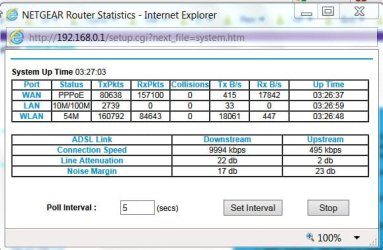
I have been using a Netgear DG834G from time immemorial. I know that it is one of the best modem/routers that can work in adverse SNR conditions where others struggle to maintain a connection.( Mine though,is not working in such adverse conditions :) : I am within a mile from my exchange.)
29-11-2017 10-06-05.jpg
 
Last edited:

My Computer

OS
Windows 7 Home Premium 32 bit
I have been using a Netgear DG834G from time immemorial. I know that it is one of the best modem/routers that can work in adverse SNR conditions where others struggle to maintain a connection.( Mine though,is not working in such adverse conditions :) : I am within a mile from my exchange.)

View attachment 401858

Thank you, that's just the information I was looking for. Does it also work with high SNR, as the latest re-set by my SP hasn't worked and the SNR has now increased to 19. I have an outreach engineer booked for tomorrow to see if they can track down the cause but I want to keep in mind that a more substantial router may well help, or could well be my only option if they can't find the issue.

LevelBest
 

My Computer

Computer type
Laptop
Computer Manufacturer/Model Number
Samsung S3511
OS
Windows 7 Home Premium 64 Bit (Service Pack 1)
CPU
Premium Dual Core P6200
Motherboard
Samsung S3511
Memory
4 GB
Graphics Card(s)
Intel (R) HD Graphic
Sound Card
Realtek High Definition Audio
Screen Resolution
1366 x 768
Hard Drives
C: D: E: (NTFS)
Cooling
Drive temperature: 38 / 100
Mouse
Wired Logitech B100
Antivirus
McAfee Total Protection
Browser
Supermium Portable and r3dfox
Who's the ISP normally they supply routers that are compatible with their network. Ask the engineer to fit a rain filter that drastically changes it and reduces noise etc. Have you got a sheilded cable from socket to router that's a must normal cable is rubbish and picks up noise
 

My Computer

Computer type
PC/Desktop
OS
win 8 32 bit
I'm dealing with a different person now at the SP and I get the feeling they're more experienced than the previous chap I'd been dealing with. He said to me that although they've provided me with a new router, it is a "basic" router. This was when I was discussing that I would be willing to buy a new router that was capable of maybe handling the fluctuating SNR.

The last engineer who came out fitted a brand new BT Master Socket 5C which I'm assuming is all singing all dancing.

I will mention to the engineer tomorrow about fitting a rein filter and see what they say, although it would be good if they could actually track down the source of the problem and fix it.

Thanks for the info guys.
 

My Computer

Computer type
Laptop
Computer Manufacturer/Model Number
Samsung S3511
OS
Windows 7 Home Premium 64 Bit (Service Pack 1)
CPU
Premium Dual Core P6200
Motherboard
Samsung S3511
Memory
4 GB
Graphics Card(s)
Intel (R) HD Graphic
Sound Card
Realtek High Definition Audio
Screen Resolution
1366 x 768
Hard Drives
C: D: E: (NTFS)
Cooling
Drive temperature: 38 / 100
Mouse
Wired Logitech B100
Antivirus
McAfee Total Protection
Browser
Supermium Portable and r3dfox
A tech came to my house a while back for an internet problem; he said that some of the connectors in the box attached to the pole were bad, so he made sure that my jack was connected to a good connector in the box.

He also made sure that I was on a good connector in the box that was attached to my house.
 

My Computer

Computer type
PC/Desktop
Computer Manufacturer/Model Number
Dell
OS
Linux Mint 18.2 xfce 64-bit (VMWare host) / Windows 8.1 Pro 32-bit (VMWare guest)
CPU
Haswell
Memory
4 GB
Monitor(s) Displays
Acer 23"
Screen Resolution
1920 x 1080
Hard Drives
Two hard drives, 1TB each: One for Linux, one for my data.
Keyboard
IBM Model M
Antivirus
Sophos (Linux), Trend Micro (Windows)
Browser
Firefox, Opera
Other Info
I use Samba to share my data drive with the other computers at my house and with my guest session in VMWare Workstation Player.
Back
Top