Hello,
I have some difficulties managing routes for my network cards. I have 2 network cards, one I use for internet, the other for multicast. Apparently, the current behaviour is that Windows chooses the first card he founds for multicast, and that will be the internet one.
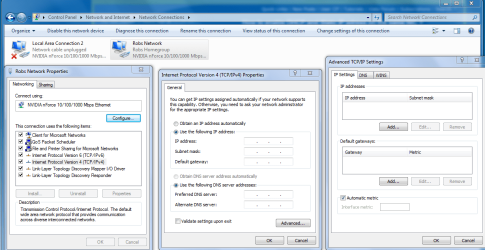
So, my cards are configured like this :
. internet :
IP : 192.168.1.66
mask : 255.255.255.0
gateway : 192.168.1.1 (this is my router)
dns : 192.168.1.1
. multicast :
IP : 192.168.0.2
mask : 255.255.255.0
gateway : empty
dns : empty
The "route print" command shows this :
and interface number for internet card is 11 and 17 for the multicast one.
By doing a simple "route delete 224.0.0.0 if 11", I have the behaviour I want. Both internet and multicast. The problem is that this route comes back after reboot.
I tried adding this route :
But after a reboot, the "route print" command shows this :
My question is how can I get rid of this route in red that keeps coming back ? And why didn't the added route replace it ?
Thanks for your help !
PS : Every route command has been executed in an elevated command prompt.
I have some difficulties managing routes for my network cards. I have 2 network cards, one I use for internet, the other for multicast. Apparently, the current behaviour is that Windows chooses the first card he founds for multicast, and that will be the internet one.
So, my cards are configured like this :
. internet :
IP : 192.168.1.66
mask : 255.255.255.0
gateway : 192.168.1.1 (this is my router)
dns : 192.168.1.1
. multicast :
IP : 192.168.0.2
mask : 255.255.255.0
gateway : empty
dns : empty
The "route print" command shows this :
Code:
224.0.0.0        240.0.0.0         On-link      192.168.1.66    276
224.0.0.0 240.0.0.0 On-link 192.168.0.2 276By doing a simple "route delete 224.0.0.0 if 11", I have the behaviour I want. Both internet and multicast. The problem is that this route comes back after reboot.
I tried adding this route :
Code:
route add 224.0.0.0 mask 240.0.0.0 192.168.1.66 metric 300 if 11 -p
Code:
[COLOR=Red]224.0.0.0        240.0.0.0         On-link      192.168.1.66    276[/COLOR]
224.0.0.0        240.0.0.0     192.168.1.66     192.168.1.66    320
224.0.0.0 240.0.0.0 On-link 192.168.0.2 276Thanks for your help !
PS : Every route command has been executed in an elevated command prompt.
My Computer
- OS
- Windows 7 Home Premium 64bits