Row Length in Excel

Mitch656

New member
Power User
VIP
Local time
12:08 AM
Messages
722
Location
Australia
So im using Excel 2010, and i making a timetable.

Right now the row going across saying period 1 2 3 they are all different sizes, some will be bigger and some would be smaller. I was wondering if there is a way to make them all the same size.


If you dont know what im talking about ask for a screenshot.

Im to busy to upload one now
 

My Computer My Computer

Computer type
PC/Desktop
Computer Manufacturer/Model Number
Custom Build
OS
Windows 7 Professional 64bit
CPU
Intel Core i5 - 2500K @ 3.30GHz
Motherboard
Gigabyte Z77-HD3
Memory
4GB DDR3
Graphics Card(s)
EVGA Nvidia GeForce GT 740 2GB DDR3
Screen Resolution
1680 x 1050
Hard Drives
1T Samaung HD/ 1T toshiba external drive/ 1T western digital external drive/ 2T seagate external drive/ 250gb samaung SSD
PSU
Antec 430W
Keyboard
Microsoft Wireless Keyboard 800
Mouse
Microsoft Wireless Mouse 1000
Antivirus
AVG
Browser
Internet Explorer
do you want the rows to all be the same height?

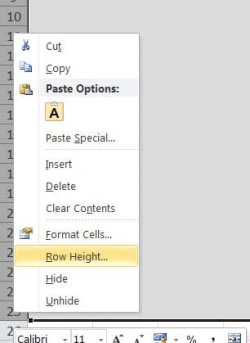
click on the first row number on the left - shift-click on the last one to select all the rows.

then right-click on the row numbers >> row height >> type in a number...

xl.jpg

you can do a similar thing with the columns too.

is this what you meant?
 

My Computer My Computer

Computer Manufacturer/Model Number
mickey megabyte 1234
OS
ultimate 64 sp1
CPU
i5 2500K [email protected]
Motherboard
MSI P67A-GD53
Memory
8 gigs GSkill Ripjaws 1600
Graphics Card(s)
amd hd6950
Sound Card
creative x-fi gamer
Monitor(s) Displays
samsung 24"
Screen Resolution
1920x1080
Hard Drives
ocz vertex 2e 60 gig, samsung f3 1tb, buffalo 2tb ext
PSU
antec 550
Case
antec three hundred
Cooling
i'm a cooling fan
Keyboard
saitek eclipse ii
Mouse
logitech g3
Internet Speed
about 4 Mbps
Other Info
i love win7
do you want the rows to all be the same height?

click on the first row number on the left - shift-click on the last one to select all the rows.

then right-click on the row numbers >> row height >> type in a number...

View attachment 152542

you can do a similar thing with the columns too.

is this what you meant?


My brain has just died :) I mean the rows? that are all grey i want them to be the same length like going across if that makes sence
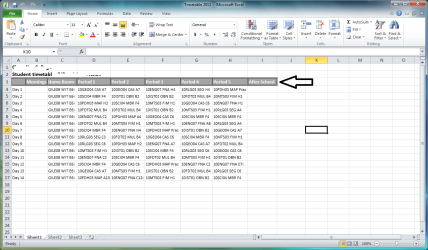
 

Attachments

  • Untitled.png
    Untitled.png
    56.4 KB · Views: 11

My Computer My Computer

Computer type
PC/Desktop
Computer Manufacturer/Model Number
Custom Build
OS
Windows 7 Professional 64bit
CPU
Intel Core i5 - 2500K @ 3.30GHz
Motherboard
Gigabyte Z77-HD3
Memory
4GB DDR3
Graphics Card(s)
EVGA Nvidia GeForce GT 740 2GB DDR3
Screen Resolution
1680 x 1050
Hard Drives
1T Samaung HD/ 1T toshiba external drive/ 1T western digital external drive/ 2T seagate external drive/ 250gb samaung SSD
PSU
Antec 430W
Keyboard
Microsoft Wireless Keyboard 800
Mouse
Microsoft Wireless Mouse 1000
Antivirus
AVG
Browser
Internet Explorer
Right-click the column, and choose the option "Column Width" to set it - you can also select several columns and set them to the same width at the same time.
 

My Computer My Computer

Computer type
PC/Desktop
Computer Manufacturer/Model Number
Golden Mk. I.4
OS
Windows 10 Pro x64 ; Xubuntu x64
CPU
Intel i7 860 @ 2.80 GHz O/C'ed to 4.0GHz
Motherboard
Gigabyte P55A-UD3R Rev.1. Award BIOS F13
Memory
16GB Corsair Vengance DDR3 @ 661 MHz Dual Channel (9-9-9-24)
Graphics Card(s)
EVGA NVidia GTX 560 1024MB
Sound Card
Realtek Integrated
Monitor(s) Displays
Dual Samsung SyncMaster 2494HS
Screen Resolution
1920*1080 and 1920*1080
Hard Drives
1*Samsung 840 EVO 120GB SSD;
1*OCZ Vertex 2 60GB SSD;
2*Samsung F3 SpinPoint 1TB in RAID0;
1*Samsung F1 SpinPoint 1TB;
2*Western Digital 1TB External USB 3.0
1*Western Digital 500GB External USB 3.0
1*Seagate 500GB External USB 2.0
PSU
Thermaltake ToughPower QFan 750W
Case
Thermaltake Element S VK60001W2Z
Cooling
Corsair H60 Water Cooling, 2*230mm and 2*80mm case fans
Keyboard
Logitech G110
Mouse
Logitech MX518
yep - just click on the first column header (the A), shift-click on the last (I or whatever)...that'll select all the columns.

...do a right-mouse click >> column width >> type a number

exactly the same process as i explained above.
 

My Computer My Computer

Computer Manufacturer/Model Number
mickey megabyte 1234
OS
ultimate 64 sp1
CPU
i5 2500K [email protected]
Motherboard
MSI P67A-GD53
Memory
8 gigs GSkill Ripjaws 1600
Graphics Card(s)
amd hd6950
Sound Card
creative x-fi gamer
Monitor(s) Displays
samsung 24"
Screen Resolution
1920x1080
Hard Drives
ocz vertex 2e 60 gig, samsung f3 1tb, buffalo 2tb ext
PSU
antec 550
Case
antec three hundred
Cooling
i'm a cooling fan
Keyboard
saitek eclipse ii
Mouse
logitech g3
Internet Speed
about 4 Mbps
Other Info
i love win7
Back
Top