roxio burn

DWFII

New member
Member
VIP
Local time
3:22 AM
Messages
116
Location
High desert of Central Oregon
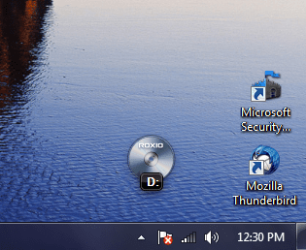
Another annoyance from Dell? when I use windows media player, I get a little icon that pops up near the bottom of the screen. I can't figure out how to get rid of it. Right clicking on the icon does nothing, Left clicking opens a small menu but there is no option to disable it. the Start menu contains a link and right clicking on it brings up a menu which contains a "properties" link but again no ability to disable the pop up icon.

Anyone have any ideas?
 

My Computer

Computer Manufacturer/Model Number
custom
OS
Windows 7 Ultimate x64
CPU
Intel Core i5 320ghz
Memory
4gbDDR2 800mhz
Graphics Card(s)
Nvidia Gforce 9800
Sound Card
Creative Audigy 2 ZS
Monitor(s) Displays
NEC
Screen Resolution
1280x1024
Hard Drives
500gb ATA
320gb ATA
Can you take a screen shot of the icon so we can see what you're talking about?
 

My Computer

Computer type
PC/Desktop
Computer Manufacturer/Model Number
Bruce ... somewhere in his 40's
OS
Windows 7 Ultimate 32bit SP1
CPU
Intel(R) Core(TM)2 Quad CPU @ 2.40GHz, 2400 MHz
Motherboard
INTEL/D975XBX2
Memory
4 GB
Graphics Card(s)
ATI Radeon HD 2600 Pro
Monitor(s) Displays
Samsung SyncMaster 914v
Screen Resolution
1280 x 1024
Hard Drives
2/500GB each ... ST3500630AS ATA Device.
One is not connected
PSU
Rocketfish 700 W
Case
G.Skill Gigabyte Chassis
Keyboard
Standard PS/2 Keyboard
Mouse
Microsoft PS/2 Mouse
Internet Speed
DSL
Antivirus
Avira Internet Security
Browser
IE 11
Other Info
ATI HDMI Audio
Open the Start menu, type msconfig in the Search box, click on the msconfig icon under Programs in the list that appears, click on the Startup tab, uncheck the "Roxio Burn" startup item, and click OK. You may have to restart your computer for the change to take effect.

Another option is to uninstall Roxio.
 

My Computer

OS
windows 7

Attachments

  • roxio_capture.PNG
    roxio_capture.PNG
    42.5 KB · Views: 12,625

My Computer

Computer Manufacturer/Model Number
custom
OS
Windows 7 Ultimate x64
CPU
Intel Core i5 320ghz
Memory
4gbDDR2 800mhz
Graphics Card(s)
Nvidia Gforce 9800
Sound Card
Creative Audigy 2 ZS
Monitor(s) Displays
NEC
Screen Resolution
1280x1024
Hard Drives
500gb ATA
320gb ATA
Before this gets buried...and now that I've posted a screen shot...is the only way to get rid of the Roxio icon through msconfig or to delete the program?

I don't mind having the utility I simply want it to come when I call it and not before.
 

My Computer

Computer Manufacturer/Model Number
custom
OS
Windows 7 Ultimate x64
CPU
Intel Core i5 320ghz
Memory
4gbDDR2 800mhz
Graphics Card(s)
Nvidia Gforce 9800
Sound Card
Creative Audigy 2 ZS
Monitor(s) Displays
NEC
Screen Resolution
1280x1024
Hard Drives
500gb ATA
320gb ATA
You can always specify when you want Roxio Burn to activate in Control Panel/AutoPlay.
 

My Computer

OS
windows 7
Did you ever get a fix for this? I have the same problem?

Thanks,

b
 

My Computer

OS
Windows 7 Home Premium 64bit
I couldn't get an answer here or from Roxio, so I got rid of it. Went to InfraRecorder (free) and have never looked back.
 

My Computer

Computer Manufacturer/Model Number
custom
OS
Windows 7 Ultimate x64
CPU
Intel Core i5 320ghz
Memory
4gbDDR2 800mhz
Graphics Card(s)
Nvidia Gforce 9800
Sound Card
Creative Audigy 2 ZS
Monitor(s) Displays
NEC
Screen Resolution
1280x1024
Hard Drives
500gb ATA
320gb ATA
Good for you and thanks for reporting back after all these many months :thumbsup:
I don't care for Roxio or Nero! Both want to take over and neither one work correctly when you need/want to use it. Why is that?
Headscratch2.gif
 

My Computer

Computer type
PC/Desktop
Computer Manufacturer/Model Number
Bruce ... somewhere in his 40's
OS
Windows 7 Ultimate 32bit SP1
CPU
Intel(R) Core(TM)2 Quad CPU @ 2.40GHz, 2400 MHz
Motherboard
INTEL/D975XBX2
Memory
4 GB
Graphics Card(s)
ATI Radeon HD 2600 Pro
Monitor(s) Displays
Samsung SyncMaster 914v
Screen Resolution
1280 x 1024
Hard Drives
2/500GB each ... ST3500630AS ATA Device.
One is not connected
PSU
Rocketfish 700 W
Case
G.Skill Gigabyte Chassis
Keyboard
Standard PS/2 Keyboard
Mouse
Microsoft PS/2 Mouse
Internet Speed
DSL
Antivirus
Avira Internet Security
Browser
IE 11
Other Info
ATI HDMI Audio
I like Roxio, but that is one of the things that really annoys me. Not everybody wants that feature so why make it so hard to turn it off or change it's functionality. :( The other major annoyance that seems to be a growing trend is to just install every component/option and turn them all on during the install. :sa:
I really liked the earlier versions, simple easy to use and not bloated down with components I'll never use, and can't easily turn off.
 

My Computer

Computer type
PC/Desktop
Computer Manufacturer/Model Number
Home Built
OS
Windows 10 Education 64 bit
CPU
AMD Phenom II X4 980 Black Edition Deneb 3.7GHz
Motherboard
Asus M4N68T-M V2 µATX Motherboard
Memory
8GB 4GBx2 Kingston PC10600 DDR3 1333 Memory
Graphics Card(s)
Zotac NVIDIA Geforce GT640 2 Gig DDR3 PCIe
Sound Card
VIA VT1708s High Definition Audio 8-channel Onboard
Monitor(s) Displays
22" LG E2242 1080p and 2 19" I-INC AG191D
Screen Resolution
1280x1024 - 1920x1080 - 1280x1024
Hard Drives
Crucial M100 256 GB SSD and 500 GB WD Blue SATA
PSU
Thermaltake TR 620
Case
Power Up Black ATX Mid-Tower Case
Cooling
Stock heatsink and fan
Keyboard
Logitech Wireless K350 Wave
Mouse
Logitech Wireless M570 Trackman Wheel
Internet Speed
80 Mbps Down 30 Mbps Up
Antivirus
Windows Defender
Browser
Internet Explorer 11
Other Info
HP DVD1040e Lightscribe - External USB2
Back
Top