
Solved RubyIconProject

Arc

New member
SF Team
Local time
7:21 PM
Messages
35,002
Whenever I am trying to upload or download something (obviously sevenforums is an exception) , I am getting this thing ....
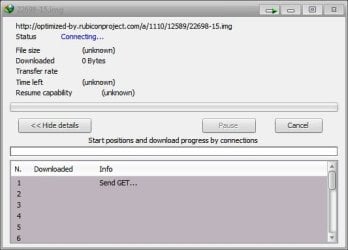
Capture.JPG

It appeared to be something not good :mad: I have inactivated IDM, and the result is the same .... for all the browsers I've tried .... IE, Firefox, Chrome and Opera .

I have cleared internet cache, but no result . MBAM could not detect it in my system :sarc:

How can I get rid of it ?
 

My Computer

Computer type
PC/Desktop
Computer Manufacturer/Model Number
Self Assembled
OS
Microsoft Windows 10 Pro Insider Preview 64-bit
CPU
Intel(R) Core(TM) i3-4130 CPU @ 3.40GHz
Motherboard
Gigabyte Technology Co., Ltd. B85M-D3H
Memory
Corsair Vengence 4GB x2 (8.00GB Dual-Channel DDR3 @ 798MHz)
Graphics Card(s)
2047MB GeForce GTS 450 (ZOTAC International)
Sound Card
Onboard (Realtek High Definition Audio)
Monitor(s) Displays
LG Flatron E2040T
Screen Resolution
1600x900
Hard Drives
Western Digital 1 TB
Seagate 500 GB
PSU
Corsair VS550
Case
Cooler Master K380
Cooling
Cooler Master Seidon 120V Plus
Keyboard
Logitech MK260r
Mouse
Logitech MK260r
Internet Speed
PMPL Broadband
Antivirus
Windows Defender + MBAM
Browser
Firefox
Other Info
Dell Studio 15" Laptop
I'd suggest you clean cookies for IE and Firefox. Otherwise this Lavasoft discussion might help?
Done everything .... but the result is the same :(
Am I try to restore my system to an earliest date ? Or restore the earliest image ?
 

My Computer

Computer type
PC/Desktop
Computer Manufacturer/Model Number
Self Assembled
OS
Microsoft Windows 10 Pro Insider Preview 64-bit
CPU
Intel(R) Core(TM) i3-4130 CPU @ 3.40GHz
Motherboard
Gigabyte Technology Co., Ltd. B85M-D3H
Memory
Corsair Vengence 4GB x2 (8.00GB Dual-Channel DDR3 @ 798MHz)
Graphics Card(s)
2047MB GeForce GTS 450 (ZOTAC International)
Sound Card
Onboard (Realtek High Definition Audio)
Monitor(s) Displays
LG Flatron E2040T
Screen Resolution
1600x900
Hard Drives
Western Digital 1 TB
Seagate 500 GB
PSU
Corsair VS550
Case
Cooler Master K380
Cooling
Cooler Master Seidon 120V Plus
Keyboard
Logitech MK260r
Mouse
Logitech MK260r
Internet Speed
PMPL Broadband
Antivirus
Windows Defender + MBAM
Browser
Firefox
Other Info
Dell Studio 15" Laptop
A couple of other suggestions before you go that route...

Go to the NAI website(Network Advertising Initiative) - make sure you are not blocking scripts for this page. This link will take you to the Opt-Out settings page. Scroll to the bottom and check Select All > Submit. Reboot and see if there is any change? If this prevents the problem re-occurring you may need to go back to the NAI settings to fine tune them to your liking?

Search User folder including hidden files/folders for any rubiconproject items in browser/chrome related storage locations, and remove?

As I understand it this problem is related to the Rubicon tracking cookie, and the window appears via your AV? Check your AV and AV forum, as this issue has been shown to be a false positive with some AVs?
 

My Computer

Computer type
PC/Desktop
OS
Windows 7
  • Like
Reactions: Arc
Thanks mate :D Apparently it seems to be solved !! But to be sure, I am to take a bit more time, if you dont mind .
 

My Computer

Computer type
PC/Desktop
Computer Manufacturer/Model Number
Self Assembled
OS
Microsoft Windows 10 Pro Insider Preview 64-bit
CPU
Intel(R) Core(TM) i3-4130 CPU @ 3.40GHz
Motherboard
Gigabyte Technology Co., Ltd. B85M-D3H
Memory
Corsair Vengence 4GB x2 (8.00GB Dual-Channel DDR3 @ 798MHz)
Graphics Card(s)
2047MB GeForce GTS 450 (ZOTAC International)
Sound Card
Onboard (Realtek High Definition Audio)
Monitor(s) Displays
LG Flatron E2040T
Screen Resolution
1600x900
Hard Drives
Western Digital 1 TB
Seagate 500 GB
PSU
Corsair VS550
Case
Cooler Master K380
Cooling
Cooler Master Seidon 120V Plus
Keyboard
Logitech MK260r
Mouse
Logitech MK260r
Internet Speed
PMPL Broadband
Antivirus
Windows Defender + MBAM
Browser
Firefox
Other Info
Dell Studio 15" Laptop
But to be sure, I am to take a bit more time, if you dont mind .

Not sure what you mean by this part though?
I meant I want to upload/download to/from a few more sites like Photobucket, ImageShack , and deviantART :)

And after that, I am satisfied . The problem is gone :D

Thank you so much Oaken :thumbsup:
 

My Computer

Computer type
PC/Desktop
Computer Manufacturer/Model Number
Self Assembled
OS
Microsoft Windows 10 Pro Insider Preview 64-bit
CPU
Intel(R) Core(TM) i3-4130 CPU @ 3.40GHz
Motherboard
Gigabyte Technology Co., Ltd. B85M-D3H
Memory
Corsair Vengence 4GB x2 (8.00GB Dual-Channel DDR3 @ 798MHz)
Graphics Card(s)
2047MB GeForce GTS 450 (ZOTAC International)
Sound Card
Onboard (Realtek High Definition Audio)
Monitor(s) Displays
LG Flatron E2040T
Screen Resolution
1600x900
Hard Drives
Western Digital 1 TB
Seagate 500 GB
PSU
Corsair VS550
Case
Cooler Master K380
Cooling
Cooler Master Seidon 120V Plus
Keyboard
Logitech MK260r
Mouse
Logitech MK260r
Internet Speed
PMPL Broadband
Antivirus
Windows Defender + MBAM
Browser
Firefox
Other Info
Dell Studio 15" Laptop
As I understand it this problem is related to the Rubicon tracking cookie, and the window appears via your AV? Check your AV and AV forum, as this issue has been shown to be a false positive with some AVs?
This window is of Internet Download Manager , not an AV . The situation was ... click on any upload or download button .... this window appears :sarc: and trying to download an image file .

It is not a fair practice from their part, IMO ! Why I am to download some unwanted stuff ?
 

My Computer

Computer type
PC/Desktop
Computer Manufacturer/Model Number
Self Assembled
OS
Microsoft Windows 10 Pro Insider Preview 64-bit
CPU
Intel(R) Core(TM) i3-4130 CPU @ 3.40GHz
Motherboard
Gigabyte Technology Co., Ltd. B85M-D3H
Memory
Corsair Vengence 4GB x2 (8.00GB Dual-Channel DDR3 @ 798MHz)
Graphics Card(s)
2047MB GeForce GTS 450 (ZOTAC International)
Sound Card
Onboard (Realtek High Definition Audio)
Monitor(s) Displays
LG Flatron E2040T
Screen Resolution
1600x900
Hard Drives
Western Digital 1 TB
Seagate 500 GB
PSU
Corsair VS550
Case
Cooler Master K380
Cooling
Cooler Master Seidon 120V Plus
Keyboard
Logitech MK260r
Mouse
Logitech MK260r
Internet Speed
PMPL Broadband
Antivirus
Windows Defender + MBAM
Browser
Firefox
Other Info
Dell Studio 15" Laptop
Aha... I use a number of blocking tools (including Hosts Man server for ads + spyware lists) as well as the full NAI list and have no probs with those sites, and most others.

If it comes back, which it could possibly, you may need to blacklist the cookie in question- which could take a bit of work to identify.
 

My Computer

Computer type
PC/Desktop
OS
Windows 7
Sorry Arc I can't help you with IDM as I've never used it.

You may want to look at this post I made concerning a possible alternative to IDM (depending on your requirements)?
 
Last edited:

My Computer

Computer type
PC/Desktop
OS
Windows 7
Back
Top