Run as Administrator

How to Run a Program as an Administrator in Windows 7


   Information
This will show you how to have a program run as administrator with full elevated rights and privileges in Windows 7.

A Standard user will still not be able to run a elevated program without getting a UAC prompt and having to enter the administrator's password.
   Note
If a program that you are trying to run is giving you a Access Denied or No Permission type error, then running it as an administrator can usually give the program the permission it needs to run properly.
   Warning
You should only allow a program that you trust to run as administrator. Once you have applied UAC permission, the program will have full access to your computer.


OPTION ONE

"Run as administrator" using a Keyboard Shortcut


NOTE: This will allow you to temporarily run a program as an administrator once until you close it.
1. Press and hold Ctrl+Shift while opening the program.

2. If prompted by UAC, then click on Yes to apply permission to allow the program to run with full permission as an Administrator.
NOTE: If you are doing this is while logged in as standard user instead of an administrator, then you will need to provide the administrator's password before the program will run as administrator.


OPTION TWO

"Run as administrator" using Context Menu of Program


NOTE: This will show you how to temporarily run a program as an administrator once until you close it.
1. Right click on the program's shortcut or an .EXE file, BAT file, CMD file, or MSI file, and click on Run as administrator. (see screenshot below)
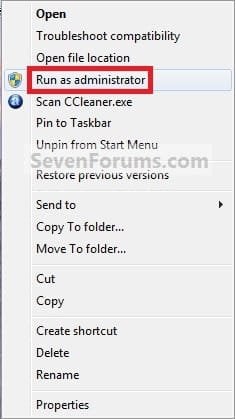
Context_Menu.jpg
2. If prompted by UAC, then click on Yes to apply permission to allow the program to run with full permission as an administrator.
NOTE: If you are doing this is while logged in as standard user instead of an administrator, then you will need to provide the administrator's password before the program will run as administrator.


OPTION THREE

"Run as administrator" from Pinned Program on Taskbar


NOTE: This will show you how to temporarily run a program pinned to the taskbar as an administrator once until you close it.
1. Right click on the icon of the pinned program on the taskbar to open it's Jump List. (see screenshot below)

2. In the Jump List, right click on the program's name, and click on Run as administrator. (see screenshot below)
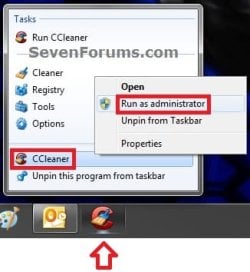
Taskbar1.jpg
3. If prompted by UAC, then click on Yes to apply permission to allow the program to run with full permission as an Administrator.
NOTE: If you are doing this is while logged in as standard user instead of an administrator, then you will need to provide the administrator's password before the program will run as administrator.


OPTION FOUR

"Run as administrator" from Start Menu Search Box


NOTE: This will show you how to temporarily run a program as an administrator once until you close it.
1. Type in the file name (ex: cmd) of the program that you want to run elevated. (see screenshot below)
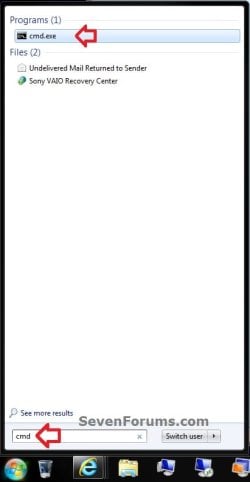
Start_Menu.jpg
2. Do either step 3 or 4 below.

3. Press Ctrl+Shift+Enter to open the program (ex: cmd) elevated, and go to step 5 below.

OR

4. Do OPTION TWO as above to right click on the program (ex: cmd) in the search results at the top of the Start Menu, and click on Run as administrator. (see screenshot below step 1)

5. If prompted by UAC, then click on Yes to apply permission to allow the program to run with full permission as an Administrator.
NOTE: If you are doing this is while logged in as standard user instead of an administrator, then you will need to provide the administrator's password before the program will run as administrator.


OPTION FIVE

"Run as administrator" using Compatibility Mode


NOTE: This will show you how to always have the program run as an administrator when you open it.
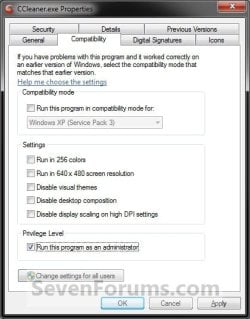
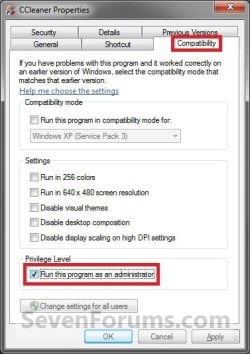
1. Right click on the program shortcut or program .exe file, then click on Properties, and on the Compatibility tab. (see screenshots below)
NOTE: If you are doing this while logged on as a standard user instead of an administrator, then you will need to also click on the Change settings for all users button and type in the administrator's password.
Compatibility_Mode1.jpgCompatibility_Mode2.jpg
2. To Always Run this Program as an Administrator
A) Check the Run this program as an administrator box, and click on OK. (see screenshots above)
3. To Not Always Run this Program as an Administrator
A) Uncheck the Run this program as an administrator box, and click on OK. (see screenshots below step 1)
4. Open the program.

5. If prompted by UAC, then click on Yes to apply permission to allow the program to run with full permission as an administrator.
NOTE: If you are doing this is while logged in as standard user instead of an administrator, then you will need to provide the administrator's password before the program will run as administrator.


OPTION SIX

"Run as administrator" using Advanced Properties


NOTE: This will show you how to always have only this specific shortcut of the program run as an administrator when you open it, and not from any other shortcut or .exe of the program.
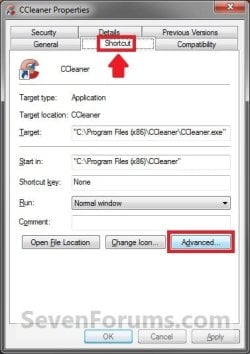
1. Right click on a shortcut that you want to run as administrator, and click on Properties.

2. Click on the Shortcut tab for a program shortcut, then cllick on the Advanced button. (see screenshot below)
Advanced_Properties1A.jpg
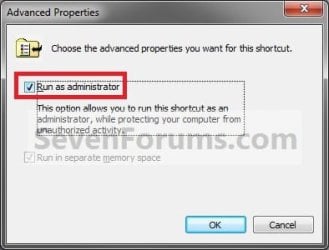
3. To Always Run this Specific Shortcut as an Administrator
A) Check the Run as administrator box, and click on OK. (see screenshot below)
Advanced_Properties2.jpg
4. To Not Always Run this Specific Shortcut as an Administrator
A) Uncheck the Run as administrator box, and click on OK. (see screenshot above)
5. Click on OK. (see screenshot below step 2)

6. Open the program.

7. If prompted by UAC, then click on Yes to apply permission to allow the program to run with full permission as an Administrator.
NOTE: If you are doing this is while logged in as standard user instead of an administrator, then you will need to provide the administrator's password before the program will run as administrator.


OPTION SEVEN

"Run as administrator" using an Elevated Shortcut


1. For how, see:
How to Create a Elevated Program Shortcut without a UAC Prompt

OR

How to Create a Elevated Program Shortcut a Standard User is able to Run in Windows 7


OPTION EIGHT

"Run as administrator" Manually in Registry Editor


1. For how, use the RUNASADMIN value with the full path to the program's file in OPTION THREE here: How to Run a Program in Compatibility Mode in Windows 7
That's it,
Shawn


Last edited:
We have liftoff!!!

I uninstalled everything. Logged in as the standard user. Hit the install package. It begged me for the admin - I responded. Install completed successfully. I went to the shortcut and took ownership of the referenced folder after providing again, the admin password. In the prop panel, the ownership was listed as "\\....Administrator" - and I reassigned ownership to the standard user, HA017. I closed out and rebooted.

Bingo! Standard user now has direct privs into the application - no admin password prompt.

BTW, before I got to this point of uninstall and reinstall, I did try the AppLocker secpol snap in as you suggested. When I called in the default "Path" item, It already populated HA017 as having "Allow" rights along with the Administrators Group and Administrators. With the standard user, this still failed. I went and added the "Everyone" object to "Allow" and tried the standard user. Did not work again.

So, happily, we're back in business and we didn't have to sacrifice security for functionality.

H
 

My Computer

Computer Manufacturer/Model Number
Acer VX275
OS
Windows 7 Pro - 32 bit
CPU
Itel Core II Duo
Motherboard
Acer
Memory
3 gB
Graphics Card(s)
Onboard
Sound Card
Onboard
Monitor(s) Displays
Varies
Hard Drives
320 gb Hitachi
PSU
Acer
Case
Acer
Cooling
Acer
That's great news Hoib. I'm happy to hear that you got it sorted.
 

My Computer

Computer type
PC/Desktop
Computer Manufacturer/Model Number
Self built custom
OS
64-bit Windows 11 Pro for Workstations
CPU
Intel i7-8700K OC'd to 5 GHz
Motherboard
ASUS ROG Maximus XI Formula Z390
Memory
64 GB (4x16GB) G.SKILL TridentZ RGB DDR4 3600 MHz
Graphics Card(s)
ASUS ROG-STRIX-GTX1080TI-O11G-GAMING
Sound Card
Integrated
Monitor(s) Displays
2 x Samsung Odyssey G7 27"
Screen Resolution
2560x1440
Hard Drives
1TB Samsung 990 PRO M.2,
4TB Samsung 990 PRO PRO M.2,
TerraMaster F8 SSD Plus NAS
PSU
Seasonic Prime Titanium 850W
Case
Thermaltake Core P3
Cooling
Corsair Hydro H115i
Keyboard
Logitech wireless K800
Mouse
Logitech MX Master 4
Internet Speed
2 Gb/s Download and 100 Mb/s Upload
Antivirus
Malwarebyte Anti-Malware Premium
Browser
Google Chrome
Other Info
Logitech Z625 speaker system,
Logitech BRIO 4K Pro webcam,
HP Color LaserJet Pro MFP M477fdn,
APC SMART-UPS RT 1000 XL - SURT1000XLI,
Galaxy S23 Plus phone
I wonder now did I actually do this the correct way, or was I just lucky or ???

H
 

My Computer

Computer Manufacturer/Model Number
Acer VX275
OS
Windows 7 Pro - 32 bit
CPU
Itel Core II Duo
Motherboard
Acer
Memory
3 gB
Graphics Card(s)
Onboard
Sound Card
Onboard
Monitor(s) Displays
Varies
Hard Drives
320 gb Hitachi
PSU
Acer
Case
Acer
Cooling
Acer
I'm not to sure myself, but it may have been that you made the standard user the "Owner" and "Allowed" the standard user "Full Control" of it while you applied the administrator's password. :confused:
 

My Computer

Computer type
PC/Desktop
Computer Manufacturer/Model Number
Self built custom
OS
64-bit Windows 11 Pro for Workstations
CPU
Intel i7-8700K OC'd to 5 GHz
Motherboard
ASUS ROG Maximus XI Formula Z390
Memory
64 GB (4x16GB) G.SKILL TridentZ RGB DDR4 3600 MHz
Graphics Card(s)
ASUS ROG-STRIX-GTX1080TI-O11G-GAMING
Sound Card
Integrated
Monitor(s) Displays
2 x Samsung Odyssey G7 27"
Screen Resolution
2560x1440
Hard Drives
1TB Samsung 990 PRO M.2,
4TB Samsung 990 PRO PRO M.2,
TerraMaster F8 SSD Plus NAS
PSU
Seasonic Prime Titanium 850W
Case
Thermaltake Core P3
Cooling
Corsair Hydro H115i
Keyboard
Logitech wireless K800
Mouse
Logitech MX Master 4
Internet Speed
2 Gb/s Download and 100 Mb/s Upload
Antivirus
Malwarebyte Anti-Malware Premium
Browser
Google Chrome
Other Info
Logitech Z625 speaker system,
Logitech BRIO 4K Pro webcam,
HP Color LaserJet Pro MFP M477fdn,
APC SMART-UPS RT 1000 XL - SURT1000XLI,
Galaxy S23 Plus phone
... and for some reason this isn't made clear in the documentation because...???

By logic (I know, I know...) one would think an Admin (with super-privs) could install an app and then confer downstream priveleges on any account he/she so chooses. What comes first in this sequence - ownership then privs or privs then ownership? Like I say, I just guessed at this because definitive instructions were hard (if not impossible) to find. I hope others will find this thread useful.

(Enjoying my time here on this beautifully run forum. One of the best I've seen. Congrats!)

:D

H
 

My Computer

Computer Manufacturer/Model Number
Acer VX275
OS
Windows 7 Pro - 32 bit
CPU
Itel Core II Duo
Motherboard
Acer
Memory
3 gB
Graphics Card(s)
Onboard
Sound Card
Onboard
Monitor(s) Displays
Varies
Hard Drives
320 gb Hitachi
PSU
Acer
Case
Acer
Cooling
Acer
RAA with UAC with Standard User

Hi, this was very helpful! I was wondering if there was a way if a standard user can always run a psecific program as Admin without the UAC prompt. There's a program our reception needs that requires it to Admin, but I don't want to give them any extra rights. Is there a way I can 'Whitelist' this program so that it can always run as admin?
 

My Computer

OS
64
Hello Hansning, and welcome to Seven Forums.

So far, I'm not aware of a way to be able to do so using this method or another. :(

Hopefully someone may know of a different way to be able to.
 

My Computer

Computer type
PC/Desktop
Computer Manufacturer/Model Number
Self built custom
OS
64-bit Windows 11 Pro for Workstations
CPU
Intel i7-8700K OC'd to 5 GHz
Motherboard
ASUS ROG Maximus XI Formula Z390
Memory
64 GB (4x16GB) G.SKILL TridentZ RGB DDR4 3600 MHz
Graphics Card(s)
ASUS ROG-STRIX-GTX1080TI-O11G-GAMING
Sound Card
Integrated
Monitor(s) Displays
2 x Samsung Odyssey G7 27"
Screen Resolution
2560x1440
Hard Drives
1TB Samsung 990 PRO M.2,
4TB Samsung 990 PRO PRO M.2,
TerraMaster F8 SSD Plus NAS
PSU
Seasonic Prime Titanium 850W
Case
Thermaltake Core P3
Cooling
Corsair Hydro H115i
Keyboard
Logitech wireless K800
Mouse
Logitech MX Master 4
Internet Speed
2 Gb/s Download and 100 Mb/s Upload
Antivirus
Malwarebyte Anti-Malware Premium
Browser
Google Chrome
Other Info
Logitech Z625 speaker system,
Logitech BRIO 4K Pro webcam,
HP Color LaserJet Pro MFP M477fdn,
APC SMART-UPS RT 1000 XL - SURT1000XLI,
Galaxy S23 Plus phone
Hi, this was very helpful! I was wondering if there was a way if a standard user can always run a psecific program as Admin without the UAC prompt. There's a program our reception needs that requires it to Admin, but I don't want to give them any extra rights. Is there a way I can 'Whitelist' this program so that it can always run as admin?

Hi,

You may find the following rather helpfull

http://www.sevenforums.com/tutorials/11949-elevated-program-shortcut-without-uac-prompt-create.html
 

My Computer

Computer Manufacturer/Model Number
Compaq Desktop
OS
Windows 7 Ultimate x64
CPU
AMD Sempron Dual Core
Memory
3GB
Graphics Card(s)
NVIDIA GeForce 6150SE nForce 430
Screen Resolution
1024x768
Hard Drives
150GB Sata
Hi, this was very helpful! I was wondering if there was a way if a standard user can always run a psecific program as Admin without the UAC prompt. There's a program our reception needs that requires it to Admin, but I don't want to give them any extra rights. Is there a way I can 'Whitelist' this program so that it can always run as admin?

Hi,

You may find the following rather helpfull

http://www.sevenforums.com/tutorials/11949-elevated-program-shortcut-without-uac-prompt-create.html

Hello Jeff,

That would work fine in an administrator account, but unfortunately the elevated shortcut would still not work in a standard user account. :(
 

My Computer

Computer type
PC/Desktop
Computer Manufacturer/Model Number
Self built custom
OS
64-bit Windows 11 Pro for Workstations
CPU
Intel i7-8700K OC'd to 5 GHz
Motherboard
ASUS ROG Maximus XI Formula Z390
Memory
64 GB (4x16GB) G.SKILL TridentZ RGB DDR4 3600 MHz
Graphics Card(s)
ASUS ROG-STRIX-GTX1080TI-O11G-GAMING
Sound Card
Integrated
Monitor(s) Displays
2 x Samsung Odyssey G7 27"
Screen Resolution
2560x1440
Hard Drives
1TB Samsung 990 PRO M.2,
4TB Samsung 990 PRO PRO M.2,
TerraMaster F8 SSD Plus NAS
PSU
Seasonic Prime Titanium 850W
Case
Thermaltake Core P3
Cooling
Corsair Hydro H115i
Keyboard
Logitech wireless K800
Mouse
Logitech MX Master 4
Internet Speed
2 Gb/s Download and 100 Mb/s Upload
Antivirus
Malwarebyte Anti-Malware Premium
Browser
Google Chrome
Other Info
Logitech Z625 speaker system,
Logitech BRIO 4K Pro webcam,
HP Color LaserJet Pro MFP M477fdn,
APC SMART-UPS RT 1000 XL - SURT1000XLI,
Galaxy S23 Plus phone
So let me see if I have this straight...

I have set up a standard account on my computer for my kids so I can control the times that they can access the computer. One of the online games that they play asks for permission to make changes to the computer, and then asks for my administrator password. I have tried various options from the tutorial to give them permanent permission to this program, but with no joy.

As I understood the reply to one of the questions earlier, there is no way to make it so that this program on a standard account doesn't require a password?

Thank you.

Keith
 

My Computer

Computer Manufacturer/Model Number
Gateway FX6840
OS
Windows 7 Home Premium 64bit
CPU
Intel i7 860 @ 280 GHz
Memory
8GB DDR3
Graphics Card(s)
ATI Radeon 5770
Monitor(s) Displays
Dell S2309
Hello Keith,

I'm afraid not for a standard user account. Anything that make changes to the system or run elevated will require administrator approval before it is allowed to. :(
 

My Computer

Computer type
PC/Desktop
Computer Manufacturer/Model Number
Self built custom
OS
64-bit Windows 11 Pro for Workstations
CPU
Intel i7-8700K OC'd to 5 GHz
Motherboard
ASUS ROG Maximus XI Formula Z390
Memory
64 GB (4x16GB) G.SKILL TridentZ RGB DDR4 3600 MHz
Graphics Card(s)
ASUS ROG-STRIX-GTX1080TI-O11G-GAMING
Sound Card
Integrated
Monitor(s) Displays
2 x Samsung Odyssey G7 27"
Screen Resolution
2560x1440
Hard Drives
1TB Samsung 990 PRO M.2,
4TB Samsung 990 PRO PRO M.2,
TerraMaster F8 SSD Plus NAS
PSU
Seasonic Prime Titanium 850W
Case
Thermaltake Core P3
Cooling
Corsair Hydro H115i
Keyboard
Logitech wireless K800
Mouse
Logitech MX Master 4
Internet Speed
2 Gb/s Download and 100 Mb/s Upload
Antivirus
Malwarebyte Anti-Malware Premium
Browser
Google Chrome
Other Info
Logitech Z625 speaker system,
Logitech BRIO 4K Pro webcam,
HP Color LaserJet Pro MFP M477fdn,
APC SMART-UPS RT 1000 XL - SURT1000XLI,
Galaxy S23 Plus phone
Hi all
I need to run some programs in runmenu (windowslogo+R) for example what shoud I type in run menu to run cmd as an administrator?

tanks
 

My Computer

OS
Windows 7 Ultimate x64

My Computer

Computer type
PC/Desktop
Computer Manufacturer/Model Number
Self built custom
OS
64-bit Windows 11 Pro for Workstations
CPU
Intel i7-8700K OC'd to 5 GHz
Motherboard
ASUS ROG Maximus XI Formula Z390
Memory
64 GB (4x16GB) G.SKILL TridentZ RGB DDR4 3600 MHz
Graphics Card(s)
ASUS ROG-STRIX-GTX1080TI-O11G-GAMING
Sound Card
Integrated
Monitor(s) Displays
2 x Samsung Odyssey G7 27"
Screen Resolution
2560x1440
Hard Drives
1TB Samsung 990 PRO M.2,
4TB Samsung 990 PRO PRO M.2,
TerraMaster F8 SSD Plus NAS
PSU
Seasonic Prime Titanium 850W
Case
Thermaltake Core P3
Cooling
Corsair Hydro H115i
Keyboard
Logitech wireless K800
Mouse
Logitech MX Master 4
Internet Speed
2 Gb/s Download and 100 Mb/s Upload
Antivirus
Malwarebyte Anti-Malware Premium
Browser
Google Chrome
Other Info
Logitech Z625 speaker system,
Logitech BRIO 4K Pro webcam,
HP Color LaserJet Pro MFP M477fdn,
APC SMART-UPS RT 1000 XL - SURT1000XLI,
Galaxy S23 Plus phone
administrative privileges

Hi Guys,

I am having a problem on dell machine with Windows Ultimate 64 bit with SP1.
Every time when I am trying to run a program from a standard user it tells me
“This program requires administrative privileges. You are not logged in as an Administrator of this computer “

I also right click and choose properties and run as administrator but again it tells me exactly the same thing.
Also in compatibility mode the privilege level to run as administrator is ticked.
Here is what I have tried so far:
• I Switched off User access control
• I have reset all permission
• I have run SFC/SCANNOW
• In Local Security policy in security option, the UAC is set to prompt for credential.
So I do not really understand what the issue is and how the windows it has been installed by dell
At the moment I cannot even run and set up a backup,
This is a client machine running on workgroup and changing the user to Administrator is not an option.
Any ideas and Help will be highly appreciated.
Kind Regards,
Koko
 

My Computer

OS
Windows 7 Ultimate x64 SP1
If you aren't logged on as an Administrative account, this is the error you will get (especially if you've disabled UAC). With UAC enabled, right-clicking and using Run as Administrator should prompt you with a dialog box for administrative credentials or a yes/no dialog box (the former if logged on as a user, the latter if logged on as an administrator).
 

My Computer

Computer type
PC/Desktop
Computer Manufacturer/Model Number
Custom
OS
Windows 10 Pro x64
CPU
Intel Core i7 4790K @ 4.5GHz
Motherboard
Asus Maximus Hero VII
Memory
32GB DDR3
Graphics Card(s)
Nvidia GeForce GTX970
Sound Card
Realtek HD Audio
Screen Resolution
1920x1200
Hard Drives
1x Samsung 250GB SSD
4x WD RE 2TB (RAIDZ)
PSU
Corsair AX760i
Case
Fractal Design Define R4
Cooling
Noctua NH-D15
Was there not a tutorial posted on how to run Admin Apps in Standard account posted recently from Brink ?
 

My Computer

Computer type
PC/Desktop
Computer Manufacturer/Model Number
Custom Built
OS
Windows 10 Pro
CPU
Core2Quad (2.6 Ghz)
Motherboard
nVidia 775
Memory
8 Gigs DDR2
Graphics Card(s)
Geforce Titan Black
Sound Card
Motherboard Audio
Monitor(s) Displays
25" Asus LCD
Screen Resolution
1680x1050
Hard Drives
120 Gig SSD
60 Gig SSD
750 Gig HDD
PSU
850 Watts
Case
Mid-Size
Keyboard
Logitech
Mouse
Logitech - I love logitech mouses
Internet Speed
DSL 25Mbps - Although extremely expensive
Antivirus
Microsoft Anti-Virus
Browser
FireFox 36.x

My Computer

Computer type
PC/Desktop
Computer Manufacturer/Model Number
Self built custom
OS
64-bit Windows 11 Pro for Workstations
CPU
Intel i7-8700K OC'd to 5 GHz
Motherboard
ASUS ROG Maximus XI Formula Z390
Memory
64 GB (4x16GB) G.SKILL TridentZ RGB DDR4 3600 MHz
Graphics Card(s)
ASUS ROG-STRIX-GTX1080TI-O11G-GAMING
Sound Card
Integrated
Monitor(s) Displays
2 x Samsung Odyssey G7 27"
Screen Resolution
2560x1440
Hard Drives
1TB Samsung 990 PRO M.2,
4TB Samsung 990 PRO PRO M.2,
TerraMaster F8 SSD Plus NAS
PSU
Seasonic Prime Titanium 850W
Case
Thermaltake Core P3
Cooling
Corsair Hydro H115i
Keyboard
Logitech wireless K800
Mouse
Logitech MX Master 4
Internet Speed
2 Gb/s Download and 100 Mb/s Upload
Antivirus
Malwarebyte Anti-Malware Premium
Browser
Google Chrome
Other Info
Logitech Z625 speaker system,
Logitech BRIO 4K Pro webcam,
HP Color LaserJet Pro MFP M477fdn,
APC SMART-UPS RT 1000 XL - SURT1000XLI,
Galaxy S23 Plus phone
Not sure if this is the proper forum for this question but here goes. I have loaded a program as administrator and it is in startup. It runs fine as administrator but when I log in as the user it does not fully run. the program will start up but does not connect. I was wondering if there is any security issues that would block it from running, I have the user set up as user and power user and have granted them full access to the program itself. Any ideas what else I could do?
 

My Computer

OS
Min XP Pro and Win 7 Pro

My Computer

Computer type
PC/Desktop
Computer Manufacturer/Model Number
Self built custom
OS
64-bit Windows 11 Pro for Workstations
CPU
Intel i7-8700K OC'd to 5 GHz
Motherboard
ASUS ROG Maximus XI Formula Z390
Memory
64 GB (4x16GB) G.SKILL TridentZ RGB DDR4 3600 MHz
Graphics Card(s)
ASUS ROG-STRIX-GTX1080TI-O11G-GAMING
Sound Card
Integrated
Monitor(s) Displays
2 x Samsung Odyssey G7 27"
Screen Resolution
2560x1440
Hard Drives
1TB Samsung 990 PRO M.2,
4TB Samsung 990 PRO PRO M.2,
TerraMaster F8 SSD Plus NAS
PSU
Seasonic Prime Titanium 850W
Case
Thermaltake Core P3
Cooling
Corsair Hydro H115i
Keyboard
Logitech wireless K800
Mouse
Logitech MX Master 4
Internet Speed
2 Gb/s Download and 100 Mb/s Upload
Antivirus
Malwarebyte Anti-Malware Premium
Browser
Google Chrome
Other Info
Logitech Z625 speaker system,
Logitech BRIO 4K Pro webcam,
HP Color LaserJet Pro MFP M477fdn,
APC SMART-UPS RT 1000 XL - SURT1000XLI,
Galaxy S23 Plus phone
Thanks, I tried this but am still having problems, the application that i am using has two executable that have to run together. I can get the first one to run fine but the second one does not run. When I set up the first one and logged in as the user the instructions were spot on, i clicked on the shortcut and it asked for the Admin password (which is what is supposed to happen) and it ran fine. But with the second one i created when I clicked on the short cut the screen came up where I would enter the the Admin password it open and closed right away not allowing me to enter the Admin password. Not sure what is happening here but still working on it. Thanks again for your help.
 

My Computer

OS
Min XP Pro and Win 7 Pro
Back
Top