Run as Administrator

How to Run a Program as an Administrator in Windows 7


   Information
This will show you how to have a program run as administrator with full elevated rights and privileges in Windows 7.

A Standard user will still not be able to run a elevated program without getting a UAC prompt and having to enter the administrator's password.
   Note
If a program that you are trying to run is giving you a Access Denied or No Permission type error, then running it as an administrator can usually give the program the permission it needs to run properly.
   Warning
You should only allow a program that you trust to run as administrator. Once you have applied UAC permission, the program will have full access to your computer.


OPTION ONE

"Run as administrator" using a Keyboard Shortcut


NOTE: This will allow you to temporarily run a program as an administrator once until you close it.
1. Press and hold Ctrl+Shift while opening the program.

2. If prompted by UAC, then click on Yes to apply permission to allow the program to run with full permission as an Administrator.
NOTE: If you are doing this is while logged in as standard user instead of an administrator, then you will need to provide the administrator's password before the program will run as administrator.


OPTION TWO

"Run as administrator" using Context Menu of Program


NOTE: This will show you how to temporarily run a program as an administrator once until you close it.
1. Right click on the program's shortcut or an .EXE file, BAT file, CMD file, or MSI file, and click on Run as administrator. (see screenshot below)
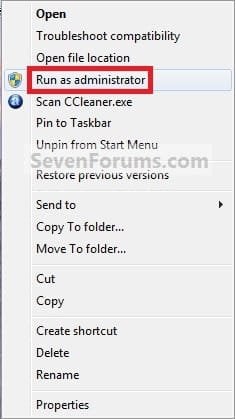
Context_Menu.jpg
2. If prompted by UAC, then click on Yes to apply permission to allow the program to run with full permission as an administrator.
NOTE: If you are doing this is while logged in as standard user instead of an administrator, then you will need to provide the administrator's password before the program will run as administrator.


OPTION THREE

"Run as administrator" from Pinned Program on Taskbar


NOTE: This will show you how to temporarily run a program pinned to the taskbar as an administrator once until you close it.
1. Right click on the icon of the pinned program on the taskbar to open it's Jump List. (see screenshot below)

2. In the Jump List, right click on the program's name, and click on Run as administrator. (see screenshot below)
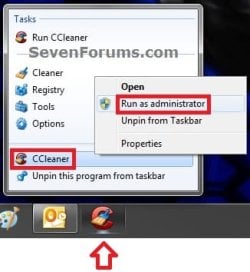
Taskbar1.jpg
3. If prompted by UAC, then click on Yes to apply permission to allow the program to run with full permission as an Administrator.
NOTE: If you are doing this is while logged in as standard user instead of an administrator, then you will need to provide the administrator's password before the program will run as administrator.


OPTION FOUR

"Run as administrator" from Start Menu Search Box


NOTE: This will show you how to temporarily run a program as an administrator once until you close it.
1. Type in the file name (ex: cmd) of the program that you want to run elevated. (see screenshot below)
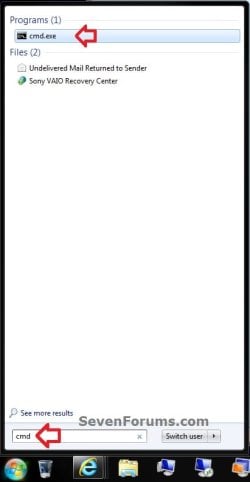
Start_Menu.jpg
2. Do either step 3 or 4 below.

3. Press Ctrl+Shift+Enter to open the program (ex: cmd) elevated, and go to step 5 below.

OR

4. Do OPTION TWO as above to right click on the program (ex: cmd) in the search results at the top of the Start Menu, and click on Run as administrator. (see screenshot below step 1)

5. If prompted by UAC, then click on Yes to apply permission to allow the program to run with full permission as an Administrator.
NOTE: If you are doing this is while logged in as standard user instead of an administrator, then you will need to provide the administrator's password before the program will run as administrator.


OPTION FIVE

"Run as administrator" using Compatibility Mode


NOTE: This will show you how to always have the program run as an administrator when you open it.
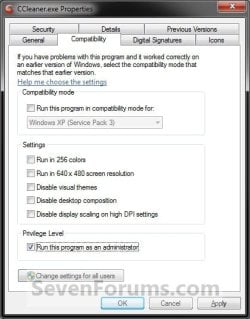
1. Right click on the program shortcut or program .exe file, then click on Properties, and on the Compatibility tab. (see screenshots below)
NOTE: If you are doing this while logged on as a standard user instead of an administrator, then you will need to also click on the Change settings for all users button and type in the administrator's password.
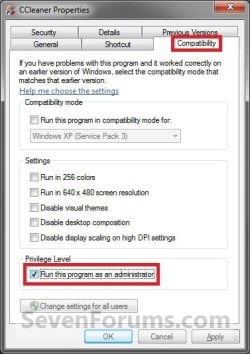
Compatibility_Mode1.jpgCompatibility_Mode2.jpg
2. To Always Run this Program as an Administrator
A) Check the Run this program as an administrator box, and click on OK. (see screenshots above)
3. To Not Always Run this Program as an Administrator
A) Uncheck the Run this program as an administrator box, and click on OK. (see screenshots below step 1)
4. Open the program.

5. If prompted by UAC, then click on Yes to apply permission to allow the program to run with full permission as an administrator.
NOTE: If you are doing this is while logged in as standard user instead of an administrator, then you will need to provide the administrator's password before the program will run as administrator.


OPTION SIX

"Run as administrator" using Advanced Properties


NOTE: This will show you how to always have only this specific shortcut of the program run as an administrator when you open it, and not from any other shortcut or .exe of the program.
1. Right click on a shortcut that you want to run as administrator, and click on Properties.

2. Click on the Shortcut tab for a program shortcut, then cllick on the Advanced button. (see screenshot below)
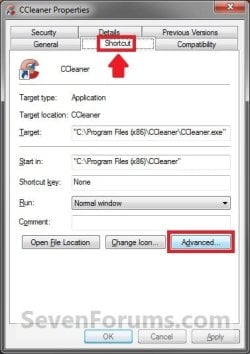
Advanced_Properties1A.jpg
3. To Always Run this Specific Shortcut as an Administrator
A) Check the Run as administrator box, and click on OK. (see screenshot below)
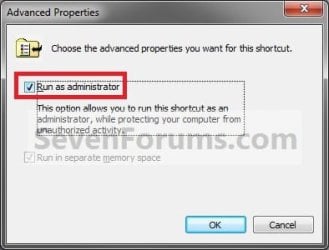
Advanced_Properties2.jpg
4. To Not Always Run this Specific Shortcut as an Administrator
A) Uncheck the Run as administrator box, and click on OK. (see screenshot above)
5. Click on OK. (see screenshot below step 2)

6. Open the program.

7. If prompted by UAC, then click on Yes to apply permission to allow the program to run with full permission as an Administrator.
NOTE: If you are doing this is while logged in as standard user instead of an administrator, then you will need to provide the administrator's password before the program will run as administrator.


OPTION SEVEN

"Run as administrator" using an Elevated Shortcut


1. For how, see:
How to Create a Elevated Program Shortcut without a UAC Prompt

OR

How to Create a Elevated Program Shortcut a Standard User is able to Run in Windows 7


OPTION EIGHT

"Run as administrator" Manually in Registry Editor


1. For how, use the RUNASADMIN value with the full path to the program's file in OPTION THREE here: How to Run a Program in Compatibility Mode in Windows 7
That's it,
Shawn


Last edited:
Outstanding. Another fine tutorial. ;)

I'd add a couple of questions, Brink...

1 - When is it NOT ok to RAA?
2 - Rules of thumb for using RAA?
3 - Drivers, always use RAA?

That might be helpful as a reference for many. ;)
 

My Computer

Computer type
PC/Desktop
Computer Manufacturer/Model Number
Custom Build/Mod
OS
Windows 7 Home Premium x64
CPU
Intel QX9650 Extreme 4.0 GHz
Motherboard
ASUS Rampage Extreme Rev2
Memory
8GB (4x2) Corsair Dominator DDR3
Graphics Card(s)
2x Radeon R390X [8GB]
Sound Card
SupremeFX X-Fi
Monitor(s) Displays
Dell 2408WFP 26" Panel
Screen Resolution
1920x1200
Hard Drives
4x WD 2TB (8TB+ Total)
2x Crucial SSD 128GB (RAID-0)
1x LG Blu-ray read/write
1x Phillips LightScribe DVD read/write
PSU
Corsair HX1000
Case
CoolerMaster - Cosmos S
Cooling
Custom Liquid - 320mm rad w/ 3x 80mm fans, CPU/NB/SB Blocks
Keyboard
Logitech Illuminater Pro
Mouse
Logitech
Internet Speed
Fractional T1 - 125Mbps
Antivirus
ESET Security Suite / Microsoft Security Essentials
Browser
Cyberfox Intel x64
Other Info
OC'd to 5.0GHz @ 44c under full load
Hello Captain Zero,

Q1) I would say that when a program runs fine normally, then there is no need to RAA.

Q2) Mostly what's in the NOTE at the top of the tutorial.

Q3) Drivers do not always RAA. Escpecially not if they are loaded at startup since it would cause you to have to apply UAC permission everytime you started Windows 7. It is usually best to leave these set at default. If the drivers do not run properly, then try installing the driver with RAA instead.

Hope this helps,
Shawn
 

My Computer

Computer type
PC/Desktop
Computer Manufacturer/Model Number
Self built custom
OS
64-bit Windows 11 Pro for Workstations
CPU
Intel i7-8700K OC'd to 5 GHz
Motherboard
ASUS ROG Maximus XI Formula Z390
Memory
64 GB (4x16GB) G.SKILL TridentZ RGB DDR4 3600 MHz
Graphics Card(s)
ASUS ROG-STRIX-GTX1080TI-O11G-GAMING
Sound Card
Integrated
Monitor(s) Displays
2 x Samsung Odyssey G7 27"
Screen Resolution
2560x1440
Hard Drives
1TB Samsung 990 PRO M.2,
4TB Samsung 990 PRO PRO M.2,
TerraMaster F8 SSD Plus NAS
PSU
Seasonic Prime Titanium 850W
Case
Thermaltake Core P3
Cooling
Corsair Hydro H115i
Keyboard
Logitech wireless K800
Mouse
Logitech MX Master 4
Internet Speed
2 Gb/s Download and 100 Mb/s Upload
Antivirus
Malwarebyte Anti-Malware Premium
Browser
Google Chrome
Other Info
Logitech Z625 speaker system,
Logitech BRIO 4K Pro webcam,
HP Color LaserJet Pro MFP M477fdn,
APC SMART-UPS RT 1000 XL - SURT1000XLI,
Galaxy S23 Plus phone
Hi Brink, thanks for tutorial. But second method doesnt works for me (classic - right click on file - run as admin). When I do this, nothing happens. Well, program starts, but not with administrator privileges.
I have UAC turned off.
Thanks for quick help.
Hope you understand my English..
 

My Computer

Computer type
Laptop
Computer Manufacturer/Model Number
Lenovo IdeaPad Y580
OS
Windows 7 Professional x64
CPU
Intel Core i5 3210 Ivy Bridge
Memory
8GB
Graphics Card(s)
NVIDIA GeForce GTX660M 2GB
Screen Resolution
15.6 "LED 1920x1080
Hello Lordofminor,

Does it work for you when you have UAC turned on?
 

My Computer

Computer type
PC/Desktop
Computer Manufacturer/Model Number
Self built custom
OS
64-bit Windows 11 Pro for Workstations
CPU
Intel i7-8700K OC'd to 5 GHz
Motherboard
ASUS ROG Maximus XI Formula Z390
Memory
64 GB (4x16GB) G.SKILL TridentZ RGB DDR4 3600 MHz
Graphics Card(s)
ASUS ROG-STRIX-GTX1080TI-O11G-GAMING
Sound Card
Integrated
Monitor(s) Displays
2 x Samsung Odyssey G7 27"
Screen Resolution
2560x1440
Hard Drives
1TB Samsung 990 PRO M.2,
4TB Samsung 990 PRO PRO M.2,
TerraMaster F8 SSD Plus NAS
PSU
Seasonic Prime Titanium 850W
Case
Thermaltake Core P3
Cooling
Corsair Hydro H115i
Keyboard
Logitech wireless K800
Mouse
Logitech MX Master 4
Internet Speed
2 Gb/s Download and 100 Mb/s Upload
Antivirus
Malwarebyte Anti-Malware Premium
Browser
Google Chrome
Other Info
Logitech Z625 speaker system,
Logitech BRIO 4K Pro webcam,
HP Color LaserJet Pro MFP M477fdn,
APC SMART-UPS RT 1000 XL - SURT1000XLI,
Galaxy S23 Plus phone
If he has UAC turned off than Run as Administrator won't appear...because he is running everything as an administrator now because of again...no UAC
 

My Computer

Computer Manufacturer/Model Number
Compal JFT02 (Custom Build Laptop)
OS
Windows 7 Home Premium x64 - Mac OS X 10.6.4 x64
CPU
Intel Core 2 Duo T9300 2.5 GHz
Motherboard
JFT02
Memory
4GB Kingston DDR2-800
Graphics Card(s)
NVIDIA Geforce 8600M GT (512MB Model)
Sound Card
Realtek HD Audio
Monitor(s) Displays
WUXGA Standard Laptop Display
Screen Resolution
1680*1050
Hard Drives
Toshiba 320GB 5400RPM Laptop HD
PSU
Standard Laptop Power Supply
Case
Standard Laptop Case
Cooling
Standard Laptop Cooling
Keyboard
Standard Laptop 105 Key-Keyboard
Mouse
Synaptics Touchpad
Internet Speed
Verizion Online DSL 3360/864 kbs (dl/up)
If he has UAC turned off than Run as Administrator won't appear...because he is running everything as an administrator now because of again...no UAC
No thats not true. I have turned off UAC and some programs wont run without running it as admin. So i right click and do run as admin and the program runs fine. So even if you disable UAC, run as admin still can be applied.
 

My Computer

Computer Manufacturer/Model Number
Samsung NP530U4B-S02IN
OS
Windows® 8 Pro (64-bit)
CPU
Intel® Core™ i5 Processor 2467M (1.60GHz, 3MB L3 Cache)
Motherboard
Samsung Electronics
Memory
6GB DDR3 System Memory at 1,333MHz (on BD 4GB + 2GB x 1)
Graphics Card(s)
AMD Radeon™ HD7550M 1GB DDR3 (Ext. Graphic)
Sound Card
Realtek High Definition Audio
Monitor(s) Displays
35.56cm (14.0) SuperBright 300nit HD LED Display
Screen Resolution
1366x768
Hard Drives
1TB S-ATA II Hard Drive (5400RPM) with ExpressCache 16GB SSD
Internet Speed
sucks
Antivirus
Microsoft Security Essentials
Browser
Google Chrome (Sync enabled)
Thanks for quick replys, I will try to turn UAC on and see if it works.
And, in which position of these three I should keep it?
fxz5z4.jpg
 

My Computer

Computer type
Laptop
Computer Manufacturer/Model Number
Lenovo IdeaPad Y580
OS
Windows 7 Professional x64
CPU
Intel Core i5 3210 Ivy Bridge
Memory
8GB
Graphics Card(s)
NVIDIA GeForce GTX660M 2GB
Screen Resolution
15.6 "LED 1920x1080
For the best protection, it should be all the way to the top. You may need to restart the computer afterwards as well.
 
Last edited:

My Computer

Computer type
PC/Desktop
Computer Manufacturer/Model Number
Self built custom
OS
64-bit Windows 11 Pro for Workstations
CPU
Intel i7-8700K OC'd to 5 GHz
Motherboard
ASUS ROG Maximus XI Formula Z390
Memory
64 GB (4x16GB) G.SKILL TridentZ RGB DDR4 3600 MHz
Graphics Card(s)
ASUS ROG-STRIX-GTX1080TI-O11G-GAMING
Sound Card
Integrated
Monitor(s) Displays
2 x Samsung Odyssey G7 27"
Screen Resolution
2560x1440
Hard Drives
1TB Samsung 990 PRO M.2,
4TB Samsung 990 PRO PRO M.2,
TerraMaster F8 SSD Plus NAS
PSU
Seasonic Prime Titanium 850W
Case
Thermaltake Core P3
Cooling
Corsair Hydro H115i
Keyboard
Logitech wireless K800
Mouse
Logitech MX Master 4
Internet Speed
2 Gb/s Download and 100 Mb/s Upload
Antivirus
Malwarebyte Anti-Malware Premium
Browser
Google Chrome
Other Info
Logitech Z625 speaker system,
Logitech BRIO 4K Pro webcam,
HP Color LaserJet Pro MFP M477fdn,
APC SMART-UPS RT 1000 XL - SURT1000XLI,
Galaxy S23 Plus phone
You may need to restart the computer afterwards as well.

It is normal that Windows doesnt inform me about need of restart? Btw, are these changes for everyone user, or only for non-admin users?
 

My Computer

Computer type
Laptop
Computer Manufacturer/Model Number
Lenovo IdeaPad Y580
OS
Windows 7 Professional x64
CPU
Intel Core i5 3210 Ivy Bridge
Memory
8GB
Graphics Card(s)
NVIDIA GeForce GTX660M 2GB
Screen Resolution
15.6 "LED 1920x1080
Normally you are prompted to restart the computer when your turn UAC completely off, back on when it was off. I would go ahead and restart the computer anyways. UAC affects all user accounts on the computer.
 

My Computer

Computer type
PC/Desktop
Computer Manufacturer/Model Number
Self built custom
OS
64-bit Windows 11 Pro for Workstations
CPU
Intel i7-8700K OC'd to 5 GHz
Motherboard
ASUS ROG Maximus XI Formula Z390
Memory
64 GB (4x16GB) G.SKILL TridentZ RGB DDR4 3600 MHz
Graphics Card(s)
ASUS ROG-STRIX-GTX1080TI-O11G-GAMING
Sound Card
Integrated
Monitor(s) Displays
2 x Samsung Odyssey G7 27"
Screen Resolution
2560x1440
Hard Drives
1TB Samsung 990 PRO M.2,
4TB Samsung 990 PRO PRO M.2,
TerraMaster F8 SSD Plus NAS
PSU
Seasonic Prime Titanium 850W
Case
Thermaltake Core P3
Cooling
Corsair Hydro H115i
Keyboard
Logitech wireless K800
Mouse
Logitech MX Master 4
Internet Speed
2 Gb/s Download and 100 Mb/s Upload
Antivirus
Malwarebyte Anti-Malware Premium
Browser
Google Chrome
Other Info
Logitech Z625 speaker system,
Logitech BRIO 4K Pro webcam,
HP Color LaserJet Pro MFP M477fdn,
APC SMART-UPS RT 1000 XL - SURT1000XLI,
Galaxy S23 Plus phone
Many Thanks Brink!
It works now!
 

My Computer

Computer type
Laptop
Computer Manufacturer/Model Number
Lenovo IdeaPad Y580
OS
Windows 7 Professional x64
CPU
Intel Core i5 3210 Ivy Bridge
Memory
8GB
Graphics Card(s)
NVIDIA GeForce GTX660M 2GB
Screen Resolution
15.6 "LED 1920x1080
That's great news John. I'm happy to hear it. :)
 

My Computer

Computer type
PC/Desktop
Computer Manufacturer/Model Number
Self built custom
OS
64-bit Windows 11 Pro for Workstations
CPU
Intel i7-8700K OC'd to 5 GHz
Motherboard
ASUS ROG Maximus XI Formula Z390
Memory
64 GB (4x16GB) G.SKILL TridentZ RGB DDR4 3600 MHz
Graphics Card(s)
ASUS ROG-STRIX-GTX1080TI-O11G-GAMING
Sound Card
Integrated
Monitor(s) Displays
2 x Samsung Odyssey G7 27"
Screen Resolution
2560x1440
Hard Drives
1TB Samsung 990 PRO M.2,
4TB Samsung 990 PRO PRO M.2,
TerraMaster F8 SSD Plus NAS
PSU
Seasonic Prime Titanium 850W
Case
Thermaltake Core P3
Cooling
Corsair Hydro H115i
Keyboard
Logitech wireless K800
Mouse
Logitech MX Master 4
Internet Speed
2 Gb/s Download and 100 Mb/s Upload
Antivirus
Malwarebyte Anti-Malware Premium
Browser
Google Chrome
Other Info
Logitech Z625 speaker system,
Logitech BRIO 4K Pro webcam,
HP Color LaserJet Pro MFP M477fdn,
APC SMART-UPS RT 1000 XL - SURT1000XLI,
Galaxy S23 Plus phone
It's still a problem with run as administrator

Hello everyone,

I have the following problem:

When i want to run a program with run as administrator option, program start but it does not run as administrator, then run as a user who has already logged!?!?

But when that same program run with the option to run as different user, and a user name type administrator and as a pass type ****** program runs as it launched an administrator.

I do not understand what is the difference.

I apologize for my bad English. :o

Grateful in advance for your help.
 

My Computer

OS
Windows 7
Hello Boki, and welcome to Seven Forums.

Run as Administrator (right click) elevates a program to run with full permission and full access of the computer.

Run as a different user allows the program the run as if it was running in that user account instead of the current account.

Hope this help,
Shawn
 

My Computer

Computer type
PC/Desktop
Computer Manufacturer/Model Number
Self built custom
OS
64-bit Windows 11 Pro for Workstations
CPU
Intel i7-8700K OC'd to 5 GHz
Motherboard
ASUS ROG Maximus XI Formula Z390
Memory
64 GB (4x16GB) G.SKILL TridentZ RGB DDR4 3600 MHz
Graphics Card(s)
ASUS ROG-STRIX-GTX1080TI-O11G-GAMING
Sound Card
Integrated
Monitor(s) Displays
2 x Samsung Odyssey G7 27"
Screen Resolution
2560x1440
Hard Drives
1TB Samsung 990 PRO M.2,
4TB Samsung 990 PRO PRO M.2,
TerraMaster F8 SSD Plus NAS
PSU
Seasonic Prime Titanium 850W
Case
Thermaltake Core P3
Cooling
Corsair Hydro H115i
Keyboard
Logitech wireless K800
Mouse
Logitech MX Master 4
Internet Speed
2 Gb/s Download and 100 Mb/s Upload
Antivirus
Malwarebyte Anti-Malware Premium
Browser
Google Chrome
Other Info
Logitech Z625 speaker system,
Logitech BRIO 4K Pro webcam,
HP Color LaserJet Pro MFP M477fdn,
APC SMART-UPS RT 1000 XL - SURT1000XLI,
Galaxy S23 Plus phone
Is there any way to batch process a lot of shortcuts to set them to always run as administrator?
 

My Computer

Computer Manufacturer/Model Number
ASUS M2N32-SLI Deluxe
OS
Windows 7 x64 SP1 - Ubuntu 10.10 x64 - Linux Mint 10 (dual boot + Virtual Box)
CPU
AMD Phenom II 945
Motherboard
ASUS M2N32-SLI Deluxe
Memory
Kingston DDR2 800 6GB
Graphics Card(s)
NVidia GForce 8600GT
Sound Card
OnBoard SoundMax Integrated HD
Monitor(s) Displays
LCD Samsung SyncMaster 2033
Screen Resolution
1600*900
Hard Drives
1.0 TB RAID 0 + 2 internal sata 320 GB + external e-sata 500 Gb
PSU
650
Internet Speed
cable 3mb

My Computers

System One System Two

  • Computer type
    PC/Desktop
    Computer Manufacturer/Model Number
    ChillBlast - Custom to my design
    OS
    Windows 11 Pro x64 [Latest Release and Release Preview]
    CPU
    Ryzen 9 5950X, 3.8 - 5.2 MHz
    Motherboard
    Asus Prime X570-Pro
    Memory
    64GB [2 x 32GB] DDR4 3200MHz
    Graphics Card(s)
    4GB NVIDIA GEFORCE GTX 1650 Ti
    Sound Card
    On-board SPDIF to 5.1 System + HDMI [5.1 system]
    Monitor(s) Displays
    32" UHD 32 Bit HDR Monitor + 43" UHD 4K 32Bit HDR TV
    Screen Resolution
    2 x 3840 x 2160 @60Hz
    Hard Drives
    1TB M2 SSD OS, 500GB Fast Access SSD, 2 x 8TB Data + Various Externals from 1TB to 4TB, 10TB NAS
    PSU
    NZXT C750 80 PLUS Gold 750W Modular PSU
    Case
    Workstation Case [Matt Black]
    Cooling
    NZXT Kraken X63 280mm CPU Cooler +2x Quiet Case fans
    Keyboard
    Logitech Wireless MX Keys & K400 + others
    Mouse
    Logitech Wireless MX Master 3S
    Internet Speed
    920 MB Down 50 MB Up
    Antivirus
    BitDefender Total Security Pro
    Browser
    Chrome (always run latest Non-Beta)
    Other Info
    Also run ...
    Laptop - Quad 8GB - Windows 10 Pro x64
    Nexus 7 Android tablet x2
    Samsung 10.2" tablet
    Blackview TAB 8 4G Android Tablet c/w Keyboard
    Wacom Intuos Pro Medium Pen Pad
    Wacom Intuos Pro Small Pen Pad
    Wacom Expresskeys Remote
    Loopdeck+ Graphics Controller
    Shuttle Pro v2 Control
  • Computer type
    Laptop
    System Manufacturer/Model Number
    Dell XPS 17 10750H
    OS
    Windows 11 Pro x64 Latest RP
    CPU
    Intel I7 10750H 5.0GHz
    Motherboard
    Dell XPS
    Memory
    32GB [2x16GB] DDR4 2933 MHz
    Graphics Card(s)
    nVidia GTX1650Ti 4 GB GDDR6
    Sound Card
    Stock [Realtek] 4 Speaker
    Monitor(s) Displays
    17" IPS UHD+ Infinity Edge Touchscreen
    Screen Resolution
    3840 x 2400
    Hard Drives
    2TB M2 NVMe, 4TB External + various 500GB & 1TB External NVMe (also have access to spinner HDD from
    PSU
    Stock
    Case
    Stock XPS Aluminium & Carbon Fibre
    Cooling
    Stock - Active Fan Control
    Keyboard
    Backlit + Various Logitech
    Mouse
    Stock Track Pad + Logitech MX Trackball
    Internet Speed
    72 MB Down 18MB Up
    Browser
    Chrome
    Other Info
    Also run ...
    Laptop - Quad 8GB - Windows 10 Pro x64
    Nexus 7 Android tablet x2
    10.2" tablet
    Sony Z3 Android Smartphone
    Wacom Intuos Pro Medium Pen Pad
    Wacom Intuos Pro Small Pen Pad
    Wacom Expresskeys Remote
    Loopdeck+ Graphics Controller
    Shuttle Pro v2 Control Pad
    10TB NAS

My Computer

Computer Manufacturer/Model Number
ASUS M2N32-SLI Deluxe
OS
Windows 7 x64 SP1 - Ubuntu 10.10 x64 - Linux Mint 10 (dual boot + Virtual Box)
CPU
AMD Phenom II 945
Motherboard
ASUS M2N32-SLI Deluxe
Memory
Kingston DDR2 800 6GB
Graphics Card(s)
NVidia GForce 8600GT
Sound Card
OnBoard SoundMax Integrated HD
Monitor(s) Displays
LCD Samsung SyncMaster 2033
Screen Resolution
1600*900
Hard Drives
1.0 TB RAID 0 + 2 internal sata 320 GB + external e-sata 500 Gb
PSU
650
Internet Speed
cable 3mb
Hey, I need some help regarding making all .exe files RAA without needing to check a box manually each time.

Also I'm trying to delete some old files from when I had XP, aaaaand it won't allow me because I'm not RAA (I have one account and it's an Administrator) and there's really no way of making me RAA.

Quick help wanted! Thanks!
 

My Computer

Computer Manufacturer/Model Number
HP pavilion
OS
Windows 7 32 bit
CPU
AMD Athlon 64 X2 Dual Core Processor 4400+
Memory
2 GB RAM
Graphics Card(s)
NVIDIA GeForce GTS 250
Sound Card
Creative SoundBlaster 0670
Monitor(s) Displays
Samsung 940NW
Screen Resolution
1440x900
Hard Drives
Maxtor 6L250S0 ATA Device 256 GB
Maxtor 6L250S0 ATA Device 232 GB
Case
HP
Keyboard
Logitech G15
Mouse
Razer Diamondback EarthGreen
Internet Speed
8 mbit Telia
Hello Degge, and welcome to Seven Forums.

The only way to not get a UAC prompt for all .exe files is to turn off or lower the UAC notification settings. It's not recommended to have all .exe files RAA though unless it is needed for the program to run. Otherwise it could cause issues with it running properly. There's no way that I know of other than manually checking the RAA box in Compatibility Mode for each .exe file that needs to be RAA to work properly.

Your deleting the files issue is a different subject than in this thread and should be posted in a new thread of it's own instead so that you can get the best help on it. :)

Hope this helps,
Shawn
 

My Computer

Computer type
PC/Desktop
Computer Manufacturer/Model Number
Self built custom
OS
64-bit Windows 11 Pro for Workstations
CPU
Intel i7-8700K OC'd to 5 GHz
Motherboard
ASUS ROG Maximus XI Formula Z390
Memory
64 GB (4x16GB) G.SKILL TridentZ RGB DDR4 3600 MHz
Graphics Card(s)
ASUS ROG-STRIX-GTX1080TI-O11G-GAMING
Sound Card
Integrated
Monitor(s) Displays
2 x Samsung Odyssey G7 27"
Screen Resolution
2560x1440
Hard Drives
1TB Samsung 990 PRO M.2,
4TB Samsung 990 PRO PRO M.2,
TerraMaster F8 SSD Plus NAS
PSU
Seasonic Prime Titanium 850W
Case
Thermaltake Core P3
Cooling
Corsair Hydro H115i
Keyboard
Logitech wireless K800
Mouse
Logitech MX Master 4
Internet Speed
2 Gb/s Download and 100 Mb/s Upload
Antivirus
Malwarebyte Anti-Malware Premium
Browser
Google Chrome
Other Info
Logitech Z625 speaker system,
Logitech BRIO 4K Pro webcam,
HP Color LaserJet Pro MFP M477fdn,
APC SMART-UPS RT 1000 XL - SURT1000XLI,
Galaxy S23 Plus phone
Back
Top