Run as Administrator

How to Run a Program as an Administrator in Windows 7


   Information
This will show you how to have a program run as administrator with full elevated rights and privileges in Windows 7.

A Standard user will still not be able to run a elevated program without getting a UAC prompt and having to enter the administrator's password.
   Note
If a program that you are trying to run is giving you a Access Denied or No Permission type error, then running it as an administrator can usually give the program the permission it needs to run properly.
   Warning
You should only allow a program that you trust to run as administrator. Once you have applied UAC permission, the program will have full access to your computer.


OPTION ONE

"Run as administrator" using a Keyboard Shortcut


NOTE: This will allow you to temporarily run a program as an administrator once until you close it.
1. Press and hold Ctrl+Shift while opening the program.

2. If prompted by UAC, then click on Yes to apply permission to allow the program to run with full permission as an Administrator.
NOTE: If you are doing this is while logged in as standard user instead of an administrator, then you will need to provide the administrator's password before the program will run as administrator.


OPTION TWO

"Run as administrator" using Context Menu of Program


NOTE: This will show you how to temporarily run a program as an administrator once until you close it.
1. Right click on the program's shortcut or an .EXE file, BAT file, CMD file, or MSI file, and click on Run as administrator. (see screenshot below)
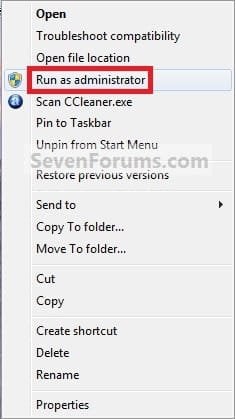
Context_Menu.jpg
2. If prompted by UAC, then click on Yes to apply permission to allow the program to run with full permission as an administrator.
NOTE: If you are doing this is while logged in as standard user instead of an administrator, then you will need to provide the administrator's password before the program will run as administrator.


OPTION THREE

"Run as administrator" from Pinned Program on Taskbar


NOTE: This will show you how to temporarily run a program pinned to the taskbar as an administrator once until you close it.
1. Right click on the icon of the pinned program on the taskbar to open it's Jump List. (see screenshot below)

2. In the Jump List, right click on the program's name, and click on Run as administrator. (see screenshot below)
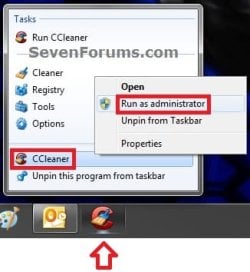
Taskbar1.jpg
3. If prompted by UAC, then click on Yes to apply permission to allow the program to run with full permission as an Administrator.
NOTE: If you are doing this is while logged in as standard user instead of an administrator, then you will need to provide the administrator's password before the program will run as administrator.


OPTION FOUR

"Run as administrator" from Start Menu Search Box


NOTE: This will show you how to temporarily run a program as an administrator once until you close it.
1. Type in the file name (ex: cmd) of the program that you want to run elevated. (see screenshot below)
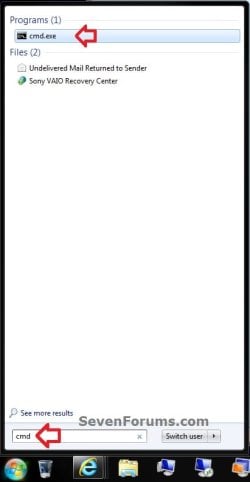
Start_Menu.jpg
2. Do either step 3 or 4 below.

3. Press Ctrl+Shift+Enter to open the program (ex: cmd) elevated, and go to step 5 below.

OR

4. Do OPTION TWO as above to right click on the program (ex: cmd) in the search results at the top of the Start Menu, and click on Run as administrator. (see screenshot below step 1)

5. If prompted by UAC, then click on Yes to apply permission to allow the program to run with full permission as an Administrator.
NOTE: If you are doing this is while logged in as standard user instead of an administrator, then you will need to provide the administrator's password before the program will run as administrator.


OPTION FIVE

"Run as administrator" using Compatibility Mode


NOTE: This will show you how to always have the program run as an administrator when you open it.
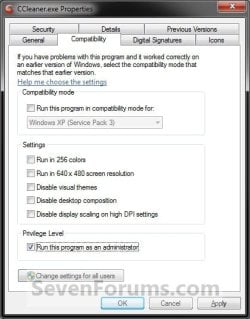
1. Right click on the program shortcut or program .exe file, then click on Properties, and on the Compatibility tab. (see screenshots below)
NOTE: If you are doing this while logged on as a standard user instead of an administrator, then you will need to also click on the Change settings for all users button and type in the administrator's password.
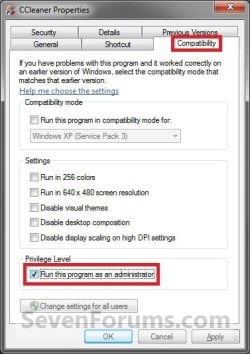
Compatibility_Mode1.jpgCompatibility_Mode2.jpg
2. To Always Run this Program as an Administrator
A) Check the Run this program as an administrator box, and click on OK. (see screenshots above)
3. To Not Always Run this Program as an Administrator
A) Uncheck the Run this program as an administrator box, and click on OK. (see screenshots below step 1)
4. Open the program.

5. If prompted by UAC, then click on Yes to apply permission to allow the program to run with full permission as an administrator.
NOTE: If you are doing this is while logged in as standard user instead of an administrator, then you will need to provide the administrator's password before the program will run as administrator.


OPTION SIX

"Run as administrator" using Advanced Properties


NOTE: This will show you how to always have only this specific shortcut of the program run as an administrator when you open it, and not from any other shortcut or .exe of the program.
1. Right click on a shortcut that you want to run as administrator, and click on Properties.

2. Click on the Shortcut tab for a program shortcut, then cllick on the Advanced button. (see screenshot below)
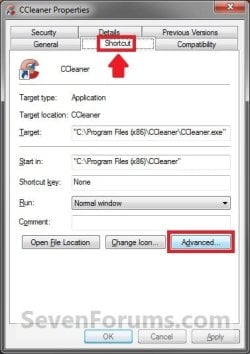
Advanced_Properties1A.jpg
3. To Always Run this Specific Shortcut as an Administrator
A) Check the Run as administrator box, and click on OK. (see screenshot below)
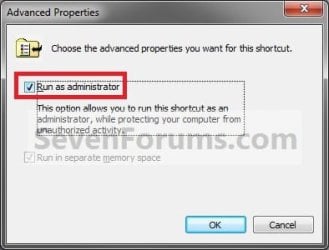
Advanced_Properties2.jpg
4. To Not Always Run this Specific Shortcut as an Administrator
A) Uncheck the Run as administrator box, and click on OK. (see screenshot above)
5. Click on OK. (see screenshot below step 2)

6. Open the program.

7. If prompted by UAC, then click on Yes to apply permission to allow the program to run with full permission as an Administrator.
NOTE: If you are doing this is while logged in as standard user instead of an administrator, then you will need to provide the administrator's password before the program will run as administrator.


OPTION SEVEN

"Run as administrator" using an Elevated Shortcut


1. For how, see:
How to Create a Elevated Program Shortcut without a UAC Prompt

OR

How to Create a Elevated Program Shortcut a Standard User is able to Run in Windows 7


OPTION EIGHT

"Run as administrator" Manually in Registry Editor


1. For how, use the RUNASADMIN value with the full path to the program's file in OPTION THREE here: How to Run a Program in Compatibility Mode in Windows 7
That's it,
Shawn


Last edited:
replyed

:huh:run as is where you can allow the limited account to run it a the admin rights without changing the limited account status to administrator


hope to get approved
cheers tylerxxx
 

My Computer

OS
windows Xp Home Edition
Hey all,

So following the regedit way, I'm trying to get OpenVPN to run as admin automatically. The entry changes the .exe to run as admin under compatibility but it does not work as needed.

When running it I get - The requested operation requires elevation (this is to change some routing through windows to properly connect to our network).

When I right click run as admin it works properly. Also works as needed when I physically add the run as admin through the properties -> compatibility.

Odd yes?

The point of getting it through regedit is I'm going to have the changes done through a .bat script so users in my office just run the script and they don't have to worry about having to right click to run or change the properties of the .exe themselves.

Any ideas?
 

My Computer

OS
Win 7 Pro 32/64

My Computer

Computer type
PC/Desktop
Computer Manufacturer/Model Number
Self built custom
OS
64-bit Windows 11 Pro for Workstations
CPU
Intel i7-8700K OC'd to 5 GHz
Motherboard
ASUS ROG Maximus XI Formula Z390
Memory
64 GB (4x16GB) G.SKILL TridentZ RGB DDR4 3600 MHz
Graphics Card(s)
ASUS ROG-STRIX-GTX1080TI-O11G-GAMING
Sound Card
Integrated
Monitor(s) Displays
2 x Samsung Odyssey G7 27"
Screen Resolution
2560x1440
Hard Drives
1TB Samsung 990 PRO M.2,
4TB Samsung 990 PRO PRO M.2,
TerraMaster F8 SSD Plus NAS
PSU
Seasonic Prime Titanium 850W
Case
Thermaltake Core P3
Cooling
Corsair Hydro H115i
Keyboard
Logitech wireless K800
Mouse
Logitech MX Master 4
Internet Speed
2 Gb/s Download and 100 Mb/s Upload
Antivirus
Malwarebyte Anti-Malware Premium
Browser
Google Chrome
Other Info
Logitech Z625 speaker system,
Logitech BRIO 4K Pro webcam,
HP Color LaserJet Pro MFP M477fdn,
APC SMART-UPS RT 1000 XL - SURT1000XLI,
Galaxy S23 Plus phone
You're most welcome. :)
 

My Computer

Computer type
PC/Desktop
Computer Manufacturer/Model Number
Self built custom
OS
64-bit Windows 11 Pro for Workstations
CPU
Intel i7-8700K OC'd to 5 GHz
Motherboard
ASUS ROG Maximus XI Formula Z390
Memory
64 GB (4x16GB) G.SKILL TridentZ RGB DDR4 3600 MHz
Graphics Card(s)
ASUS ROG-STRIX-GTX1080TI-O11G-GAMING
Sound Card
Integrated
Monitor(s) Displays
2 x Samsung Odyssey G7 27"
Screen Resolution
2560x1440
Hard Drives
1TB Samsung 990 PRO M.2,
4TB Samsung 990 PRO PRO M.2,
TerraMaster F8 SSD Plus NAS
PSU
Seasonic Prime Titanium 850W
Case
Thermaltake Core P3
Cooling
Corsair Hydro H115i
Keyboard
Logitech wireless K800
Mouse
Logitech MX Master 4
Internet Speed
2 Gb/s Download and 100 Mb/s Upload
Antivirus
Malwarebyte Anti-Malware Premium
Browser
Google Chrome
Other Info
Logitech Z625 speaker system,
Logitech BRIO 4K Pro webcam,
HP Color LaserJet Pro MFP M477fdn,
APC SMART-UPS RT 1000 XL - SURT1000XLI,
Galaxy S23 Plus phone
it is possible to run all *.exe files as adminstrator, just for once setting :D
please help, thanks :geek:
 

My Computer

OS
win 8 32 bit

My Computer

Computer type
PC/Desktop
Computer Manufacturer/Model Number
Self built custom
OS
64-bit Windows 11 Pro for Workstations
CPU
Intel i7-8700K OC'd to 5 GHz
Motherboard
ASUS ROG Maximus XI Formula Z390
Memory
64 GB (4x16GB) G.SKILL TridentZ RGB DDR4 3600 MHz
Graphics Card(s)
ASUS ROG-STRIX-GTX1080TI-O11G-GAMING
Sound Card
Integrated
Monitor(s) Displays
2 x Samsung Odyssey G7 27"
Screen Resolution
2560x1440
Hard Drives
1TB Samsung 990 PRO M.2,
4TB Samsung 990 PRO PRO M.2,
TerraMaster F8 SSD Plus NAS
PSU
Seasonic Prime Titanium 850W
Case
Thermaltake Core P3
Cooling
Corsair Hydro H115i
Keyboard
Logitech wireless K800
Mouse
Logitech MX Master 4
Internet Speed
2 Gb/s Download and 100 Mb/s Upload
Antivirus
Malwarebyte Anti-Malware Premium
Browser
Google Chrome
Other Info
Logitech Z625 speaker system,
Logitech BRIO 4K Pro webcam,
HP Color LaserJet Pro MFP M477fdn,
APC SMART-UPS RT 1000 XL - SURT1000XLI,
Galaxy S23 Plus phone

My Computer

Computer type
PC/Desktop
Computer Manufacturer/Model Number
Self built custom
OS
64-bit Windows 11 Pro for Workstations
CPU
Intel i7-8700K OC'd to 5 GHz
Motherboard
ASUS ROG Maximus XI Formula Z390
Memory
64 GB (4x16GB) G.SKILL TridentZ RGB DDR4 3600 MHz
Graphics Card(s)
ASUS ROG-STRIX-GTX1080TI-O11G-GAMING
Sound Card
Integrated
Monitor(s) Displays
2 x Samsung Odyssey G7 27"
Screen Resolution
2560x1440
Hard Drives
1TB Samsung 990 PRO M.2,
4TB Samsung 990 PRO PRO M.2,
TerraMaster F8 SSD Plus NAS
PSU
Seasonic Prime Titanium 850W
Case
Thermaltake Core P3
Cooling
Corsair Hydro H115i
Keyboard
Logitech wireless K800
Mouse
Logitech MX Master 4
Internet Speed
2 Gb/s Download and 100 Mb/s Upload
Antivirus
Malwarebyte Anti-Malware Premium
Browser
Google Chrome
Other Info
Logitech Z625 speaker system,
Logitech BRIO 4K Pro webcam,
HP Color LaserJet Pro MFP M477fdn,
APC SMART-UPS RT 1000 XL - SURT1000XLI,
Galaxy S23 Plus phone
You're most welcome Brian. :)
 

My Computer

Computer type
PC/Desktop
Computer Manufacturer/Model Number
Self built custom
OS
64-bit Windows 11 Pro for Workstations
CPU
Intel i7-8700K OC'd to 5 GHz
Motherboard
ASUS ROG Maximus XI Formula Z390
Memory
64 GB (4x16GB) G.SKILL TridentZ RGB DDR4 3600 MHz
Graphics Card(s)
ASUS ROG-STRIX-GTX1080TI-O11G-GAMING
Sound Card
Integrated
Monitor(s) Displays
2 x Samsung Odyssey G7 27"
Screen Resolution
2560x1440
Hard Drives
1TB Samsung 990 PRO M.2,
4TB Samsung 990 PRO PRO M.2,
TerraMaster F8 SSD Plus NAS
PSU
Seasonic Prime Titanium 850W
Case
Thermaltake Core P3
Cooling
Corsair Hydro H115i
Keyboard
Logitech wireless K800
Mouse
Logitech MX Master 4
Internet Speed
2 Gb/s Download and 100 Mb/s Upload
Antivirus
Malwarebyte Anti-Malware Premium
Browser
Google Chrome
Other Info
Logitech Z625 speaker system,
Logitech BRIO 4K Pro webcam,
HP Color LaserJet Pro MFP M477fdn,
APC SMART-UPS RT 1000 XL - SURT1000XLI,
Galaxy S23 Plus phone
Hi All

A member of staff has downloaded a trial version of Freedom and I've installed it on his machine. The person doesn't have admin rights to this machine so I've followed the instructions (Option 5 - Run as administrator using compatibility mode). Logged in as the non admin account I've entered in the local administrator account details when clicking on "Change settings for all users" but each time he opens Freedom on the desktop it's always prompting for the admin password.

Is there anyway this program can run without admin rights? The machine is running Windows 7 Enterprise 64 bit version.
 

My Computer

Computer type
PC/Desktop
Computer Manufacturer/Model Number
HP
OS
Windows 7 Enterprise 64 bit
Memory
8GB
Antivirus
Sophos
Browser
IE 10

My Computer

Computer type
PC/Desktop
Computer Manufacturer/Model Number
Self built custom
OS
64-bit Windows 11 Pro for Workstations
CPU
Intel i7-8700K OC'd to 5 GHz
Motherboard
ASUS ROG Maximus XI Formula Z390
Memory
64 GB (4x16GB) G.SKILL TridentZ RGB DDR4 3600 MHz
Graphics Card(s)
ASUS ROG-STRIX-GTX1080TI-O11G-GAMING
Sound Card
Integrated
Monitor(s) Displays
2 x Samsung Odyssey G7 27"
Screen Resolution
2560x1440
Hard Drives
1TB Samsung 990 PRO M.2,
4TB Samsung 990 PRO PRO M.2,
TerraMaster F8 SSD Plus NAS
PSU
Seasonic Prime Titanium 850W
Case
Thermaltake Core P3
Cooling
Corsair Hydro H115i
Keyboard
Logitech wireless K800
Mouse
Logitech MX Master 4
Internet Speed
2 Gb/s Download and 100 Mb/s Upload
Antivirus
Malwarebyte Anti-Malware Premium
Browser
Google Chrome
Other Info
Logitech Z625 speaker system,
Logitech BRIO 4K Pro webcam,
HP Color LaserJet Pro MFP M477fdn,
APC SMART-UPS RT 1000 XL - SURT1000XLI,
Galaxy S23 Plus phone
Brink,
I currently delete my old backup files on an external disk using a batch file which runs "DELOLDER.EXE" with appropriate switches. The switches are set to keep three of the newest backup deleting all others. This runs fine from the batch file. I want to automate the process using the task scheduler. However, I get an error 0X5 (access denied)from the scheduler. The dos window opens and closes but no files are deleted. I presume that the portion of DELOLDER that opens the command window works but the portion that deletes the files is where the access denied comes from.
I have looked at all of the options and don't know which one to use if any. Your the expert so I'm coming to you.
Bill
 

My Computer

Computer type
Laptop
Computer Manufacturer/Model Number
Asus
OS
W7 Ultimate
CPU
2.2 bh Intel Core i3-2330M
Motherboard
Asustek Computer Inc. P53E 1.0
Memory
4MB
Graphics Card(s)
On Board
Sound Card
On Board
Monitor(s) Displays
On Board
Screen Resolution
1366 X 768
Hard Drives
ST9500423AS
ST2000DM USB Backup Drive External

My Computer

Computer type
PC/Desktop
Computer Manufacturer/Model Number
Self built custom
OS
64-bit Windows 11 Pro for Workstations
CPU
Intel i7-8700K OC'd to 5 GHz
Motherboard
ASUS ROG Maximus XI Formula Z390
Memory
64 GB (4x16GB) G.SKILL TridentZ RGB DDR4 3600 MHz
Graphics Card(s)
ASUS ROG-STRIX-GTX1080TI-O11G-GAMING
Sound Card
Integrated
Monitor(s) Displays
2 x Samsung Odyssey G7 27"
Screen Resolution
2560x1440
Hard Drives
1TB Samsung 990 PRO M.2,
4TB Samsung 990 PRO PRO M.2,
TerraMaster F8 SSD Plus NAS
PSU
Seasonic Prime Titanium 850W
Case
Thermaltake Core P3
Cooling
Corsair Hydro H115i
Keyboard
Logitech wireless K800
Mouse
Logitech MX Master 4
Internet Speed
2 Gb/s Download and 100 Mb/s Upload
Antivirus
Malwarebyte Anti-Malware Premium
Browser
Google Chrome
Other Info
Logitech Z625 speaker system,
Logitech BRIO 4K Pro webcam,
HP Color LaserJet Pro MFP M477fdn,
APC SMART-UPS RT 1000 XL - SURT1000XLI,
Galaxy S23 Plus phone
:thumbsup:
 

My Computer

Computer type
PC/Desktop
Computer Manufacturer/Model Number
Self built custom
OS
64-bit Windows 11 Pro for Workstations
CPU
Intel i7-8700K OC'd to 5 GHz
Motherboard
ASUS ROG Maximus XI Formula Z390
Memory
64 GB (4x16GB) G.SKILL TridentZ RGB DDR4 3600 MHz
Graphics Card(s)
ASUS ROG-STRIX-GTX1080TI-O11G-GAMING
Sound Card
Integrated
Monitor(s) Displays
2 x Samsung Odyssey G7 27"
Screen Resolution
2560x1440
Hard Drives
1TB Samsung 990 PRO M.2,
4TB Samsung 990 PRO PRO M.2,
TerraMaster F8 SSD Plus NAS
PSU
Seasonic Prime Titanium 850W
Case
Thermaltake Core P3
Cooling
Corsair Hydro H115i
Keyboard
Logitech wireless K800
Mouse
Logitech MX Master 4
Internet Speed
2 Gb/s Download and 100 Mb/s Upload
Antivirus
Malwarebyte Anti-Malware Premium
Browser
Google Chrome
Other Info
Logitech Z625 speaker system,
Logitech BRIO 4K Pro webcam,
HP Color LaserJet Pro MFP M477fdn,
APC SMART-UPS RT 1000 XL - SURT1000XLI,
Galaxy S23 Plus phone
Hello Shawn. I appreciate your contributions and have used many of them over the years. I have a recent issue I can't seem to find anything about online. I'm running Windows 7 Pro 64-bit and I have quite a few programs pinned to the taskbar. Now up until a couple of days ago I could right click and 'run as administrator' and everything worked fine. Now when I do that nothing happens. I mean, I don't get any errors or anything but the program never launches at all. It will of course launch without elevation when I just click on it. I can't think of anything that I have done that would cause this to happen. I did download and use a couple of new file managers; CubicExplorer and Explorer++ but I got the portable versions of each so I can't see how that would change anything. I think I did set Explorer++ to be the default file manager but as soon as I saw it couldn't properly open some windows (64-bit obviously) I reverted it back to the default of none. I can't for the life of me figure out what I'm missing or even what to look for. I understand I could do a system restore but I am honestly trying to avoid that. Anyway, thank you so much for your time and help and for all your contributions. Blessings to you and yours! Amanda
 

My Computer

Computer type
Laptop
Computer Manufacturer/Model Number
HP Pavilion Sleekbook 15-b119wm
OS
Windows 8 - 64 bit
CPU
AMD A4/A6/A8/A10 Trinity 32nm Technology
Motherboard
Hewlett-Packard 193B (Socket FT1)
Memory
8.00GB Dual-Channel DDR3 @ 665MHz (8-8-9-23)
Graphics Card(s)
512MB ATI AMD Radeon HD 7600G (HP)
Hard Drives
698GB TOSHIBA MQ01ABD075 SATA Disk Device (SATA)
4657GB Samsung D3 Station USB Device (USB (SATA))
Antivirus
Kaspersky Internet Security 16.0.0.614 (g)
Browser
Vivaldi 1.10.867 (x32), Google Chrome 59.0.3071.109(x64)

My Computer

Computer type
PC/Desktop
Computer Manufacturer/Model Number
Self built custom
OS
64-bit Windows 11 Pro for Workstations
CPU
Intel i7-8700K OC'd to 5 GHz
Motherboard
ASUS ROG Maximus XI Formula Z390
Memory
64 GB (4x16GB) G.SKILL TridentZ RGB DDR4 3600 MHz
Graphics Card(s)
ASUS ROG-STRIX-GTX1080TI-O11G-GAMING
Sound Card
Integrated
Monitor(s) Displays
2 x Samsung Odyssey G7 27"
Screen Resolution
2560x1440
Hard Drives
1TB Samsung 990 PRO M.2,
4TB Samsung 990 PRO PRO M.2,
TerraMaster F8 SSD Plus NAS
PSU
Seasonic Prime Titanium 850W
Case
Thermaltake Core P3
Cooling
Corsair Hydro H115i
Keyboard
Logitech wireless K800
Mouse
Logitech MX Master 4
Internet Speed
2 Gb/s Download and 100 Mb/s Upload
Antivirus
Malwarebyte Anti-Malware Premium
Browser
Google Chrome
Other Info
Logitech Z625 speaker system,
Logitech BRIO 4K Pro webcam,
HP Color LaserJet Pro MFP M477fdn,
APC SMART-UPS RT 1000 XL - SURT1000XLI,
Galaxy S23 Plus phone
Thank you so much. I did download and run the 'Restore 'Run as Administrator' from Context Menu'. Nothing changed so I thought I'd restart to see if it made any difference and unfortunately it did not. I did notice though that I can do the same thing with a program in the Start Menu and it works so it must have something to do specifically with my taskbar. Thank you again. Amanda
 

My Computer

Computer type
Laptop
Computer Manufacturer/Model Number
HP Pavilion Sleekbook 15-b119wm
OS
Windows 8 - 64 bit
CPU
AMD A4/A6/A8/A10 Trinity 32nm Technology
Motherboard
Hewlett-Packard 193B (Socket FT1)
Memory
8.00GB Dual-Channel DDR3 @ 665MHz (8-8-9-23)
Graphics Card(s)
512MB ATI AMD Radeon HD 7600G (HP)
Hard Drives
698GB TOSHIBA MQ01ABD075 SATA Disk Device (SATA)
4657GB Samsung D3 Station USB Device (USB (SATA))
Antivirus
Kaspersky Internet Security 16.0.0.614 (g)
Browser
Vivaldi 1.10.867 (x32), Google Chrome 59.0.3071.109(x64)
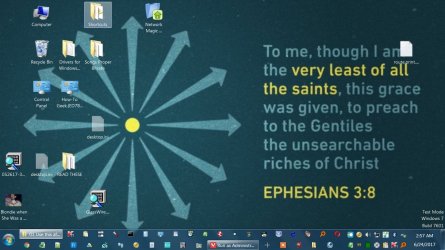
This is an image of my desktop showing all the programs I have pinned to the taskbar and in the system tray.
 

Attachments

  • 6-24-17 Desktop Showing All Programs Pinned to Taskbar and in System Tray.jpg
    6-24-17 Desktop Showing All Programs Pinned to Taskbar and in System Tray.jpg
    131.8 KB · Views: 57
Last edited:

My Computer

Computer type
Laptop
Computer Manufacturer/Model Number
HP Pavilion Sleekbook 15-b119wm
OS
Windows 8 - 64 bit
CPU
AMD A4/A6/A8/A10 Trinity 32nm Technology
Motherboard
Hewlett-Packard 193B (Socket FT1)
Memory
8.00GB Dual-Channel DDR3 @ 665MHz (8-8-9-23)
Graphics Card(s)
512MB ATI AMD Radeon HD 7600G (HP)
Hard Drives
698GB TOSHIBA MQ01ABD075 SATA Disk Device (SATA)
4657GB Samsung D3 Station USB Device (USB (SATA))
Antivirus
Kaspersky Internet Security 16.0.0.614 (g)
Browser
Vivaldi 1.10.867 (x32), Google Chrome 59.0.3071.109(x64)
Amanda,

It looks like your image was broken.

As a test, unpin one of the items from the taskbar, and pin it to the taskbar again from the source location to see if you are able to "Run as administrator" from the taskbar afterwards.
 

My Computer

Computer type
PC/Desktop
Computer Manufacturer/Model Number
Self built custom
OS
64-bit Windows 11 Pro for Workstations
CPU
Intel i7-8700K OC'd to 5 GHz
Motherboard
ASUS ROG Maximus XI Formula Z390
Memory
64 GB (4x16GB) G.SKILL TridentZ RGB DDR4 3600 MHz
Graphics Card(s)
ASUS ROG-STRIX-GTX1080TI-O11G-GAMING
Sound Card
Integrated
Monitor(s) Displays
2 x Samsung Odyssey G7 27"
Screen Resolution
2560x1440
Hard Drives
1TB Samsung 990 PRO M.2,
4TB Samsung 990 PRO PRO M.2,
TerraMaster F8 SSD Plus NAS
PSU
Seasonic Prime Titanium 850W
Case
Thermaltake Core P3
Cooling
Corsair Hydro H115i
Keyboard
Logitech wireless K800
Mouse
Logitech MX Master 4
Internet Speed
2 Gb/s Download and 100 Mb/s Upload
Antivirus
Malwarebyte Anti-Malware Premium
Browser
Google Chrome
Other Info
Logitech Z625 speaker system,
Logitech BRIO 4K Pro webcam,
HP Color LaserJet Pro MFP M477fdn,
APC SMART-UPS RT 1000 XL - SURT1000XLI,
Galaxy S23 Plus phone
Sorry about the broken image. I'm not very familiar with posting on forums and I didn't realize I could upload the picture from my computer. Anyway, I appreciate your reply. I tried your suggestion with four different programs and I still get the same effect or non effect. So I just chose 'Run as Administrator' under their properties and that works. I still wonder what happened but I suppose I can live with it like this. The thing I'd really like to solve and is the main reason I keep trying different 32-bit file managers is because I am wanting to add popup descriptions to folders and files. I appreciate your time and help greatly! Be blessed! Amanda
 

My Computer

Computer type
Laptop
Computer Manufacturer/Model Number
HP Pavilion Sleekbook 15-b119wm
OS
Windows 8 - 64 bit
CPU
AMD A4/A6/A8/A10 Trinity 32nm Technology
Motherboard
Hewlett-Packard 193B (Socket FT1)
Memory
8.00GB Dual-Channel DDR3 @ 665MHz (8-8-9-23)
Graphics Card(s)
512MB ATI AMD Radeon HD 7600G (HP)
Hard Drives
698GB TOSHIBA MQ01ABD075 SATA Disk Device (SATA)
4657GB Samsung D3 Station USB Device (USB (SATA))
Antivirus
Kaspersky Internet Security 16.0.0.614 (g)
Browser
Vivaldi 1.10.867 (x32), Google Chrome 59.0.3071.109(x64)
Back
Top