Run as Administrator

How to Run a Program as an Administrator in Windows 7


   Information
This will show you how to have a program run as administrator with full elevated rights and privileges in Windows 7.

A Standard user will still not be able to run a elevated program without getting a UAC prompt and having to enter the administrator's password.
   Note
If a program that you are trying to run is giving you a Access Denied or No Permission type error, then running it as an administrator can usually give the program the permission it needs to run properly.
   Warning
You should only allow a program that you trust to run as administrator. Once you have applied UAC permission, the program will have full access to your computer.


OPTION ONE

"Run as administrator" using a Keyboard Shortcut


NOTE: This will allow you to temporarily run a program as an administrator once until you close it.
1. Press and hold Ctrl+Shift while opening the program.

2. If prompted by UAC, then click on Yes to apply permission to allow the program to run with full permission as an Administrator.
NOTE: If you are doing this is while logged in as standard user instead of an administrator, then you will need to provide the administrator's password before the program will run as administrator.


OPTION TWO

"Run as administrator" using Context Menu of Program


NOTE: This will show you how to temporarily run a program as an administrator once until you close it.
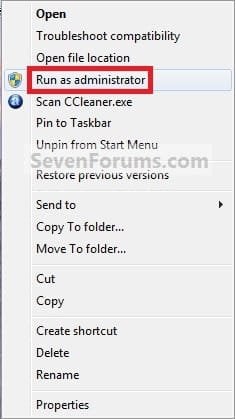
1. Right click on the program's shortcut or an .EXE file, BAT file, CMD file, or MSI file, and click on Run as administrator. (see screenshot below)
Context_Menu.jpg
2. If prompted by UAC, then click on Yes to apply permission to allow the program to run with full permission as an administrator.
NOTE: If you are doing this is while logged in as standard user instead of an administrator, then you will need to provide the administrator's password before the program will run as administrator.


OPTION THREE

"Run as administrator" from Pinned Program on Taskbar


NOTE: This will show you how to temporarily run a program pinned to the taskbar as an administrator once until you close it.
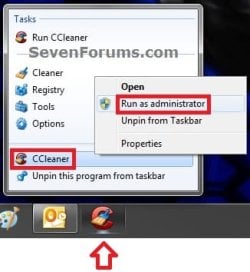
1. Right click on the icon of the pinned program on the taskbar to open it's Jump List. (see screenshot below)

2. In the Jump List, right click on the program's name, and click on Run as administrator. (see screenshot below)
Taskbar1.jpg
3. If prompted by UAC, then click on Yes to apply permission to allow the program to run with full permission as an Administrator.
NOTE: If you are doing this is while logged in as standard user instead of an administrator, then you will need to provide the administrator's password before the program will run as administrator.


OPTION FOUR

"Run as administrator" from Start Menu Search Box


NOTE: This will show you how to temporarily run a program as an administrator once until you close it.
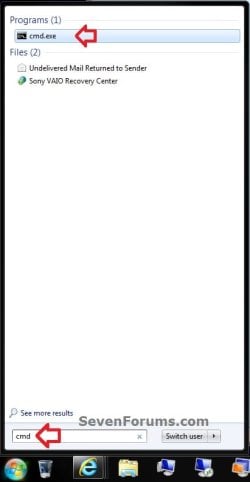
1. Type in the file name (ex: cmd) of the program that you want to run elevated. (see screenshot below)
Start_Menu.jpg
2. Do either step 3 or 4 below.

3. Press Ctrl+Shift+Enter to open the program (ex: cmd) elevated, and go to step 5 below.

OR

4. Do OPTION TWO as above to right click on the program (ex: cmd) in the search results at the top of the Start Menu, and click on Run as administrator. (see screenshot below step 1)

5. If prompted by UAC, then click on Yes to apply permission to allow the program to run with full permission as an Administrator.
NOTE: If you are doing this is while logged in as standard user instead of an administrator, then you will need to provide the administrator's password before the program will run as administrator.


OPTION FIVE

"Run as administrator" using Compatibility Mode


NOTE: This will show you how to always have the program run as an administrator when you open it.
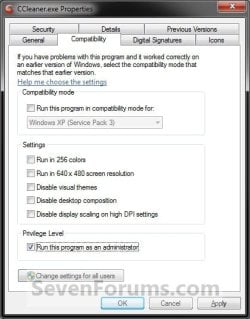
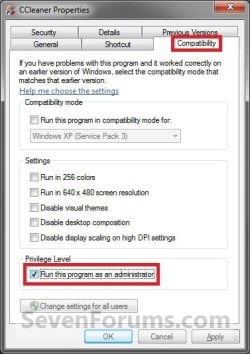
1. Right click on the program shortcut or program .exe file, then click on Properties, and on the Compatibility tab. (see screenshots below)
NOTE: If you are doing this while logged on as a standard user instead of an administrator, then you will need to also click on the Change settings for all users button and type in the administrator's password.
Compatibility_Mode1.jpgCompatibility_Mode2.jpg
2. To Always Run this Program as an Administrator
A) Check the Run this program as an administrator box, and click on OK. (see screenshots above)
3. To Not Always Run this Program as an Administrator
A) Uncheck the Run this program as an administrator box, and click on OK. (see screenshots below step 1)
4. Open the program.

5. If prompted by UAC, then click on Yes to apply permission to allow the program to run with full permission as an administrator.
NOTE: If you are doing this is while logged in as standard user instead of an administrator, then you will need to provide the administrator's password before the program will run as administrator.


OPTION SIX

"Run as administrator" using Advanced Properties


NOTE: This will show you how to always have only this specific shortcut of the program run as an administrator when you open it, and not from any other shortcut or .exe of the program.
1. Right click on a shortcut that you want to run as administrator, and click on Properties.

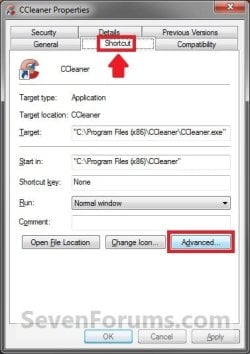
2. Click on the Shortcut tab for a program shortcut, then cllick on the Advanced button. (see screenshot below)
Advanced_Properties1A.jpg
3. To Always Run this Specific Shortcut as an Administrator
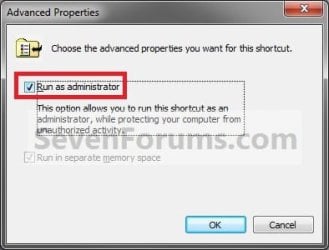
A) Check the Run as administrator box, and click on OK. (see screenshot below)
Advanced_Properties2.jpg
4. To Not Always Run this Specific Shortcut as an Administrator
A) Uncheck the Run as administrator box, and click on OK. (see screenshot above)
5. Click on OK. (see screenshot below step 2)

6. Open the program.

7. If prompted by UAC, then click on Yes to apply permission to allow the program to run with full permission as an Administrator.
NOTE: If you are doing this is while logged in as standard user instead of an administrator, then you will need to provide the administrator's password before the program will run as administrator.


OPTION SEVEN

"Run as administrator" using an Elevated Shortcut


1. For how, see:
How to Create a Elevated Program Shortcut without a UAC Prompt

OR

How to Create a Elevated Program Shortcut a Standard User is able to Run in Windows 7


OPTION EIGHT

"Run as administrator" Manually in Registry Editor


1. For how, use the RUNASADMIN value with the full path to the program's file in OPTION THREE here: How to Run a Program in Compatibility Mode in Windows 7
That's it,
Shawn


Last edited:
I have the UAC down to zero, yet it's still bugging me about how I need to run it as Administrator.
 

My Computer

Computer Manufacturer/Model Number
HP pavilion
OS
Windows 7 32 bit
CPU
AMD Athlon 64 X2 Dual Core Processor 4400+
Memory
2 GB RAM
Graphics Card(s)
NVIDIA GeForce GTS 250
Sound Card
Creative SoundBlaster 0670
Monitor(s) Displays
Samsung 940NW
Screen Resolution
1440x900
Hard Drives
Maxtor 6L250S0 ATA Device 256 GB
Maxtor 6L250S0 ATA Device 232 GB
Case
HP
Keyboard
Logitech G15
Mouse
Razer Diamondback EarthGreen
Internet Speed
8 mbit Telia
Degge,

Unfortunately, the only way to stop that is to manually use OPTION THREE in the tutorial for any program exe that requires it. Afterwards, it will remain set to always RAA. :(
 

My Computer

Computer type
PC/Desktop
Computer Manufacturer/Model Number
Self built custom
OS
64-bit Windows 11 Pro for Workstations
CPU
Intel i7-8700K OC'd to 5 GHz
Motherboard
ASUS ROG Maximus XI Formula Z390
Memory
64 GB (4x16GB) G.SKILL TridentZ RGB DDR4 3600 MHz
Graphics Card(s)
ASUS ROG-STRIX-GTX1080TI-O11G-GAMING
Sound Card
Integrated
Monitor(s) Displays
2 x Samsung Odyssey G7 27"
Screen Resolution
2560x1440
Hard Drives
1TB Samsung 990 PRO M.2,
4TB Samsung 990 PRO PRO M.2,
TerraMaster F8 SSD Plus NAS
PSU
Seasonic Prime Titanium 850W
Case
Thermaltake Core P3
Cooling
Corsair Hydro H115i
Keyboard
Logitech wireless K800
Mouse
Logitech MX Master 4
Internet Speed
2 Gb/s Download and 100 Mb/s Upload
Antivirus
Malwarebyte Anti-Malware Premium
Browser
Google Chrome
Other Info
Logitech Z625 speaker system,
Logitech BRIO 4K Pro webcam,
HP Color LaserJet Pro MFP M477fdn,
APC SMART-UPS RT 1000 XL - SURT1000XLI,
Galaxy S23 Plus phone
I can not set compatibility mode for wmplayer.exe in C:/Program Files/Window Media Player . Can you help me ?
 

My Computer

OS
window 7
Hello Lavecoi, and welcome to Seven Forums.

You can only right click on that one to temporarily "Run as adminsitrator" it. However, you should not need to with Windows Media Player. What issue are you having with it??
 

My Computer

Computer type
PC/Desktop
Computer Manufacturer/Model Number
Self built custom
OS
64-bit Windows 11 Pro for Workstations
CPU
Intel i7-8700K OC'd to 5 GHz
Motherboard
ASUS ROG Maximus XI Formula Z390
Memory
64 GB (4x16GB) G.SKILL TridentZ RGB DDR4 3600 MHz
Graphics Card(s)
ASUS ROG-STRIX-GTX1080TI-O11G-GAMING
Sound Card
Integrated
Monitor(s) Displays
2 x Samsung Odyssey G7 27"
Screen Resolution
2560x1440
Hard Drives
1TB Samsung 990 PRO M.2,
4TB Samsung 990 PRO PRO M.2,
TerraMaster F8 SSD Plus NAS
PSU
Seasonic Prime Titanium 850W
Case
Thermaltake Core P3
Cooling
Corsair Hydro H115i
Keyboard
Logitech wireless K800
Mouse
Logitech MX Master 4
Internet Speed
2 Gb/s Download and 100 Mb/s Upload
Antivirus
Malwarebyte Anti-Malware Premium
Browser
Google Chrome
Other Info
Logitech Z625 speaker system,
Logitech BRIO 4K Pro webcam,
HP Color LaserJet Pro MFP M477fdn,
APC SMART-UPS RT 1000 XL - SURT1000XLI,
Galaxy S23 Plus phone
I right click on wmplayer.exe and choose "properties" , in compatibility tab, i see " Compatibility mode can not be set on this program because it is part of this version of window " . How do I? because I only create "playlist" when i run it as administrator .

My English is not good, can you understand me?:D
 

My Computer

OS
window 7

My Computer

Computer type
PC/Desktop
Computer Manufacturer/Model Number
Self built custom
OS
64-bit Windows 11 Pro for Workstations
CPU
Intel i7-8700K OC'd to 5 GHz
Motherboard
ASUS ROG Maximus XI Formula Z390
Memory
64 GB (4x16GB) G.SKILL TridentZ RGB DDR4 3600 MHz
Graphics Card(s)
ASUS ROG-STRIX-GTX1080TI-O11G-GAMING
Sound Card
Integrated
Monitor(s) Displays
2 x Samsung Odyssey G7 27"
Screen Resolution
2560x1440
Hard Drives
1TB Samsung 990 PRO M.2,
4TB Samsung 990 PRO PRO M.2,
TerraMaster F8 SSD Plus NAS
PSU
Seasonic Prime Titanium 850W
Case
Thermaltake Core P3
Cooling
Corsair Hydro H115i
Keyboard
Logitech wireless K800
Mouse
Logitech MX Master 4
Internet Speed
2 Gb/s Download and 100 Mb/s Upload
Antivirus
Malwarebyte Anti-Malware Premium
Browser
Google Chrome
Other Info
Logitech Z625 speaker system,
Logitech BRIO 4K Pro webcam,
HP Color LaserJet Pro MFP M477fdn,
APC SMART-UPS RT 1000 XL - SURT1000XLI,
Galaxy S23 Plus phone
I set wmplayer.exe RUNASADMIN, and it run as administrator right now.
But when I right click on music folder and choose " Play with Window Media Player" and the message box display " This requested operation requires elevation" . How can I avoid it without turn off UAC ?
 

My Computer

OS
window 7
With it set to always "Run as administrator", you will not be able to without doing so. :(
 

My Computer

Computer type
PC/Desktop
Computer Manufacturer/Model Number
Self built custom
OS
64-bit Windows 11 Pro for Workstations
CPU
Intel i7-8700K OC'd to 5 GHz
Motherboard
ASUS ROG Maximus XI Formula Z390
Memory
64 GB (4x16GB) G.SKILL TridentZ RGB DDR4 3600 MHz
Graphics Card(s)
ASUS ROG-STRIX-GTX1080TI-O11G-GAMING
Sound Card
Integrated
Monitor(s) Displays
2 x Samsung Odyssey G7 27"
Screen Resolution
2560x1440
Hard Drives
1TB Samsung 990 PRO M.2,
4TB Samsung 990 PRO PRO M.2,
TerraMaster F8 SSD Plus NAS
PSU
Seasonic Prime Titanium 850W
Case
Thermaltake Core P3
Cooling
Corsair Hydro H115i
Keyboard
Logitech wireless K800
Mouse
Logitech MX Master 4
Internet Speed
2 Gb/s Download and 100 Mb/s Upload
Antivirus
Malwarebyte Anti-Malware Premium
Browser
Google Chrome
Other Info
Logitech Z625 speaker system,
Logitech BRIO 4K Pro webcam,
HP Color LaserJet Pro MFP M477fdn,
APC SMART-UPS RT 1000 XL - SURT1000XLI,
Galaxy S23 Plus phone
Excellent tutorial. Thank you very much.
 

My Computer

Computer Manufacturer/Model Number
Home built
OS
Windows 7 Ultimate 32 bit
CPU
Intel(R) Pentium(R) 4 CPU 3.00GHz
Motherboard
ASUS P4P800-VM Motherboard Chipset: Intel 865G + ICH5
Memory
2.50 GB RAM
Graphics Card(s)
NVIDIA GeForce 7600 GS
Sound Card
SoundMax Integrated Digital Audio (Chip)
Monitor(s) Displays
ViewSonic VX 1962 wm
Screen Resolution
1680 X 1050
Hard Drives
Seagate Barracuda 7200.10 80 GB
ST380215A ATA Device 18.6 GB
Western Digital "My Book" external hard drive 750 GB
Cooling
Fan based
Keyboard
Microsoft Comfort Curve Keyboard 2000 v10 USB
Mouse
Logitec optic USB
Internet Speed
3.01 Mb/s download 0.64 Mb/s upload
You're most welcome Carl, and thank you. :)
 

My Computer

Computer type
PC/Desktop
Computer Manufacturer/Model Number
Self built custom
OS
64-bit Windows 11 Pro for Workstations
CPU
Intel i7-8700K OC'd to 5 GHz
Motherboard
ASUS ROG Maximus XI Formula Z390
Memory
64 GB (4x16GB) G.SKILL TridentZ RGB DDR4 3600 MHz
Graphics Card(s)
ASUS ROG-STRIX-GTX1080TI-O11G-GAMING
Sound Card
Integrated
Monitor(s) Displays
2 x Samsung Odyssey G7 27"
Screen Resolution
2560x1440
Hard Drives
1TB Samsung 990 PRO M.2,
4TB Samsung 990 PRO PRO M.2,
TerraMaster F8 SSD Plus NAS
PSU
Seasonic Prime Titanium 850W
Case
Thermaltake Core P3
Cooling
Corsair Hydro H115i
Keyboard
Logitech wireless K800
Mouse
Logitech MX Master 4
Internet Speed
2 Gb/s Download and 100 Mb/s Upload
Antivirus
Malwarebyte Anti-Malware Premium
Browser
Google Chrome
Other Info
Logitech Z625 speaker system,
Logitech BRIO 4K Pro webcam,
HP Color LaserJet Pro MFP M477fdn,
APC SMART-UPS RT 1000 XL - SURT1000XLI,
Galaxy S23 Plus phone
"Run as Administrator" but still asks for password

I've a Media Center PC (w7 x64) with an standard account "Media Center".
Recently haded 3 programs that start with windows:
Asus PC Probe, PowerGuard (UPS) monitor and ASUS Update.
I've tried the option "run as administrator" on the "program.exe" and even in the shortcut and doesn't work.
When the PC starts always shows the prompt to place the admin password to start the programs :mad:.

Can anyone help?

Thanks,

Marco Costa
 

My Computer

OS
Windows 7 x64

My Computer

Computer type
PC/Desktop
Computer Manufacturer/Model Number
Self built custom
OS
64-bit Windows 11 Pro for Workstations
CPU
Intel i7-8700K OC'd to 5 GHz
Motherboard
ASUS ROG Maximus XI Formula Z390
Memory
64 GB (4x16GB) G.SKILL TridentZ RGB DDR4 3600 MHz
Graphics Card(s)
ASUS ROG-STRIX-GTX1080TI-O11G-GAMING
Sound Card
Integrated
Monitor(s) Displays
2 x Samsung Odyssey G7 27"
Screen Resolution
2560x1440
Hard Drives
1TB Samsung 990 PRO M.2,
4TB Samsung 990 PRO PRO M.2,
TerraMaster F8 SSD Plus NAS
PSU
Seasonic Prime Titanium 850W
Case
Thermaltake Core P3
Cooling
Corsair Hydro H115i
Keyboard
Logitech wireless K800
Mouse
Logitech MX Master 4
Internet Speed
2 Gb/s Download and 100 Mb/s Upload
Antivirus
Malwarebyte Anti-Malware Premium
Browser
Google Chrome
Other Info
Logitech Z625 speaker system,
Logitech BRIO 4K Pro webcam,
HP Color LaserJet Pro MFP M477fdn,
APC SMART-UPS RT 1000 XL - SURT1000XLI,
Galaxy S23 Plus phone
Hi, I think this tutorial may contain a mistake: Option Four: Using Advanced Properties - the 'Run as administrator' box exists in the 'advanced properties' of shortcuts, but not in the 'advanced attributes' of executables.
 

My Computer

OS
Win 7 Home Premium (OEM) - Install date: 02-2010
CPU
AMD X4 Phenom II 965
Motherboard
Gigabyte GA 790FXTA-UD5
Memory
OCZ Black Edition - 2x2GB DDR3-1600
Graphics Card(s)
Sapphire HD 5770 1GB GDDR5
Sound Card
Integrated
Monitor(s) Displays
Generic CRT
Screen Resolution
1024x7xx
Hard Drives
System: OCZ Vertex 2, 60 GB SSD
Data: Western Digital Caviar Black WD1002FAEX, 1TB HDD
PSU
Thermaltake w705 - 700 watt
Case
Fractal R2 Define
Cooling
Air
Keyboard
Generic
Mouse
Gigabyte Optical Gaming Mouse
Internet Speed
IDSL
Thank you THX. The error has been corrected. :)
 

My Computer

Computer type
PC/Desktop
Computer Manufacturer/Model Number
Self built custom
OS
64-bit Windows 11 Pro for Workstations
CPU
Intel i7-8700K OC'd to 5 GHz
Motherboard
ASUS ROG Maximus XI Formula Z390
Memory
64 GB (4x16GB) G.SKILL TridentZ RGB DDR4 3600 MHz
Graphics Card(s)
ASUS ROG-STRIX-GTX1080TI-O11G-GAMING
Sound Card
Integrated
Monitor(s) Displays
2 x Samsung Odyssey G7 27"
Screen Resolution
2560x1440
Hard Drives
1TB Samsung 990 PRO M.2,
4TB Samsung 990 PRO PRO M.2,
TerraMaster F8 SSD Plus NAS
PSU
Seasonic Prime Titanium 850W
Case
Thermaltake Core P3
Cooling
Corsair Hydro H115i
Keyboard
Logitech wireless K800
Mouse
Logitech MX Master 4
Internet Speed
2 Gb/s Download and 100 Mb/s Upload
Antivirus
Malwarebyte Anti-Malware Premium
Browser
Google Chrome
Other Info
Logitech Z625 speaker system,
Logitech BRIO 4K Pro webcam,
HP Color LaserJet Pro MFP M477fdn,
APC SMART-UPS RT 1000 XL - SURT1000XLI,
Galaxy S23 Plus phone
Not working for me

I am sorry but this is not working for me.

I am trying to get Server2Go - Self configurable WAMPP Stack to work on a HP Mini using Windows 7 starter and I keep on getting the prompt to enter the administrator password.

I try to start the program using a standard user, I have given the user full rights on the directory of the program and have selected the option to run as administrator, but none of this has helped.
 

My Computer

OS
Windows 7
Hellp Flip69, and welcome to Seven Forums.

Sorry, but a Standard user will not be able to run a elevated program without getting a UAC prompt and having to enter the administrator's password. :(

This is to be used in a administrator account instead.
 

My Computer

Computer type
PC/Desktop
Computer Manufacturer/Model Number
Self built custom
OS
64-bit Windows 11 Pro for Workstations
CPU
Intel i7-8700K OC'd to 5 GHz
Motherboard
ASUS ROG Maximus XI Formula Z390
Memory
64 GB (4x16GB) G.SKILL TridentZ RGB DDR4 3600 MHz
Graphics Card(s)
ASUS ROG-STRIX-GTX1080TI-O11G-GAMING
Sound Card
Integrated
Monitor(s) Displays
2 x Samsung Odyssey G7 27"
Screen Resolution
2560x1440
Hard Drives
1TB Samsung 990 PRO M.2,
4TB Samsung 990 PRO PRO M.2,
TerraMaster F8 SSD Plus NAS
PSU
Seasonic Prime Titanium 850W
Case
Thermaltake Core P3
Cooling
Corsair Hydro H115i
Keyboard
Logitech wireless K800
Mouse
Logitech MX Master 4
Internet Speed
2 Gb/s Download and 100 Mb/s Upload
Antivirus
Malwarebyte Anti-Malware Premium
Browser
Google Chrome
Other Info
Logitech Z625 speaker system,
Logitech BRIO 4K Pro webcam,
HP Color LaserJet Pro MFP M477fdn,
APC SMART-UPS RT 1000 XL - SURT1000XLI,
Galaxy S23 Plus phone
Hi,
I have no problem following this tutorial / locking /unlocking the administrator account, but it doesn't seem to actually be working for me...
By which I mean, I'm trying to execute a file from intel (a chipset utility identifier) and no matter what I do to turn on the 'run as administrator' it still tells me it cannot run the file because it has to be run as administrator -- I'm at a loss for what to try next. I've logged on and logged off as the administrator multiple times -- both with and without restarting my computer. I've right clicked on the file and selected run as administrator, i've clicked file properties and checked the 'run as administrator' box, both for current user and all users....

Any suggestions?
 

My Computer

OS
windows 7 home premium
Hello Nssuprin, and welcome to Seven Forums.

Do you have UAC turned on? Some programs that require "run as administrator" may not run properly if UAC is turned off.

Have you tried running the program while logged in as the built-in Administrator?

Hope this helps for now,
Shawn
 

My Computer

Computer type
PC/Desktop
Computer Manufacturer/Model Number
Self built custom
OS
64-bit Windows 11 Pro for Workstations
CPU
Intel i7-8700K OC'd to 5 GHz
Motherboard
ASUS ROG Maximus XI Formula Z390
Memory
64 GB (4x16GB) G.SKILL TridentZ RGB DDR4 3600 MHz
Graphics Card(s)
ASUS ROG-STRIX-GTX1080TI-O11G-GAMING
Sound Card
Integrated
Monitor(s) Displays
2 x Samsung Odyssey G7 27"
Screen Resolution
2560x1440
Hard Drives
1TB Samsung 990 PRO M.2,
4TB Samsung 990 PRO PRO M.2,
TerraMaster F8 SSD Plus NAS
PSU
Seasonic Prime Titanium 850W
Case
Thermaltake Core P3
Cooling
Corsair Hydro H115i
Keyboard
Logitech wireless K800
Mouse
Logitech MX Master 4
Internet Speed
2 Gb/s Download and 100 Mb/s Upload
Antivirus
Malwarebyte Anti-Malware Premium
Browser
Google Chrome
Other Info
Logitech Z625 speaker system,
Logitech BRIO 4K Pro webcam,
HP Color LaserJet Pro MFP M477fdn,
APC SMART-UPS RT 1000 XL - SURT1000XLI,
Galaxy S23 Plus phone
Thanks Shawn -- I actually have tried it with the built-in administrator, and with the UAC both on and off...(at least, I think it's on. I never get asked for a password, though) unfortunately with the same results every time.

thank you,
Nick
 

My Computer

OS
windows 7 home premium
Could you post a link to the utility? I'll test it on my system, if able to, to see if it might be a issue with the program itself.
 

My Computer

Computer type
PC/Desktop
Computer Manufacturer/Model Number
Self built custom
OS
64-bit Windows 11 Pro for Workstations
CPU
Intel i7-8700K OC'd to 5 GHz
Motherboard
ASUS ROG Maximus XI Formula Z390
Memory
64 GB (4x16GB) G.SKILL TridentZ RGB DDR4 3600 MHz
Graphics Card(s)
ASUS ROG-STRIX-GTX1080TI-O11G-GAMING
Sound Card
Integrated
Monitor(s) Displays
2 x Samsung Odyssey G7 27"
Screen Resolution
2560x1440
Hard Drives
1TB Samsung 990 PRO M.2,
4TB Samsung 990 PRO PRO M.2,
TerraMaster F8 SSD Plus NAS
PSU
Seasonic Prime Titanium 850W
Case
Thermaltake Core P3
Cooling
Corsair Hydro H115i
Keyboard
Logitech wireless K800
Mouse
Logitech MX Master 4
Internet Speed
2 Gb/s Download and 100 Mb/s Upload
Antivirus
Malwarebyte Anti-Malware Premium
Browser
Google Chrome
Other Info
Logitech Z625 speaker system,
Logitech BRIO 4K Pro webcam,
HP Color LaserJet Pro MFP M477fdn,
APC SMART-UPS RT 1000 XL - SURT1000XLI,
Galaxy S23 Plus phone
Back
Top